Our Verdict
Pros
- Records video footage from the front, back, and sides
- Nice, clear 4K footage, even in poor conditions
- Integrated and intelligent safety zone alerts
- Time-lapse parking functionality (if hardwired)
- Includes 64GB microSD card
Cons
- The MiVue app is poor
- No parking recording without hardwiring
- Confusing naming structure for Navman MiVue cameras
- Permanent fixture style won't suit every car
Should you buy it?
Introduction & Specification Details and Close-up
Using a dashcam when you're driving can be a very smart move, even if you're a cautious and careful driver, because it can give clear indications after an accident as to who's at fault.
I speak from experience; a year or so back, I had an insurance dispute that was settled in seconds due to the fact that I could show dashcam footage that rather solidly proved I was not the driver at fault in a (thankfully minor) impact.
Popular Now: You can now apply DLSS 5 Neural Rendering to your entire Windows desktop
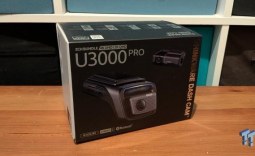
While some premium model cars now come with integrated dashcam functionality, there are plenty of newer models at the budget end of the pool, as well as a large stock of existing vehicles that never had dashcams in the first place. Navman's latest offering, the Navman MiVue Smart True 4K Surround Dashcam, provides a nice wide view of nearly everything that's going around your car, with some smart integrated features - and a few that could do with a little more polish.
Specifications & Close Up
| Device | Navman MiVue Smart True 4K Surround Dashcam |
|---|---|
| Display | 2.7 Inch IPS LCD |
| Warranty | 3 Years |
| Lenses | CMOS 120deg front & CMOS 170deg Interior & STARVIS 2 135deg rear |
| Recording Modes | Continuous, Event, Manual |
| Recording Format | True 4K Ultra HD 2160p @30fps MP4 file |
| Still Image Format | 3840 x 2160px JPG file |
| Storage | MicroSD (64GB Card Included) |
| Safety Camera Updates | Monthly |
Installation and Software
Installation

Most dashcams aren't particularly hard to install, and while the Navman MiVue Smart True 4K Surround Dashcam does offer a little more functionality than you'll find in a budget-range model, this is still broadly true... though you do have to make a few decisions as to exactly how you'd like to install it.
The Navman MiVue Smart True 4K Surround Dashcam is built around two camera modules: one that sits on the front windscreen in classic dashcam style, and another that connects through and is intended for the rear windscreen, though it has cameras on both sides of its body.

Best Deals: Garmin Dash Cam Mini 3
Price Trend:
Prices last scanned 19 hours ago

7 days ago: $99.99 USD30 days ago: $118.14 USD
7 days ago: $189.99 CAD30 days ago: $189.99 CAD
7 days ago: £129.99


That's because while the rear camera houses a 135-degree 2.5K camera sensor for peering out at the cars behind you, it also features a 170-degree wide-angle 2.5K sensor for recording the sides of your car, at least in theory. The front-facing sensor is the only one that has an actual 4K sensor, but then that's typically where you're going to want and need the crispest images in most cases.

Aside from the primary camera modules, you also get wiring for permanently connecting the Navman MiVue Smart True 4K Surround Dashcam to your car's electronics - best performed by a qualified vehicle electrical specialist - and a more standard 12V "Cigarette Lighter" style plug that doesn't require permanent wiring.
Our Latest Cables & Accessories Review Coverage
Which you choose is up to you, with the important qualification that the Navman MiVue Smart True 4K Surround Dashcam's integrated parking mode only works if it's been hardwired in. For the purposes of this review, I wasn't able to get the unit hardwired in, so I can only note that it's present, not how well it works for recording timelapses and event footage when you're not in your vehicle.

The Navman MiVue Smart True 4K Surround Dashcam uses small plastic mounts with 3M adhesive tape on them to connect to your front and rear windscreens, which isn't my preferred approach. In my case, the installation was only going to be temporary, but I always prefer to have units with suction cup mounts in any case, simply because it gives you flexibility. Navman does provide a transparent electrostatic sticker for easier removal, but there's only one of them and two cameras, so something's likely to get well fixed in place no matter what. Sadly, it appears that the only additional mounts they offer for this dashcam are further adhesive options, not any other style.
The ideal here - and to be clear, it's not quite what I ended up doing - is that you affix the front camera up high on your windscreen, run its cabling through the car frame to your lighter socket or hardwired, and then do the same for the rear camera. For my own temporary install purposes, I went the quick-and-easy route of just having dangling cables, which isn't pretty, but it did also permit me to centrally mount the camera rather than having it straight in front of and above my face. I find that kind of placement distracting, although tastes here can naturally vary a lot.
Careful placement is important here for both cameras, and this will vary for the rear camera depending on the precise boot and window style of your vehicle. That's in no way Navman's fault; there are simply too many car shapes to build one internal camera system that's going to capture everything from every angle.
The Navman MiVue Smart True 4K Surround Dashcam uses microSD cards for storage, with a 64GB card included in the box. You also get a promotional flyer that promises $100 worth of petrol for the best dashcam footage submitted to Navman if they use it on their social media accounts.

Leaving aside the privacy issues inherent in that kind of approach, it does make me wonder what they'd do if you drove a diesel, LPG, or electric vehicle?
It's also worth noting that Navman's branding around its differentiated Dash Cams is... confusing.
What I'm reviewing here is the $529 Navman MiVue Smart True 4K Surround Dashcam, but Navman also sells a dashcam for $529 called the Navman True 4K Pro Surround. It also features a trio of cameras, microSD card storage, and an app, but despite the Pro branding, it lacks some features that the Navman MiVue Smart True 4K Surround Dashcam has... but has others, including voice commands that you don't get on the unit I've tested.
I do not pretend to understand Navman's marketing or pricing schemes here, but I bring this up more because it's worth knowing that it has at least two units at this price, and they're not identical or just rebadged versions of the same product. Make sure you know what you're getting when you buy!
Software
The Navman MiVue Smart True 4K Surround Dashcam also has a companion app, used for firmware updates and for connection to the camera system. This uses a simple enough QR code to connect to an ad-hoc Wi-Fi network running from the camera itself, which works well enough... but very, very slowly.

Connection via QR code worked rapidly enough on both iOS and Android platforms, but when it came time to look over footage, I hit two distinct problems.
Firstly, all you get are filenames for recording events, with no real context to help guide you through finding the "right" recording. It took me a while to work out that the filenames use a Year/Month/Day/Time format, but this isn't entirely easy to read in the app; some kind of preview image would be quite welcome here.
By default, these are one-minute chunks, and if you're just going for the most recent footage, that might be OK, but as soon as you're talking about anything more than five minutes ago, working out which file is the right one becomes a chore.
Then there's the matter of file transfer, which is glacially slow. Bear in mind that your phone's also going to be on a Wi-Fi network with no other data sources coming in, which typically will mean that for the many minutes it takes to churn through a file, you're not typically going to be able to do anything else with your phone. It quickly became apparent to me that the MiVue app, outside any firmware updates, isn't worth bothering with - or at least not until it gets a fairly radical overhaul to make it easier to use and a lot faster for video file transfer.
Pick up a decent microSD card reader if your laptop or PC doesn't have one, and you'll do much better and faster. Just remember to put the microSD card back in the Navman MiVue Smart True 4K Surround Dashcam when you're done. For what it's worth - which is to say that I did accidentally leave it at home once during my review period - safety features will work without a microSD card present, but not surprisingly, recording features won't.
Performance

I tested the Navman MiVue Smart True 4K Surround Dashcam in a 2016 Nissan Leaf; not exactly your regular everyday car, but a decent enough example (I feel) of the kind of lower-cost vehicle most likely to omit a dashcam as standard... well, if we ignore the fact that this model has one already, although as a Japanese import its performance is... shall we say... quirky, especially as it's running on a platform that's now a decade old.

For basic video capture, the Navman MiVue Smart True 4K Surround Dashcam performed very well, starting up and informing me to drive safely every time the car was started, not that I would plan to do anything but that.
While it boasts 4K resolution at the front, you do still have to temper your expectations, at least a little. For any vehicle within accident range, it's likely to pick up license plates without issue, but if you're also after just broader video coverage for any other reason, it does taper off in terms of clarity in the mid-range. It handled lower light and inclement weather situations well, too, from both the front and rear cameras.

The big selling point for the Navman MiVue Smart True 4K Surround Dashcam is the interior camera, and here I have mixed impressions. Actual video pickup is decent enough, and the camera does split files into each input, so if you just want the in-car view, you can grab that as its own file.
However, while it's sold on the idea that you'll be able to see all sides of your car, this is highly dependent on both placement and the precise build of your car and where its windows are.
It's essentially an ultra-wide camera that's trying to get the view from the left and right sides of your vehicle, but that does mean its field of view will vary depending on your car's viewpoint from the back.

I experimented a little with quick, simple placement - not permanent - in another vehicle, and outside of the not-entirely-welcome view of the back of my own skull, I got a quite different view of the world outside.
The important detail to remember here is that this isn't a duplicate of the kinds of 360-degree cameras you get with some car reversing cameras, because those systems rely on a number of external cameras sitting outside the car.
The Navman MiVue Smart True 4K Surround Dashcam is inside the car, so all it can do is peek out whatever kind of window orientation you've got, which will vary a lot depending on your vehicle.

The Navman MiVue Smart True 4K Surround Dashcam includes safety alerts for accident zones, speed cameras, and school zones. As you approach a school zone, you get an audio warning, and the display on the front camera changes to the appropriate speed limit and your current velocity.
One nice touch here is that you also get a distance countdown to near where the school zone starts. I'm not going to fault Navman for not being 100% on the spot for this, because it's clearly a GPS limitation, with some zones better picked than others, but the point here is that you're given a lot of information to ensure you slow down to a safe limit, as well as avoiding fines.
During my review period, the Navman MiVue Smart True 4K Surround Dashcam did a fine job of getting the school zone timing right, so I never hit a false positive alert for a zone outside the right timing, too.
Final Thoughts

If you're just after a very basic dashcam recording for your vehicle, the Navman MiVue Smart True 4K Surround Dashcam is total overkill at its $529 asking price.

However, within the space of premium dashcams, there's a fair amount to like here, though it's going to be best suited for a vehicle that you're happy to (and able to) permanently hardwire and affix onto your car.

That would avoid the issues of cable clutter that I hit, though you've still got to be careful about camera placement and consider your own driving style and distraction preferences when placing it on, thanks to the use of that theoretically permanent adhesive on the camera mount.