
Our Verdict
OWC likely has one of the largest portfolios of Thunderbolt solutions on the market. Devices ranging from docks and expansion to storage solutions fill nearly every segment in the market. Up until recently, OWCs Thunderbay line of products has always been limited in capacity due to the number of bays.
In its latest release, OWC has revamped the Thunderbay to include eight bays, with the new Thunderbay 8 platform. Options include both turn-key up to 128TB or a DIY chassis-only SKU. This allows more direct competition in the market with the likes of Areca, ATTO, and LaCie that have offered high capacity large bay platforms for the last several years.
Popular Now: Rockstar's next game after GTA 6 is already confirmed, but it isn't Red Dead Redemption 3With the increased number of bays, performance is now up and reaching ~2500 MB/s for some models. Each chassis will also allow you to daisy chain additional units or add a DisplayPort monitor direct from the DP 1.2 port on the chassis itself. This new Thunderbay 8 platform is the first release since the official release of SoftRAID for Windows. Still, we are currently unaware if OWC plans to include two separate licenses or allow cross-platform use of the license included with the Thunderbay.
The MSRP of the diskless OWC Thunderbay 8 comes in at $749.99 with a one-year warranty. Additional options include turn-key solutions from 16TB to 128TB equipped with either standard or enterprise HDD models.
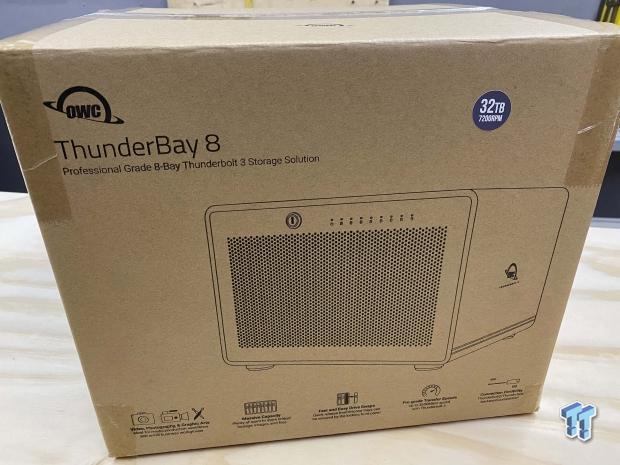
Packaging includes a basic cardboard box with branding and outline of the Thunderbay. Capacity is given with a sticker placed on the box, top right.

Best Deals: OWC ThunderBay 8 Thunderbolt 3 8-Bay DAS
Price Trend:
Prices last scanned 57 minutes ago

7 days ago: $999.99 USD30 days ago: $999.99 USD
7 days ago: $1449.99 CAD30 days ago: $1449.99 CAD
7 days ago: £849.9930 days ago: £811.99


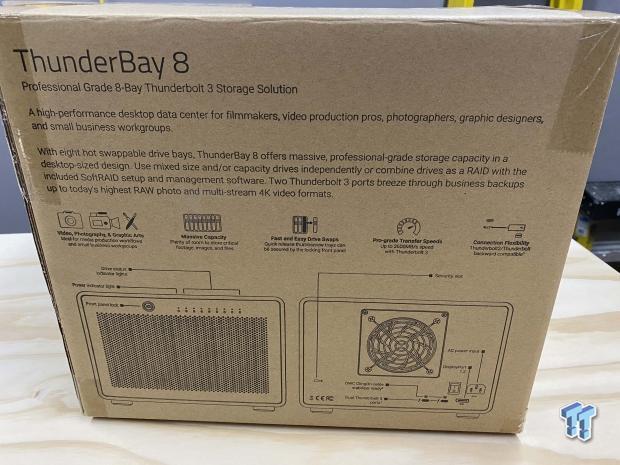
The back goes into more detail with features and platform outline of ports.
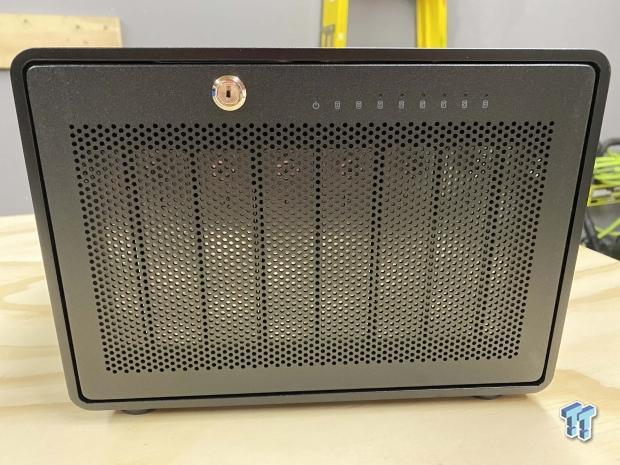
Unboxing, the Thunderbay is legit, as expected. The entire front panel is meshed for increased airflow while a single rotating lock keeps your drives secured. Across the top right, we have several LEDs, one for each drive and power.
Our Latest SOHO NAS/DAS Review Coverage
- UGREEN NASync DXP4800 GT Review: powerful 4-bay NAS with AMD Ryzen and dual 10GbE ports
- ASUSTOR Lockerstor 2 Gen2+ AS6702T v2 NAS Review - Fast Performance
- TERRAMASTER D4 SSD 4-Bay NVMe DAS Enclosure Review - Superior Portable DAS
- ASUSTOR AS5402T 2-Bay NAS Review - Fast 2-bay NAS performance
- UGREEN NASync DH2300 Review - Simple NAS at a low price
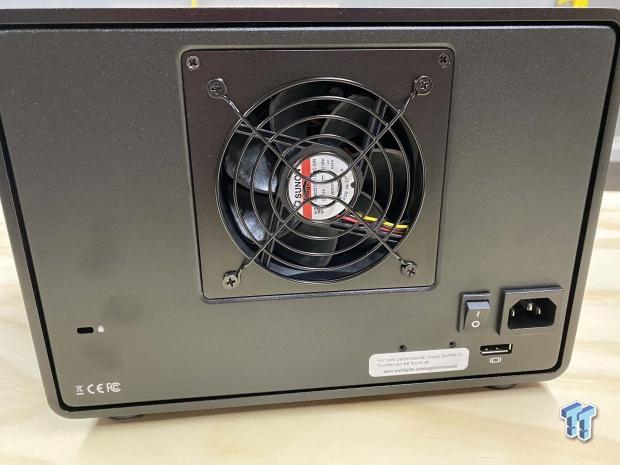
The backside offers a lock slot to the left, followed by a rather small cooling fan for eight bays. We then have power input and DisplayPort with both Thunderbolt 3 ports covered up by the white sticker.
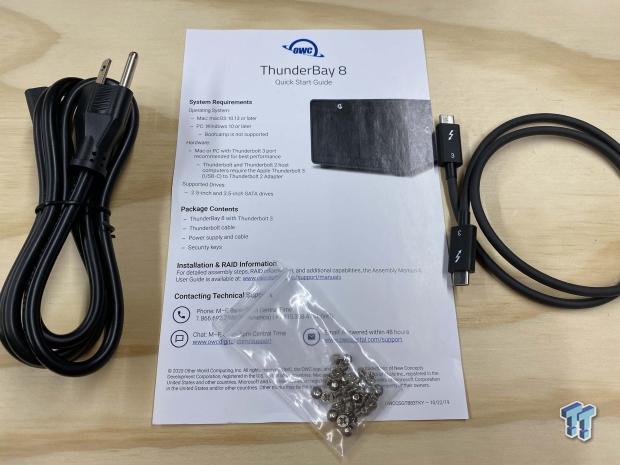
Even if you purchased your unit stacked with drives, the Thunderbay 8 package comes with drive screws for 2.5" drives if you ever want to switch. You will also find the power cord and Thunderbolt 3 cable.
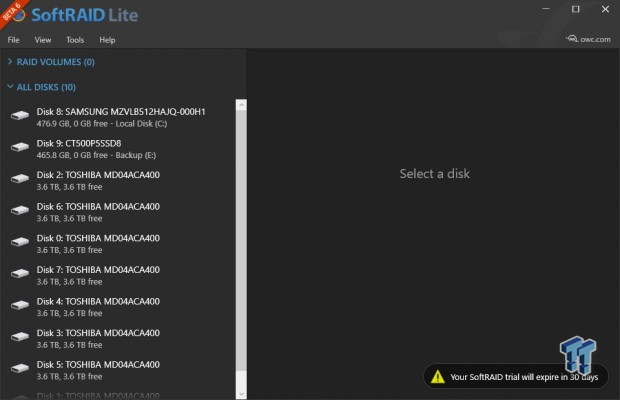
I had to run beta 6 of SoftRAID Windows for testing, and as you can see from the image, it gives a very similar feel to the macOS platform used in the past. We have all the drives listed to the left.
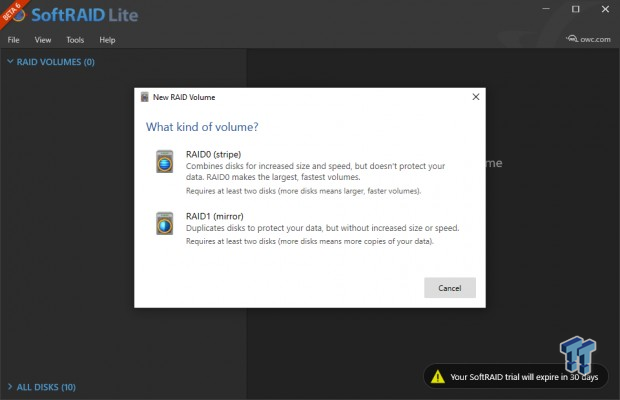
Volumes were limited to just RAID 0 and 1 for this beta 6 build.
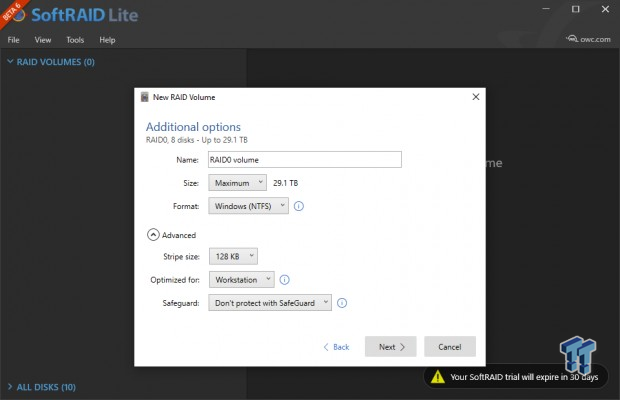
Options allow you to control the name, size, and filesystem on the ThunderBay 8. You can further adjust stripe size and optimize the platform for your workload.
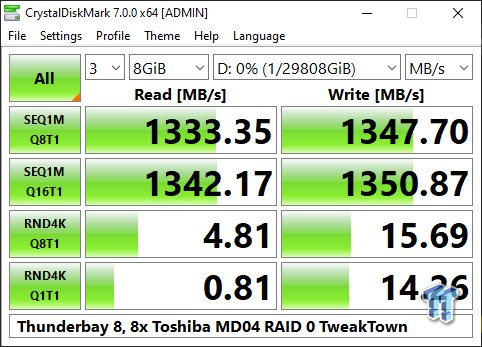
I was able to test performance in RAID 0 and 1 with SoftRAID. CDM showed 1333 MB/s read at Q8 and a small bump to 1342 for Q16. Write performance hit 1347 MB/s at Q8 and 1350 MB/s at Q16. All of these tests were performed with 7200RPM Toshiba MD04 drives. Higher capacity drives should offer increased performance.
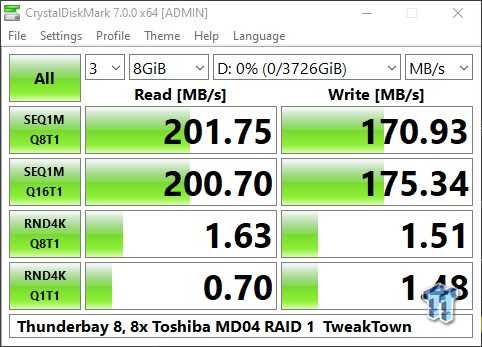
Even with 8x drives installed, RAID 1 only utilizes two. The performance came in at 201 MB/s read and 170 MB/s write.
Quality is still there with the ThunderBay lineup, even doubling the capacity couldn't stop that. The enclosure offered is a mix of aluminum for a large portion of the appliance with steel for the front and rear panels. Like the models before, OWC has kept with a robust I/O design, including DisplayPort expansion, allowing you to connect an additional monitor directly to the chassis.
Performance has certainly been increased nearly double over the last ThunderBay platform tested. In RAID 0, we were seeing close to 1350 MB/s read and write, and while we were limited by software, we did manage to test RAID 1 as well, reaching 201 MB/s read and 170 MB/s write.
SoftRAID in its beta 6 form for Windows was easy to use, anyone coming over from macOS would surely have no issues making the transition. For new users familiar with Windows, the design is very straightforward, with drives listed on the left and a few sub-menus along the top for setting up your arrays.
Pricing is fair on the ThunderBay 8 with a $749.99 MSRP. There aren't many diskless Thunderbolt 3 RAID platforms on the market, but to compare, we do have the Areca 8050T3 lineup, which takes advantage of hardware RAID as does the Highpoint Rocketstor solution. Both of those come in about double the price of the ThunderBay 8, but again hardware vs. software RAID is hugely different.
Tyler's Test System Specifications
- Motherboard: ASUS Crosshair VIII Formula X570 (buy from Amazon)
- CPU: AMD Ryzen 5 3600 (buy from Amazon)
- RAM: Corsair Vengeance 16GB 2x8GB DDR4 3600 (buy from Amazon)
- Cooler: Corsair Hydro H60 (buy from Amazon)
- Case: Corsair Carbide 275R (buy from Amazon)
- OS Storage: Corsair MP600 1TB (buy from Amazon)
- Power Supply: Corsair RM850x (buy from Amazon)
- OS: Microsoft Windows 10 (buy from Amazon)