













Our Verdict
Pros
- Impressive 30K sensor
- 8K polling over wireless
- Robust build quality and comfortable symmetrical design
- Dedicated DPI switch
- Versatile with deep customization
Cons
- Swarm II software has some quirks to get used to
- Faces stiff competition at this price
Should you buy it?
Introduction & Specification Details and Close-up
The symmetrical, lightweight gaming mouse, built for competitive gaming and modeled after the mice used by professional players, has quickly become one of the most prominent and popular designs on physical and digital retail shelves. Take one quick look at the name and you'll realize that the Turtle Beach Burst II Pro isn't the company's first attempt at this style of gaming mouse, however, the original Burst Pro dates back to the when Turtle Beach's PC peripheral division was a separate German company called Roccat that made a name for itself by creating high-performance and stylish PC gaming peripherals for the enthusiast market.
This is a roundabout way of saying that the new Turtle Beach Burst II Pro is the latest model in a series of competitive-focused gaming mice that have been around for years, so it's not a case of following a trend. As expected, the design focuses on performance, latency, and battery life, with deep customization in a lightweight build weighing in at 57 grams. Now, in the ultralightweight era, we're seeing several prominent brands release gaming mice that weigh under 60 and 50 grams. The Turtle Beach Burst II Pro is not the lightest pro gaming mouse on the market, but it still falls within the ultralightweight category and feels great in that respect. Put it this way, it's about half the weight of the ergonomic Turtle Beach Kone II Air we reviewed late last year.
Popular Now: Assassin's Creed Odyssey becomes the highest-rated entry in the franchise, thanks to Nolan's 'The Odyssey'Performance-wise, the key feature of the Burst II Pro is its support for 8K or 8,000 Hz polling over wireless, achieving sub-millisecond latency. 8K polling on a wireless mouse is a nice-to-have feature for competitive gaming; however, it definitely consumes more battery life compared to gaming using the industry standard 1,000 Hz polling. On that front, it's great to see that the Burst II Pro ships with a relatively large-capacity battery for a wireless gaming mouse, one that can deliver around 40 hours of gaming in 8K mode, which increases to 150 hours with the standard 1,000 Hz polling rate.
Specifications & Close Up

| Item | Details |
|---|---|
| Product Name | Turtle Beach Burst II Pro |
| Product Type | Wireless Gaming Mouse |
| Color | Black, White |
| Interface | 2.4GHz Wireless, Bluetooth, USB-A Wired |
| Compatibility | PC (Windows 10, 11), macOS, Linux, iOS, Android |
| Sensor | Owl-Eye 30K optical sensor |
| Switches | TITAN Switch Optical |
| DPI/CPI | 30,000 |
| Polling Rate | Up to 8000 Hz (Wired and Wireless) |
| Tracking/Acceleration | 750 IPS, 70G |
| Buttons | 8 (Programmable) |
| Lighting | None |
| Weight | 57 grams |
| Battery Life | Up to 150 hours (1K Polling), Up to 40 hours (8K Polling) |
| What's In The Box | Turtle Beach Burst II Pro, 8 kHz Wireless USB-A Transmitter, PhantomFlex 8K USB-C to USB-A Charging Cable, USB-A to USB-C Transmitter Adapter, Grip Tape, 1 Full-size PTFE, 8 PFTE Dots, 8 UHMW-PE Dot Skates, Quick Start Insert |


Best Deals: Turtle Beach Burst II Pro Wireless Gaming Mouse
Price Trend:
Prices last scanned 4 hours and 1 minute ago

7 days ago: $167 USD30 days ago: $167 USD
7 days ago: $179.99 CAD30 days ago: $179.99 CAD
7 days ago: £87.3130 days ago: £87.31
7 days ago: $245.93 AUD30 days ago: $245.93 AUD


Kosta's Test System Specifications
| Item | Details |
|---|---|
| Motherboard | ASUS ROG CROSSHAIR X670E HERO (Buy at Amazon) |
| CPU | AMD Ryzen 9 7950X (Buy at Amazon) |
| GPU | NVIDIA GeForce RTX 5090 Founders Edition (Buy at Amazon) |
| Display | MSI MAG 321UPX QD-OLED 4K 240Hz (Buy at Amazon) |
| Cooler | ASUS ROG RYUO III 360 ARGB (Buy at Amazon) |
| RAM | Corsair DOMINATOR TITANIUM RGB 32GB DDR5-6000 (Buy at Amazon) |
| SSD | Sabrent Rocket 4 Plus-G 4TB (Buy at Amazon) |
| Power Supply | ASUS TUF Gaming 1000W Gold (Buy at Amazon) |
| Case | Corsair 5000D AIRFLOW (Buy at Amazon) |
| OS | Microsoft Windows 11 Pro (Buy at Amazon) |
Design, Sensor, & Software
Design
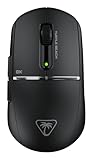
The symmetrical design and shape of the Turtle Beach Burst II Pro will be instantly familiar to those who have used a competitive gaming-focused mouse in recent years. With support for multiple grip styles and a clean design that minimizes features like additional buttons and ergonomic flourishes, Turtle Beach's take is still distinct enough to make it stand out. From a physical design and layout perspective, the company has done one thing that most mice of this type don't do: add a physical DPI or sensitivity button, located at the top-most part of the left side of the mouse. Although it looks a little out of place, being out of the way is a smart way to add quick access to DPI adjustments, with the ability to remap the button to perform any other task.

The all-black matte finish of the Turtle Beach Burst II Pro is clean and minimalist, with a touch of style in the form of a reflective metallic strip between the left and right click buttons and the body. With the Turtle Beach logo and an '8K' label on the left-click button, the design is impressive; however, we did find that the finish was prone to retaining fingerprints after a solid week of use. Thankfully, for added comfort, you've got grip tape, which is quickly becoming the standard for competitive-focused mice like this. With the Burst Pro II, you've also got your choice of three alternate sets of skates to adjust the glide for various surface types.
Another area where the Burst Pro II takes that extra step is in the charge and USB extension cable for the dongle, which features a premium, flexible style that makes wired use feel like a relatively seamless transition. On the connectivity front, although this mouse is designed for competitive gaming and fast-paced PC titles where latency is crucial, the Burst II Pro also supports Bluetooth, enabling it to be connected to a wide range of devices and used as a general-purpose productivity mouse.

One thing we immediately noticed when connecting the Burst II Pro for the first time was that the sound of the left and right clicks is noticeably lower in volume compared to competitive gaming mice from companies like Logitech, Corsair, and ASUS. This is a quieter mouse to use; however, it still features a snappy click thanks to the responsive Titan Optical Switches used for the main left and right-click buttons, which are rated for 100 million clicks. Another difference is that the step-based scroll wheel sits a little lower, so it's not as prominent - a design choice that we're not sure whether we like or dislike. However, it was something we noticed right from the start.
Our Latest Mice Review Coverage
- Razer Viper V4 Pro Wireless Gaming Mouse Review - Built for Competition
- Corsair SABRE v2 PRO CARBON FIBER Wireless Gaming Mouse Review - The Premium Option
- Corsair SABRE v2 PRO Wireless MG Gaming Mouse Review - A Strong Contender
- Logitech G PRO X2 SUPERSTRIKE Wireless Gaming Mouse Review - Competitive Gaming Perfected
- ASUS ROG Harpe II Ace Wireless Gaming Mouse Review - Performance, Comfort, and Versatility
Sensor
As expected, especially with its support for 8K polling, the Turtle Beach Burst II Pro's 30K or 30,000 DPI Owl-Eye sensor is right up there in terms of performance and capabilities. Optimized for tracking on a wide range of surfaces, including glass, Turtle Beach's upgraded Owl Eye sensor provides fantastic tracking and accuracy with adjustable features such as lift-off distance. The 750 IPS tracking speed is more than enough for competitive gaming, and the 70G acceleration rating, or gravitational force, is plentiful, too. Now, as a 30K sensor in 2025, it isn't the most advanced in terms of specifications, but it's definitely on the higher end of the spectrum.

Essentially, the 30K Owl Eye sensor, which we assume is a variation of the PixArt 3950 sensor, offers a highly performant and power-efficient design, resulting in a mouse that can deliver up to 150 hours of battery life in 1,000 Hz mode while still offering impressive tracking and accuracy.
Software
Making adjustments and customizing the Turtle Beach Burst II Pro is all handled via the company's Swarm II software for Windows PCs. The good news is that it's modular, takes up relatively few system resources, and is intuitive to use - for the most part. The main settings display for the Burst II Pro is somewhat cluttered, information-wise, but it provides quick access to all the key adjustable features. DPI settings can be manually adjusted here, and different colors can be assigned to the single LED status light on the mouse, with up to five DPI steps available for each profile.

On the main settings screen, you can also adjust the Polling Rate, choosing from 1, 2, 4, or 8K, adjust the lift-off distance, Angle Snapping for those that don't swipe in a straight line, Debounce Time for mouse clicks, and various battery-related settings ranging from pop-up notifications to adjusting the Standby Mode timing. It's all cleanly laid out and detailed, with a few competitive-gaming features that are great to see, like Angle Snapping. The issue here, though, is that as soon as you adjust one of the DPI settings or any other setting, the mouse automatically and instantly makes the change, accompanied by a slight pause and an on-screen 'please wait' overlay. Not being able to make changes before applying them all at once and having to wait after every adjustment quickly became a little annoying.


It's not a deal breaker, but something worth pointing out as a quirk of Swarm II - which is otherwise great to use. It's the same situation with remapping, but it's not as annoying here. With a visual representation of the Burst Pro II, all you need to do is select the button, and then choose from a wide range of detailed and intuitive options covering all bases - including Macros, with quick access to Swarm II's dedicated Macro recording tool. There's even secondary functionality via Easy Shift, which can be activated by assigning Easy Shift to one of the buttons or a compatible Turtle Beach keyboard. This opens the door to secondary functions for all eight programmable buttons.
Gaming Performance and Productivity
Gaming Performance
It's one of the games of the moment, so naturally, we spent quite a bit of our review time with the Turtle Beach Burst II Pro playing Battlefield 6, testing out the different polling rates and other settings to gauge overall performance. Throw in some Call of Duty, Borderlands 4, and even some light strategy via the indie city builder meets tower defense game, Becastled, and the Burst II Pro lived up to its promise of delivering "flawless" gaming performance. Fast, responsive, and accurate, even though it was hard to distinguish between 1K and 8K in many cases, the fact that both wired and wireless modes felt identical, latency and performance-wise, shows how well the wireless connectivity is implemented here.

With the ability to create custom profiles for gaming and productivity, we appreciated having the option to create a dedicated 8K profile for gaming, featuring specific DPI clutch settings for precision aiming. Additionally, we appreciated the ability to have the profile auto-switch when a particular game, including the competitive shooters mentioned above, is launched. You have to add the .exe files for each game manually, but it's worth spending those few minutes to customize, because when you're not gaming, there's no real need for 8K polling and that level of accuracy.
Productivity
As a productivity mouse, the Turtle Beach Burst II Pro is lightweight, comfortable, and versatile thanks to its long-lasting battery and Bluetooth support. The 57-gram weight definitely feels great for everyday tasks like browsing, checking emails, and general work and productivity. The symmetrical shape isn't ever going to match more ergonomic shapes designed for right-handed grips, but it's a far cry from feeling like a gaming-only mouse. The additional DPI switch button, as well as the ability to remap everything and add secondary functionality via Swarm II, also enhance the mouse's productivity chops.
Final Thoughts
The Turtle Beach Burst II Pro faces stiff competition, as there's a wide range of wireless gaming mice built for gaming performance, and its $139.99 USD price point isn't quite as competitive as we had expected. The 57-gram weight and 30K Owl-Eye Sensor mean that it's not the lightest or most powerful gaming mouse; however, you still get fantastic performance with up to 8K polling in an ultralightweight build. There's a lot to like about the design, too, especially in relation to features present here that might not be present elsewhere. Features like a dedicated DPI switch that's accessible while gaming, as well as Bluetooth support for versatility, help it double as an ultralight on-the-go mouse.

Ultimately, choosing the Turtle Beach Burst II Pro over the competition will come down to personal preference, as it's hard to go wrong when the performance and customization on offer are at this level. However, in a competitive market, it's the little things that can make the difference in either direction. For example, with the Burst II Pro, the dedicated DPI switch and Bluetooth support might be the features that make you choose it over something else. On the other hand, something as small as the Scroll Wheel sitting a little low or the shape being slightly different from what you're used to might be the thing that makes you look elsewhere. Either way, the Turtle Beach Burst II Pro is the latest impressive wireless gaming mouse to consider.


 Logitech G316 X 98 Wired Gaming Keyboard Review - Retro-Inspired Board that Falls a Little Short
 Logitech G512 X 98 Analog Mechanical Gaming Keyboard Review - An Innovative Two-in-One
 ASUS ROG Raikiri II Xbox Wireless Controller Review - Ready to Take Control
 IQUNIX Magi96 Pro Aluminum Low Profile Mechanical Keyboard Review - Premium Build, Satisfying Sound
 Razer Pro Type Ergo Wireless Split Ergonomic Keyboard Review - Built for Comfort and Support
 Giveaway: 12 Winners Will Score MONTECH NX400 and NX600 CPU Coolers
 Assassin's Creed Odyssey becomes the highest-rated entry in the franchise, thanks to Nolan's 'The Odyssey'
 PlayStation gamers' planned week-long 'PS Blackout' begins today
 Nintendo Switch 2 will rise to £419.99 in the UK, starting September 1
 One retailer says 91% of attempts to buy DDR5 memory are coming from bots
 Jensen Huang signed NVIDIA RTX Pro 6000 graphics card sells for $57,450 at auction
 GTA 6 leaks have reportedly led to a morale drop at Rockstar, with Netflix frustrated as well
 The Blood of Dawnwalker won't hit 60 FPS on any console, PS5 Pro tops out at 40 FPS
 AMD claws back ground against Intel in the CPU market, climbs to 35% share in desktop CPUs
 Redditor receives not one but TWO empty boxes of Ryzen 5 9600X from Amazon
 Xbox Series X25 Limited Edition Console is priced at $900, arrives November 2026
 Cooler Master MasterFan A120 Fan Review
 GIGABYTE MO27Q2A Gaming Monitor Review: 1440p, 280Hz, and QD-OLED is a winning combination
 Cooler Master V8 ACE 3DHP BLACK CPU Cooler Review
 ASUS ROG Strix XG129C Review: A $199 Gaming Monitor You Don't Play Games On
 Cooler Master HAF II 500 Mid-Tower Chassis Review
 Corsair HS35 v3 Wireless Gaming Headset Review - An Affordable Winner
 D-Link F518 5G Wi‑Fi 6 AX1800 Mobile Hotspot Review: All-Day Mobile Hotspot
 Bose Lifestyle Ultra Speaker Review - Impressively Detailed Room-Filling Sound
 MSI Z890 Gaming Plus WIFI6E Review - Z890 for under $200
 Mortal Kombat (1995) 4K Ultra HD Blu-ray Review
 Using Multiple Monitors? Change these Windows settings for a Better Experience
 Windows Sandbox is The Windows Security Feature Most People Never Use
 I ditched the Windows 11 context menu for this open-source tool, and here's why
 Windows 11 may be encrypting your drive already, and I checked where my recovery key went
 GIGABYTE's 40 Days of INFINITY celebrates 40 Years of Innovation with stunning GeForce RTX graphics cards and rewards
 I swapped File Explorer for this free file manager and finally got the layout I wanted
 How to tell if someone has been using your Windows PC without your permission
 6 Task Manager tips for troubleshooting Windows performance problems
 ASUS ROG's 20th Anniversary Line-up of Premium PC Gaming Gear has Arrived - Here's Everything You Need to Know
 Six File Explorer tips every Windows user should know