

Our Verdict
Pros
- Cost
- Lower noise levels
- Attractive aesthetic
- 3DHP technology
- Easy to install
Cons
- Thermal performance
- Lower average CPU speed
- Warm VRM thermals
- Fan replacement
Should you buy it?
Introduction, Specifications, and Pricing
UPDATE: There was a little communication issue with Cooler Master and it turns out the launch date of the Cooler Master V4 Alpha 3DHP Black CPU cooler will likely be sometime in October, 2025. Cooler Master also noted that we were sent the reviewer's version (not what you will actually get), so the packaging will be different.
Anyone familiar with Cooler Master knows they are not afraid to try new things and push the boundaries of what we expect in a CPU cooler. Taking a quick look at our Cooler Master folder, we have seen well over 30 of their latest and most extraordinary designs over the years. While many were essentially a simple refresh, many coolers have popped up that were either way ahead of their time, or an unusual way of looking to solve the issue of removing heat.
Popular Now: Linus Tech Tips leaks Steam Frame first impressions, and Valve may be working on native Half-Life: Alyx supportAlong that journey, we saw C-style coolers, the venerable Hyper 212 in many forms, the entire Hyper line, for that matter, Masterair, Masterliquid, Neptunes, Seidons, a sphere nearly twenty years ago, but what struck us most was the V-Series. Given that our first leap into that series was well ahead of its time, with V10 featuring a TEC strapped to the monstrous cooler, we expected great things from the rest of the series, which the V6 GT and V8 GTS also delivered.
While its predecessors in the V-series all used a lot of fin surface area, they also used fans that were much more powerful, but also noisier than the market standards of today. Rather than sit on their heels and allow the market to progress without them, Cooler Master makes a new addition to the V-series of coolers, with something called 3DHP technology. Simply put, 3DHP uses part of another heat pipe soldered to another U-shaped heat pipe, allowing more heat transfer, as well as delivering that heat to unused parts of the fin array. That said, this is the most petite version of a V-cooler, but with the claims made, the V4 Alpha 3DHP Black CPU cooler is expected to save you a significant amount while still impressing you with its performance.
| Item | Details |
|---|---|
| Model | MAZ-T2HP-217PK-R1 |
| MSRP | $39.99 |
| Socket | Intel: LGA 1851 / 1700 / 115x / 1200 / 2011 / 2066 AMD: AM5 / AM4 |
| Color Option | Black |
| Dimensions w/Fan | 133 x 114 x 161mm (WxDxH) |
| Heat Sink Material | 2 x 3DHP / Aluminum Fins |
| Fan Size | 120 x 120 x 25mm |
| Profile | Non-LED |
| Speed | 0 - 2500±10% RPM |
| Air Flow | 63.1 CFM |
| Static Pressure | 2.69 mmH2O |
| MTTF | > 200,000 Hours |
| Noise Level | 22.6 dB(A) |
| Bearing Type | Loop dynamic Bearing |
| Connector | 4-pin PWM |
| Rated Voltage | 12VDC |
| Rated Current | 0.12A |
| Power Consumption | 1.44W |
| Warranty | 5 Years |
With our example being the V4 Alpha 3DHP Black, we would assume there will be others in this lineup, so be sure to pay attention to the MAZ-t2HP-217PK-R1 model number for the cooler we are showing you. In the box, you get a cooler with fifty-three aluminum fins, getting their heat from a pair of U-shaped heat pipes, which have been opened to allow another bit of heat pipe to enter that other pipe, be resealed, and increase the performance, while changing the way we think about heat pipe coolers in general. Most dimensions are typical, but note the 161mm overall height; Cooler Master also does not provide a weight.
While the tower is a massive part of the thermal performance, it is the fans that do most of the heavy lifting. In the V4, we receive a pair of unmatched fans, which is why the chart displays both front and rear specifications. The front fan delivers up to 63.1 CFM and 2.69 mmH2O of pressure at 2500 RPM. The rear fan is not as powerful, delivering 50.5 CFM and 1.77 mmH2O of pressure, capped at 1850 RPM. Noise is shown to be 22.6 dBA at maximum speed, taking its power from the 4-pin PWM fan connector.
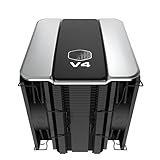
Best Deals: Cooler Master V4 Alpha 3DHP Black Air Cooled CPU Cooler
Price Trend:
Prices last scanned 6 hours and 41 minutes ago

7 days ago: $34.99 USD30 days ago: $49.99 USD
7 days ago: $51.59 CAD30 days ago: $49.09 CAD
7 days ago: £34.9930 days ago: £34.99


In the literature we received, we were told two things to expect. One, a cooler that performs on par with one of the most mentioned comparable in the game that starts with an "N," while the second fact was that the pricing would be far below any expectations of such a cooler. While we have yet to get to the performance aspect of this new entry to the CPU cooling game, we are fully aware of that astonishingly low MSRP of $39.99. To be blunt, at $40, we fully expect lower-tier performance, but Cooler Master says otherwise, so we will trust them and see how it all plays out.
Our Latest CPU Air Coolers Review Coverage
Packaging

Helping in the quest to keep costs low, Cooler Master forgoes the fancy packaging in favor of a plain cardboard container, embellished with a giant sticker that also works as a seal to the packaging. On the sticker, we see the cooler, the Cooler Master name and logo, and the V-Series V4 Alpha 3DHP Black product naming.

As we spin the box, the right side is more plain cardboard, this time with screen-printed information. We see the CM logo and their tagline, along with the model and EAN numbers. There is an additional sticker applied, which shows the model, followed immediately by the serial number.

The back is much simpler than expected, with only codes for the manual and product page, along with locations and other information about what's inside.

The left side of the box is similar to the right side, but it only includes the logo, name, and tagline.

The reason the back of the box was so bare is because of the sticker that wraps over the top of the box. Here, you will find all the specifications Cooler Master offers, which match what we showed earlier.

Removing the cooler from the box left us with this. There is an outer sleeve of cardboard still stuck in the box, which wraps the cooler body with at least two more layers of cardboard on all sides. Above the cooler, you will see the hardware box, which includes everything needed to get up and running with this V4 Alpha 3DHP Black CPU cooler.
Cooler Master V4 Alpha 3DHP Black CPU Cooler

Fresh out of the inner packaging and free from its plastic bag, we find the V4 Alpha 3DHP Black essentially ready to go. The fan covers much of the fin array while staying lower than the top of the tower, and leaves plenty of room below for fan connectivity and RAM clearance.

Cooler Master provides a wide tower that sits between a pair of fans, which utilize wire fan clips for securing, but are also mounted to the cover above the tower. Below the tower, we see a centered design, without offset, yet it still sits well within the boundaries set by the socket and RAM.

Leading and trailing edges are identical and are mostly flat. The sides are raised more than the central portion to allow fans to breathe, with some sawtooth patterning on either side to help disturb the fans' airflow.

A closer look at the side of the tower reveals that Cooler Master traps all the airflow it can, forcing it through the tower rather than out the sides. Not only are there tabs and latches to trap that air, but it also ensures proper spacing of the fin array, giving this tower its best chance at performing well.

Each side of the tower has this trio of pipes running through the fins. Two 6mm diameter pipes run behind the sawtooth-patterned part, and the third 3DHP comes from the base and runs straight up through the central portion of the tower.

This is the image that explains it all. In typical fashion, we find two heat pipes traveling through the base as usual, then bending and having the fins pressed onto them. To help transfer more heat, the pipes are opened, and another pipe is slid into them. It is then reattached to deliver heat to the fins, rather than relying on a pre-cooler or a much thicker base to handle the task.

The mating surface of the base is not plated in any way, but is left in its natural state, with clearly visible circular machine marks. The base is convex for added pressure, and while from the top it appeared to be an HDT design, there are no indications of the pipes in the copper.

The top of the v4 Alpha 3DHP Black is significantly brighter than the name would suggest. However, we are fans of the black on silver aesthetic, and while the Cooler Master logo may be tougher to make out in dim light, that chrome V4 will reflect even the slightest bit of lighting in the chassis.

To remove the fans from the V4, first unclip the wire fan mounting. Then, lift the cooler cover off, and the fans will come with it. This is mandatory to do, as the fans cannot be installed when accessing the cooler's mounting screws.

Under the cover, you will find four Phillips #1 screws that disconnect the steel fan bracket from the cover, and we also see foam tape placed inside to reduce vibrations. The fans are held in place at the top only, with more Phillips #1 screws, three of which come out, while one is stripped, so replacing fans is not an option for us.
Accessories and Documentation

The hardware included with the V4 Alpha 3DHP Black is among the simplest and easiest to use in the game. On the left are the Intel brackets with adjustable screw placement to go along with the adjustable Intel backplate in the middle. That leaves us with the brackets on the right, used for AMD sockets, and both sets use spring-loaded screws to secure the tower to the motherboard.

The fans that cool this tower are the Cooler Master Mobius 120 fans. The rear fan we are looking at is the lower-spec'd of the pair, but it shows you what to look for if you plan to replace the fans. However, with a runtime of over 200,000 hours, that will be quite a while.

In addition to all the hardware, you will also find the literature. The manual is a step-by-step guide to all supported sockets, complete with images and a parts list that make it easy to follow and get this tower into a build in under five minutes. The warranty information covers the terms of their five-year coverage in many languages and offers ways to contact Cooler Master should there be any issues.
Installation and Finished Product

Following the manual, we removed the motherboard hardware and got to the bracket installation. For AMD users, grab the straighter set and install them with the bump inward. Then, send the provided screw all the way home to lock it in.

With the factory bits out of the way, what you see is all you need to continue, minus the thermal paste application. The brackets use the factory backplate holes, without any additional required goodies.

Mounting the tower is easy. Start at a corner, get a few threads going, and in an X-pattern, turn a few threads until you run out of them. We initially assumed the sawtooth area was deep enough for direct access, but in installation, access to all four screws is angled, and may cause you to strip the hardware if not careful.

With the cover and fans back in place, the intake fan now clears the top of our RAM choice without increasing the overall height. In a dual stick config, you can go as tall as you want with memory, but populating all slots will bring height limits.

From this side, it is much easier to see what we were on about with the population of DIMM slots. There is plenty of room for the average user, but if you want to use four sticks, with no fan adjustment, you will need to keep them low.

Even with two fans and a widebody tower design, we still have access to the 8-pin EPS cables. We also see that the V4 clears the rear I/O cover, something that can be an issue with some offset coolers and two fans in play.

Cooler Master opted not to add any RGB to the V4 Alpha 3DHP Black edition, and while the top does resemble an engine cover for a European exotic, the visual appeal is enough for most, as-is. Even in our high-contrast build, the V4 stands out and is a prominent part of the kit.
Test System Setup, Thermal Tests, and Noise Results
Chad's CPU Cooler Test System Specifications
| Item | Details |
|---|---|
| Motherboard | ASUS ROG STRIX X870E-E Gaming Wi-Fi (Buy at Amazon) |
| CPU | AMD Ryzen 9 9900X (Buy at Amazon) |
| RAM | Patriot Viper Elite 5 32GB @ 7000MT/s (Buy at Amazon) |
| GPU | GIGABYTE GeForce RTX 4070Ti Super Windforce OC 16G (Buy at Amazon) |
| SSD | Patriot Viper 2TB VP4300 PCIe m.2 Gen4 x4 (Buy at Amazon) |
| Case | be quiet! Light Base 900 DX (Buy at Amazon) |
| Case Fans | be quiet! Light Wings White 140mm PWM High-Speed ARGB (Buy at Amazon) |
| Power Supply | be quiet! Dark Power Pro 12 1500W (Buy at Amazon) |
| OS | Microsoft Windows 11 Home 64-bit (Buy at Amazon) |
| Software | AIDA64 Engineer 7.60.7300, and CPU-z 2.14.0 x64 |
To see our testing methodology and to find out what goes into making our charts, please refer to our 2025 CPU Cooler Testing and Methodology article for more information.
Thermal Results
Using PWM to control the fans, we saw them top out at 730 RPM at idle. The V4 Alpha 3DHP Black can eke out the best results in this chart at 42.5°C, and we hope this is the start of a trend for our charts.

Giving the V4 the beans with AIDA64, we find Cooler Master at the opposite end of the chart. Considering the competition, we are starting to think that "N-company" might still be out of their reach. At 73.9°C, a full degree hotter than the Pure Rock coolers, it's decent results for a two-plus-two heat pipe design, but not the level we pictured from the briefing.

Although we observed the highest overage package temperature from the V4, a closer look at the CPUs' maximum loaded temps reveals that Cooler Master performs better on the grander scale than the previous chart suggests.
CPU Speed

Keeping a list of average CPU speeds helps determine if the cooler you're considering will hinder the CPU's ability to overclock, potentially limiting your performance. The gap from best to worst is still a tight race, but it is tough to put a bright spin on the lowest average result in this chart at 5197 MHz.
VRM Thermal Results

Something we had never assumed could be an issue for a dual-fan powered, single-tower design, but somehow, all the airflow misses our VRM. There is less than four degrees between the other coolers in the list, but the V4 manages to be somehow six degrees hotter than that, leaving our VRM at 62°C.
Fan Speed and Noise Levels

We knew something had to give in the equation, and with fewer pipes and an average fin array, Cooler Master needs much more fan speed to keep the thermal load at bay. The V4 Alpha 3DHP Black requires 1508 RPM to match the performance of the others.

What shocked us most is that this cooler can match most others' maximum CPU temperatures, yet requires an additional 300 RPM to achieve this, and can do so with only 32 dB of noise in the room. Outside of the PWM range, the fans increase exponentially the faster they go, but in the end, the gains did not warrant the extra noise.
Final Thoughts
As we recall the cool stuff, the aesthetically appealing aspects, the cost, performance, and everything we just saw, we find ourselves impressed in some ways. The visual appeal delivers a higher-end aesthetic than the price would suggest. RGB? We don't care; either way is fine with us. Attention to detail and the use of many tricks of the trade are also things we admired as we took our spin around the tower. The removable top and fan combo is a trick we have seen before, but it usually doesn't include wire fan clips. The warranty length, MTTF, reasonable results, and associated costs of a fancy Hyper 212 solution all point towards a successful Cooler Master outing.
On the flip side, we have things like a stripped screw within the fan mounting assembly. Not that you will ever need to with 200,000 hours of use, but it will keep us from ever having that option. With a below-average idle temp, we assumed that once loaded, this new 3DHP tech may be the answer to all our woes. However, while maximum temperatures were similar, the V4 gave us our highest average package temperature with the lowest average frequency. Even when it came to hardware, as easy as it could be to use, Cooler Master does not give you direct access to the spring-loaded screws, an oversight, maybe, but we feel it went through as "good enough." To be blunt, unless we see throttling, we couldn't care less about the VRM temps while testing a CPU cooler for short bursts, but those doing longer, much more complex tasks will want to consider an optional avenue for cooling the VRMs because the V4 does not do a great job at it.
Maybe we are looking at this all wrong. When we get back to the cost of the V4 Alpha 3DHP Black, you get a ton of ingenuity while not denting your account like many other options, well over $100. At $39.99, we see this as more of a big brother to the Hyper 212 coolers, and less as a little brother to something like the V8 and V10. As such, the fact that they could keep up with coolers with twice the pipes, some with twice the rated TDP, and can still make it through without throttling, that should get Cooler Master a massive gold star, and it does. With all things considered, and going back and forth in our minds. Considering the constraints we faced, the V4 design offers CM the right path forward. The V4 may not be the perfect solution, but thinking outside of the box has its advantages, and Cooler Master's V4 Alpha 3DHP Black is a lot of cooler for a very low investment.