









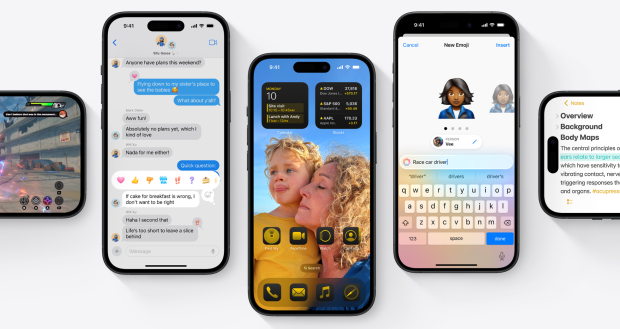




Apple has rolled out the latest version of iOS to the public and it comes with a bunch of new changes that are worth knowing about.
The public beta for iOS 18 has been unveiled, and it covers Apple's range of products with different operating system versions. For example, watchOS18, macOS Sequia, tvOS 18, and of course iPhone's iOS 18, are all available to download now. Users can do this by heading to Settings > Update and then opting into the public beta for the upgraded operating system.
iOS 18 is the operating system version slated to implemented Apple's version of artificial intelligence called Apple Intelligence, but unfortunately many of those main features have been left out of this public beta. Additionally, this article will be covering the top non-AI features currently available in the iOS 18 beta, which should help you decide if you want to upgrade to it or not.
Top 5 iOS 18 Features
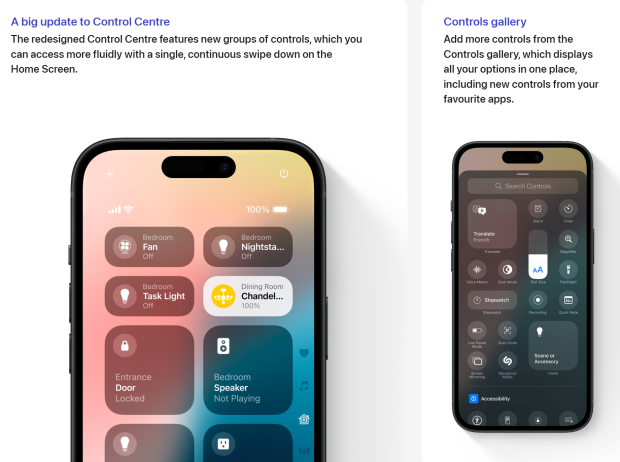
Control Center Overhaul - I don't know how much this update was requested by users, but Apple decided to overhaul the Control Center, making the user interface (UI) paginated. Users will now get three pages; one for direct access to your favorite toggleable controls, another for any media playing, and the third for connectivity options. Users are also able to customize what controls on the main control page, along with the size of the controls.
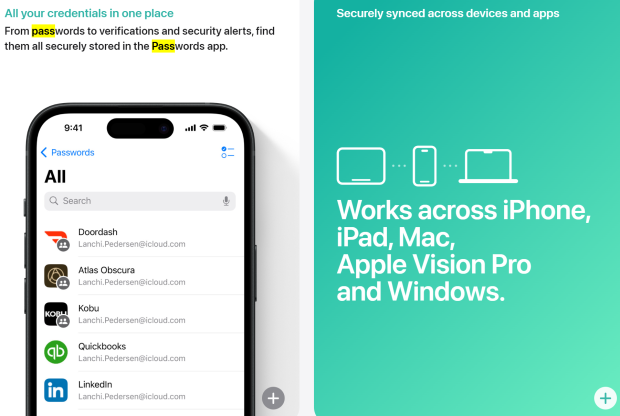
Passwords App - Appearing on the home screen of any user upgrading to iOS 18 is the new Passwords App. This new app complies all of your passwords that were already attached to your device in one app.
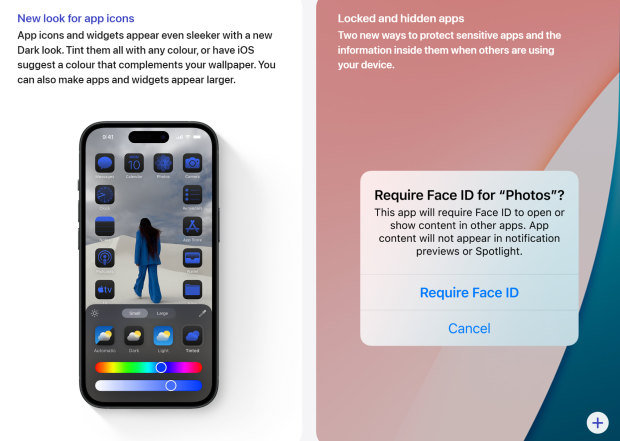
Home Screen Customization - Apple has finally added home screen customization to iOS, with users now being able to put apps wherever in the grid they like without them automatically jumping up to the line just below other app icons. Additionally, app icons and widget appearances can be changed to Dark mode, or be tinted with the new "Tinted" feature. This feature allows a user to select a color present on the home screen and make their entire app selection the same color. However, not all apps look great when tinted.
Small Changes - Often, a lot of small quality-of-life changes make a big impact with a software update, and iOS 18 is no different. Apple has upgraded many aspects of the OS, such as shortcuts to Shazam, RCS support being enabled, intuitive Photos search, and more. Notably, I am seeing a lot of reports saying RCS support is still buggy in a few different regions, as some users are still unable to see read receipts, send high-quality videos, and more.
Upgraded Calculator App - iOS 18 has introduced a long-awaited calculator app, and in Apple fashion, they have made it special. The upgraded calculator app has added a scientific calculator and Math Notes. Users are now able to draw any math equation, and Math Notes will be able to provide them with the answer in various forms. If the arithmetic calls for a graph, Math Notes will be able to provide one. This feature is easily the most impressive out of all the non-AI features in iOS 18 and is definitely worth having a play with.
![Photo of the $10 -PlayStation Store Gift Card [Digital Code]](https://m.media-amazon.com/images/I/41MT2s0Gm2L._SL160_.jpg)


 Don't update your iPhone before knowing the big downside
 Apple's iOS 18.2 comes with a selection of new Apple Intelligence features and improvements
 Apple Intelligence slated to release with iOS 18.1 on coming release date
 Apple code leaks four iOS 27 features and new design changes
 Apple confirms an iOS 18 patch for the DarkSword exploit, even for users who skipped upgrading to iOS 26
 Bose launches QuietComfort Headphones with new ActiveSense noise-canceling tech and 24-bit audio
 KIOXIA, Micron, and Samsung earn Best of Show awards at FMS 2026
 Retailer issues warning: If you want a GeForce RTX 5070, RTX 5070 Ti or RTX 5080, you better hurry
 NVIDIA's RTX Neural Texture Compression now runs on RTX Spark and Windows on Arm
 $1 billion in TSMC chips for Apple's new iPhone 18 are reportedly sitting on shelves, waiting for DRAM
 Nintendo's profits jumped 53.5% despite a revenue decline, thanks to a surprise one-time US tariff refund
 Minecraft is getting a native Switch 2 version on October 27, but Switch 1 owners may need to pay to upgrade
 Sony is now putting disc death warning stickers on PS5 boxes, proving it has no plans on reversing its decision
 Quake gets new free episode and roguelite mode in 30th anniversary update
 Call of Duty Black Ops I & II sold 11 million copies on PS4 and PS5, per analyst estimates
 ASRock X870E Taichi White Review: a premium AM5 motherboard with 10G LAN and WiFi 7
 Asetek Initium Pedal Modular Upgrades Review
 Thinkware U3000 Pro Review - Smart Dashcam with Wi-Fi quirks
 Montech TG3 Mid-Tower Chassis Review
 ASUS ROG Strix X870E-A Gaming WiFI7 Neo Review - A New Enticing Option
 Noctua NL-LC1-36 Liquid CPU Cooler Review
 Logitech G316 X 98 Wired Gaming Keyboard Review - Retro-Inspired Board that Falls a Little Short
 Biwin M560 2TB SSD Review - Best Overall Retail-Ready DRAMless SSD
 Logitech G512 X 98 Analog Mechanical Gaming Keyboard Review - An Innovative Two-in-One
 Thrustmaster T.Flight HOTAS 5 MSFS Edition Review
 GIGABYTE's 40 Days of INFINITY celebrates 40 Years of Innovation with stunning GeForce RTX graphics cards and rewards
 I swapped File Explorer for this free file manager and finally got the layout I wanted
 How to tell if someone has been using your Windows PC without your permission
 6 Task Manager tips for troubleshooting Windows performance problems
 ASUS ROG's 20th Anniversary Line-up of Premium PC Gaming Gear has Arrived - Here's Everything You Need to Know
 Six File Explorer tips every Windows user should know
 I switched my PC to encrypted DNS in Windows 11, and browsing felt more private
 Printer Not Working in Windows? How to fix detection, print queues and drivers
 The Ultimate Guide to Personalizing Your Windows 11 Taskbar
 How to Turn Your Windows Laptop Into a Second Monitor with Miracast and Wireless Display in Minutes