
Our Verdict
Pros
- Very powerful
- Fast, bright, HDR, OLED screen
- Speakers are loud and punchy
Cons
- Very expensive
- Fingerprint magnet
- Runs hot and loud
Should you buy it?
Introduction, Specifications, and Pricing
The Gen 2 in the title partly signals that GIGABYTE has moved from Intel to AMD in this refresh. The new model uses AMD's top-tier 'Fire Range' Ryzen 9 9955HX3D processor, which has Zen 5 processor architecture; uses TSMC's 4nm fabrication process; has 16 cores (with Multithreading) that operate between 2.5 and 5.4GHz; and uses AMD's 2nd Gen V-Cache technology. It doesn't have an NPU for AI shenanigans. Its integrated GPU (Radeon 610M) is for display purposes only: this processor is (almost) all about gaming and providing a platform that amplifies the performance of a discrete GPU.

Our review unit had the highest spec (SKU: 6ZJ), but most people will simply refer to it as the one with the NVIDIA RTX 5090 (with 24GB of GDDR7 RAM) rather than the 5080 model or the one with the 5070 Ti.
It also comes with 32GB of DDR5-5600 RAM and (depending on where you're shopping) a 1TB or 2TB hard drive.
The initial retail price was $5,400, but it's since dropped to $4,899. That's still incredibly expensive, but these are all top-end components in a RAM-crisis-inflated market. It's also experienced some big 'on sale' discounts recently, so keep an eye out for price fluctuations as we approach the crazy end-of-year sales.


Best Deals: GIGABYTE AORUS Master 16 GEN 2 Gaming Laptop
Price Trend:
Prices last scanned 20 hours ago

7 days ago: $4899.99 USD30 days ago: $4899.99 USD
7 days ago: $7236.76 CAD

7 days ago: $8999

Features, Details and Design

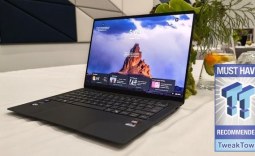
On the one hand, the AORUS Master 16 Gen 2 doesn't look like the glitziest, premium gaming laptop: there are no aggressive design elements, elaborate vent designs, look-at-me patterns, or encouraging slogans littered everywhere, but for many buyers, it's better for it. Still, the plain "5-Degree Black" chassis has plenty of RGB flourishes, including a light strip at the front, two more beneath the screen, a per-key-lit RGB keyboard, a fragmented, mosaic-like AORUS logo on the lid, plus a 'Beacon' AORUS logo that's projected onto the desk at the rear. Our only real gripe is that it's one heck of a fingerprint magnet.

The 16-inch OLED display offers true blacks, superb contrast and vibrant colors, as one would expect. The 2,560 x 1,600 resolution provides plenty of desktop real estate for high-resolution gaming (and work tasks), but the glossy finish can get reflective when viewing dark content and when operating in bright environments. Activating HDR dials things up a level, with the 1,000-nit peak brightness making bright objects really pop from the screen while simultaneously illuminating the details of dark objects in dark areas. Some details can get lost in brighter highlights, though.

HDR also helps ensure all colorful and monochromatic transitions and gradients are incredibly smooth. The screen also supports 99 percent of the tricky DCI-P3 color space, which designers and creators will like. It's also Pantone Validated for colour accuracy and has TÜV Rheinland's Low Blue Light technology to reduce eye fatigue.
Our Latest Gaming Laptops Review Coverage
- Dell XPS 14 (2026) Laptop Review - Premium Quality, Impressive Performance
- HP Omen 16 (Core i9-14900HX + RTX 5070) Gaming Laptop Review
- MSI Crosshair 16 HX AI (Core Ultra 9 275HX + RTX 5070) Gaming Laptop Review
- Acer Predator Helios 18 AI (Core Ultra 9 275HX + RTX 5090) Gaming Laptop Review
- MSI Raider A18 HX A9W (Ryzen 9 9955HX3D + RTX 5090) Gaming Laptop Review
The 0.2ms pixel response time marries with the 240Hz refresh rate to provide motion smoothness and blur-free clarity that only pro eSports players might grumble at. It's a great screen.

Frequently Asked Questions
Open a question for an answer from TweakTown's coverage of this review, or ask your own below.
How does the AORUS Master 16 Gen 2 RTX 5090 compare with the MSI Titan 18 HX AI in gaming benchmarks?
What frame rates can the AORUS Master 16 Gen 2 sustain at its 2560 x 1600 resolution in demanding games?
Can the AORUS Master 16 Gen 2's spare Gen 5 NVMe slot be used to add a second SSD, and what drives are compatible?
What resolutions and refresh rates can the AORUS Master 16 Gen 2 output over HDMI 2.1 and USB 4?
Have a question that isn't listed here? Ask below, and TweakBot will answer it.

Above it is a Full HD webcam which is generally sharp but can get grainy, even in good lighting. The microphone also sounds rather muddy, but this isn't really designed for web-conferencing, and many gamers (and streamers) will use headsets anyway.
GIGABYTE touts its 2-Watt, quad-speaker array plus its integration of Dolby Atmos and bespoke Smart AMP technology. While I won't delve into the claimed specifics of the virtualized enhancements, what I can tell you is that this laptop is one of the loudest on the market with punchy bass and very good, all-round fidelity.

The keyboard is low-travel, comfortable, and accurate to type and game on for extended periods. Despite the size, there's no number pad, though, and some gamers (particularly RTS players) might miss this. Nonetheless, all keys are full-sized, and there are no squished arrow keys. The large trackpad is smooth and accurate, and the button actuations are well-weighted.

All in all, it's got great ergonomics.
Software

GIGABYTE has made a big fuss regarding its GiMate software in the past, but there's not much of note on display here. Beyond the standard laptop settings and operating modes (including NVIDIA Optimus for forcing the discrete GPU on and off), there are built-in, local integrations for users of Hugging Face AI. However, it's not hard to replicate this functionality with other third-party apps.

I/O

On the left of the AORUS Master 16 Gen 2 is an annoyingly placed power cord port (very much so if you're left-handed), Gigabit Ethernet, HDMI 2.1, a USB-A 3.2 Gen 2 port, and a USB 4 port.

On the right-hand side is another USB-A 3.2 Gen 2 port, a USB-C 3.2 Gen 2 port, a microSD slot (UHS-II speed), and a 3.5mm audio jack.

Inside, there's Wi-Fi 7 and Bluetooth 5.4. That's an impressive connectivity complement.
Portability
This 16-inch gaming laptop has relatively standard dimensions for the category: 357 x 255 x 25mm. GIGABYTE has tried to keep it thin, and it's 19mm thick at its thinnest point - that's impressive considering what's inside.

It weighs 2.3 kg, which isn't light, but it also isn't the heaviest for a stacked, 16-incher. The power supply is relatively small considering the power it needs to reliably provide, but it still adds an extra 503g to the mix. You'll need to carry it around too, as it only lasted 6 hours 2 minutes in UL Procyon's Office Productivity test. It does, at least, charge to 50 percent in just 30 minutes.
As for build quality, the base is very firm and suffers from minimal flex. The hinges feel rather lightweight, but they keep the screen from wobbling too much and will have undergone additional testing compared to budget laptops. The lid is rather lightweight and flimsy though, and it can flex significantly when a twisting force is applied. Protect it well if you're taking it out and about.

Benchmarks
GIGABYTE said that the AORUS Master 16 Gen 2 AM6J is the fastest gaming laptop in the world. Did it succeed? We started off with general benchmarks.
CrystalDiskMark

The Gen 2 has two NVMe slots - a Gen 5 and Gen 4. The scores in CrystalDiskMark (7,244MB/s read) demonstrate that our review model has a spare Gen 5 slot, so it could be faster.
CineBench R24
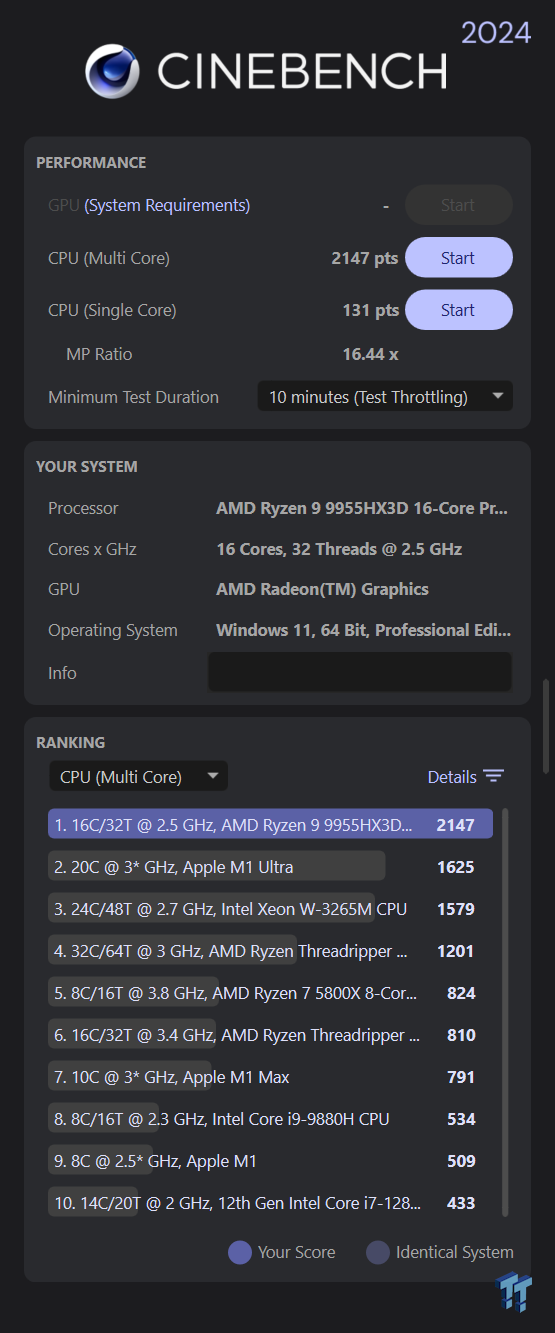
The AORUS wields AMD's beefy, 16-core Ryzen 9 9955HX3D 16-core processor (with Multithreading), so we expected it to perform well at CPU-based rendering. The single-core score of 131 is quick for a consumer processor, but this score doesn't mean much in the real world. For instance, the Apple M5 chip in a MacBook Air scored 198.
In the multithreaded test, it scored 2,147, which is one of the highest scores we've seen on a laptop: it's good for processor-based rendering.
GeekBench 6 CPU
It was a similar situation in GeekBench 6 even though other components come into play here. The single-core score of 3,103 is above average but unimpressive and unrepresentative of most real-world tasks. However, while its multithreaded score of 19,399 is much better, we've seen more from Intel-based rivals.
GeekBench 6 GPU
In the GPU version of the GeekBench test, the GIGABYTE scored an impressive 232,601. This is the second-highest score we've seen - only beaten by a 5090-wielding MSI Titan 18 HX AI, which is a super-premium, 18-inch rival with more overclocking headroom.
In the CPU version, the Gen 2 scored 3,103 in the single-core test (which is just above average) and 19,399 in the multi-core test (which is very good). The latter was, again, only beaten by the Titan, which scored 21,845 with an Intel Core Ultra 9 285HX processor.
3DMark Speed Way + Steel Nomad

3DMark Speed Way runs at 1,440p and uses complex ray-tracing to give powerful gaming laptops a serious workout. It's very hard to run smoothly, but the 5090-sporting AORUS scored 6,135, which is a (smooth-running) average of 61fps. That's one of the (very) highest scores we've seen on a laptop.

In Steel Nomad, which tests 4K gaming prowess, it scored 5,959, which is (essentially) 60fps. Another great achievement and just a smidge off first place.
3DMark Solar Bay

3DMark's Solar Bay benchmark is a less-demanding, 1,440p ray-tracing test, and the AORUS scored 114,655, which represents an average of 436fps. It's another near-top score, so it's fair to say the AORUS aced all the relevant synthetic gaming benchmarks.
Cyberpunk 2077

To push the AORUS Master 16 Gen 2 further, I ran Cyberpunk 2077 at 4K (it was connected to a large, external gaming monitor) with the highest 'Ray Tracing: Overdrive' preset. It averaged 44.6 fps, with the lowest registering 40.3fps, so it will generally run smoothly when connected to a high-end gaming monitor. There'll be no choppiness issues on the lower-resolution, built-in screen.
Shadow of the Tomb Raider

In this popular benchmark, the AORUS 16 averaged a smooth 128fps at 4K with the High preset. So, no issues here.
Adobe Premiere
I'm a big fan of UL's Procyon Video Editing benchmark, which uses Adobe Premiere to encode four 900MB UHD files. The AORUS scored 54,422, which means it completed the hardest test (UHD, H.265, 60fps) in 45 seconds. We've seen other 5090 laptops get nearer 30 seconds (ultraportables can take several minutes), but this is still a potentially good choice for mobile video editing.
Cooling
GIGABYTE makes a point that it uses a new asymmetric fan and vapor-chamber technology, and this, along with multiple air inlets, helps keep it cool and quiet (there's also a supposed 'cool zone' around the WASD keys). GiMate AI will apparently also learn to keep everything cooler as time goes on, but we can only imagine what the AORUS would be like with standard cooling tech.
You'll be hard-pressed to catch the AORUS Master 16 Gen 2 in a state where it's not warm and/or noisy - even in Silent mode. Any minor workload sets the fans in motion, delivering a robust whoosh that extends to a room-filling, near-hairdryer sound when maxed out in Performance Mode. While this is arguably inevitable when delivering a 230-Watt TDP (55W CPU plus 175W GPU) in such a thin chassis, you'll likely need a headset to not be distracted by the loud fans when gaming.
It also suffered a 4 percent decrease in performance during our 30-minute Cinebench test. That's not bad, but it's more than many rivals.
Final Thoughts

With the prices of RTX 5090 computers skyrocketing, the chance to get one cheaper in a decent gaming laptop like the AORUS Master 16 Gen 2 is actually attractive. For most people, it will be sat next to a monitor most of the time, but even if you're using it purely as a laptop, the ergonomics are all very good.
However, it's hard to get away from the noise (and the heat), so beware of that before you buy. Beyond that, all things considered, it's a very good gaming laptop.