










Our Verdict
Pros
- Power Efficiency
- Single-Sided PCB
Cons
- Expensive
- Gaming Performance
Should you buy it?
AvoidConsiderShortlistBuyIntroduction & Drive Details
Sometimes an SSD comes along that has us scratching our heads. This is one of those SSDs. As far as we can tell, there are only two attributes that the FireCuda X1070 has to offer that might appeal to a small segment of the DIY gaming community. It is single-sided at 4TB, which we love, and it is very power-efficient, both of which are an absolute must for handhelds and laptops alike.
The drive is marketed as offering generous space for all your games and streams, which is indeed accurate; however, it is also marketed as high-capacity storage without the premium price tag, which is borderline laughable. The 4-channel, DRAMless, QLC arrayed, PCIe Gen4 interfaced FireCuda X1070 has all the attributes that have always signaled a bargain in storage good enough to overlook its inherently inferior performance - but not this time.
As we rifle through Amazon looking at the current and highly inflated selling prices of SSDs, one thing stands out to us: we can't find even one NVMe SSD coming from a normal seller that is priced as high as our test subject. You can even get a 4TB Samsung 9100 Pro for $50 less than the FireCuda X1070 4TB. We understand that flash is like gold these days, but come on, man, this is absurd at $830 for 4TB of some of the lowest performing NVMe storage we've ever encountered.
Drive Details
| Item | Details |
|---|---|
| Model | Seagate FireCuda X1070 4TB |
| MSRP | $830 |
| Model Number | ZP4000GS3A001 |
| Interface | PCIe Gen4 x4 |
| Form Factor | M.2 2280 |
| Performance | Up to 7,200 MB/s |
| Warranty | 3-Years Limited |

The single-sided FireCuda X1070 SSD is available in 1TB, 2TB, and 4TB capacities - ideal for ultrathin laptops, handheld gaming devices, and consoles with NVMe storage expansion.


Best Deals: Seagate FireCuda X1070 4TB SSD
Price Trend:
Prices last scanned 21 hours and 22 minutes ago

7 days ago: $829.99 USD30 days ago: $829.99 USD

7 days ago: $829.99 USD30 days ago: $829.99 USD
7 days ago: $1164.99 CAD30 days ago: $1164.99 CAD
7 days ago: $1569.98 CAD30 days ago: $1569.98 CAD


If you find the need to manage your Seagate FireCuda SSD, this can be done with Seagate's SeaTools freeware. Firmware updates, health monitoring, and performance tuning are as easy as a couple of clicks right from your desktop. Get it Here. Additionally, the drive comes with a free 1-Month Ultimate XBOX Game Pass.
Jon's Test System Specifications
Intel Test System
| Item | Details |
|---|---|
| Motherboard | ASUS Z890 APEX (Buy at Amazon) |
| CPU | Intel Core Ultra 9 285K (Buy at Amazon) |
| GPU | MSI SUPRIM X RTX 3080 12GB (Buy at Amazon) |
| Cooler | Alphacool Eissturm Hurricane Copper 45 (Buy at Amazon) |
| RAM | Patriot Viper Xtreme 5 8000 48GB (Buy at Amazon) |
| Power Supply | be quiet! Dark Power Pro 12 1200W (Buy at Amazon) |
| Case | PrimoChill's Praxis Wetbench (Buy at Amazon) |
| OS | Microsoft Windows 11 Pro (Buy at Amazon) |
AMD Test System
Our Latest SSD Review Coverage
- Phison E37T SSD Controller Exclusive Preview - The Fastest DRAMless SSD Platform Yet
- Micron 3610 2TB SSD Review - DRAMless QLC at 11,000 MB/s
- SK hynix Platinum P51 2TB SSD Review - A Powerful Gen5 Alternative
- Biwin Black Opal X570 Pro 8TB SSD Review - Massive Capacity with Elite Performance
- Samsung 9100 PRO 1TB SSD Review - Lab Champion at 1TB
| Item | Details |
|---|---|
| Motherboard | ASUS ROG Crosshair X870E APEX (Buy at Amazon) |
| CPU | AMD Ryzen 9 9950X (Buy at Amazon) |
| GPU | MSI SUPRIM X RTX 3080 12GB (Buy at Amazon) |
| Cooler | Alphacool Eissturm Hurricane Copper 45 (Buy at Amazon) |
| RAM | Sabrent Rocket DDR5 32GB (Buy at Amazon) |
| Power Supply | be quiet! Dark Power Pro 12 1200W (Buy at Amazon) |
| Case | PrimoChill's Praxis Wetbench (Buy at Amazon) |
| OS | Microsoft Windows 11 Pro (Buy at Amazon) |
Please note: We employ an M.2 AIC for testing on our Intel Core Ultra 9 285K platform.
Sony PlayStation 5 - M.2 Storage Expansion
PS5 Read Performance
With Sony's wildly popular PlayStation 5 console now enabled for M.2 NVMe SSDs to be used as fast storage expansion, we are including results for PS5-compatible SSDs we test as a part of our reviews going forward.


For SSDs that don't have an adequately sized PS5 compatible heatsink or other SSDs where the heatsink provided doesn't fit right and can be removed, we both use and recommend Sabrent's unparalleled PS5 heatsink available HERE.


We only chart SSDs that can deliver a minimum of 5,500 MB/s read, which is Sony's original recommendation.
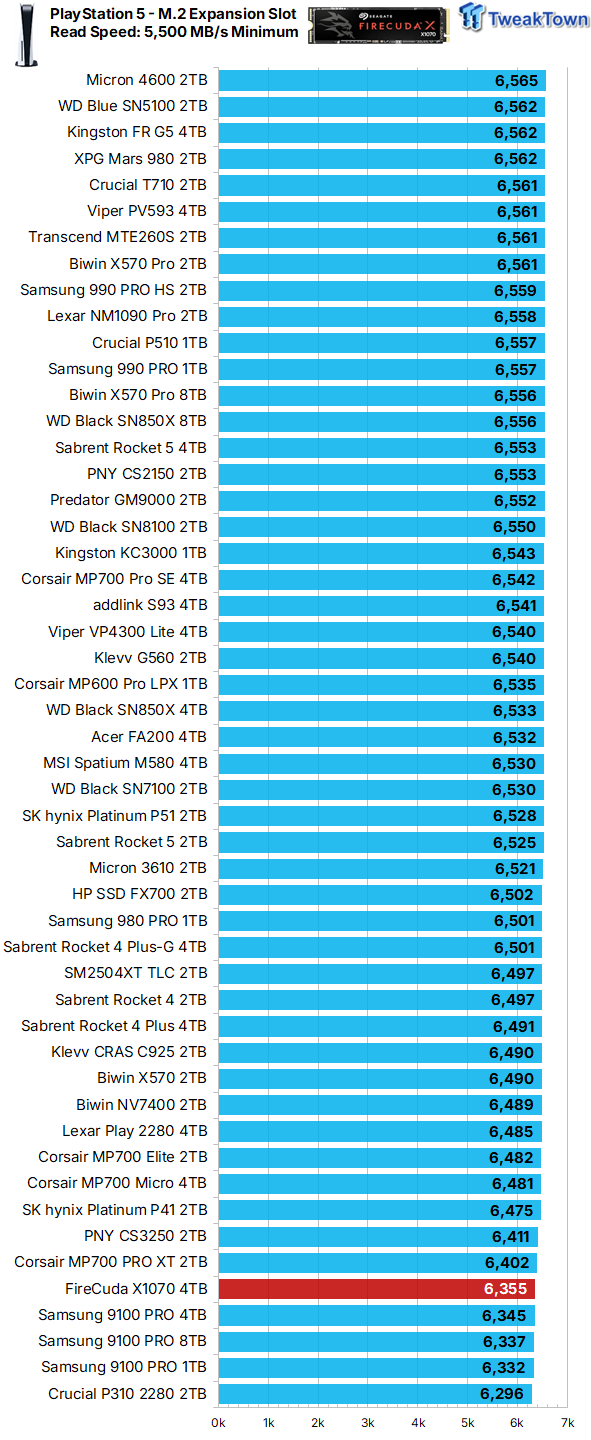
Its sequential read speed in a PS5 environment suggests the FireCuda X1070 4TB makes for a decent choice for PS5 M.2 storage expansion.
Synthetic Benchmarks: CDM, Max IOPS, ATTO
CrystalDiskMark
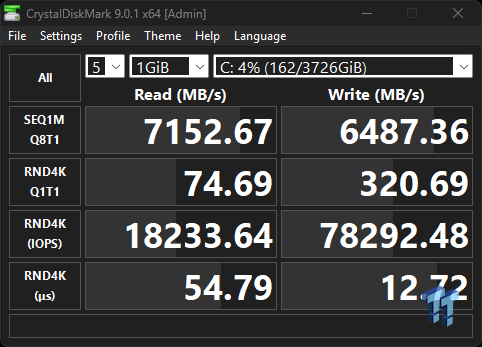
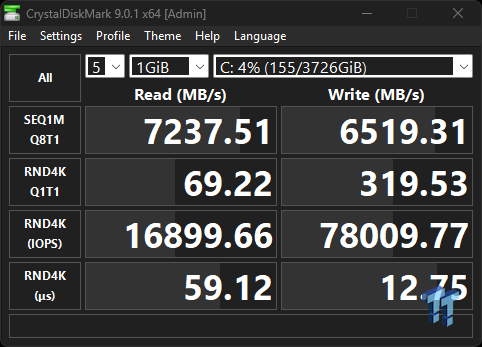
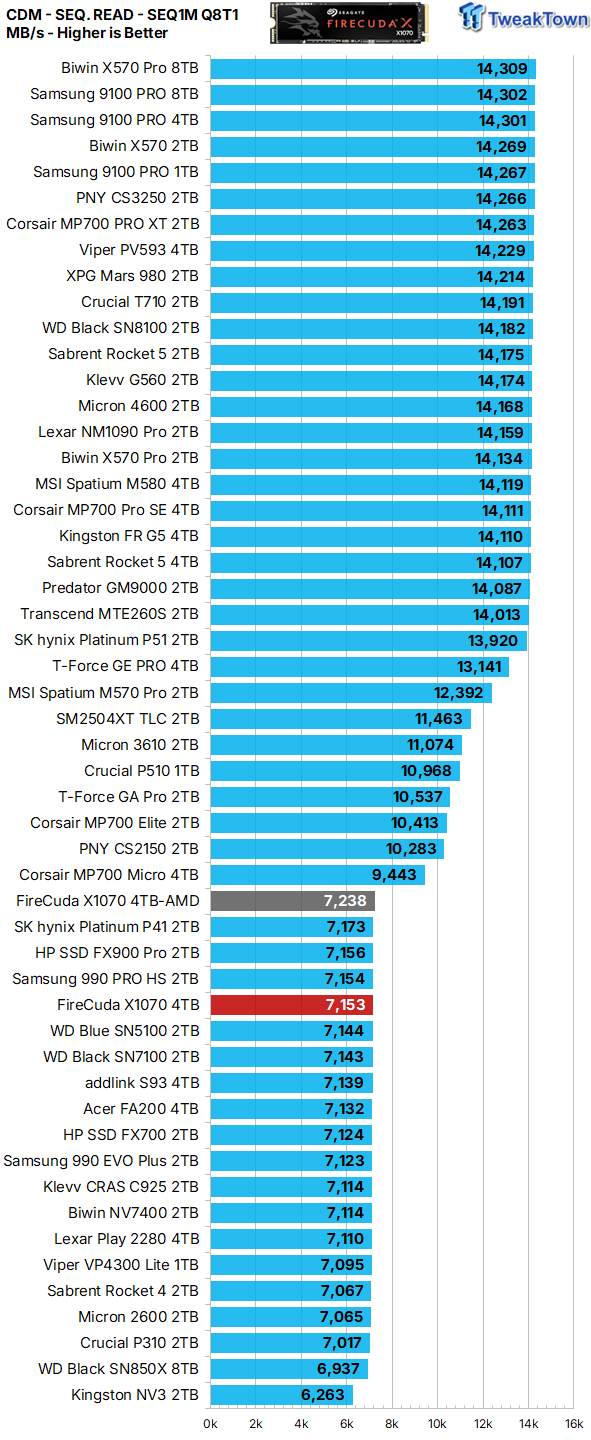
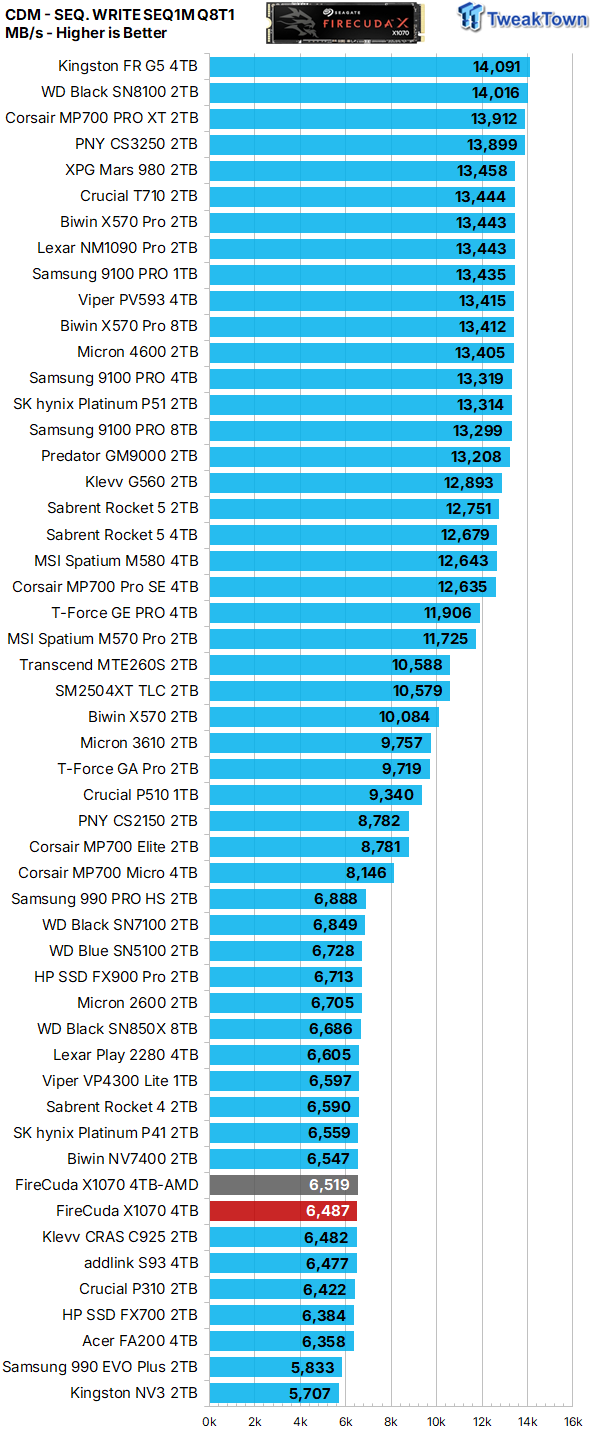
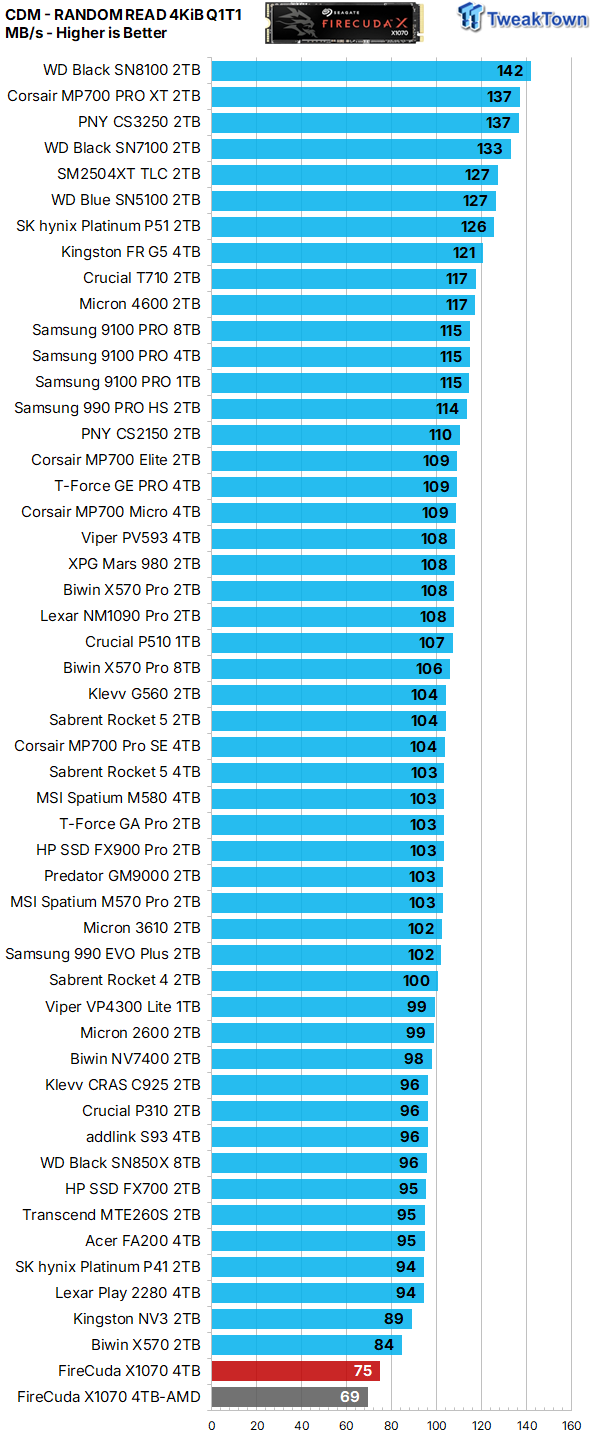
We employ CDM as our standard measurement for both sequential throughput and Q1T1 random read. In terms of sequential throughput, the FireCuda X1070 4TB delivers exactly as advertised. However, looking at the all-important Q1T1 random read speed, we must do a double-take as it's the lowest we can remember ever seeing coming from a drive in its class.
Max IOPS
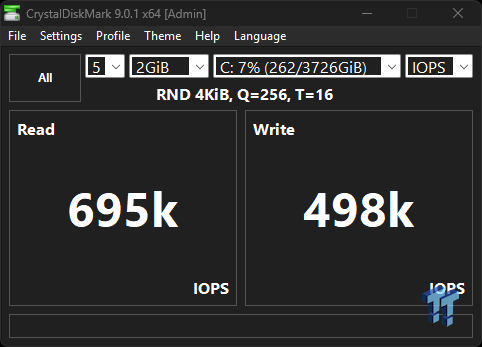
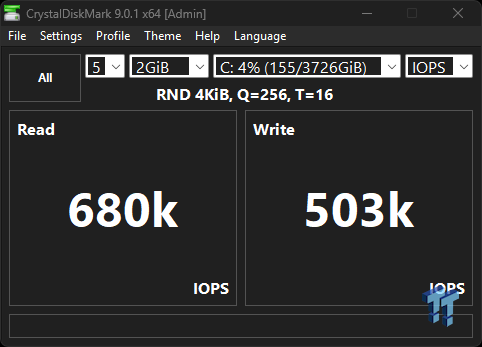
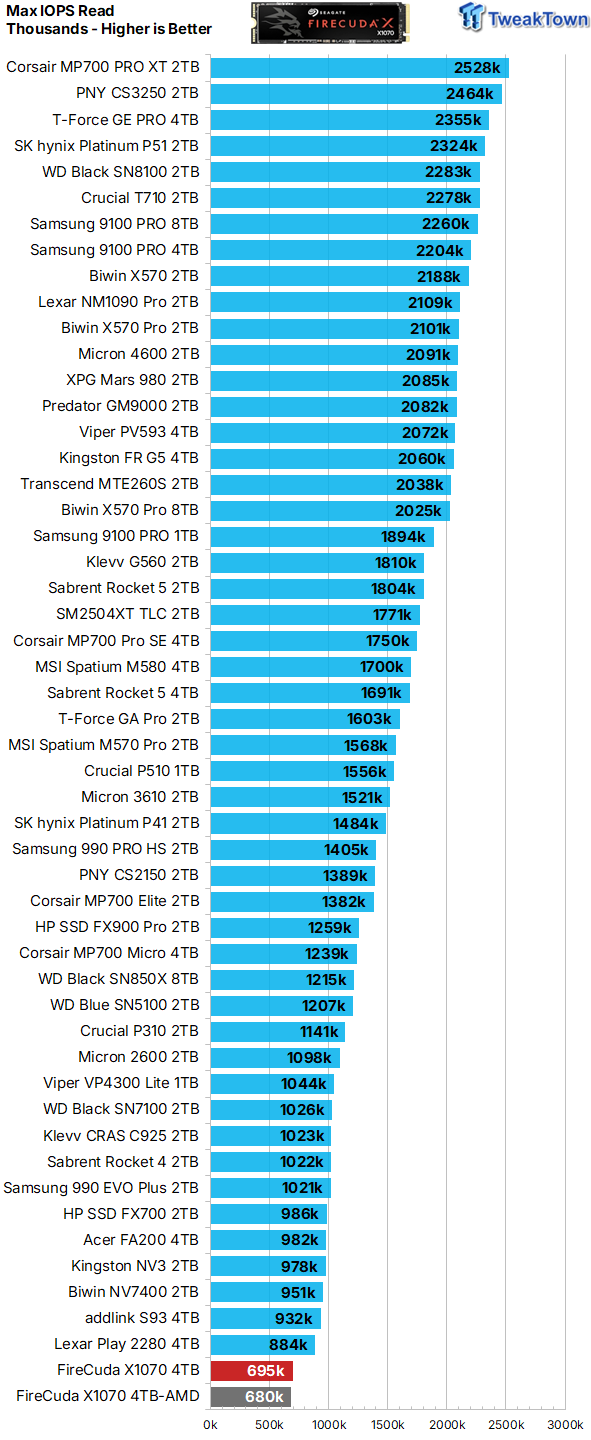
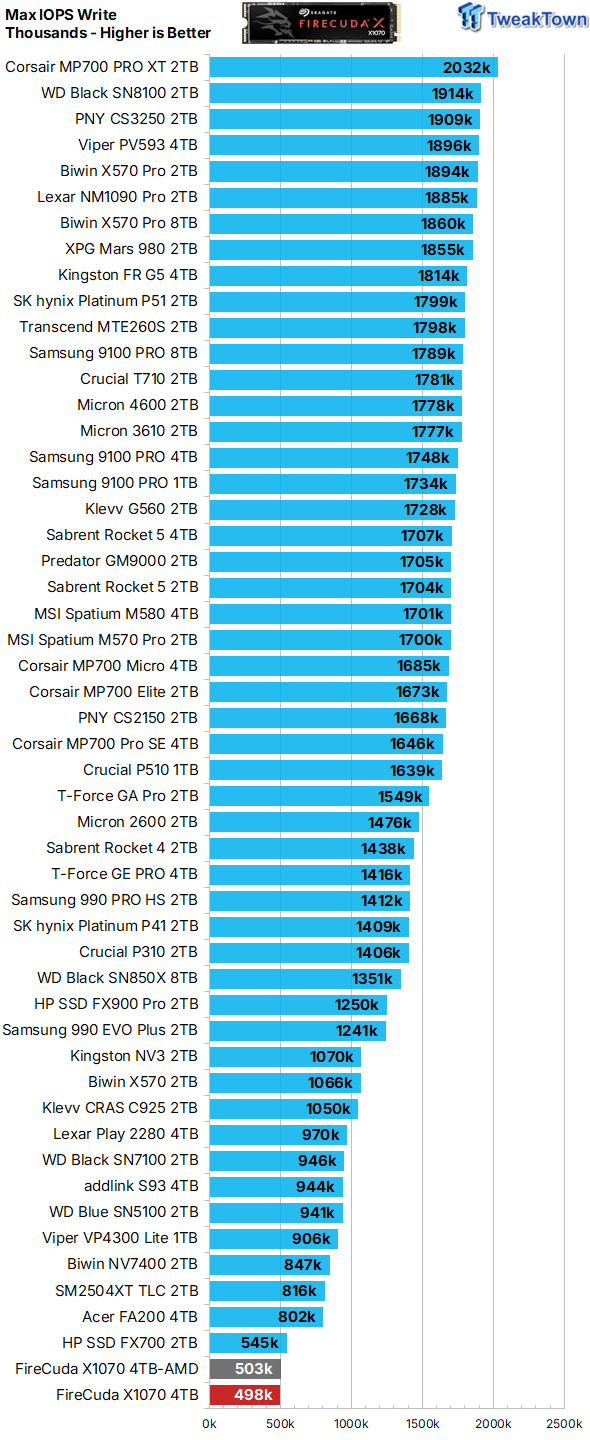
Highest price for the lowest IOPS. Not looking too good.
ATTO
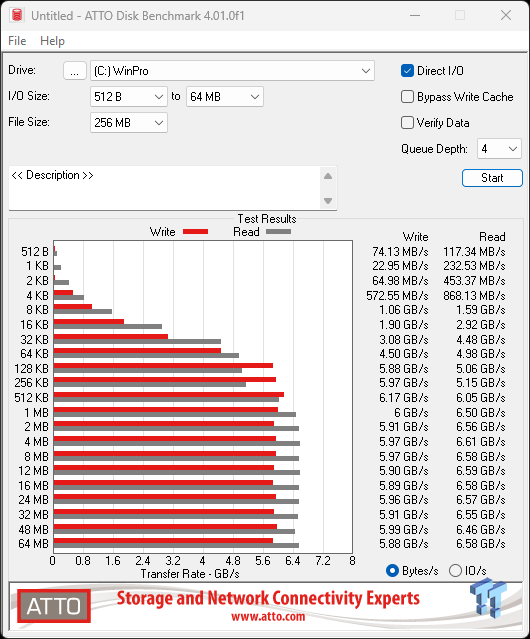
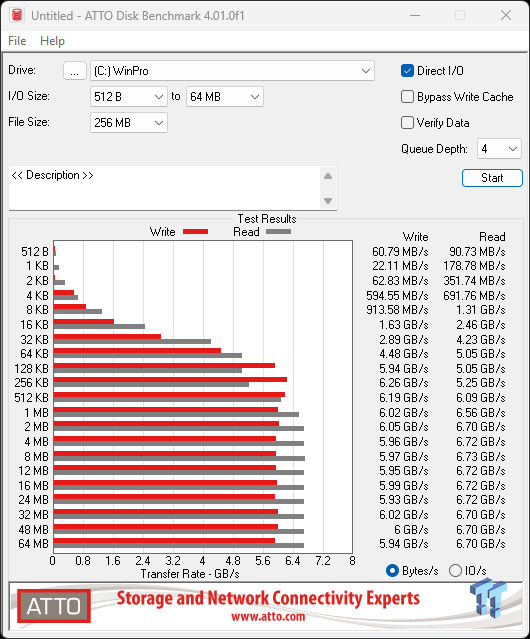
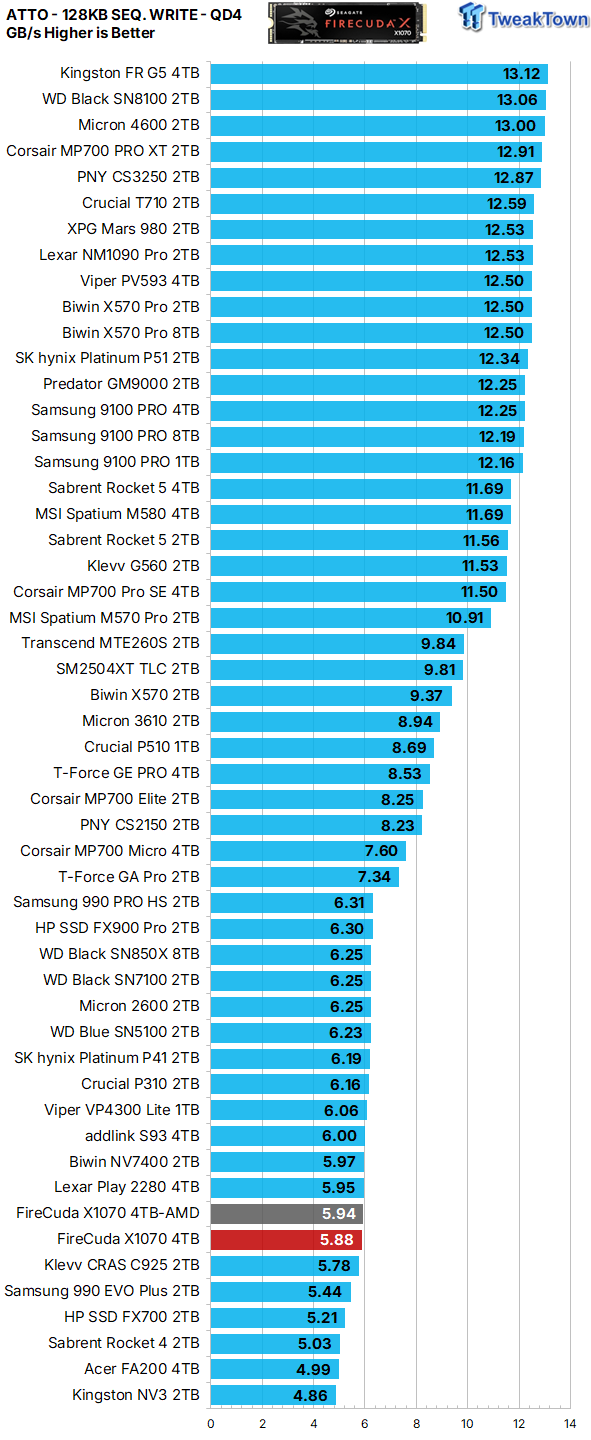
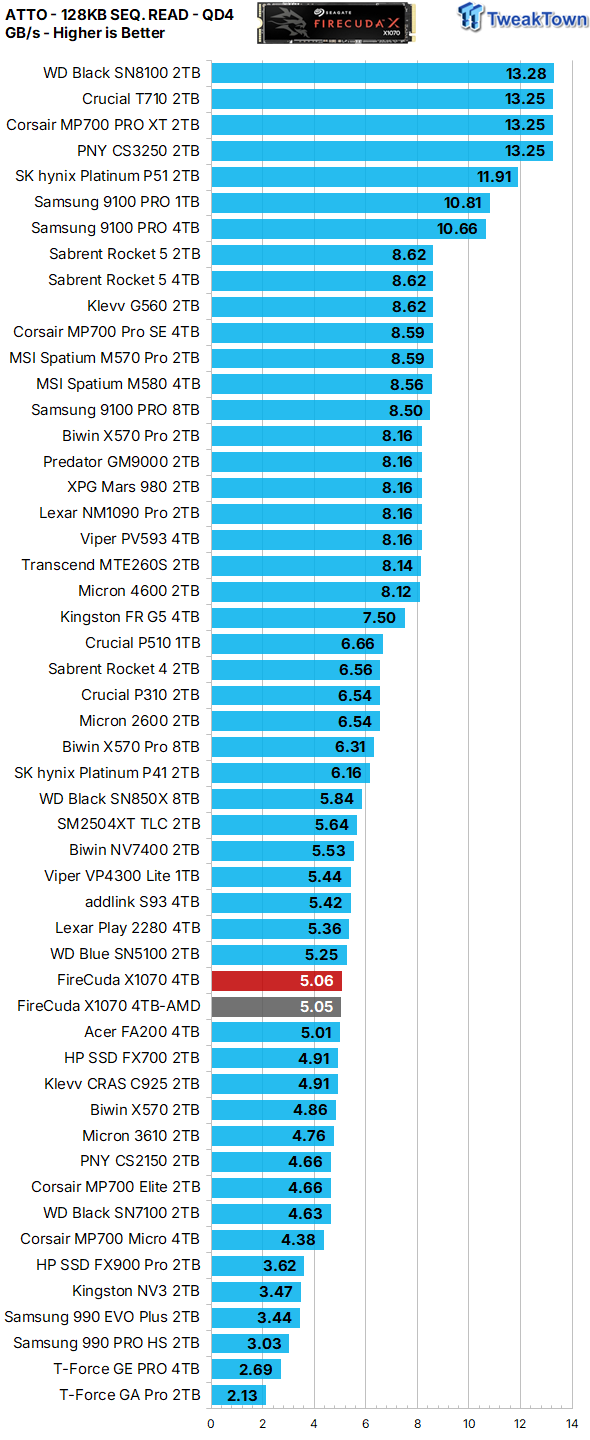
ATTO gives us a clear picture of what transfer sizes a particular SSD favors in terms of QD4 sequential throughput. We chart 128K transfers. At a queue depth of four, the X1070 4TB favors sequential transfers of 1MB or larger when serving data to the host (reading) and 256KB or larger when programming (writing) data.
Real-World Testing: Transfers, 3DMark SSD Gaming Test, PCM10 Storage
Transfer Rates
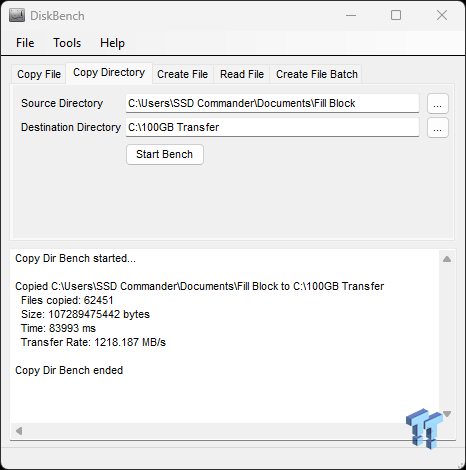
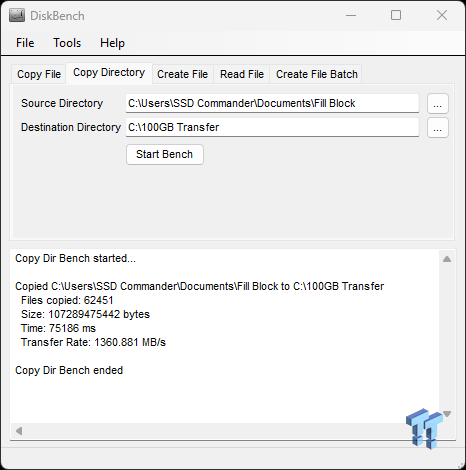
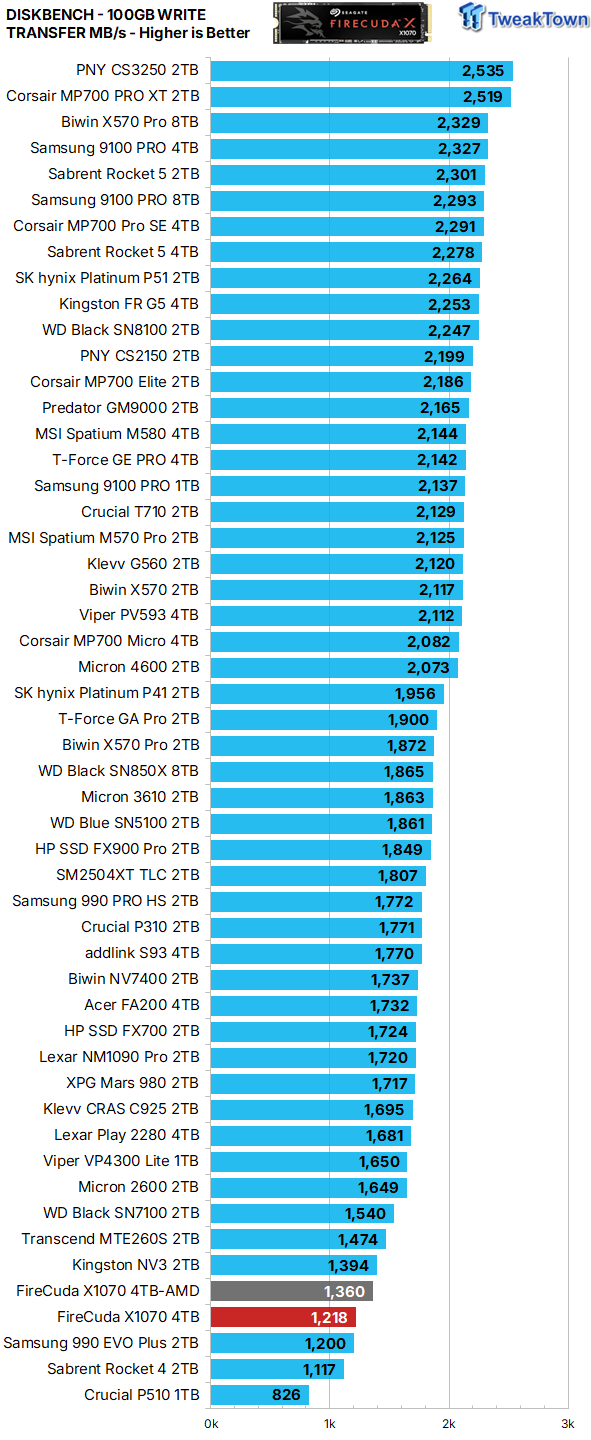
Our 100GB data transfer test is not your ordinary 100GB of data; ours is a crushing mix composed of more than 62K files. Writing performance, random or sequential, is an infrequent operation, and thus, we do not consider it to be an important performance metric in the consumer space. An example is how many times a game is installed vs. how many times it's played. Speeds here are again at the bottom of the barrel.
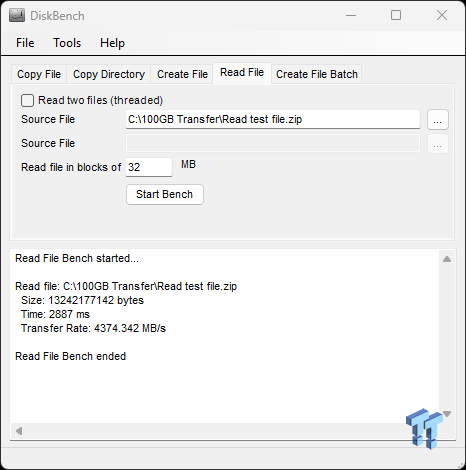
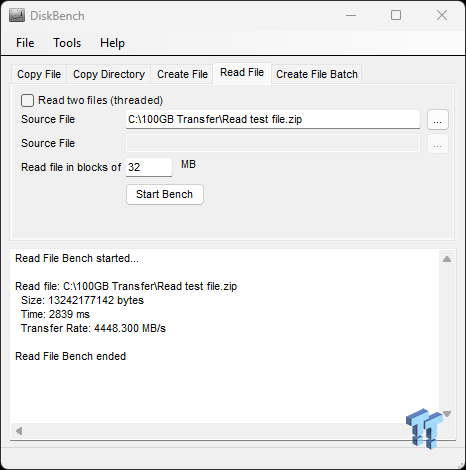
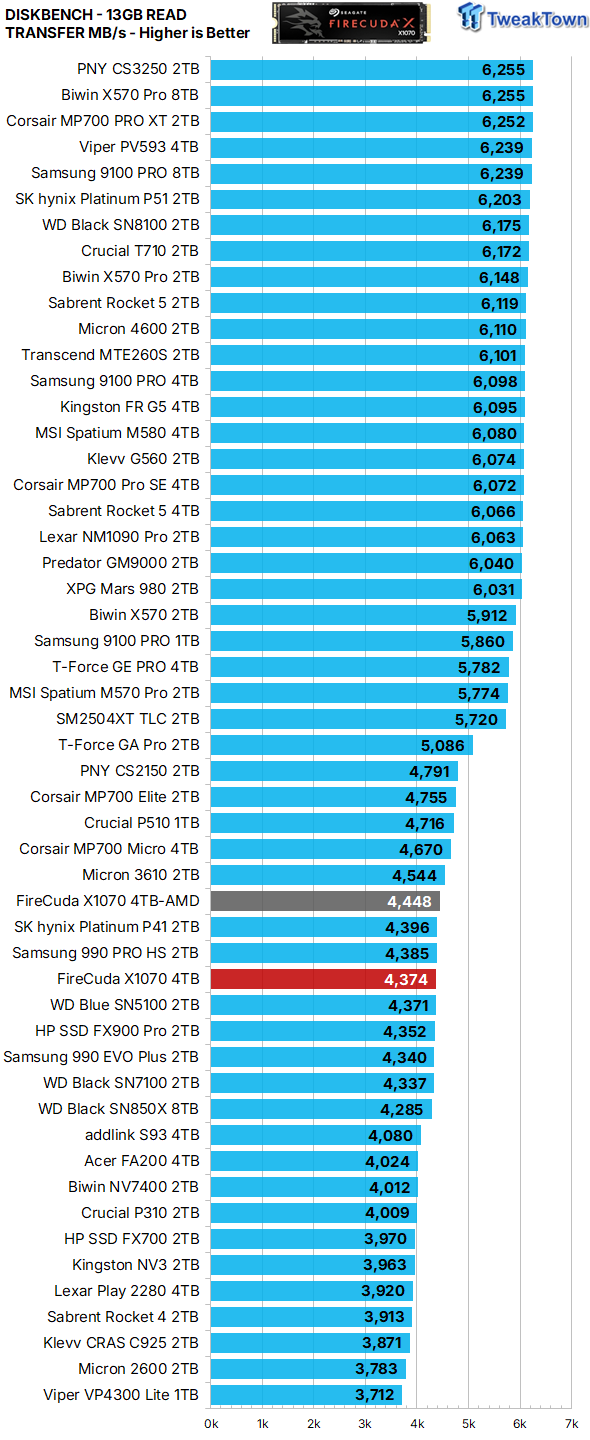
Unlike programming (writing) data, serving data to the host (reading) is typically an important performance metric as it relates to the consumer space. Speeds here are pleasantly surprising.
3DMark SSD Gaming Test
UL's newest 3DMark SSD Gaming Test is the most comprehensive SSD gaming test ever devised. We consider it superior to testing against games themselves because, as a trace, it is much more consistent than variations that will occur between runs on the actual game itself. This test is the same as running the actual game, just without the inconsistencies inherent to application testing. In short, we believe that this is the world's best way to test an SSDs gaming prowess and accurately compare it against competing SSDs. The 3DMark SSD Gaming Test measures and scores the following:
- Loading Battlefield V from launch to the main menu.
- Loading Call of Duty Black Ops 4 from launch to the main menu.
- Loading Overwatch from launch to the main menu.
- Recording a 1080p gameplay video at 60 FPS with OBS (Open Broadcaster Software) while playing Overwatch.
- Installing The Outer Worlds from the Epic Games Launcher.
- Saving game progress in The Outer Worlds.
- Copying the Steam folder for Counter-Strike Global Offensive from an external SSD to the system drive.


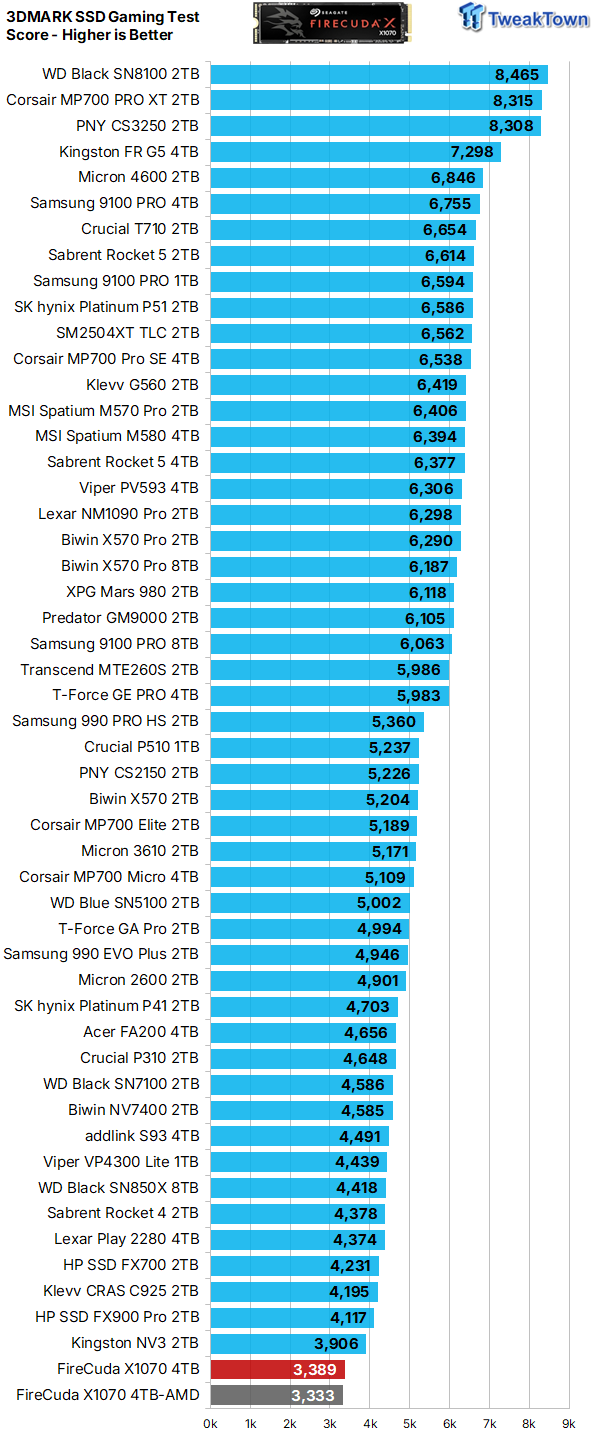
Gaming is a performance metric that matters to most DIY consumers, especially for the enthusiast crowd that TweakTown caters to. Now we've reached the point where results start to matter as they are a direct reflection of user experience.
The performance exhibited here is not what you want to see coming from a "Gaming SSD".
PCM10 Storage Tests
PCMark 10 Storage Test is the most advanced and most accurate real-world consumer storage test ever made. There are four different tests you can choose from; we run two of them. The Full System Drive Benchmark and the Quick System Drive Benchmark. The Full System Drive Benchmark writes 204 GB of data over the duration of the test. These tests directly correlate with mainstream user experience.
PCMark 10 Full System Drive Benchmark
This test writes 204GB of data and covers a broad range of common consumer tasks, including booting Windows 10, file transfers, Adobe and Office applications, and startup times for games such as Battlefield V, COD Black Ops 4, and Overwatch. Unlike synthetic numbers, this is comprehensive real-world data, which is why we use it to rank SSDs in terms of user experience.


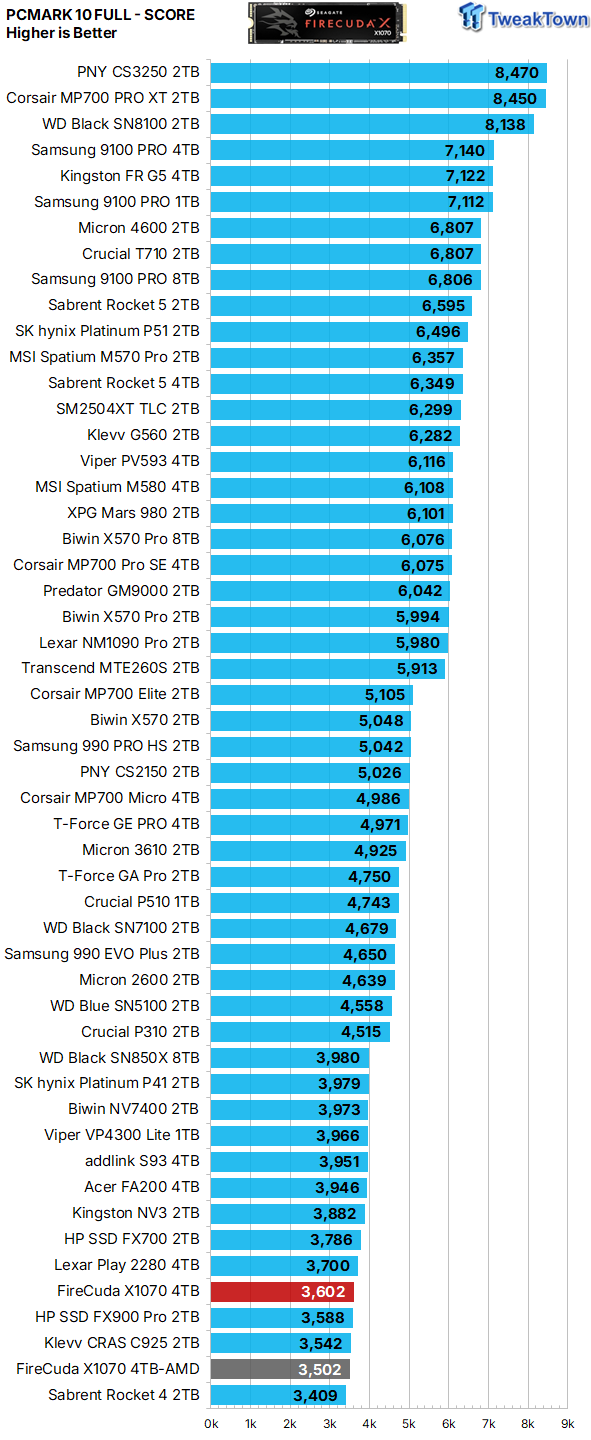
Even though the performance delivered here is again near the bottom of our chart, it is an acceptable result for an SSD that is priced right, which this SSD certainly is not.
PCMark 10 Quick System Drive Benchmark
The Quick System Drive Benchmark writes 23 GB of data over the duration of the test.


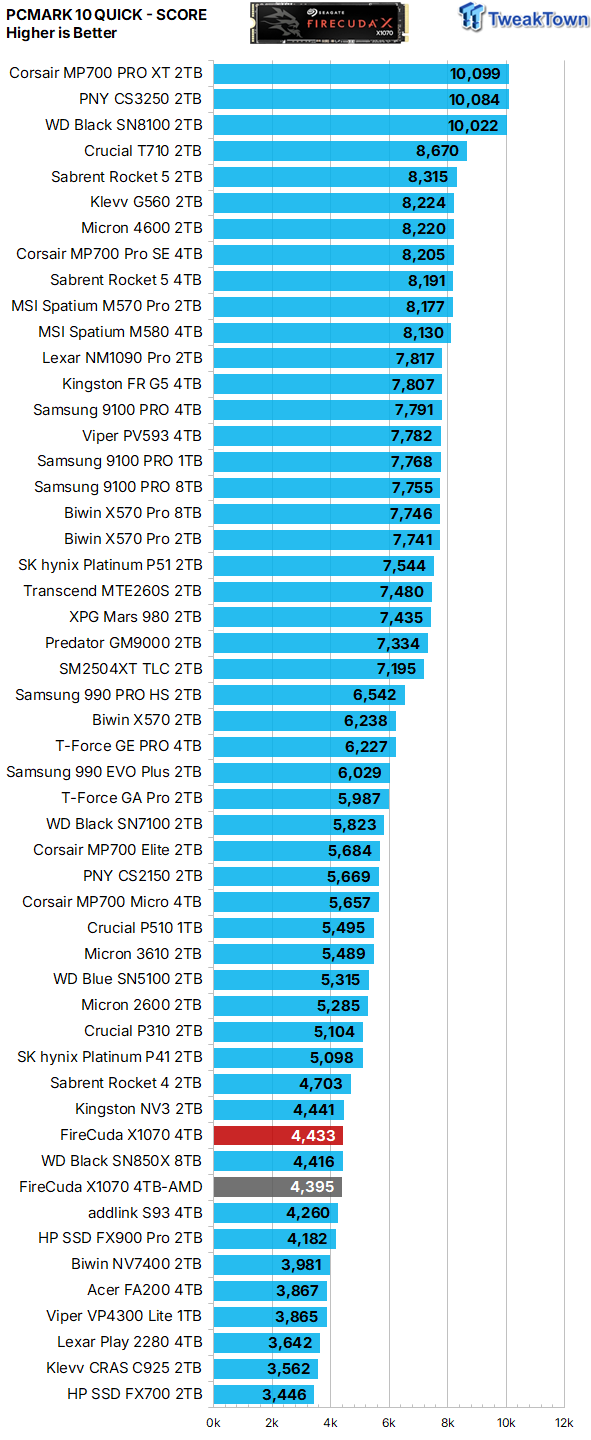
Of all the benchmarks we run, it can be argued that this one offers the best reflection of a typical consumer use case scenario. Again, the results here are more than acceptable if the price is right, but in this case, the price is wrong.
Final Thoughts
For the most part, QLC arrayed SSDs offer a bargain to the consumer that is compelling enough to overlook the inherent performance and endurance inferiorities that go hand-in-hand with 4-bit flash. Not this time, though. Priced as it currently is, we simply can't overlook its meager performance, especially its lowest-in-class gaming performance.
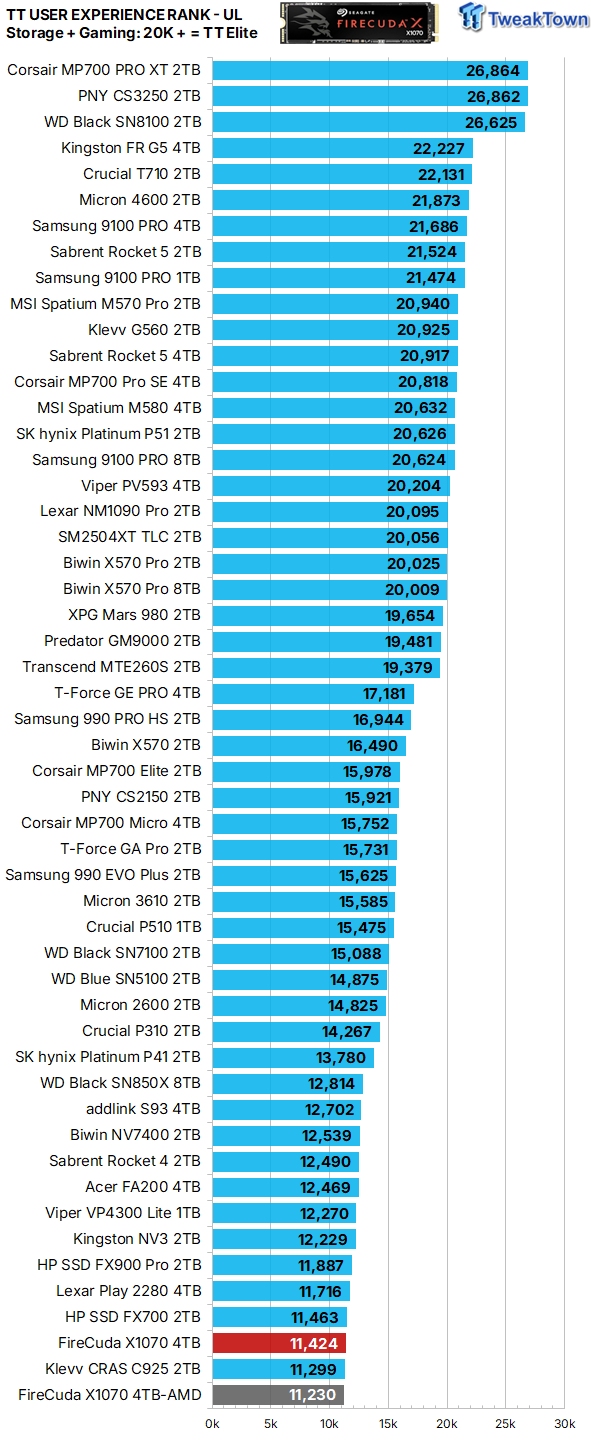
We rank SSDs in terms of overall user experience (performance where it matters most) as expressed by PCMark 10 storage and 3DMark gaming storage tests. Currently, we consider a user experience score of 20K or more to verify an SSD as a TweakTown Elite performer.

While we could possibly recommend the drive if it were priced at about half what it currently is, we cannot find even a sliver of sunshine for 4TB of this at $830.


 Phison E37T SSD Controller Exclusive Preview - The Fastest DRAMless SSD Platform Yet
 ASUSTOR Lockerstor 2 Gen2+ AS6702T v2 NAS Review - Fast Performance
 TERRAMASTER D1 SSD Pro Thunderbolt/USB Portable Enclosure Review - Incredible Potential
 Orico K20 Mini 2TB Magnetic Portable SSD Review - Ultra-Thin MagSafe Drive
 TERRAMASTER D4 SSD 4-Bay NVMe DAS Enclosure Review - Superior Portable DAS
 CD Projekt Red is reportedly working on an unannounced free-to-play Witcher co-op RPG for PC and mobile
 Google is in talks with Samsung to build next-gen 'Icefish' TPU on 1.4nm and 2nm process split
 AMD's Ryzen AI Halo AI mini PC launches in the US with 128GB memory and a $3,999 price tag
 Microsoft expands Advanced Shader Delivery support to all AMD Radeon GPUs since RX 5000 series
 Microsoft CEO strongly hints at free cloud gaming with YouTube monetization comments
 Apple's first touchscreen MacBook Pro is '100% confirmed', leaker says
 AMD reversed a warranty rejection for a swollen Ryzen 9 7950X3D after Hardware Unboxed called it out publicly
 ASUS' $50 ROG Equalizer cable meant to stop GPU connector burns reportedly burns itself
 Intel's 18-core Core Ultra 7 251HX is matching its 20-core siblings in early PassMark results
 Elon Musk is the world's first trillionaire - enough to spend $1 million a day for nearly 3,000 years
 Speed Racer (2008) 4K Ultra HD Blu-ray Review: a stunning remaster of the cult classic
 MOAIPLAY ORA PRO G1 850W ATX 3.1 PSU Review: high efficiency and 10-year warranty for $119.99
 Navman MiVue Smart True 4K Surround Dashcam Review - Seeing In All Directions At Once
 IQUNIX Magi96 Pro Aluminum Low Profile Mechanical Keyboard Review - Premium Build, Satisfying Sound
 Asetek Forte S-Series Racing Simulator Bundle Review
 Razer Pro Type Ergo Wireless Split Ergonomic Keyboard Review - Built for Comfort and Support
 ASUS ROG Strix Morph 96 Wireless Gaming Keyboard Review - Great Performance, More Affordable
 SAPPHIRE Radeon RX 9070 GRE PULSE OC Review - A New 1440p Challenger Has Arrived
 NZXT H6 RGB+ Compact Dual-Chamber Chassis Review
 ASRock Radeon RX 9070 GRE Steel Legend Review - The RDNA 4 Mid-Range Reshuffle
 This Windows security feature protects Documents from ransomware, but it is off by default
 Windows 11 already has a voice typing tool, and it is the one most people are not using
 Quick Assist is the only remote-support tool I open when a relative calls about their PC
 The PowerToys utilities I keep enabled on every Windows 11 PC, and the ones I turned off within a week
 TweakTown's Best of Computex 2026 Awards - The Best Hardware, Gaming Gear, and AI
 USB Ports Not Working in Windows 11? Try These Fixes
 ASUS WiFi Routers and Networking Solutions Deliver Long-term Security and Reliability with No Additional Cost
 Second Monitor Not Detected in Windows 11? Try These Fixes
 Turn Your Old Smartphone Into a Dedicated Webcam for Your Windows PC