There is a huge post on the MSDN blog about Windows 8, and how they are improving the setup experience. Microsoft are really working hard on perfecting Windows 8 and after reading the blog I'm 100-percent confident they are on the road to success.
They've got some big challenges ahead of them, and are committed to get more PCs working with Windows 8 than any previous version of Windows was capable of. With more than 450 millin PCs that will be Windows 8-capable, Microsoft expect that many systems that are currently rocking along with Windows Vista and even Windows XP will be eligible.
Windows 8 will also now be offered through an online installation, with a "pre-key" inside the setup image that is downloaded to a unique user, this means that you won't even need to enter the 25-digit product key during installation. In pre-installation, Windows 8 will scan your PC to determine compatibility, resulting in a summary report that shows what programs and devices on your system will/won't work, and what items require your attention.
- Read more: Microsoft messes up Windows 11's Media Creation Tool just as Windows 10 support ends
- Read more: Microsoft is finally fixing Windows Update, letting you skip updates during setup, extend pauses, and avoid forced restarts
- Read more: Microsoft confirms Windows 11 update will let users remap the Copilot key back to Right Ctrl or Context Menu
After this, an integrated download manager will provide time estimates, data validation, the ability to pause, resume, and re-download only parts of the file if something goes wrong. Another great feature of this is that because the software has already scanned the PC to determine compatibility, it knows which version of Windows 8 it needs to download, this saves time asking questions such as which language, or OS architecture to choose.
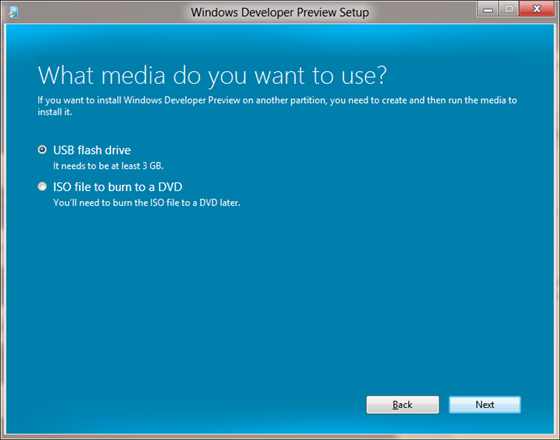
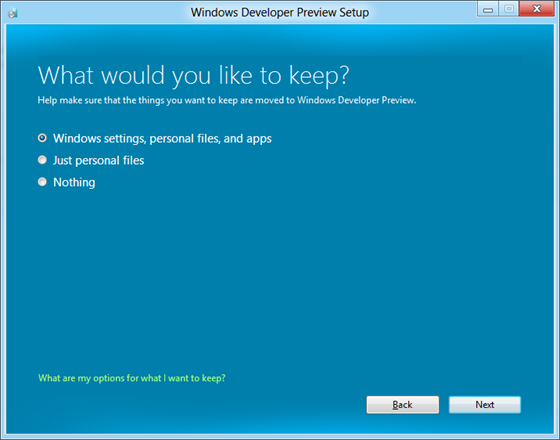
From here, you're presented to continue the installation, or install on another partition. Another option is 'advanced,' where you can save the file as an ISO or create a bootable USB drive before completing other advanced setup options. After that is the choice of update, keep all, some, or none of your personal data, everything is your personal preference.
The blog goes into quite a bit more detail, what I've reported is just the tip of the iceberg. I'm really excited for Windows 8, not just for myself, but it seems to make the upgrade, or new installation of an OS so much more of a streamlined process.