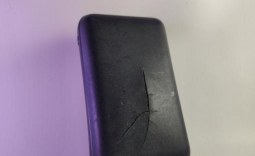
Anker has announced it is recalling more than 1 million power banks after it discovered they were prone to overheating.

The recall has been detailed by the US Consumer Product Safety Commission, which wrote that 11 instances of these power banks erupting resulted in more than $60,000 of property damage. The units affected by the recall were sold online in the US by Anker, Amazon, Ebay, and Newegg between the following dates: June 2016 through to December 2022 for approximately $27.
The specific unit prone to overheating is the "PowerCore 10000" power bank, which regulators urge owners to stop using immediately. However, not every PowerCore 10000 is affected by the recall; only units with the model number A1263 are. So, what should you do if you own one of these power banks? Firstly, stop using it immediately, and then begin the process of obtaining a replacement. Anker has detailed the steps in a post on its website, but I have listed what to do below.
Steps to get a Replacement
- Check the Model Number: Look at the bottom of your power bank. Confirm it says "Anker PowerCore 10000" and the model number is A1263.
- Locate the Serial Number: Check the bottom of the device for the serial number (SN). Be careful with characters like "O" vs "0" and "I" vs "1" - "O" and "I" are not used in serial numbers. If the SN is worn off or unreadable, contact Anker for help.
- Verify Your Serial Number: Go to Anker's recall verification tool online. Enter your serial number to see if your device is affected.
- Gather Required Information: To submit your recall claim, prepare: Your name and contact information. Proof of purchase (e.g., invoice), OR a photo of the power bank with: "recalled" or "recall" written in permanent marker. The model number, serial number, your name, and current date clearly visible.
- Stop Using the Device: If your device is part of the recall, immediately stop using it. Do not throw it away until Anker confirms your device qualifies for recall.
- Submit Your Recall Claim: Go to Anker's recall submission page. Upload the required information and photos. Choose to receive a replacement power bank or a gift card.
- Dispose of the Product Properly (After Approval): Once Anker confirms your claim, follow their instructions to dispose of the power bank according to local laws and regulations.