




Introduction
Have you got a brand new AMD Zen 5 processor? Zen 4 processor? Zen 3 processor? Intel processor? You might want to read this article and know that with a simple Windows Update, you can enjoy a 10-20% (and sometimes more) performance increase from your system.
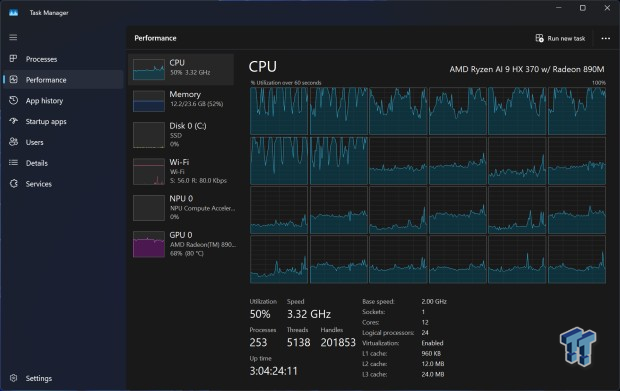
Microsoft's upcoming Windows 11 update 24H2 is available right now through their preview channel. I have spent the last few days playing around with the ASUS Zenbook S16 OLED laptop, which is powered by AMD's new Ryzen AI 9 HX 370 "Strix Point" APU, and I walked away very, very surprised.
Squeezing every single drop of performance out of your CPU is important, but it's even more important for an APU, which has far less performance than a dedicated CPU + GPU. This is why I thought it was important to test out the Windows 11 23H2 vs. 24H2 update with the Strix Point APU since I had it in-house at the time. Free performance for updating Windows? Sure, let's do it.
Why do you need to do this: Normally, I wouldn't recommend updating Windows so much that you're living on the update train, but this time, you're getting free performance for updating Windows, meaning if you don't, you're giving up FREE performance.
The new update includes branch prediction optimizations for AMD's new Zen 5-based CPUs, which are the part of the chip that works out which instructions are likely to be queued next. These optimizations have led to performance improvements not just for Zen 5 chips but also for Zen 4, Zen 3, and even Intel processors.

Best Deals: ASUS Zenbook S16 OLED
Price Trend:
Prices last scanned 6 hours and 25 minutes ago


At the ready, I've got a new ASUS Zenbook S16 OLED laptop that features AMD's new flagship Ryzen AI 9 HX 370 "Strix Point" APU, which packs the new Zen 5 and RDNA 3.5 architectures. Zen 5 benefits from the new Windows Update 24H2 build, and I've got results of the Strix Point laptop before and after this update.
AMD should've waited for Zen 5: I've said this multiple times in some of the news coverage on the topic, but when there's 10-20-30% or more free performance with a Windows update that is weeks after your brand new, next-gen Zen 5 CPU launches? Just wait, AMD.
Our Latest Editorials Article Coverage
- AMD + HP "AI CREATE" Sydney Event - AI for Creators, For the Future
- What is a Copilot+ PC? Do you need an AI PC? Should you buy one?
- Qualcomm Snapdragon 8cx: the real rival to Intel for the PC
- AMD Threadripper vs. Intel Core i9 CPUs Clock for Clock
- X79 / Z68 / 990FX CrossFireX HD 6970 x3 Performance Analysis
Seriously, if AMD had waited just 2-3 weeks or worked with Microsoft more closely - seriously, how is there hidden performance being unleashed out of a Windows Update without more fanfare from Microsoft, Intel, and AMD - and launched its new Zen 5 processors alongside the new 24H2 update to Windows 11. We don't run AMD, and we don't have a time machine... so we're just reacting to the industry as it happens, which is why we're going to dive into the Strix Point APU being tested against Windows 11 23H2 and 24H2, let's go.
Specs Tested: ASUS Zenbook S16 OLED Laptop
ASUS Zenbook S16 OLED (AMD Ryzen AI 9 HX 370 "Strix Point" APU)
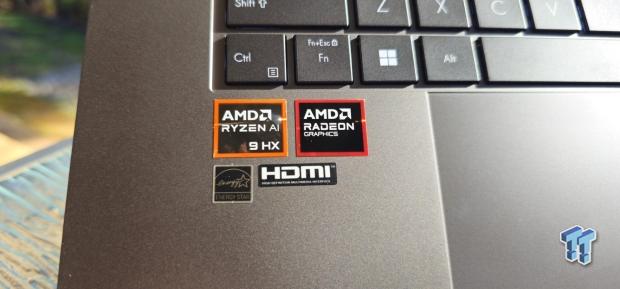
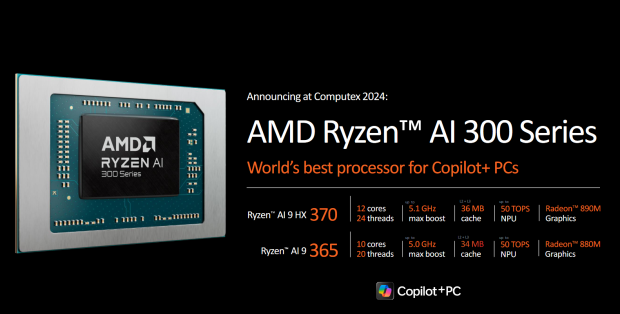
- CPU: AMD Ryzen AI 9 HX 370 (12 cores, 24 threads @ up to 5.1GHz)
- RAM: 32GB LPDDR5X
- SSD: 1TB Gen4 SSD
- GPU: AMD Radeon 890M
- Display: 16-inch 3K (2880 x 1800) OLED 120Hz
- OS: Windows 11 Home (23H2)
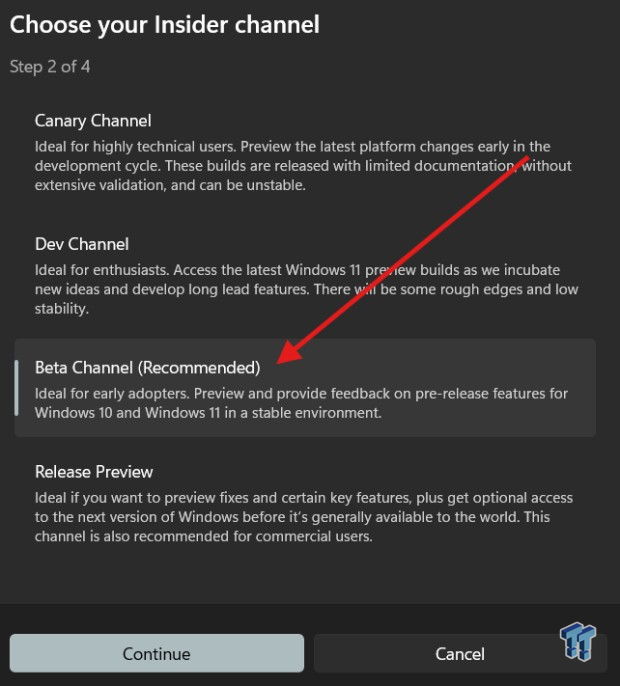
I updated the ASUS Zenbook S16 as far as I could until entering the Windows Insider program and getting the preview build 24H2, so I ran the benchmarks included below on that version of Windows before updating. Once I updated, I made sure there were no other updates, and the re-benchmarking began.
How to Update to Windows 11 24H2
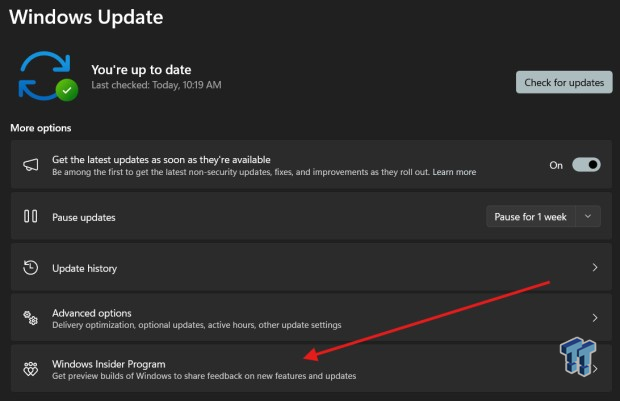
If you want to apply the Windows 11 24H2 update early, you'll need to download the preview build that will provide some optimizations to your CPU. You'll need to press the Windows button on your keyboard, search for "update" to bring up Windows Update.
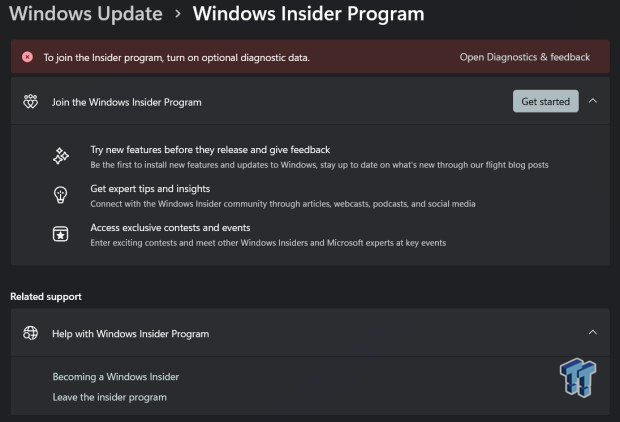
Link an account to join the Windows Insider program (your Microsoft account).
Synthetic Benchmarks
Synthetics Tested
For the synthetic testing side of things, I'm only using a couple of benchmarks on the Strix Point APU: 3DMark (TimeSpy Extreme, TimeSpy, and FireStrike Ultra) as well as the ever-reliant Cinebench 2024 benchmark.
Cinebench 2024
A new laptop has to run Cinebench 2024, right? Cinebench 2024's single-threaded and multi-threaded tests are a fantastic way to see your CPU or APU stretch its legs on the open benchmarking road.
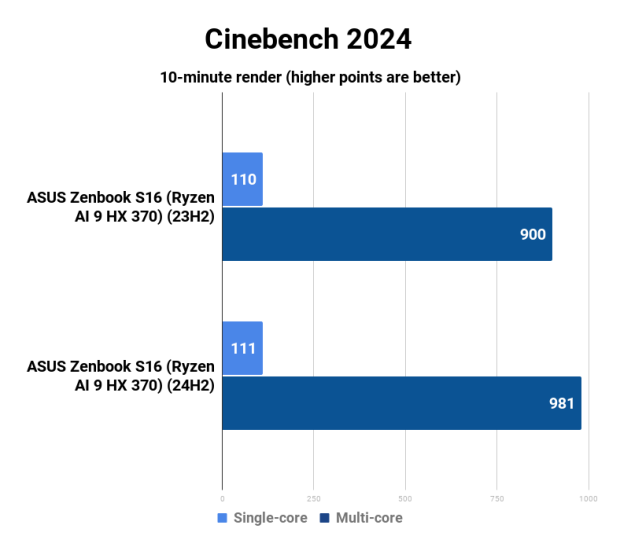
Performance thoughts: Between the different Windows 11 builds, 23H2 and 24H2, we noticed close to 10% more performance on the Ryzen AI 9 HX 370 "Strix Point" APU. Not bad at all, once again, free performance, my friends... free performance. Not that you'll be running Cinebench 2024 all day, but we can see the raw performance of Zen 5 scaling up with a simple Windows 11 update.
3DMark
Ahhhh, 3DMark... it wouldn't be a benchmarking session without you. For the ASUS Zenbook S16 OLED laptop and its AMD Ryzen AI 9 HX 370 "Strix Point" APU, we've got to run some 3DMark tests on this chip. We're running TimeSpy Extreme, TimeSpy, and FireStrike Extreme.
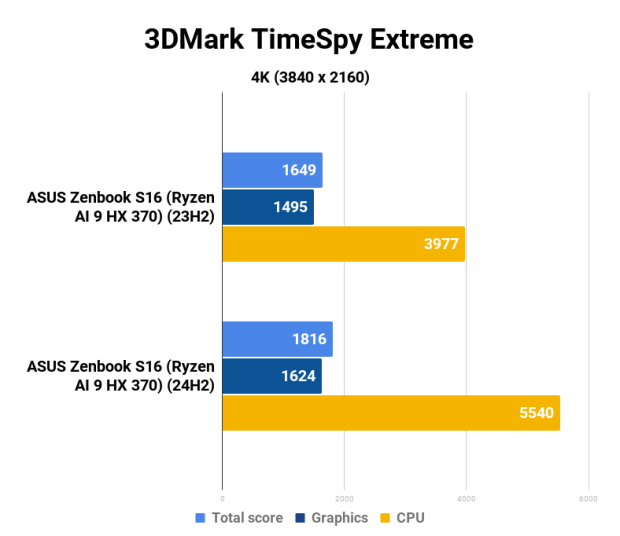
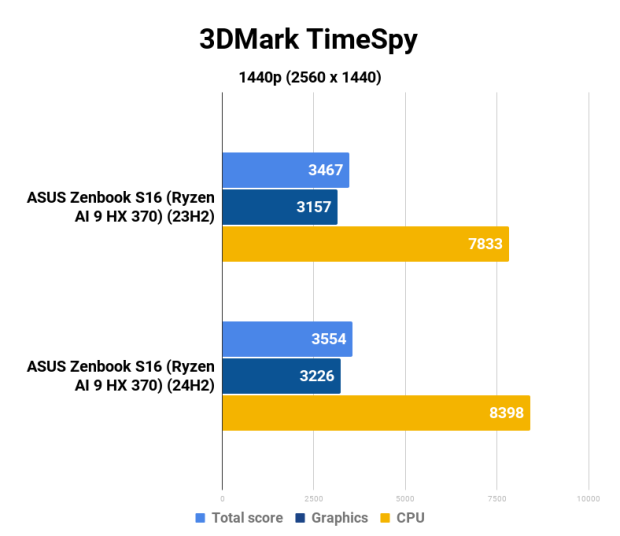
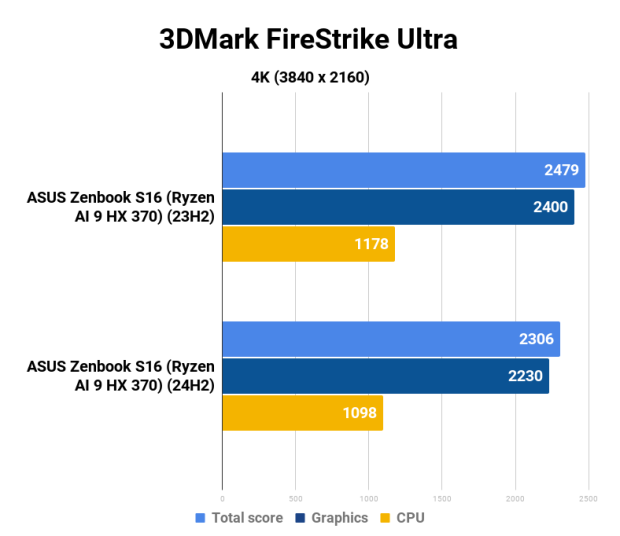
Performance thoughts: As you can see from the TimeSpy Extreme score, the new 24H2 update adds a chunky 39% faster in its CPU score while adding another 8.6% performance to the graphics score in TSE. Not bad, not bad. However, we see some regression in performance in FireStrike Ultra.
Gaming Benchmarks
Games Tested
On the gaming side of things, I've only tested a few games on the Strix Point APU between the 23H2 and 24H2 updates. For games, we've got Black Myth: Wukong, Cyberpunk 2077, and Forza Horizon 5, all using their built-in benchmarks to keep everything nice and neat and repeatable.
I did some different resolutions, FSR enabled and disabled, and low, medium, high, and ultra graphics presets in Cyberpunk 2077 and Forza Horizon 5. For Cyberpunk 2077, I tested at 1080p only, provided stock presets, and then re-benched with RT (ray tracing) and FSR (AMD's in-house AI-powered FidelityFX Super Resolution tech, their answer to NVIDIA DLSS).
In Forza Horizon 5, we've got a different style of game to Cyberpunk 2077 (it's a driving game, duh), so I've run FH5 in both 1080p at Medium and Ultra presets, then again with FSR 2.2 on Performance enabled, and then again at 1800p at Medium and Ultra presets (with FSR disabled), and then again with FSR 2.2 enabled on Performance.
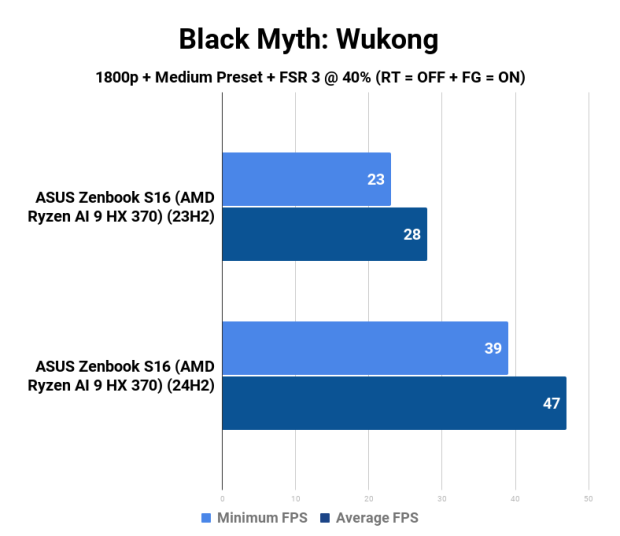
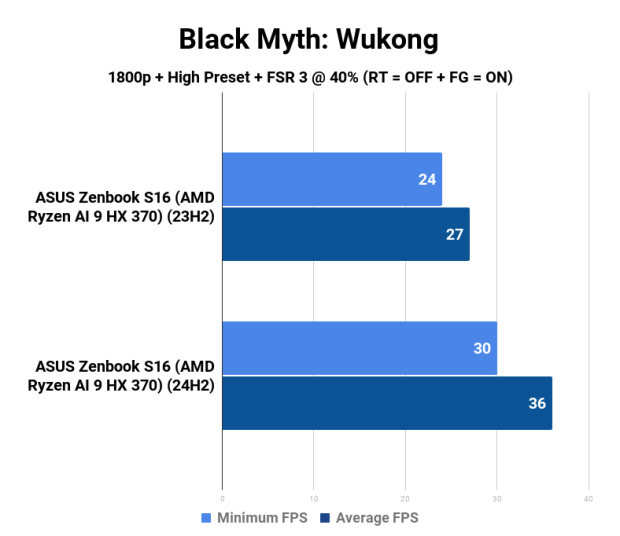
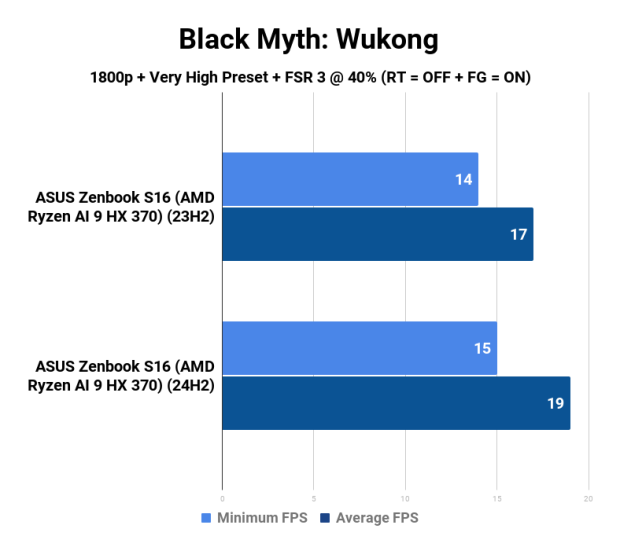
For Black Myth: Wukong, I've run just the native 2880 x 1800 resolution (1800p) on the ASUS Zenbook S16 OLED laptop, and you will be damn surprised at what the Windows 11 build 24H2 brings to the table over 23H2. Let's go!
Cyberpunk 2077 @ 1080p
As you scroll down through these benchmarks, we've got Cyberpunk 2077 running at native 1080p with ray tracing (RT) disabled, and FSR disabled. From top to bottom, we've got Low, Medium, High, and the Ultra preset.
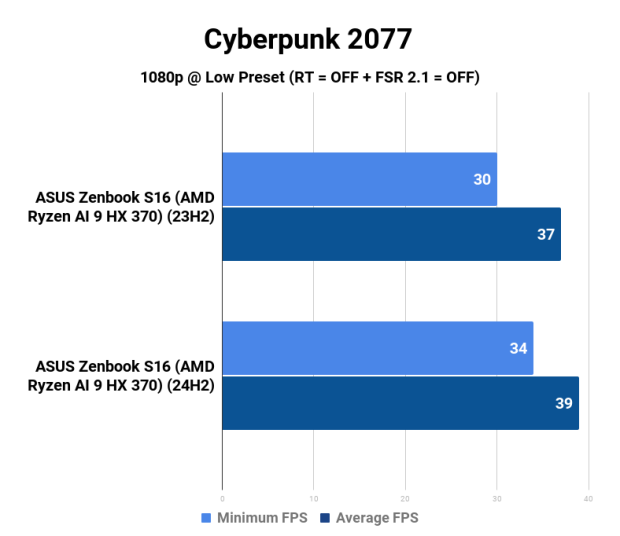
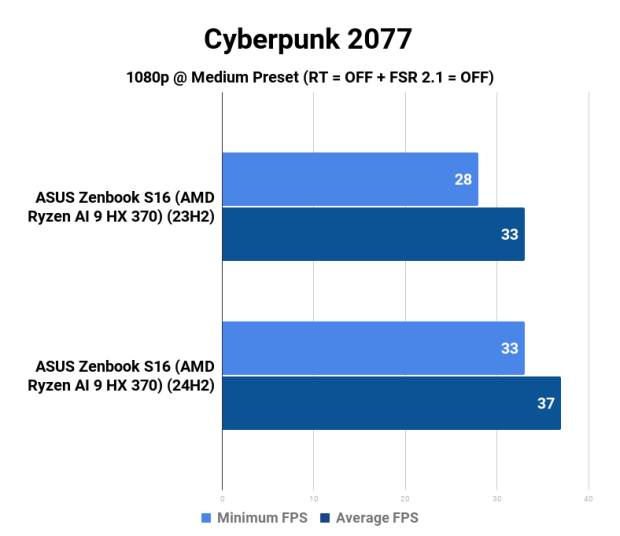
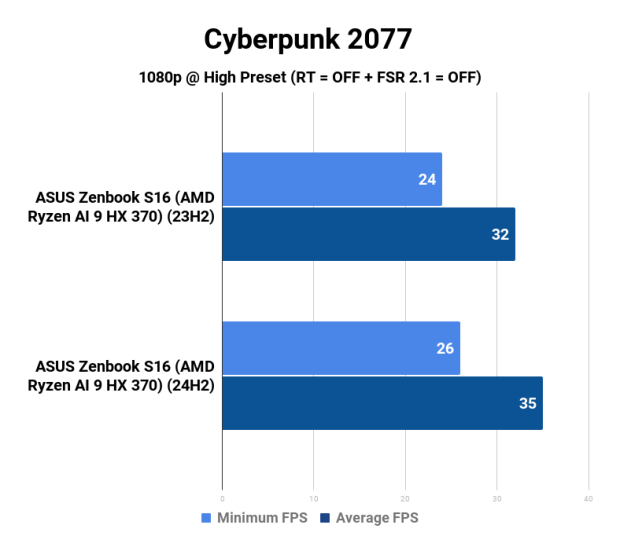
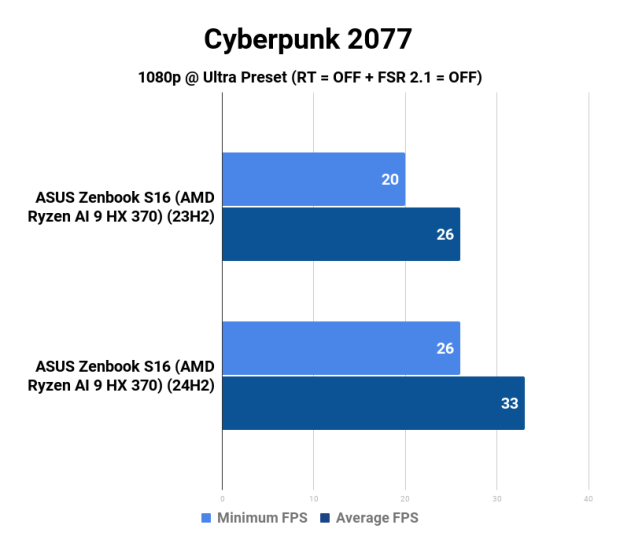
Performance thoughts: Cyberpunk 2077 enjoys around 10% more performance on the Low, Medium, and High presets at native 1080p with the new 24H2 update on the Ryzen AI 9 HX 370 "Strix Point" APU while enjoying over 20% more performance on the Ultra preset (26FPS versus 33FPS average).
Now, let's enable some ray tracing and turn on FSR 2.1 onto Performance and see how this Strix Point APU goes with the new 24H2 update. Once again we're running 1080p here, with RT enabled and FSR 2.1 @ Performance, from top to bottom we've got Low, Medium, High and Overdrive RT presets.
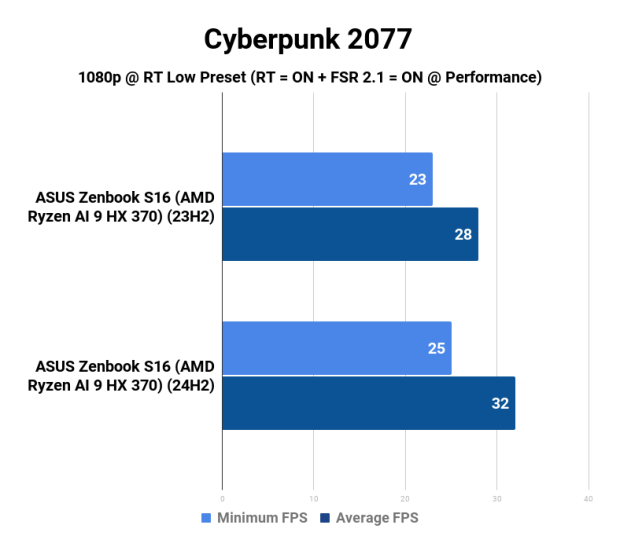
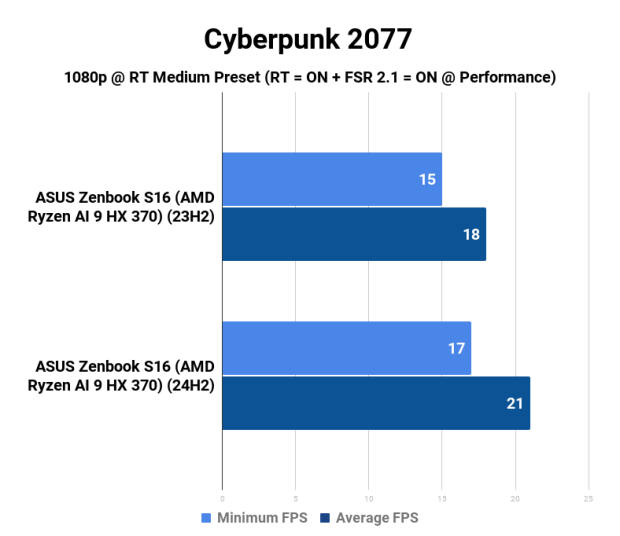
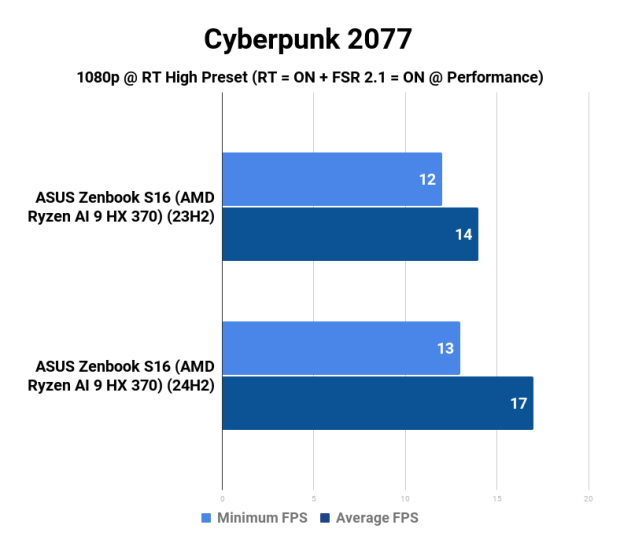
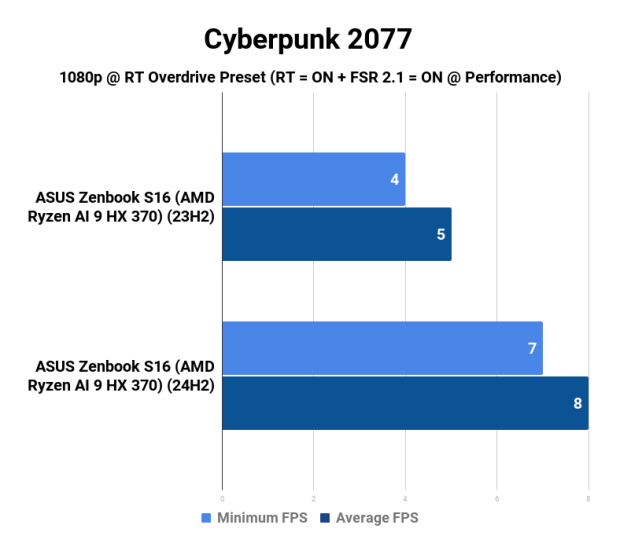
Performance thoughts: The gains are more visible, but that's because the FPS is dropping at the same time because we've enabled RT (at Low, Medium, High, and Overdrive). At 1080p on the Low RT setting, we've got 28FPS on the 23H2 build but 32FPS on 24H2.
30FPS+ running Cyberpunk 2077 at 1080p with RT enabled at just 33W of power on this Strix Point APU is damn, damn impressive.
Forza Horizon 5 @ 1080p + 1800p
Forza Horizon 5 gets some tweaked testing, with 1080p and 1800p resolutions tested. I've run 1080p at both the Medium and Ultra presets and again with FSR 2.2 enabled on Performance mode. Once again, I've re-run the benches at 1800p on the Medium and Ultra presets and again with FSR 2.2 enabled on Performance mode.
From top to bottom we've got 1080p on the Medium preset, 1080p on the Medium preset with FSR 2.2 on Performance, and then again at 1080p but this time at Ultra, and once again at Ultra with FSR 2.2 on Performance.
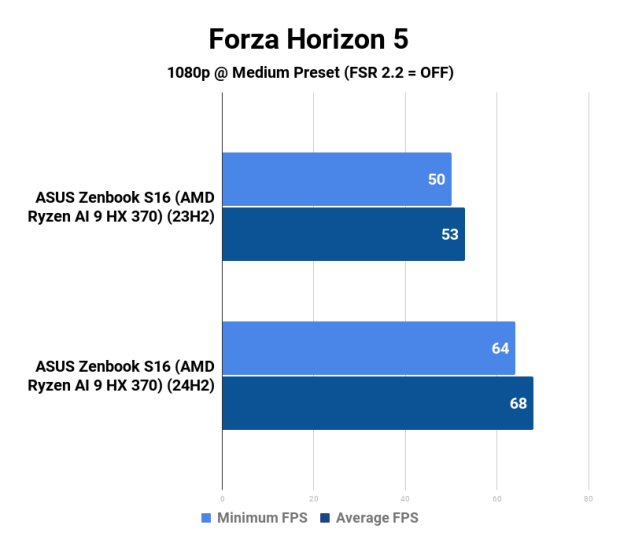
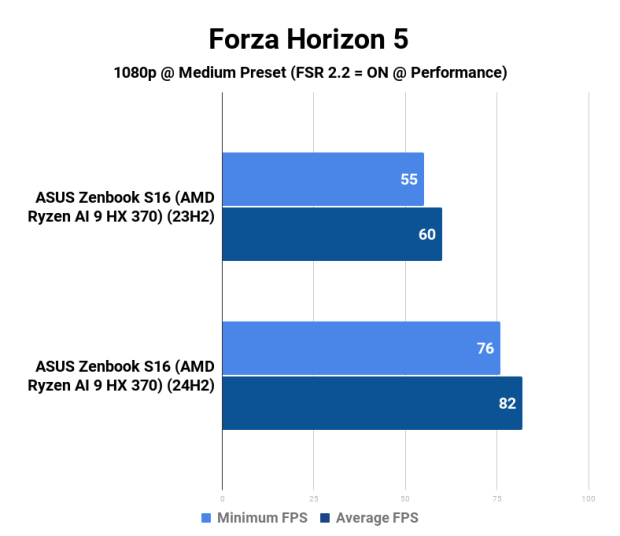
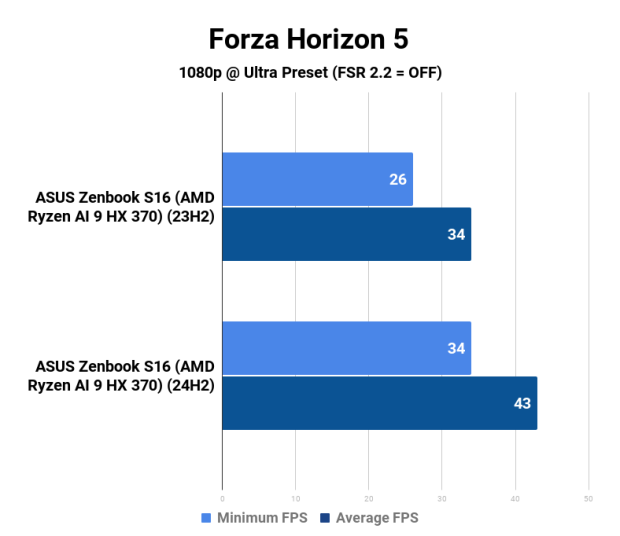
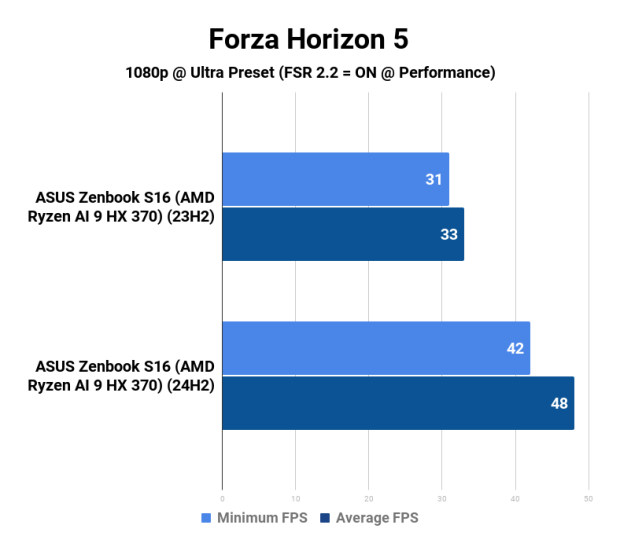
Performance thoughts: Straight away, we can see the huge performance improvement on the Strix Point APU between Windows 11 build 23H2 and 24H2, with a gigantic 28% performance improvement at 1080p on the Medium preset (no FSR 2.2 enabled).
This is an AAA game running at 60FPS on an APU sipping just 33W. It's bloody awesome. But what about FSR?
Forza Horizon 5 running at 1080p on the Medium preset with FSR 2.2 enabled and on Performance mode, bumps that up to a huge 82FPS - and that's up from a solid 60FPS on the 23H2 build. 24H2 delivers a whopping 36% performance improvement.
That's just at the Medium preset, and the same performance uplifts are noticed on the Ultra setting with 26% more performance on Ultra without FSR at 1080p, and a gigantic 45% uplift with FSR enabled. Wow.
Once again, but at 1800p with the same bench runs from top to bottom: 1800p on the Medium preset, then again with FSR 2.2 on Performance. After that, we've got 1800p again but on the Ultra preset, and then once more (with feeling) on Ultra but with FSR 2.2 enabled on Performance.
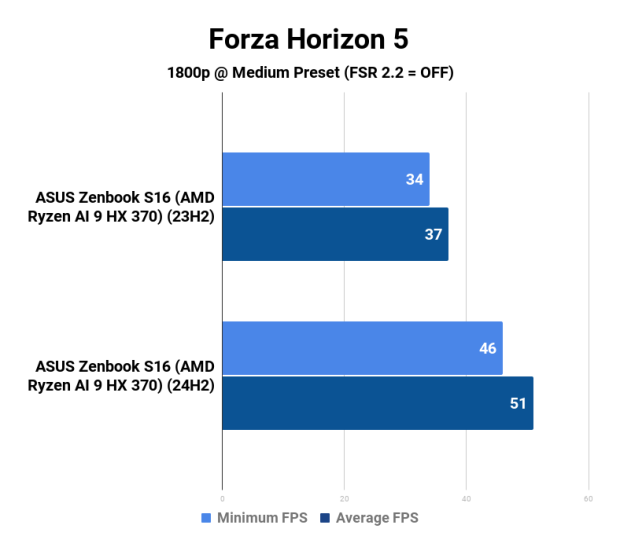
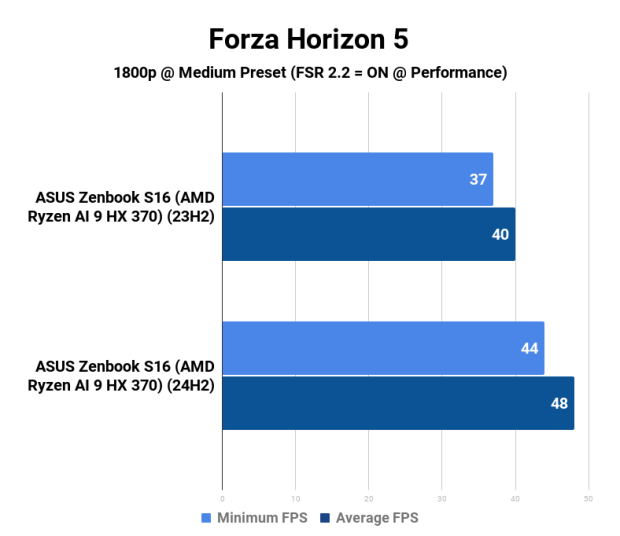
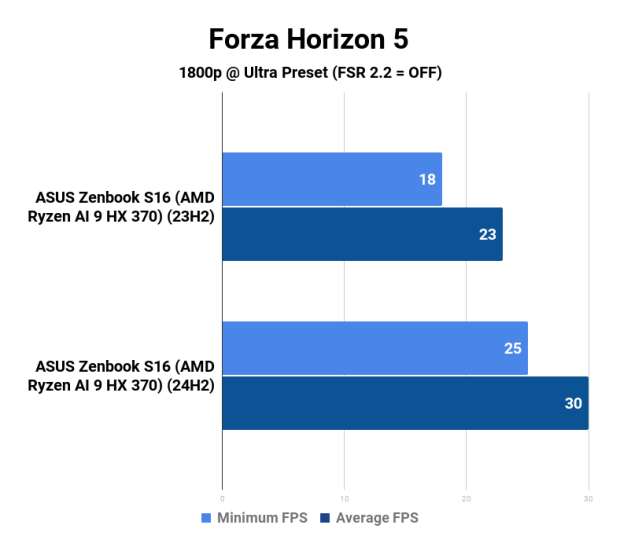
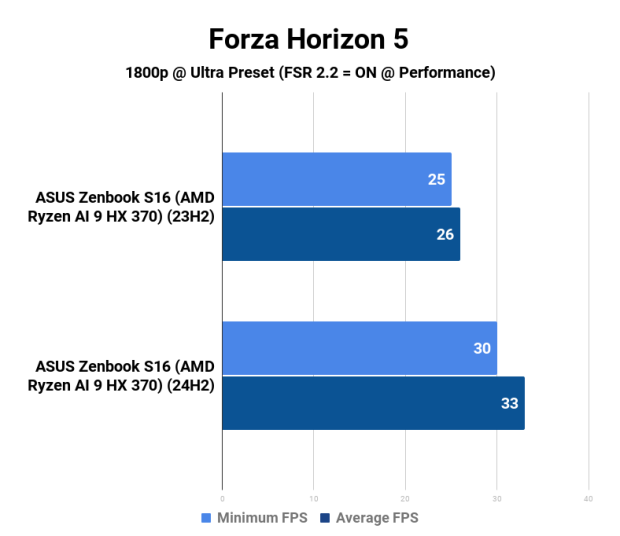
Performance thoughts: Alrighty, this is the situation that something like the ASUS Zenbook S16 OLED laptop is made for: a fantastic workstation and content creation laptop, with some awesome AAA games running at 60FPS+ on that 2880 x 1800 (1800p) OLED panel at a super-smooth 120Hz.
Forza Horizon 5, running at its native 2880 x 1800 resolution on the AMD Ryzen AI 9 HX 370 "Strix Point" APU, is spitting out a 37FPS average on Windows 11 build 23H2, but on 24H2 that skyrockets to 51FPS - a 37% increase.
At 1800p on the Ultra preset with FSR enabled, you can enjoy a decent 33FPS average. I wouldn't play at 1800p on the Strix Point APU, but I would easily play a game like Forza Horizon 5 at native 1800p and 51FPS at Medium settings. It looks great, runs great, and once again... all for 33W.
Black Myth: Wukong @ 1800p
For Black Myth: Wukong, I only ran the native resolution of 2880 x 1800 on the ASUS Zenbook S16 OLED laptop, with massively surprising results out of one of the most talked about games of the moment.
I did a similar run on Black Myth: Wukong from top to bottom of Low, Medium, High, Very High, and the Cinematic presets. I enabled FSR 3 at 40% scaling, no ray tracing (RT) with FG (Frame Generation) enabled. Check them out:
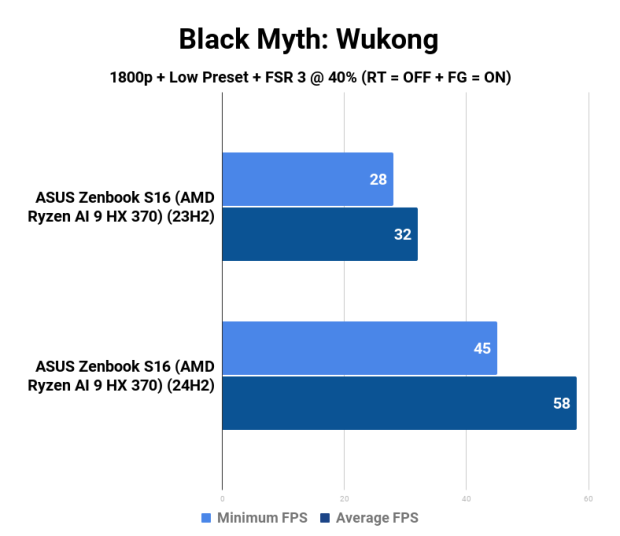
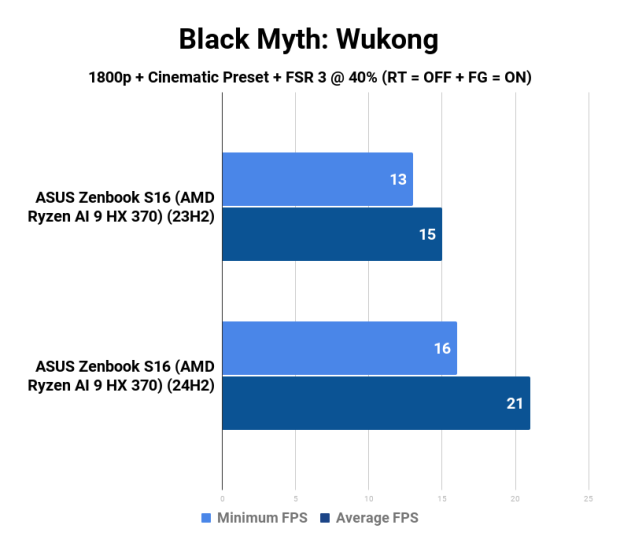
Performance thoughts: Yeah wow, Windows 11 build 23H2 to 24H2 offers some huge improvements on the Strix Point APU. We're talking about 32FPS to an incredible 58FPS, which is a mind-boggling 81% improvement in performance with a simple Windows update on the Low preset of Black Myth: Wukong. I re-ran this test a few times just to be sure.
But even on the Medium preset (again, this is with FSR 3 enabled), we're talking about going from 28FPS to 47FPS, making the game far more playable, an improvement of 67%, all for free through a Windows update. Fantastic to see, and a reminder: all at just 33W through the Strix Point APU. Hot damn.
Final Thoughts
It's truly, truly hard to believe where AMD was 10 years ago in the laptop space and where they are today... a complete turnaround in the last few years. It started with the desktop with Ryzen, extended into HEDT with Ryzen Threadripper, took the server market by storm with EPYC, and is now taking the battle into the laptop market with Ryzen AI 300.
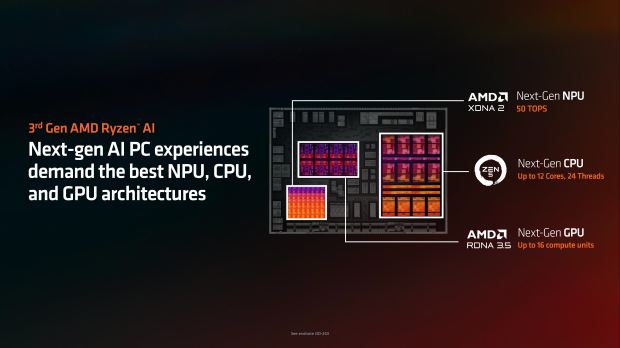
The new ASUS Zenbook S16 OLED is a masterclass laptop in its own right, but the chosen chip inside, AMD's new flagship Ryzen AI 9 HX 370 "Strix Point" APU, is a match made in heaven. The chip consumes only 33W of power, allowing it to enjoy a fanless system and a very thin and light design.
12 cores and 24 threads that boost at up to 5.1GHz with a beefed-up RDNA 3.5-based Radeon 890M GPU that's capable of playing AAA games at 60FPS for 33W? Incredible stuff.
But what's even more incredible is downloading over 80% more performance in some titles with the new Windows 11 build 24H2 over the 23H2 build. That's awesome. We never thought we'd be able to download free performance, but here we are knocking on the door of September 2024, and a simple Windows Update gives you leaps and bounds more performance on particular CPUs -- in this case, a new Zen 5 laptop APU.
Seriously, what is this update? This new Windows update providing all of this new performance is a new Windows-specific "branch prediction" patch for AMD's fleet of Zen 5 and Zen 4 processors, including the new Copilot+ ready Ryzen AI 300 series "Strix Point" APUs.
If you've got a Zen 4 or Zen 5 processor, you will want to update your OS immediately. If you wait, it will be rolled out in the coming weeks by Microsoft through the 24H2 update when it's official (and not in preview).