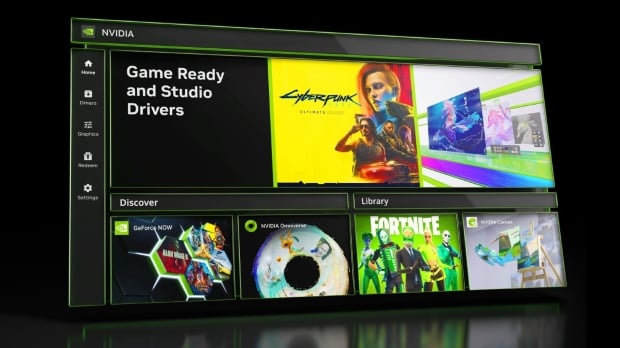





The new NVIDIA App is now available in beta. It modernizes the look and feel of the NVIDIA Control Panel and GeForce Experience apps while combining their features and giving NVIDIA GPU owners and gamers access to all of the company's apps and RTX technologies in a single package.

For those who have been switching between the NVIDIA Control Panel and GeForce Experience apps in recent years to do all of their display and graphics configuration and driver updating, you'll be pleased to know that NVIDIA has been working on the new NVIDIA App for some time - with the goal being unification.
In addition to a clean, modern, and minimal look, the new client is reportedly 50% more responsive than the previous GeForce Experience app for gamers while taking up 17% less disk space. And you no longer need to log in to use its features!
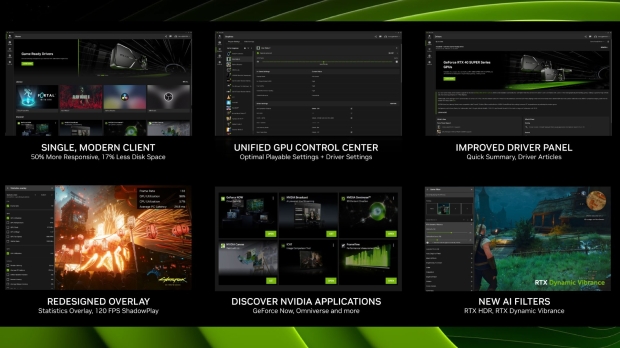
The login requirement for GeForce Experience has been an issue since the app's debut, and even though you can log into the NVIDIA App for things like redeeming promotional codes if you simply want to update drivers and go through graphics and driver settings for your most used apps and games - there's no need. And, in beta form, there's no prompt or push to sign up either.
The NVIDIA App features a clean UI design, with the Home Page displaying the latest in news (such as driver updates and weekly DLSS updates) while offering a quick look at your library and additional NVIDIA, GeForce, and RTX applications available to download, install, and run. With quick access to GeForce NOW cloud streaming, NVIDIA Broadcast, NVIDIA Omniverse, NVIDIA Canvas, ICAT, and FrameView - the NVIDIA App also doubles as a hub for all of the company's GeForce and RTX-powered apps, monitoring tools and content creation platforms.
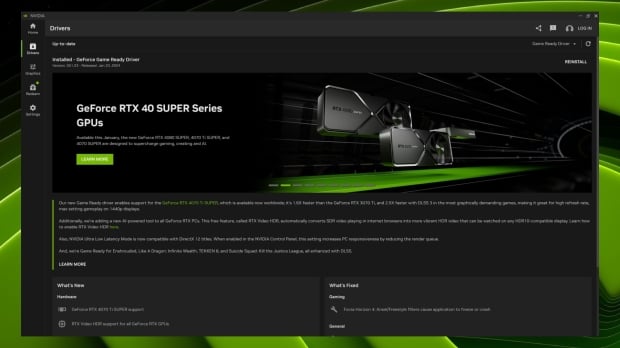
The redesigned Drivers page naturally offers access to the latest GameReady Driver releases; however, here you'll also find details on what's included, from day one game support to bug fixes and any other relevant, up-to-the-minute information.
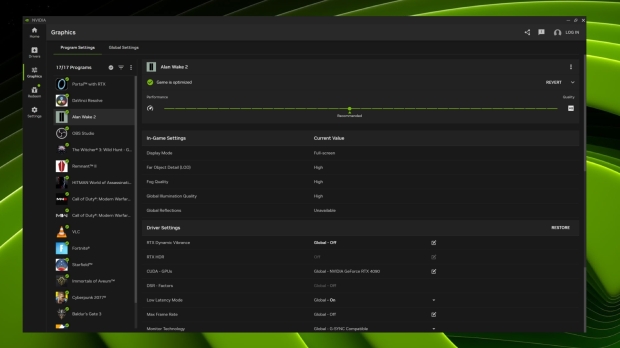
The Graphics tab is the real magic, as this combines all of the per-game optimization and settings you can tweak on a per-game or per-app basis from GeForce Experience with additional driver-level features that used to be hidden within NVIDIA Control Panel like image scaling, power management, v-sync, low latency mode, and max frame-rates.
Plus, some brand-new driver-level features like RTX HDR, which leverages AI and the Tensor Cores in GeForce RTX GPUs to convert SDR games to HDR, and RTX Dynamic Vibrance, which boosts the look and feel of a game by enhancing colors and other elements. It's also AI-powered. With the new minimal, clean, fast interface, using the NVIDIA App to change visual settings and enable the new RTX features is incredibly easy and powerful.
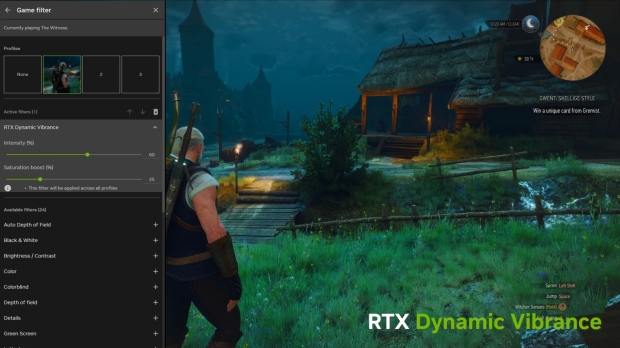
Finally, the on-screen overlay has also been overhauled using the new design language (similar to the GeForce NOW app), and here, you have access to capturing images and video while displaying real-time stats. Everything has been improved and tweaked, from a new and fast gallery you can access to view captures to 120 FPS recording to adjusting AI Freestyle Filters like the new RTX Dynamic Vibrance in real-time.
Regarding stats and monitoring (with the ability to record), NVIDIA has gone all out. Not only can you adjust where on the screen this info (like FPS and GPU Utilization) is presented, but you can customize the orientation and how visible all of the real-time data is.
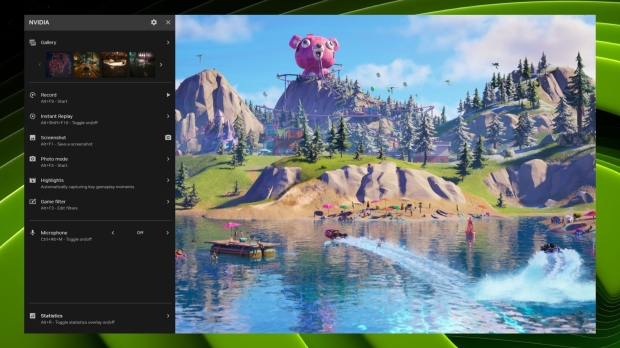
Here are all of the stats you can choose from.
FPS
- Frame Rate
GPU
- GPU Utilization
- GPU Temperature
- GPU Clock
- GPU Voltage
- GPU Fan Speed
- VRAM Clock
CPU
- CPU Utilization
Latency
- Render Latency
- Average PC Latency
- Reflex Monitor Position
- Mouse Latency
- Average Mouse Latency
- PC + Display Latency
- Average PC + Display Latency
- System Latency
- Average System Latency
The NVIDIA App is now in beta, and installing it removes the GeForce Experience app while still giving you access to the NVIDIA Control Panel. In a special preview session, NVIDIA told us that, as a Beta, not all features are currently available. Regular updates will be coming - with some of the more notable updates on the horizon: the addition of NVIDIA Control Panel's full display, resolution, refresh rate, and color controls, and the ability to record gameplay and footage using the new AV1 codec.
NVIDIA notes that AV1 ShadowPlay files will be dramatically smaller without impacting visual fidelity. At the same time, another feature from the GeForce Experience side that will be added and enhanced will be robust overclocking controls for boosting performance.