Microsoft has released the Windows 7 Release Client to the public and it is now available to download.
Microsoft says that there isn't any rush to get it, however those wishing to get their hands on it and give it a shot probably are. You can download the both the 32-bit and 64-bit versions from Microsoft's website.
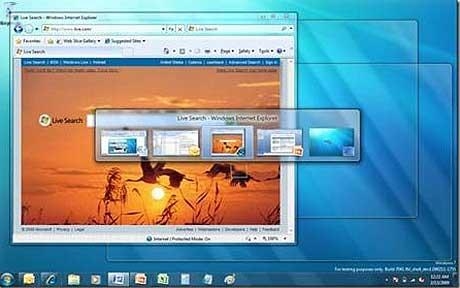
Users will be able to use the Windows 7 RC for over a full year before it starts warning you to move on to the retail or go back to something else. The RC will expire on June 1, 2010, then start shutting your PC down every two hours.
Downloads for the Windows 7 RC will be available at least through July of this year according to Microsoft and they will be issuing unlimited keys to install it. If you want to try out Windows 7 before it goes gold sometime in the next nine months, just make sure your computer meets the following system requirements:
- 1 GHz or faster 32-bit (x86) or 64-bit (x64) processor
- 1 GB RAM (32-bit) / 2 GB RAM (64-bit)
- 16 GB available disk space (32-bit) / 20 GB (64-bit)
- DirectX 9 graphics processor with WDDM 1.0 or higher driver
You can install the Windows 7 RC on a PC running Windows Vista without backing up the PC-but we encourage you to make a backup for safe keeping. If you're running Windows XP or the Windows 7 Beta, you'll need to backup your data, then do a clean installation of the RC, then reinstall your applications and restore your data.
The 32- and 64-bit versions of Windows 7 RC are available in five languages: English, German, Japanese, French, and Spanish. Just choose the version that fits the system you'll be using, pick your language, and click go to register for and download the RC.
Downloading the Windows 7 RC could take a few hours. The exact time will depend on your internet provider, bandwidth, and traffic. The good news is that once you start the download, you won't have to answer any more questions - you can walk away while it finishes. If it gets interrupted, it'll restart where it left off.