












Valve has just made significant improvements to the infrastructure surrounding gifting games on Steam, removing the need for Steam friends, accounts, or region locks, and overhauling the wishlisting feature with custom categories.
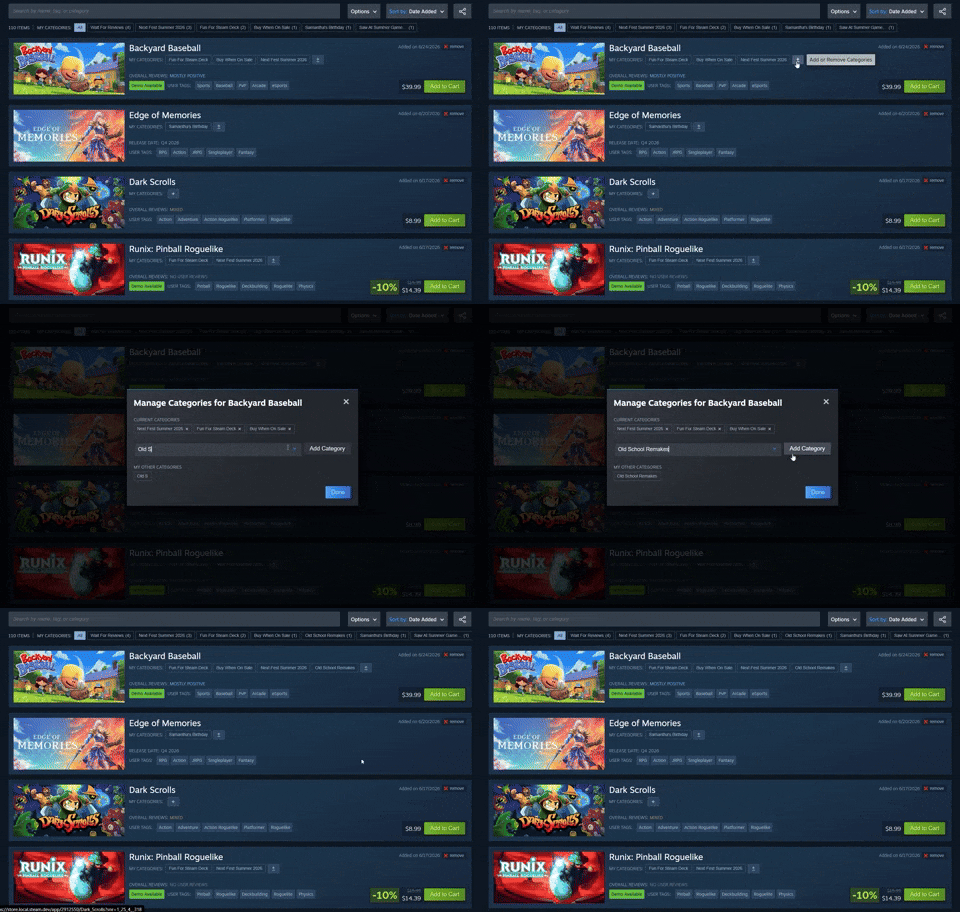
You can now send a game to someone's email address directly, purchase from shareable wishlists, and all without needing to be logged into a Steam account. The update allows cross-region gifting, though you'll need to know the recipient's Steam account to see the pricing in their specific region.
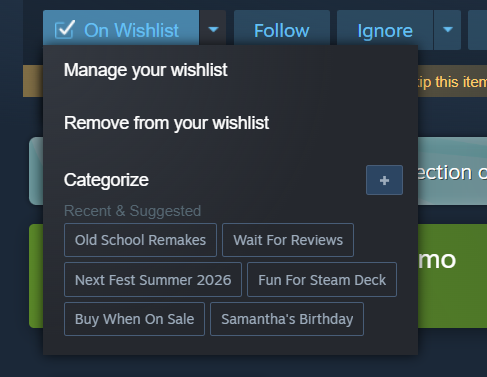
You can also now organize your wishlist into categories and share only specific lists, such as a dedicated "Xmas" list or a big Steam sale. This is a big win for surprise gifting and better organization of games you want to keep tabs on, and is undoubtedly a welcome addition to the Steam storefront.
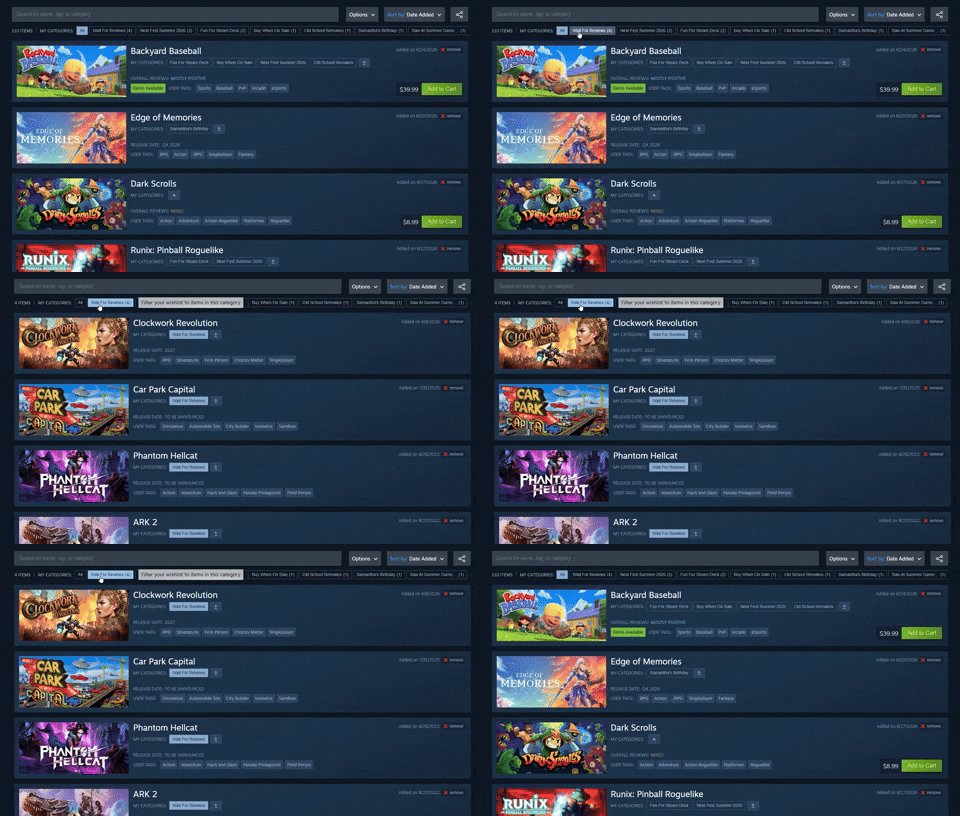
The new wishlist features, especially the category system, offer a more intuitive and user-friendly experience, as users are able to filter games by category by simply pressing on their category. If you are struggling to think of some custom categories, here are some suggestions: Wait for Reviews, Buy When on Sale, Samantha's Birthday, and Summer Games Sale.

Frequently Asked Questions
TweakBot answers common questions about this news using TweakTown's own coverage from this page and related content from our archive. Tap a question to reveal the answer, or type your own below.
How do I send a Steam game to someone’s email address without being logged into a Steam account?
Can I gift a Steam game across different regions, and what recipient information is required to see regional pricing?
How do shareable wishlists work and how can I send someone only a specific wishlist category?
If I don’t have the recipient as a Steam friend, what information do I need to successfully gift them a game?
Have a question not listed here? Ask below and TweakBot will answer it.

With these updates, Steam is making the experience less tedious or cumbersome to send someone a gift, while also adding a nice degree of customization to users who like to keep their shopping lists organized into specific categories, or those who simply want to keep tabs on titles in order to snag them at a heavily discounted price. Either, these changes are a welcomed addition in my book.


 Epic Games Store is being rebuilt to deliver up to 6.5X faster performance
 Steam Families lets you share your games library with up to 5 family members
 Escape from Tarkov coming to Steam, existing Battlestate launcher owners have to rebuy game
 Valve confirms nobody hacked Steam, over 89 million Steam accounts and passwords are safe
 Steam users in UK now required to prove age to access mature game pages
 NVIDIA confirms the first RTX Spark laptops and when they will release
 Ubisoft adds 80+ games to the Xbox PC Store without Xbox achievements
 Hacked NVIDIA RTX Spark drivers make an RTX 4060 run on Windows 11 Arm
 Microsoft is changing the classic File Explorer 'right-click' Properties in Windows 11
 iPhone Fold vs Galaxy Z Fold 8: Apple's first foldable could be $600 more
 MSI launches its epic $7,000 Titan 18 HX Dragon Edition Draco Epic gaming laptop
 Young Australians want esports at the Olympics, but that support drops dramatically among older generations
 Global PC shipments decline as the DRAM and supply crisis takes hold
 Reddit and other major publishers are considering blocking Google as AI Overviews continue to hurt their traffic
 Palworld's 1.0 launch pulled its concurrent player count from 58,000 to nearly a million in a matter of days
 Thrustmaster T.Flight HOTAS 5 MSFS Edition Review
 SteelSeries Arctis Nova Pro Omni Wireless Headset Review - One Headset to Rule Them All
 SteelSeries Arctis Nova 7 Wireless Gen 2 Headset Review - New and Improved, But Is It Enough?
 AMD Ryzen 7 7700X3D Review - Days of Future Past
 Samsung 990 2TB SSD Review - Ninth Gen QLC at PCIe Gen4 Speeds
 ASUS ExpertBook Ultra (Panther Lake) 14" Business Laptop Review
 ASUS ROG Raikiri II Xbox Wireless Controller Review - Ready to Take Control
 MOZA FMP18 Panel Bundle Review: authentic F/A-18 Hornet cockpit controls for flight sims
 Micron 6600 ION 245.76TB Enterprise SSD Review - Best in Class Programming Speeds
 MOZA MA3F EFCM Flight Control Module Review: authentic Airbus A320 autopilot panel for simulators
 I capped Windows Update's bandwidth with Delivery Optimization, and my downloads stopped choking
 I use this decade-old free tool that finds files faster than Windows Search does
 I install and update most of my apps with this Windows command now, and I stopped downloading sketchy installers
 Hisense U6SF 65-inch MiniLED TV: High Performance Meets Leisurely Convenience
 I stopped digging through Windows menus after I set up this one folder
 Don't sell your Windows laptop until you do these things
 6 PC cleaning mistakes to avoid for safer hardware maintenance
 Phison and Intel Take Aim at Local AI's Memory Wall with aiDAPTIV
 How to Remap Keyboard Keys in Windows using Microsoft PowerToys
 7 tips to organize your Windows files for faster, easier access