Newsletter IconFacebook IconX IconThreads IconInstagram IconYouTube IconPinterest Icon
Giveaway: MSI GeForce RTX 5070 World of Warcraft: Midnight GPU and MAESTRO 500

You no longer need a Steam account to buy someone a Steam game

Valve has rolled out a bunch of changes to the Steam storefront, significantly improving gifting and tracking games through custom categories.

You no longer need a Steam account to buy someone a Steam game
Facebook IconX IconReddit Icon
Comments
Tech and Science Editor
Published
1 minute & 15 seconds read time
TL;DR: Valve updated Steam gifting and wishlists: you can buy games using an email address, send gifts without a Steam login or friend connection, and gift across regions (recipient account needed to view regional prices). Wishlists now support sharable custom categories for easier organization and filtering.
Voice: Jak Connor
0:00 / 1:49
Use left and right arrow keys to seek audio.

Valve has just made significant improvements to the infrastructure surrounding gifting games on Steam, removing the need for Steam friends, accounts, or region locks, and overhauling the wishlisting feature with custom categories.
Animated GIF related to You no longer need a Steam account to buy someone a Steam game

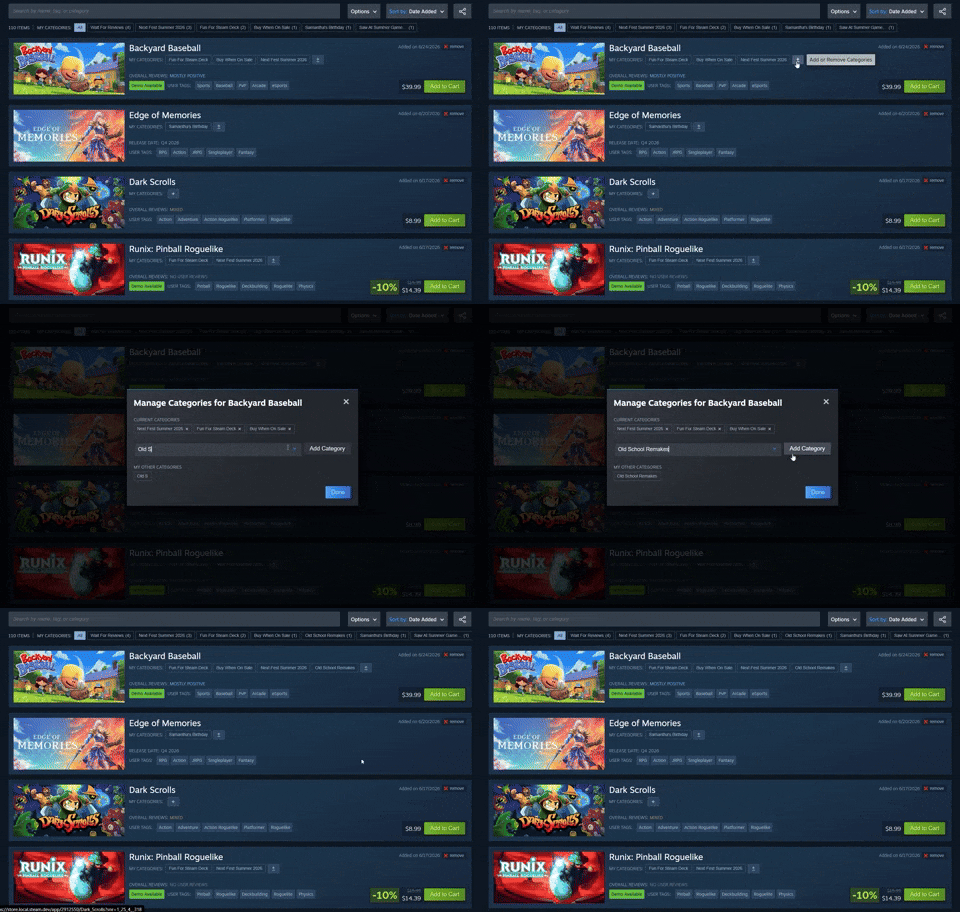
You can now send a game to someone's email address directly, purchase from shareable wishlists, and all without needing to be logged into a Steam account. The update allows cross-region gifting, though you'll need to know the recipient's Steam account to see the pricing in their specific region.

You can also now organize your wishlist into categories and share only specific lists, such as a dedicated "Xmas" list or a big Steam sale. This is a big win for surprise gifting and better organization of games you want to keep tabs on, and is undoubtedly a welcome addition to the Steam storefront.
Animated GIF related to You no longer need a Steam account to buy someone a Steam game

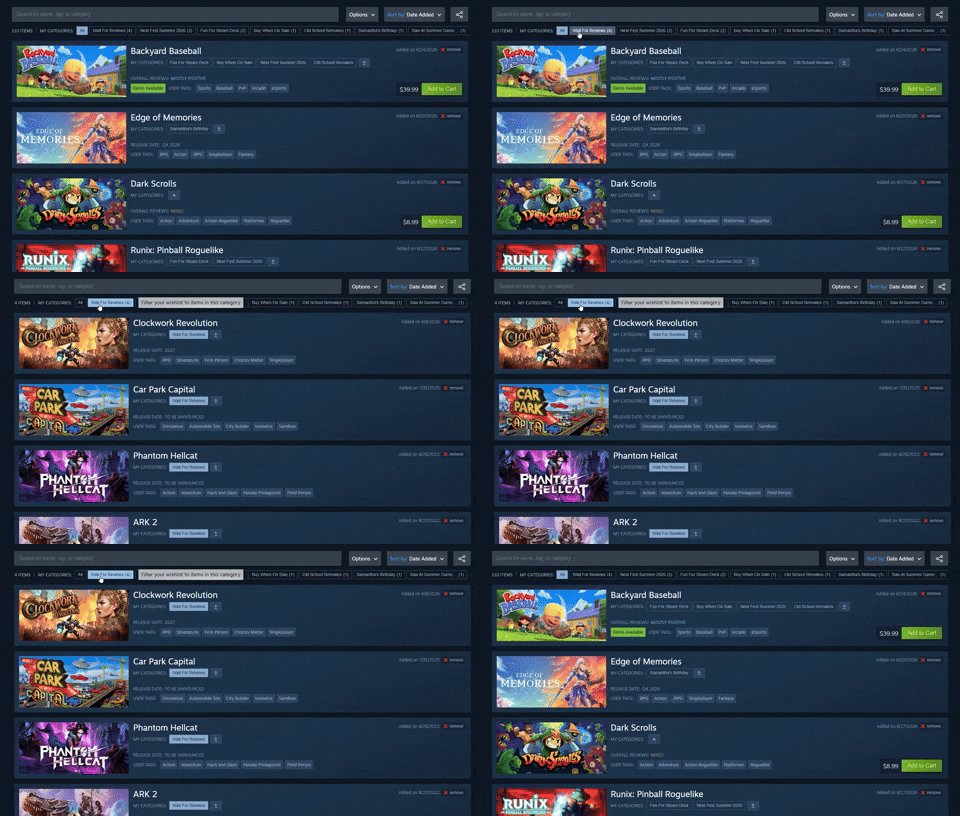
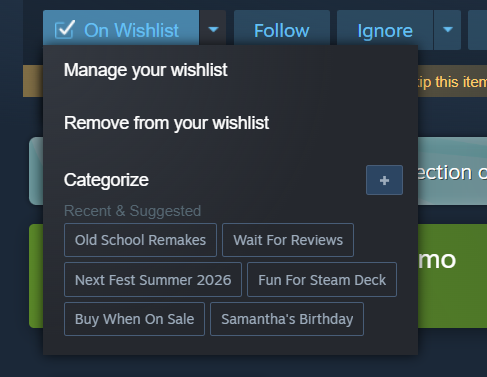
The new wishlist features, especially the category system, offer a more intuitive and user-friendly experience, as users are able to filter games by category by simply pressing on their category. If you are struggling to think of some custom categories, here are some suggestions: Wait for Reviews, Buy When on Sale, Samantha's Birthday, and Summer Games Sale.

You no longer need a Steam account to buy someone a Steam game 1

Frequently Asked Questions

Open a question for an answer from TweakTown's coverage of this news, or ask your own below.

Question #1

How do I send a Steam game to someone’s email address without being logged into a Steam account?

Steam's storefront update now lets you send a game directly to someone's email address and purchase from shareable wishlists without being logged into a Steam account. The update also enables cross-region gifting, but you will need the recipient's Steam account to view pricing in their specific region.
Question #2

Can I gift a Steam game across different regions, and what recipient information is required to see regional pricing?

Yes. The update allows cross-region gifting so you can send a game to someone in a different region. To see regional pricing for the recipient you need to know their Steam account; the article says you must know the recipient's Steam account to view pricing in their specific region.
Question #3

How do shareable wishlists work and how can I send someone only a specific wishlist category?

Steam lets you organize your wishlist into custom categories and make those categories shareable, so you can filter to a single category (for example "Xmas" or "Summer Games Sale") and share just that subset of items. To send someone only a specific wishlist category, put the desired games in that custom category, press the category to filter it, then share that filtered list; purchases can be made from those shareable wishlists and you can even send a game directly to someone's email without being logged into a Steam account.
Question #4

If I don’t have the recipient as a Steam friend, what information do I need to successfully gift them a game?

You can send the game to the recipient's email address directly without having them as a Steam friend. If you need to see pricing for their specific region you will need to know the recipient's Steam account.

Have a question about this content not listed here? Ask below and TweakBot will answer it.

With these updates, Steam is making the experience less tedious or cumbersome to send someone a gift, while also adding a nice degree of customization to users who like to keep their shopping lists organized into specific categories, or those who simply want to keep tabs on titles in order to snag them at a heavily discounted price. Either, these changes are a welcomed addition in my book.

You no longer need a Steam account to buy someone a Steam game 2
Photo of the ANMUDA Vintage Pocket Watch Coffee Mug

Best Deals: ANMUDA Vintage Pocket Watch Coffee Mug

Prices last scanned 7 hours and 30 minutes ago

* Prices may be inaccurate. As an Amazon Associate, we earn from qualifying purchases. We earn affiliate commission from any Newegg or PCCG sales.

Join Our Newsletter

Join the TweakTown Newsletter for daily tech updates delivered to your inbox.

See previous giveaways.

Comments

About the author

Tech and Science Editor

Jak joined TweakTown in 2017 and has since reviewed 100s of new tech products and kept us informed daily on the latest science, space, and artificial intelligence news. Jak's love for science, space, and technology, and, more specifically, PC gaming, began at 10 years old. It was the day his dad showed him how to play Age of Empires on an old Compaq PC. Ever since that day, Jak fell in love with games and the progression of the technology industry in all its forms.

Stay Updated

Follow TweakTown for breaking tech news, reviews, and daily updates.

Add TweakTown as a preferred source on GoogleFind TweakTown on Apple News
Newsletter Subscription