
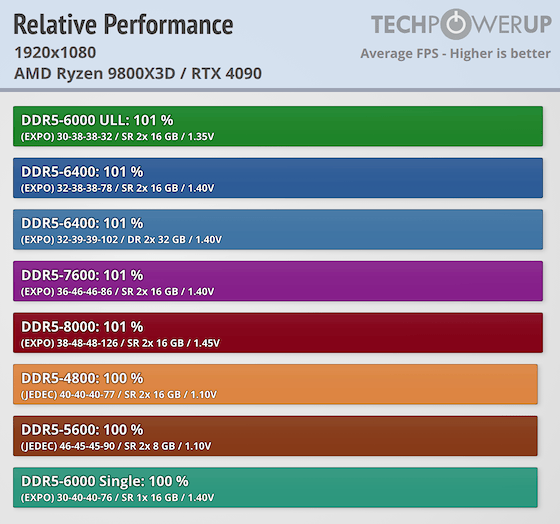
New memory testing has confirmed that AMD's Ryzen CPUs with 3D V-Cache are less sensitive to high-speed DDR5 memory setups compared to other CPUs on the market (including Intel chips). TechPowerUp conducted an eight-game benchmark test with eight different DDR5 memory configurations on a Ryzen 7 9800X3D, and found the fastest-performing kits on average performed only 2% better than the slowest kits.
TechPowerUp found that the Ryzen 7 9800X3D performs 2% better on average with a DDR5-6000 Ultra Low Latency 2x16GB kit of memory using 30-38-38-32 timings, compared to a DDR5-4800 2x8GB kit running at JEDEC timings. The test bench was paired with an RTX 4090, and all eight games were tested at 1080p, 1440p, and 4K, featuring Palworld, Baldur's Gate 3, Elden Ring, Resident Evil 9, Spider-Man Remastered, Forza Horizon 6, Counter-Strike 2, and Cyberpunk 2077. The full suite of test kits consisted of eight single-stick and dual-stick configurations with either 16GB or 32GB of memory capacity and transfer rates ranging from DDR5-4800 all the way up to DDR5-8000.
In Palworld at 1080p high settings, all eight DDR5 configurations ran at a super tight 119 FPS average, with 1% lows being 6% faster on the fastest kit (DDR5-6000 2x16GB Ultra Low Latency) compared to the slowest kit (DDR5-5600 2x8GB). In Baldur's Gate 3 at 1080p high settings, the performance gap between the fastest and slowest kits was 6.24 FPS for average FPS, ranging between 178.97 and 172.73 FPS. 1% lows were 7% faster on the fastest kit (DDR5-8000 2x16GB) compared to the slowest kit (DDR5-4800 2x16GB). Similarly, 0.1% lows performed 5% better on the fastest kit (DDR5-6000 2x16GB Ultra Low Latency) compared to the slowest kit (DDR5-4800 2x16GB)
Elden Ring at 1080p high settings was one of the least sensitive games to memory performance, showing a less than 1 FPS difference in performance between the fastest and slowest kits on average. In terms of 1% lows, the fastest kit (DDR5-6400 2x32GB) was 6% faster than the slowest kit (DDR5-4800 2x16GB). For 0.1% lows, the fastest kit (DDR5-6000 2x16GB Ultra Low Latency) was 24% faster than the slowest kit of the bunch (DDR5-4800 2x16GB). Resident Evil 9 at 1080p high settings saw a 2.17 FPS difference between the fastest and slowest kits on average, with frame rates ranging between 219.10 and 216.93 FPS. The fastest kit (DDR5-6400 2x16GB) was 4% faster than the slowest kit in 1% lows, and for 0.1% lows the fastest kit (DDR5-6400 2x16GB) was 9% faster than the slowest kit (DDR5-6000 1x16GB).
Spider-Man Remastered at high settings saw a 4.8FPS difference between the fastest and slowest kits, ranging between 243.97 and 239.17 FPS. The fastest kit (DDR5-8000 2x16GB) saw 9% higher 1% lows and 11% higher 0.1% lows compared to the slowest kit (DDR5-5600 2x8GB). Forza Horizon 6 at high settings saw a 6.4 FPS difference between the fastest and slowest memory kits, ranging between 180.73 FPS and 174.33 FPS. 1% lows were 13% better on the fastest kit (DDR5-8000 2x16GB) compared to the slowest kit (DDR5-6000 1x16GB). 0.1% lows were 16% better on the fastest kit (DDR5-6400 2x32GB) compared to the slowest kit (DDR5-6000 1x16GB).
In Counter-Strike 2 at high settings, there was an extremely small 3.16 FPS difference between the fastest and slowest kits, ranging between 408.73 FPS and 405.57 FPS. 1% lows were extremely tight between all of the kits that worked in this game, with the fastest kit (DDR5-6000 2x16GB Ultra Low Latency) being just 2% faster than the slowest kits (DDR5-6400 2x32GB and DDR5-4800 2x16GB). Similarly, 0.1% lows were just 3% faster on the fastest kit (DDR5-6000 2x16GB Ultra Low Latency) compared to the slowest kit (DDR5-7600 2x16GB). It is worth mentioning that all the aforementioned benchmarking results are so tight that many (if not all of the comparisons) are within the margin of error.
Cyberpunk 2077 at 1080p high settings also saw extremely tight average FPS, featuring a spread of just 3.83 FPS ranging between 242.90 FPS and 239.07 FPS. 1% lows were 9% faster on the fastest kit (DDR5-6000 2x16 Ultra Low Latency) compared to the slowest kit (DDR5-5600 2x8GB). 0.1% lows on the fastest kit (DDR5-8000 2x16GB) were 14% faster compared to the slowest kit (DDR5-5600 2x8GB).

Frequently Asked Questions
Open a question for an answer from TweakTown's coverage of this news, or ask your own below.
How much did the Ryzen 7 9800X3D’s gaming performance change at 1080p versus 1440p and 4K with different DDR5 kits?
Which of the tested games was most sensitive to DDR5 speed on the Ryzen 7 9800X3D?
Does the Ryzen 7 9800X3D need dual-channel memory, or did any of the single-stick configurations hold up well in gaming?
What role does the Ryzen 7 9800X3D’s 64MB L3 cache play in reducing dependence on faster DDR5 memory?
Have a question that isn't listed here? Ask below, and TweakBot will answer it.

TechPowerUp's benchmark results prove that you don't need a high-speed memory kit to get good gaming performance out of AMD's Ryzen X3D chips, with even the slowest DDR5 memory modules providing very good performance with the Ryzen 7 9800X3D in games. This behavior is all the result of the chip's massive 64MB L3 cache die, which moves a lot of a game's critical data closer to the CPU, making the CPU less reliant on DRAM to keep frame rates high. This behavior is also highly beneficial for PC gamers who are looking to upgrade to an X3D chip amidst the ongoing DRAM shortage, which has driven up DDR5 memory prices, especially high-speed, low-latency DDR5 kits. TechPowerUp's results show that even pairing a baseline DDR5-4800 kit running at JEDEC timings with a 9800X3D is not a bad option and will provide good performance in games.