Our Verdict
Pros
- Great price point for performance
- Plethora of connectivity
- Wi-Fi 7 and dual 2.5G LAN ports
Cons
- Noticeably larger than the IT15 MAX
- No memory upgrade path in 24GB model
- SSD performance was lacking
Should you buy it?
Introduction, Specifications, and Pricing
Last time we looked at what GEEKOM sent over, it was the IT15 AI MAX with the Core i9 285H CPU; this time, it is the IT13 MAX with the Intel Core i9 185H CPU. Essentially, the CPU is one generation behind the 200 series, with slower clock speeds and a slower Arc iGPU.
Pricing, however, is also lower at $669 if you use their early bird coupon, saving you $130, but it does make some compromises to make this specific price point, namely in the department of system RAM, being 24GB of LPDDR5, to be exact. Windows 11 comes pre-installed on a 500GB NVMe PCIe 5.0 M.2 SSD. So let's look at what the IT13 MAX is all about and come back with a conclusion.
Popular Now: You can now apply DLSS 5 Neural Rendering to your entire Windows desktop| Item | Details |
|---|---|
| Model | GEEKOM IT13 MAX |
| Form Factor | Mini PC SFF |
| Dimensions | 135.89 mm x 132.08 mm x 50.038 mm |
| Weight | 836g |
| Materials | Plastic |
| Color | Black |
| CPU | Intel Core 9 185H (16c/22t) |
| CPU Frequency | Max Boost 5.1GHz |
| RAM | 16GBx1 SO-DIMM DDR4-3200 |
| Storage | Kingston SNV3S 500GB M.2 2280 NVMe SSD |
| Warranty | 3 Years |
Packaging

The IT Series comes in a black box with multi-color text. Clearly, GEEKOM wants you to know it is from the IT series.

The specifications found on the back of the packaging show that the IT13 Max includes an Intel Core Ultra 9 185H CPU, 24GB of LPDDR5 memory, and a 500GB NVMe PCIe 4.0 M.2 SSD.


Best Deals: GEEKOM IT13 MAX AI Mini PC
Price Trend:
Prices last scanned 18 hours and 33 minutes ago

7 days ago: $799 USD30 days ago: $799 USD

7 days ago: $799 USD30 days ago: $799 USD
7 days ago: $2096.74 CAD

GEEKOM has packaged the IT13 MAX with foam inserts and a protective plastic sleeve for a great overall presentation.

The accessories that GEEKOM has included with the IT13 MAX are:
- AC Power Cable (US three-prong 120V)
- Power Adapter (120W)
- HDMI Cable
- Mounting Screws
- VESA Monitor Mounting Plate
- Instruction Guide
- Thank You Card
Outside the GEEKOM IT13 MAX Mini PC

The outside of the IT13 MAX measures 5.35" x 5.20" x 1.97" or 135.89 mm x 132.08 mm x 50.038 mm. The GEEKOM logo/branding is also centered at the top in silver lettering.
Our Latest SFF PCs Review Coverage

The front panel of the IT13 MAX has four USB 3.2 Gen 2 Type-A ports, with one port in Always On status. A combo 3.5mm stereo headset jack sits between the USB ports and the squared-off power button.

Frequently Asked Questions
Open a question for an answer from TweakTown's coverage of this review, or ask your own below.
What storage expansion options does the IT13 MAX have beyond the included 500GB NVMe SSD?
How many displays can the IT13 MAX drive through its HDMI 2.0 and USB4 ports?
What kind of Ethernet setups can the dual 2.5G LAN ports on the IT13 MAX support?
How does the Intel Core Ultra 9 185H in the IT13 MAX compare with the Core i9 285H used in the IT15 AI MAX?
Have a question about this content not listed here? Ask below and TweakBot will answer it.


The right side features mesh ventilation and a single Kensington lock for added security.

The rear I/O of the IT13 MAX has more ventilation above all the ports. From left to right, a 19V barrel power connector, a USB4 Type-C port (DP-Alt mode / PD-in), HDMI 2.0 port, two 2.5G LAN RJ45 ports, a USB 3.2 Gen 2 Type-A port, a USB 2.0 Type-A port, a USB4 Type-C port (DP-Alt mode), and lastly another HDMI 2.0 port.

The left side has more ventilation along with an SD 4.0 card reader, which is nice for content creators.

The bottom of the IT13 MAX shows four rubber feet with access screws, along with the model name and all the regulatory information. The serial number and MAC addresses are also placed along the upper lip.

Comparing the IT13 MAX (left) to the IT15 MAX (right), I noticed that the IT15 MAX is substantially smaller than the IT13 MAX.

Both models use the same design language in the IT series.

The IT13 MAX has twice the USB support as the IT15 MAX did in the front panel.

Moving to the rear for comparison, the IT13 MAX again has a slight advantage with an additional 2.5G LAN RJ45 port; otherwise, the layouts are pretty much identical.
Inside the GEEKOM IT13 MAX Mini PC

Opening up the IT13 MAX, we see a fairly open layout with an M.2 slot available for future expansion.

The occupied M.2 slot (2280) has a Kingston SNV3S 500GB NVMe SSD, which runs on the PCIe 4.0 interface, at speeds up to 5,000 MB/s read and 3,000 MB/s write.

The empty slot is an M.2 SATA III slot (2242), which runs up to 600 MB/s.
BIOS

In the GEEKOM IT15 BIOS, the Main tab shows BIOS version IT13.Max.0.28 with a build date of 05/13/2026. It also displays other information, such as the CPU and total system memory.

In the Advanced tab, you'll find other traditional BIOS options, such as CPU Configuration, SATA Configuration, Onboard Device Configuration, Power Management Configuration, Hardware Configuration, TPM Configuration, Product Information, and, lastly, the Intel Ethernet Controller configuration.

The next tab, Security, again shows all the typical settings, such as Supervisor Password, User Password, Change Supervisor Password, Change User Password, Password Login Control, Flash Write Protection, and Secure Boot Configuration.

The next tab shows the BOOT information. Bootup Num-Lock, Fast Boot Function, and Boot from USB device are all enabled by default. Boot Device Priority lets you select which device boots first, and then which thereafter. The last option is for UEFI Hard Disk Drive BBS Priorities.

The last BIOS tab is Exit, where you can save changes and exit, exit without saving changes, or Load Default Settings.
Testing
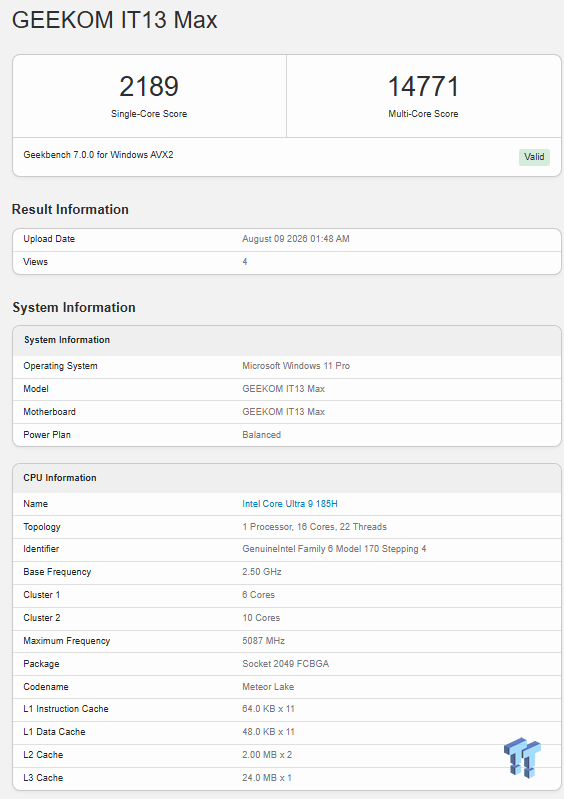
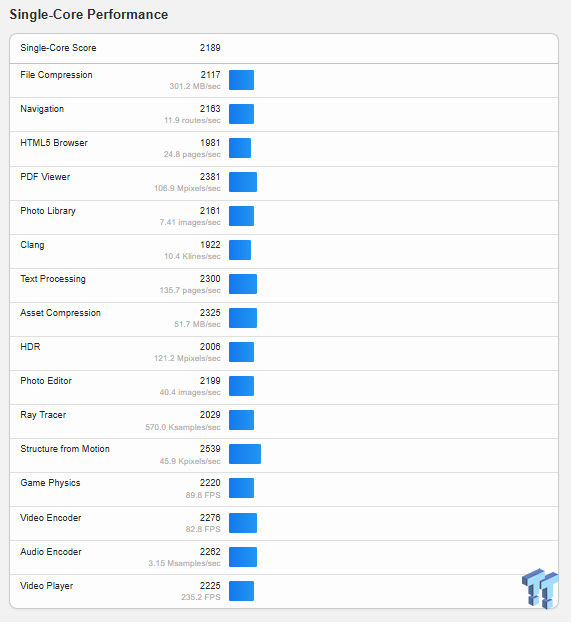
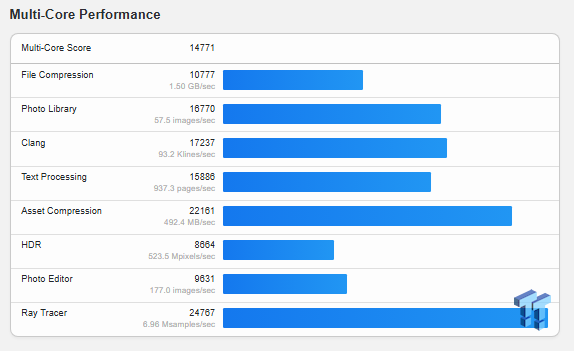
The Geekbench 7 benchmark yielded a score of 2,189 for single-core performance and 14,771 for multi-core performance.
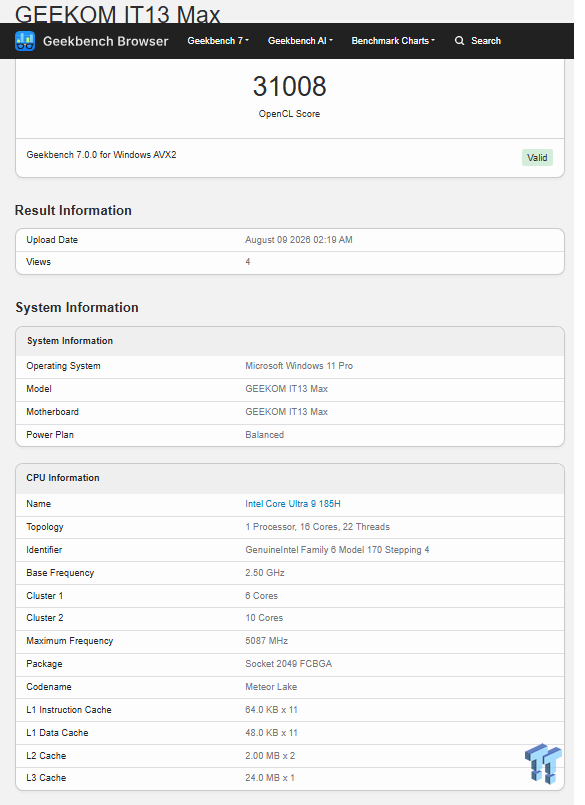
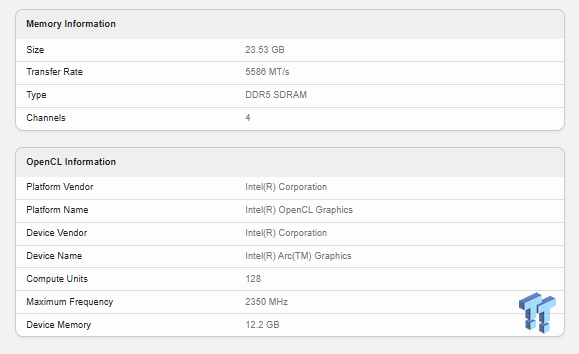
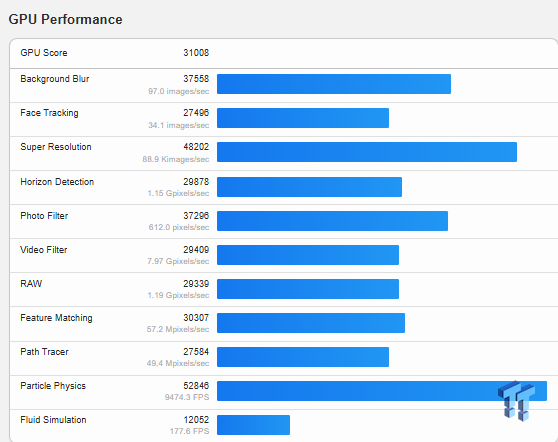
The Intel Arc GPU's performance was measured using the Geekbench Windows AVX2 benchmark, which scored 31,008.

The IT13's Intel Core Ultra 9 185H CPU and Arc iGPU were tested exclusively with the Time Spy gaming workload, scoring 4,049.

The IT13 MAX's Kingston 500GB PCIe 4.0 M.2 NVMe SSD performed well enough for PC games. When moving raw files, speeds topped out at just over 1.277 GB/s. This SSD scored 1128 and averaged 196.88 MB/s, which is fairly low for a PCIe 4.0 SSD.

The CPU Profile showed a single-thread score of 976, which increased to 7,949 when all available threads were used.

The Intel XeSS feature text is a new test I added to test the Arc iGPU, so XeSS is similar to NVIDIA's DLSS, adding extra frames in games to improve performance. With XeSS off, the GPU managed only 6.88 FPS; with XeSS on, it managed 18.62 FPS, a 170.7% increase.

Another new test added was Steel Nomad Light, intended to test a light DX12 load on lower-end machines. The IT15 scored 3,180, which, according to this test, is a great score, meaning it could run Battlefield V at 1440p Ultra at 40+ FPS, so to speak.

Firestrike is another good test to evaluate a system's graphics capabilities. The IT13 Max scored 8,061, which this benchmark says is a good score. This test says Battlefield V would run at 1440p Ultra at 30+ FPS so I would take that with a grain of salt.

Rounding out the benchmarks is the latest version of Cinebench, Cinebench 2026. Getting a multi-core score of 3,618 puts the Core Ultra 9 185H just above an AMD Ryzen 7 5800X, but not quite as good as an Apple M2 CPU. The single-core score of 130 again is pretty typical for this class of CPU.
Final Thoughts
The GEEKOM IT13 MAX is a mixed bag, but at $669 with early-bird pricing, it offers a lot of value. Stepping back one CPU generation to the Intel Core Ultra 9 185H keeps costs down while still offering plenty of horsepower for daily tasks, content creation, and light gaming.
The Good
- While it's noticeably bulkier than the IT15 MAX, GEEKOM uses that extra real estate well. The port selection is standard-setting for a mini PC in this class - dual 2.5G LAN, dual USB4 Type-C, and a full-size SD 4.0 card reader are a huge win for creators and power users. Adding Wi-Fi 7 out of the box is another great future-proofing touch.
- Performance held up well across our test suite. The Arc iGPU manages light DX12 gaming without much trouble, and enabling Intel's XeSS provides a massive boost - making casual gaming genuinely viable on integrated graphics.
The Bad
To get down to this price point, GEEKOM made two notable cuts:
- 24GB Soldered RAM: LPDDR5 is fast, but 24GB is all you'll ever get out of this unit. If your workloads demand 32GB or 64GB down the road, you're out of luck.
- Lackluster SSD: The included 500GB drive technically runs on PCIe 4.0, but benchmark bandwidth was pretty disappointing. It works fine as a boot drive, but you'll probably want to add a faster NVMe drive into the empty M.2 slot right out of the box.
The Verdict
If you don't care about having the absolute newest CPU architecture on the market, the GEEKOM IT13 MAX delivers where it counts. You get strong multi-threaded performance, exceptional networking options, and great port variety for under $700. Just keep the non-upgradable memory limits in mind before pulling the trigger.