Our Verdict
Pros
- Excellent build quality and hardware
- Hot-swappable linear switches and PBT keycaps
- Gasket-mount design
- Long-lasting battery
- Smart Actions are an intuitive way to customize the keyboard
Cons
- Limited customization
- No wired mode for gaming
- No wrist rest or programmable control knob
Should you buy it?
Introduction & Specification Details and Close-up
Although mechanical and magnetic keyboards have become a mainstay in the PC gaming space, their responsiveness and performance have also made them increasingly prevalent in the productivity space, too. In fact, picking up a mechanical keyboard purely for work or school can feel essential, as the modern, flexible office or study environment has led to much of the work now being done on laptops. Having an external keyboard and mouse ready is often a quick, easy way to boost productivity by transforming the traditionally cramped laptop experience into a comfortable desktop-like setup.

When it comes to mechanical keyboards, most options on the market are built or marketed for gaming. The reason is simple: a PC peripheral labeled 'gaming' is expected to deliver a certain level of performance. For gaming keyboards, wired or wireless, that means low-latency, customization, and switches that are built to last. Of course, whether a particular product can live up to that expectation is why we all look to reviews. Still, more often than not, if a gaming keyboard performs as expected when playing a fast-paced competitive shooter, it'll be just fine for a productivity task like drafting an email. Or, at the very least, deliver a solid typing experience.
Since the new Logitech Alto Keys K98M Wireless Mechanical Keyboard is built for productivity, you might be wondering if the opposite is true. And for the most part, that's a yes: this is a productivity keyboard that doubles as a gaming keyboard. However, the Logitech Alto Keys K98M's unique design and software support result in a keyboard that leans into its productivity, entertainment, app, AI, and everyday typing in much the same way a gaming keyboard with Rapid Trigger functionality and per-key RGB lighting takes full advantage of PC gaming.
In addition to featuring hot-swappable linear switches, PBT keycaps, and an impressive UniCushion gasket mount, the Logitech Alto Keys K98M leverages the Logi Options+ App for customization, and it's as impressive as it is limited. Let's dig in.
Specifications & Close Up

Best Deals: Logitech Alto Keys K98M Wireless Mechanical Keyboard
Price Trend:
Prices last scanned 1 hour and 6 minutes ago

7 days ago: $101.99 USD30 days ago: $119.99 USD

7 days ago: $119.99 USD30 days ago: $119.99 USD
7 days ago: $189.99 CAD30 days ago: $194.24 CAD
7 days ago: $159.99 CAD30 days ago: $159.99 CAD

| Item | Details |
|---|---|
| Product Name | Logitech Alto Keys K98M Wireless Mechanical Keyboard |
| Product Type | Wireless Mechanical Keyboard |
| Compatibility | PC (Windows 10 or later), Mac (macOS 11 or later), Linux, ChromeOS, iPadOS, iOS, Android |
| Interface | 2.4 GHz Wireless, Bluetooth |
| Size | 98 Keys |
| Polling Rate | 1000 Hz (via Logi Bolt USB Receiver) |
| Switch | Linear Marble Mechanical |
| Lighting | Yes, white color |
| Battery | Rechargeable, 12 months of wireless use (backlighting turned off) |
| Dimensions | 401 x 147 x 39.6mm |
| Weight | 1100 grams |
| What's in the Box | Logitech Alto Keys K98M, USB Cable, Logi Bolt USB Receiver, Warranty Information |


Kosta's Test System
| Item | Details |
|---|---|
| Motherboard | MSI MPG X870E Carbon WiFi (Buy at Amazon) |
| CPU | AMD Ryzen 7 9800X3D (Buy at Amazon) |
| GPU | NVIDIA GeForce RTX 5080 Founders Edition (default) (Buy at Amazon) |
| Display | MSI MAG 321UPX QD-OLED 4K 240Hz (Buy at Amazon) |
| Cooler | Corsair iCUE LINK TITAN 360 RX LCD Liquid CPU Cooler (Buy at Amazon) |
| RAM | Corsair VENGEANCE RGB 32GB (2x16GB) DDR5-6000 (Buy at Amazon) |
| SSD | Sandisk WD_BLACK SN8100 2TB PCIe Gen5 (Buy at Amazon) |
| Secondary SSD | Patriot Viper VP4300 Lite 4TB PCIe Gen4 (x2) (Buy at Amazon) |
| Power Supply | MSI MEG Ai1300P PCIE5 (Buy at Amazon) |
| Case | Corsair FRAME 4000D Modular Mid-Tower PC Case (Buy at Amazon) |
| Case Fans | Corsair iCUE LINK RX120 MAX RGB 120mm PWM Starter Kit (Buy at Amazon) |
| OS | Microsoft Windows 11 Pro (Buy at Amazon) |
Design & Software
Design
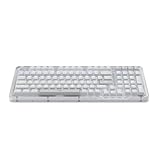
The Logitech Alto Keys K98M features a clean, minimalist design that highlights its hardware, features, and build quality. The transparent outer shell showcases the underlying gasket-mount design, which features a large UniCushion-like pad that absorbs vibrations, delivering the cushiony, rattle-free feel we're seeing in modern premium keyboards. For a mechanical keyboard, a gasket-mount is when the PCB is suspended between layers of foam or silicon instead of being screwed directly into the base or case. It's not common, and you're more likely to find it on a premium custom board than on a $100 offering from a major brand like Logitech.

In addition to showcasing the UniCushion silicon layer, the transparent outer shell contrasts well with the keycaps, which come in three base colors: graphite (black), lilac (purple), and white. All three options include grey-colored keycaps for the Spacebar, Enter, Escape, and some of the system keys, a stylistic touch that gives Logitech Alto Keys K98M some character. The keycaps are all PBT, so they feel premium, and the shine-through effect lets the white LEDs deliver a nice underglow. There's no per-key lighting or RGB here, with white-colored lights feeling as far from the gaming keyboard rainbow effect as you can get.
When it comes to the physical design of the Logitech Alto Keys K98M, the last major piece of the puzzle is the hot-swappable Marble Linear mechanical switches. Having hot-swappable switches is a definite plus, and the Logitech Alto Keys K98M is compatible with all standard MX-type switches. Interestingly, Logitech's Marble switches have an acoustic profile that was louder than expected. Given that the Alto Keys K98M is a productivity board and the UniCushion design resembles a large silicone pillow, we were half-expecting a quiet or near-silent sound, but that's not the case. They're not loud by any stretch, and the overall acoustics are uniformly crisp and pleasant thanks to the gasket-mount.
Our Latest Keyboards Review Coverage
- Corsair CLIPPER PRO MINI 60 Hall Effect Gaming Keyboard Review - Small and Mighty
- Logitech G316 X 98 Wired Gaming Keyboard Review - Retro-Inspired Board that Falls a Little Short
- Logitech G512 X 98 Analog Mechanical Gaming Keyboard Review - An Innovative Two-in-One
- IQUNIX Magi96 Pro Aluminum Low Profile Mechanical Keyboard Review - Premium Build, Satisfying Sound
- Razer Pro Type Ergo Wireless Split Ergonomic Keyboard Review - Built for Comfort and Support

Logitech claims that the Alto Keys K98M offers up to 12 months of battery life on a single charge when the backlighting is turned off. Although we've only been using it on and off for a few weeks for this review, we've yet to plug it in for a charge, even with the lighting turned on at a relatively low brightness. Which is a plus, as we were also surprised to learn that the Alto Keys K98M is wireless-only, with low-latency 2.4 GHz via the Logi Bolt USB receiver and Bluetooth as your two connectivity options. That said, it's an impressively versatile keyboard, with the option to seamlessly switch between three connected devices - which can be a PC, laptop, iPad, Mac, Linux device, or anything else that supports Bluetooth keyboards.
Although the lack of nice-to-have features like dedicated media keys or even a wrist rest (we would have loved a UniCushion for our palms), one key feature of the Alto Keys K98M that sets it apart from other productivity keyboards is its customizable keys, which can be adjusted via the simple-to-use Logi Options+ App.
Software
When it comes to the breadth of customization options that you normally find with a mechanical keyboard, namely the ability to remap keys, set up different profiles, and record macros, all of that is either absent with the Logitech Alto Keys K98M or handled completely differently. And yet, the Logi Options+ App offers impressive customization options tailored to productivity and non-gaming tasks. In terms of the keys that you can remap, you're limited to the F4 to F12 function keys and the three top-right system keys.


Designed for simplicity and function, most in-depth remapping is handled by Smart Actions, custom macros that streamline a sequence of events. Some of the pre-programmed examples on offer include 'Meeting Mode', which opens Zoom and brings it to the foreground, and opens Notepad for note-taking; and 'Select and Search', which copies the highlighted text and opens a new Google tab in your browser to search for that text. With productivity, leisure, creator, and other categories of Smart Actions, the depth is impressive. You can even create your own Smart Actions through a simple process, and it's an impressive, intuitive take on macro recording. That said, you need to be logged in to a Logitech account to access this feature.


In addition to Smart Actions, there's also an AI Prompt Builder mode to connect the keyboard directly to GPT or Gemini for summaries, drafting responses, and other general AI tasks. Again, it's impressive but also limited. In addition to Smart Actions and limited remapping, you can adjust the overall brightness of the lighting and battery-saving features, such as when lighting should automatically turn off (the default is 30 seconds), and manage the Easy Switch Bluetooth devices paired with the keyboard. There's also the ability to turn off certain keys, mimicking 'Game Modes' for other keyboards, and a handy option that lets you switch the Function keys' primary and secondary functions around, which is handy for getting dedicated media controls.
Productivity and Gaming Performance
As a pure productivity board that pairs nicely with Logitech's custom software, for this review, I set up a basic productivity 'Begin the Day' Smart Action that would open up a bunch of different tabs, Gmail, Google Docs, TweakTown admin-related things, and even my dedicated music player. The fact that it only took a minute to set this up was impressive, and it's a testament to the Logitech Alto Keys K98M being a great productivity keyboard if you take full advantage of the Logi Options+ App. The app's clean interface and responsive menus are also a plus.

As for the Marble switches, the linear responsiveness is similar to other MX Red-style switches on the market, but the gasket-mount adds a rattle-free, smooth typing experience. When paired with PBT keycaps and a full-size layout that includes the NumPad, it's a solid mechanical keyboard for everyday use, though we wish it included a wrist rest for added comfort. That, and a programmable control knob, which we feel is becoming a must-have feature for productivity keyboards.
Gaming Productivity
The Logitech Alto Keys K98M, with its linear switches and PBT keycaps, has no real issue doubling as a gaming keyboard. However, without a dedicated wired mode, the overall wireless latency doesn't feel as consistent as that of many wireless gaming keyboards, including Logitech options. This isn't to say that it can't be used for both gaming and productivity. But, if you're serious about competitive shooters like Counter-Strike 2 and Overwatch, you're probably better off going the pure gaming route, where low-latency 1,000 or even 8,000 Hz polling rates offer better overall latency.
Keyboard Click Sound Level
To test a keyboard's overall sound level, we use the Ozito Digital Sound Level Meter, capturing the sentence "the quick brown fox jumps over the lazy dog" multiple times and recording the maximum dB level. This indicates how "loud" the switches used are for everyday usage. The following chart showcases where the Logitech Alto Keys K98M sits.

Final Thoughts
The Logitech Alto Keys K98M Wireless Mechanical Keyboard, paired with the Logi Options+ App, delivers on its promise as a versatile, high-performance keyboard with smart features. Although the customization options are limited compared to most mechanical keyboards, the focus on Smart Actions and tailored-to-you shortcuts offers a simple way to expand what a traditional keyboard can do. And when it comes to hardware, the Alto Keys K98M absolutely delivers thanks to the UniCusion gasket-mount design, hot-swappable switches, PBT keycaps, and robust build quality.

One thing the Logitech Alto Keys K98M Wireless Mechanical Keyboard isn't is a jack-of-all-trades; it isn't the ultimate productivity keyboard (the limited customization is the biggest roadblock here, as well as the lack of a programmable control knob), nor is it a keyboard that excels at both gaming and productivity. However, it's still an impressive offering, blending smart features with great hardware at a price point that makes it a definite value winner. It's also versatile and the sort of wireless keyboard you can pair with just about any device, while offering exceptional battery life, which means you don't really have to charge it all that often.