









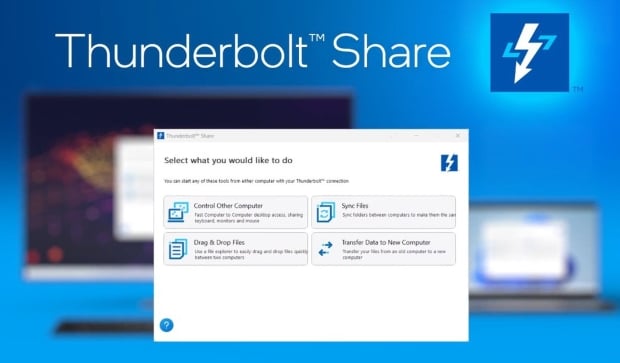




Intel has just launched a proprietary app that allows you to install it on Thunderbolt 4 or 5 compliant systems, connect them with a Thunderbolt cable, and share your mouse, keyboard, storage, screens, USB peripherals, and more... it's called Thunderbolt Share.
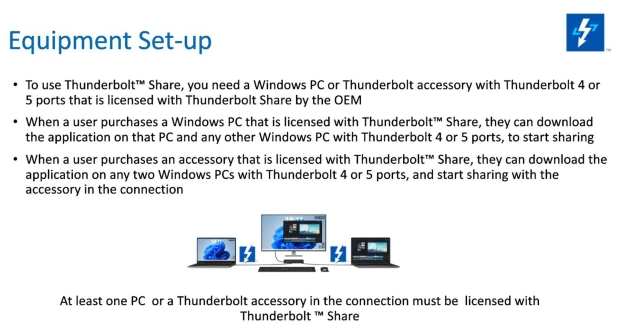
Thunderbolt Share will allow you to use the huge bandwidth available to Thunderbolt 4 -- 40Gbps right now -- between two PCs connected over Thunderbolt, which is kinda nifty. Intel says that you can mirror one PC's screen to another at 1080p 60FPS with low latency and zero compression. PCs can connect through a Thunderbolt dock or monitor, if that's easier than a direct link.
Intel explains that you don't need a Thunderbolt-certified PC for Thunderbolt Share to work, you actually don't even need an Intel processor. Intel Thunderbolt boss Jason Ziller explains that "USB 4 and Thunderbolt 3 connections may work, we just really don't guarantee it, we won't be providing support for it".
However, you will need an app that Intel will be charging OEMs an extra license fee for to provide exclusively with new hardware. The new Thunderbolt Share app is an upsell for PC manufacturers, with Ziller saying Intel wants to test and certify it throroughly with them "to make sure it's a great experience".
Acer, Lenovo, MSI, and Razer are the first PC partners for Intel Thunderbolt Share, with accessory vendors Belkin, Kensington, Plugable, and Promise Technology.
A few benefits of Thunderbolt Share:
- Super fast connection with high bandwidth and ultra-low latency using standard Thunderbolt cables
- Fast PC-to-PC access for securely sharing screen/monitor, keyboard, mouse and storage
- Quickly transfer data and files from an old computer to a new computer
- Sync folders or drag-and-drop files between PCs with the speed of Thunderbolt
- Hardware-based security - SMB/commercial friendly
- Offered with select new Thunderbolt-enabled PCs and accessories, and works with all Thunderbolt 4 or Thunderbolt 5 products on Windows OS


 Razer intros Thunderbolt 5 Dock and Core X V2: ultra-fast external GPU enclosure for $350
 OWC unveils Thunderbolt 5 products ready for Apple's new M4-powered Mac mini, MacBook Pro
 Razer's new Core X V2 external Thunderbolt 5 GPU enclosure now available, costs $350
 SCHENKER KEY 17 Pro: desktop replacement laptop: dual Thunderbolt 5 ports, 80Gbps bandwidth
 Intel Arrow Lake confirmed Thunderbolt 4 support with 40Gbps transfer speed
 Assassin's Creed Hexe to be revealed 'relatively soon' according to insider
 LG claims that you can improve your aim by up to 38% by playing on a 480Hz OLED monitor
 Pixel 11 Pro Fold leak may reveal Google's next big foldable upgrade
 Sony's $500 million lawsuit heats up after choice to end PlayStation disc production
 Spacecraft confirmed to be approaching one of Earth's seven mysterious 'quasi-moons'
 AI models could soon get cheaper as OpenAI, Meta, and xAI enter a new price war
 SAP escapes EU penalty by easing customer lock-in concerns
 Cursor builds AI agent 'Sand' to rival Anthropic's Claude Cowork
 PocketMage is a distraction-free pocket computer with a wizard-themed operating system
 Samsung is holding your health data hostage to train its AI
 MOZA FMP18 Panel Bundle Review: authentic F/A-18 Hornet cockpit controls for flight sims
 Micron 6600 ION 245.76TB Enterprise SSD Review - Best in Class Programming Speeds
 MOZA MA3F EFCM Flight Control Module Review: authentic Airbus A320 autopilot panel for simulators
 Turtle Beach Stealth Pro II Wireless Gaming Headset Review - Premium Sound, Fantastic Features
 MOZA MGX1000 Instrument Panel Review: a realistic Garmin G1000 replica for immersive flight sims
 Simagic Zeus Formula Steering Wheel Review: premium build and advanced inputs for F1 racing
 GIGABYTE X870E Aero X3D Dark Wood Review - A woody goody
 The Super Mario Galaxy Movie (2026) 4K Ultra HD Blu-ray Review
 KTC H49S66 5K2K (5120x1440) 49-inch 180Hz Gaming Monitor Review
 HighPoint Rocket 1604L Gen5 x16 NVMe Software RAID AIC Review: half the price with full 59 GB/s speed
 I stopped digging through Windows menus after I set up this one folder
 Don't sell your Windows laptop until you do these things
 6 PC cleaning mistakes to avoid for safer hardware maintenance
 Phison and Intel Take Aim at Local AI's Memory Wall with aiDAPTIV
 How to Remap Keyboard Keys in Windows using Microsoft PowerToys
 7 tips to organize your Windows files for faster, easier access
 Intel Arc G3 Extreme first impressions with MSI's Claw 8 EX AI+ - Incredible power for an extreme price
 How to fix Wi-Fi Adapter Not Working on Windows laptops: troubleshooting tips
 Hisense U7SG 4K TV: Modern Entertainment for the New Age
 6 underrated Microsoft Word features worth using to boost your productivity