

Introduction
 25
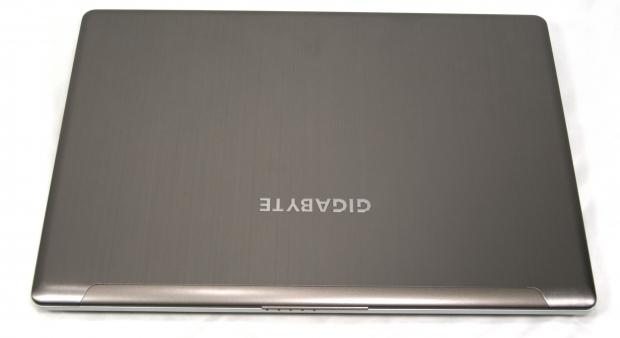
25Today in the lab I have one of GIGABYTE's latest Ultrabooks. To be classified as an Ultrabook, the notebook has to meet certain specification criteria as set forth my Intel, the champion of the form factor. In exchange, Intel has been advertising the Ultrabook form factor and has set aside money to help companies engineer Ultrabooks.
Specifications for an Ultrabook include size, weight, boot time, and others, but not present is the requirement for a discrete video card. Due to the size and weight restrictions, most Ultrabooks don't include a discrete GPU, something that this offering does.
The GIGABYTE U2442F is going to be one of the best choices in the Ultrabook category if you want to be able to do any sort of modern gaming. Thanks to its discrete GPU, it can hang with systems that outweigh and outclass it.
During our testing, you'll want to keep an eye on how the GIGABYTE U2442F compares to the HP Folio 13 and ASUS S56C as they are both Ultrabooks. Based upon price, you'll want to compare the U2442F against the GIGABYTE P2542, as they are roughly the same price.
With the introduction out of the way, let's move on to the specifications.
Specifications, Configurations, Pricing and Packaging
 25
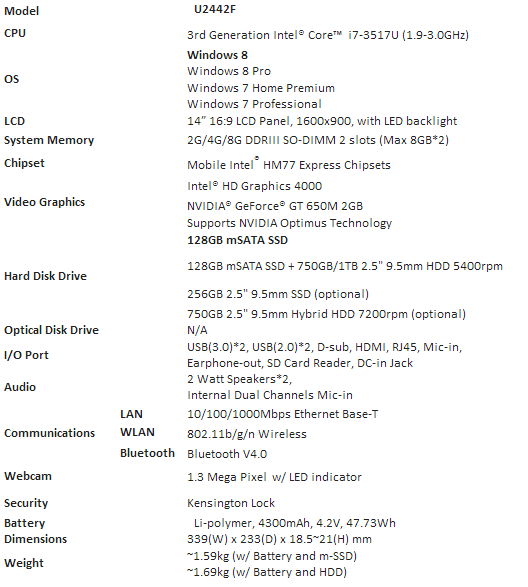
25The system we have in the lab today features a dual-core Intel Core i7-3517U processor. The i7-3517U is one of Intel's low power processors specifically designed for Ultrabooks and other low-power applications. It features HyperThreading and TurboBoost and is based upon the Ivy Bridge microarchitecture.
The CPU is coupled with two sticks of 4GB DDR3 SO-DIMM RAM and an NVIDIA GeForce GT 650M, which features 2GB of vRAM. Seeing a discrete video card included in an Ultrabook is somewhat rare, especially one with as much horsepower as the 650M.
The video card is pumping out pixels to the LCD screen that is running at a 1600x900 resolution. Storage is handled by a 128GB mSATA SSD, which aids in speedy booting and system operation.
The U2442F comes with everything else you would expect to see in an Ultrabook: 802.11b/g/n WiFi, Bluetooth 4.0, Windows 8, and a backlit keyboard. The system also features a two year global warranty.
Packaging
The packaging used to ship the notebook from Taiwan was a bit interesting. The system was wrapped in bubble wrap, though I don't expect consumer systems to arrive this way.
 25
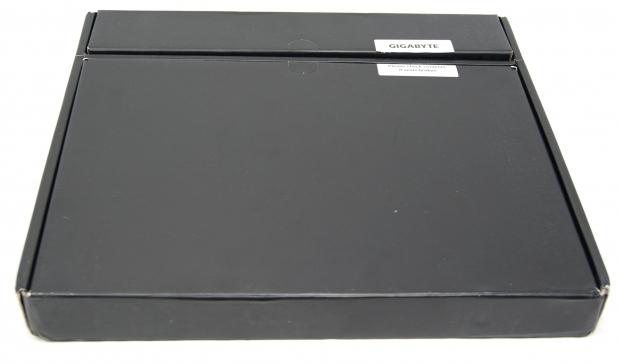
25Inside the bubble wrap, the box below was inside of a paper sleeve detailing the system. Inside of the box, the system was covered in a traditional white bag to protect from scratches.
 25
25It seems as though the packaging was a bit weak, but I have a feeling retail systems will be shipped inside of another box to protect them. If this is the case, then the machine will survive. If GIGABYTE is shipping machines in just the sleeve, I'd be a bit concerned.
Temperatures, Cooling and Noise
The drawbacks of shoving a discrete video card into an Ultrabook chassis include shorter battery life and more heat, two things that a company has to be cognizant of when making the choice of what discrete GPU to use.
The NVIDIA 650M used by GIGABYTE is the same GPU that I have in my personal laptop. My personal laptop is much thicker, yet it still gets really hot. Part of this is due to the quad-core CPU, but some of it can be attributed to the GPU.
 25
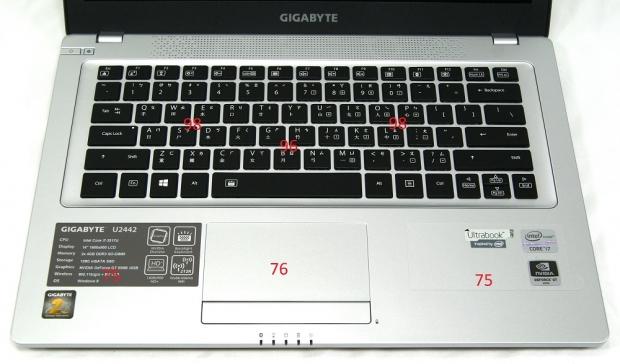
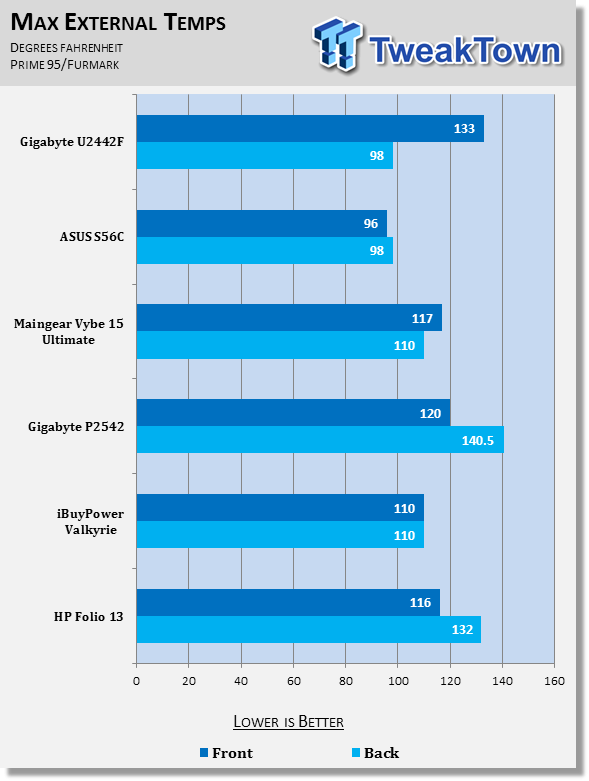
25As you can see, on the front of the system, we logged a maximum temperature of 98 degrees Fahrenheit. This high temperature was located directly in the middle of the WSAD keys. The palm rests stayed a cool 75 degrees Fahrenheit. This is likely due to having a solid state drive, which produces minimal heat compared to a traditional disk drive.
 25
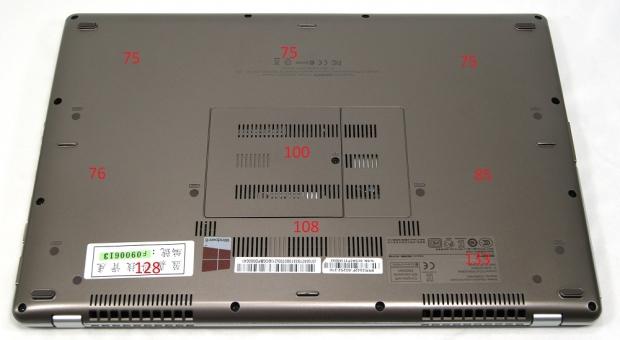
25Moving around to the back side, temperatures were even higher. The maximum observed temperature was 133 degrees Fahrenheit. This was observed directly above hot air exhaust port. The rest of the system ranged from 75 degrees to 108 degrees Fahrenheit. All of the hotter temperatures were towards the back of the system where the processor, GPU, and heatsink assembly are located.
 25
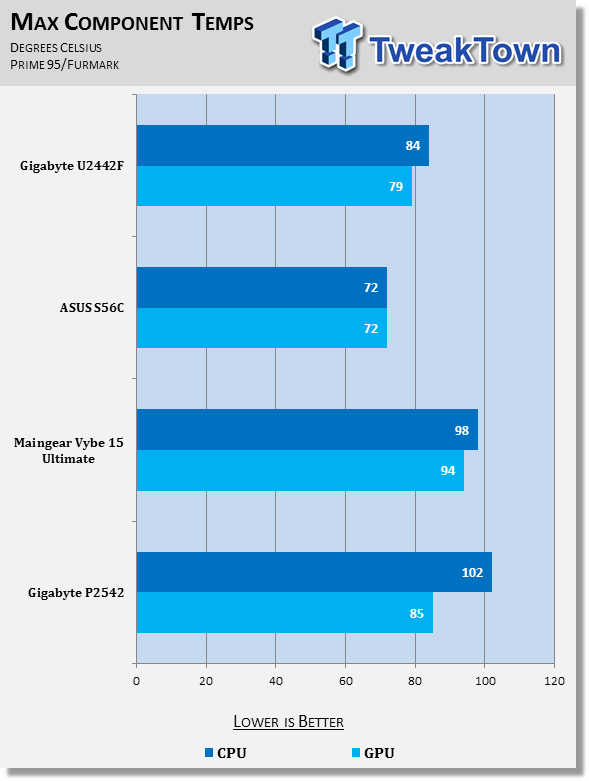
25The maximum observed GPU temperature was 79 degrees Celsius, a temperature well within the limits for a video card. The CPU reached a maximum of 84 degrees Celsius, a temperature that is on the high end of what a CPU should be running at, but still within a safe limit.
 25
25While gaming, one should avoid using this notebook on their laps, due to the high heat registered on the back near the exhaust vents. Normal web surfing or other low power tasks should be fine to use on the lap or other soft surface.
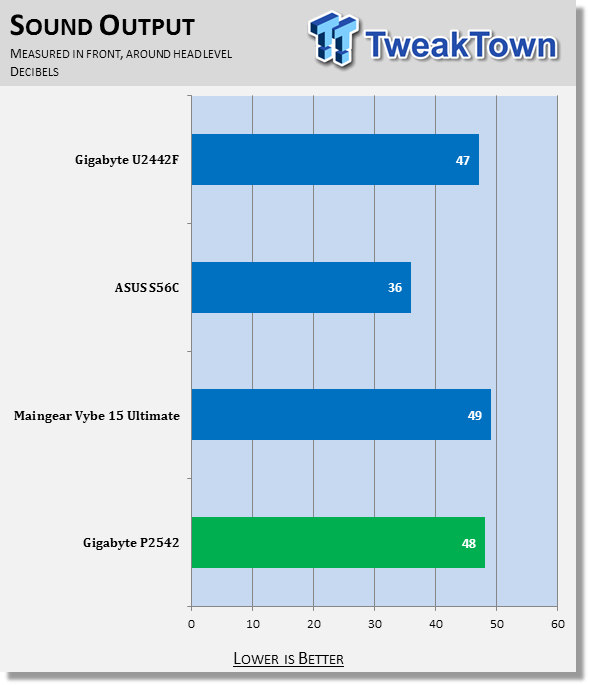
The GIGABYTE U2442F produced a sound level of 47 decibels in our measurement. Our measurement is taken in front of the laptop at roughly head level. For comparison, 30dB is a totally quiet night time in the desert, 40dB is whispering and 60dB is a normal conversation.
 25
25Keyboard, TouchPad, Screen and other User Interfaces
Keyboard and TouchPad
 25
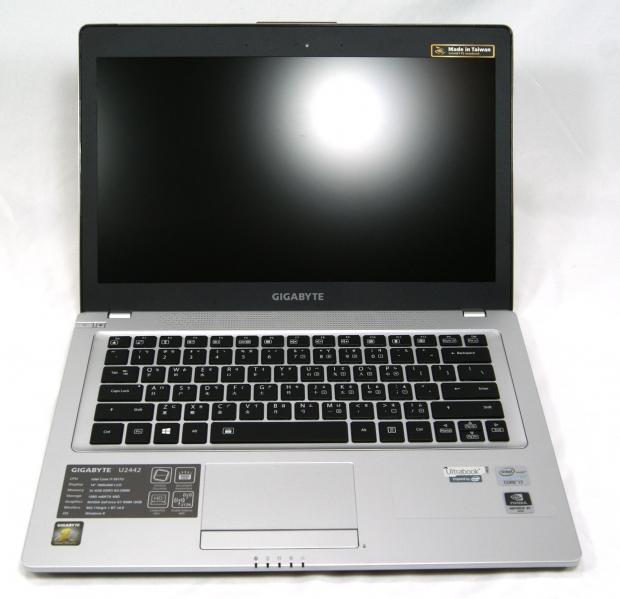
25The GIGABYTE U2442F in the lab today has an international keyboard installed, due to the fact it came out of Taiwan. The keyboard is of the standard island style that has become so popular as of late and is not one of the best ones I have used.
There is basically no flex over the entire range of keys, which helps the typing experience. However, it produces a very annoying tinny sound when keys are pressed. It's not oppressively loud, but it certainly was like fingers on a chalkboard to me.
The keys have a matte texture on the surface and appear to be perfectly flat. The keys have a smooth travel when typing, but seem to feature a slightly shorter travel distance. I would guess that the shorter throw is due to the engineers saving thickness on the unit.
One nice aspect of the keyboard is the inclusion of a backlit keyboard. For whatever reason, backlighted keyboards are still a premium feature, and with this Ultrabook being a premium device, the lack of a backlight would have really hurt it.
The touchpad is a two-piece assembly. The touchpad portion and click buttons are two different pieces. The left and right click buttons are a single piece of plastic, which makes clicking towards the middle somewhat difficult. I'd prefer two separate and distinct buttons for left and right click.
The touch-sensitive area of the touchpad has small bumps over the surface, which sets the touch-sensitive area off from the rest of the system. The bumps make it so you can tell when you are on the touchpad since it is not recessed.
Screen
GIGABYTE has fitted the U2442F with a 14-inch 1600x900 screen. The screen is an LCD version and features a matte coating so as to reduce glare. As with most matte implementations, it has a slightly grainy texture, though it's basically not noticeable when using the screen.
Unfortunately, the GIGABYTE U2442F has a pretty poor panel. Viewing angles are quite small, with color distortions happening fairly rapidly when you move your head left or right or up or down.
Colors are vibrant and seemingly well reproduced. Of course, no TN panel will ever be able to compete with an IPS on viewing angle or color reproduction. There shouldn't be any surprises when looking at pictures on the screen, and games look good.
Testing Methodology
View our full testing methodology article.
- Accessory Port Testing
Ports to which an external storage device can be connected to are tested using HD Tune Pro to obtain their maximum, minimum and average read and write speeds. USB 2.0, USB 3.0 and eSATA ports are tested using a Corsair Neutron GTX 240GB SSD that is capable of saturating the theoretical bandwidth available.
The Corsair Neutron GTX is housed inside an Icy Dock external enclosure which features a SATA I/II/III to USB 3.0 and eSATA converter.
- Gaming Tests
3DMark Vantage is ran on the Performance preset to get a feel for how the computer would manage gaming. The CPU, GPU and combined scores are reported. A higher overall score is the best and a high GPU or CPU score shows particular prowess with tasks that use that part of the computer.
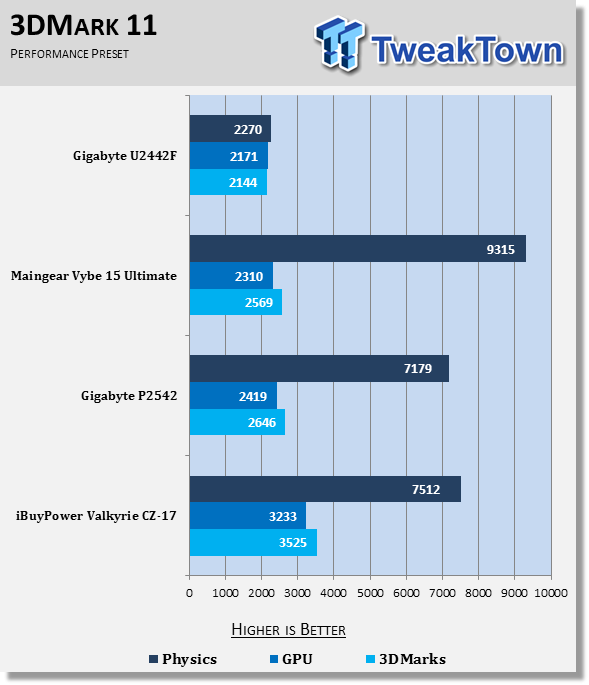
3DMark 11 is run on the Performance preset and the Physics, GPU and combined scores are reported. This test is only run if the system supports DirectX 11. A higher overall score is the target, though a high individual result shows prowess in a particular area.
- System Tests
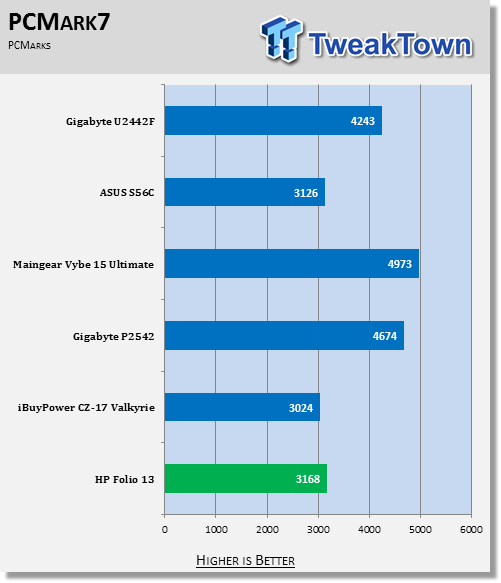
PCMark 7 is run to get an overall idea of how the system performs as a whole. It tests all aspects of the PC and puts a score on how well it performs overall. In this test, a low scoring area can affect the overall score, so it's important to read the analysis. A higher score is better.
MobileMark 2012 is another test run to get a feeling for the system performance taken as a whole. MobileMark 2012 uses real-world applications as part of the benchmark. We use the Office Productivity suite which includes applications like Adobe Acrobat and Microsoft Word. The test also reports battery life as all tests are run on battery. Higher is better for both results.
CrystalDiskMark is run to put a number on how well the system hard disk drive / SSD runs. It measures five different metrics, of which higher is better for all. The higher the numbers, the snappier the operating system will feel, especially if the "4K" number is high, as most operating system files are small files.
- Battery Life
PowerMark is used to measure battery life of the system when set to "Balanced" and "Performance" power plans. This test simulates several different activities, but uses custom built applications.
Accessory Port Layout and Performance
 25
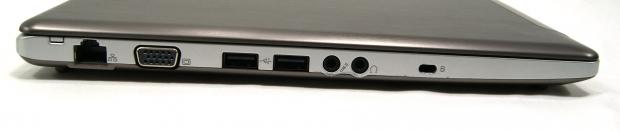
25The left side, from back to front, features the Ethernet port, VGA port, two USB 2.0 ports, microphone and audio jacks and Kensington lock.
 25
25The right side, from back to front, features the power port, an HDMI port, two USB 3.0 ports and an SD card reader.
HD Tune Pro
Version and / or Patch Used: 5.00
Developer Homepage: http://www.efdsoftware.com
Product Homepage: http://www.hdtune.com
HD Tune is a Hard Disk utility which has the following functions:
Benchmark: measures the performance
Info: shows detailed information
Health: checks the health status by using SMART
Error Scan: scans the surface for errors
Temperature display
HD Tune Pro gives us accurate read, write and access time results and for the last couple of years has been gaining popularity amongst reviewers. It is now considered a must have application for storage device testing.
 25
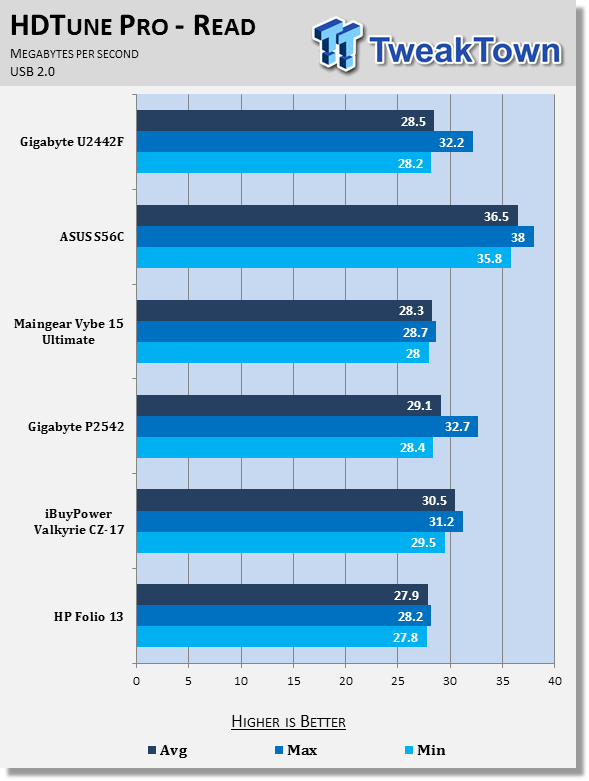
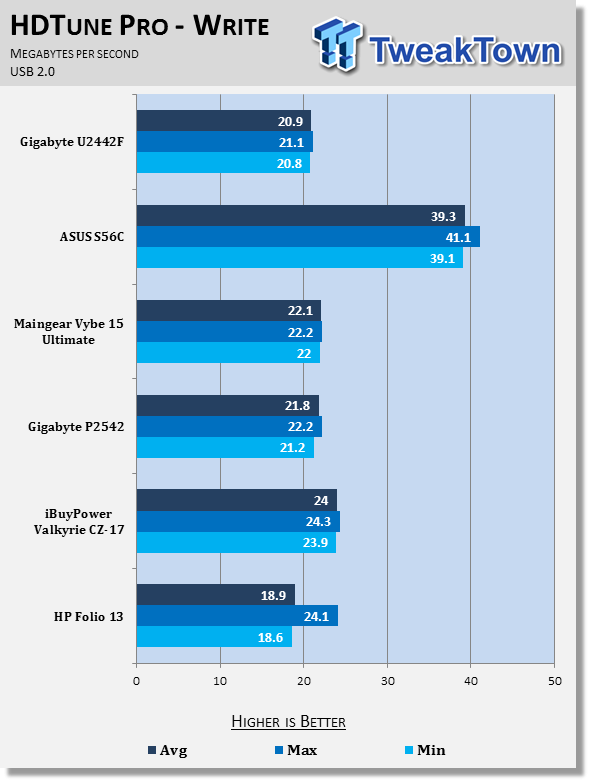
25The GIGABYTE U2442F's USB 2.0 implementation doesn't really offer any surprises. It runs in a similar range as the other comparison systems and averages out to be towards the bottom, but not by much.
 25
25Again, nothing exactly surprising or exciting happening with the U2442F's USB2.0 write performance. The system manages an average of 20.9MB/s, which is again towards the end of the pack, but not by a lot.
 25
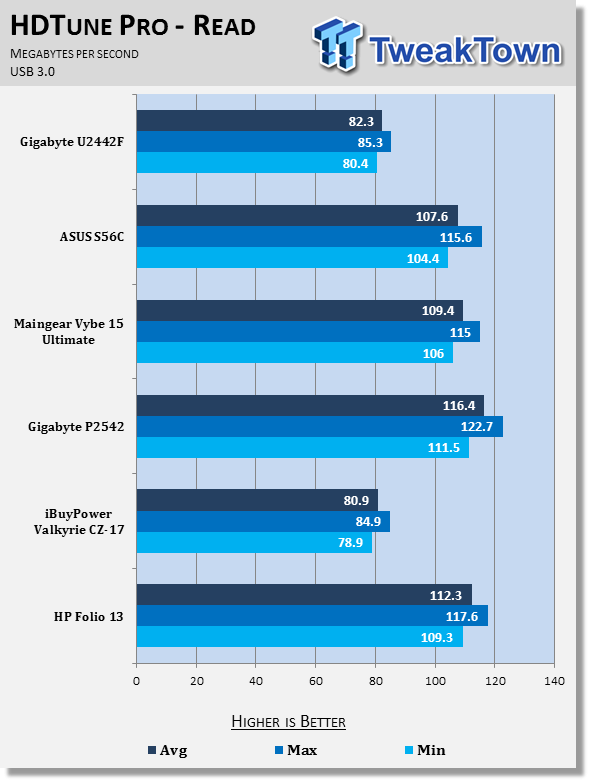
25Moving to USB 3.0, however, the GIGABYTE U2442F starts to fall behind. While not the slowest we have tested, it's pretty close to it and is over 20MB/s slower than the fastest unit we have tested.
 25
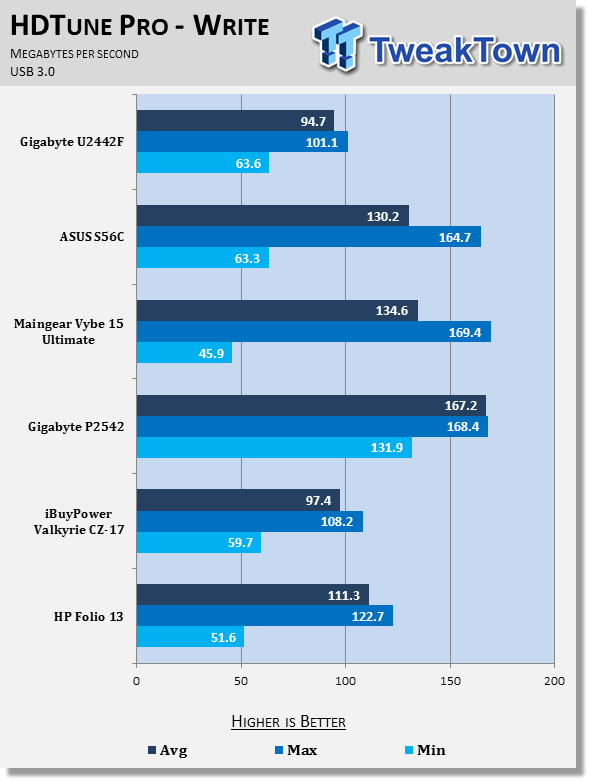
25When it comes to write performance, the GIGABYTE U2442F continues the trend. It produces a write speed of 94.7MB/s, which is the slowest tested so far. It's just more than half as fast as the fastest unit we've tested, the GIGABYTE P2542G.
Gaming Performance
3DMark Vantage
Version and / or Patch Used: 1.1.0
Developer Homepage: http://www.futuremark.com
Product Homepage: http://www.3dmark.com/3dmarkvantage
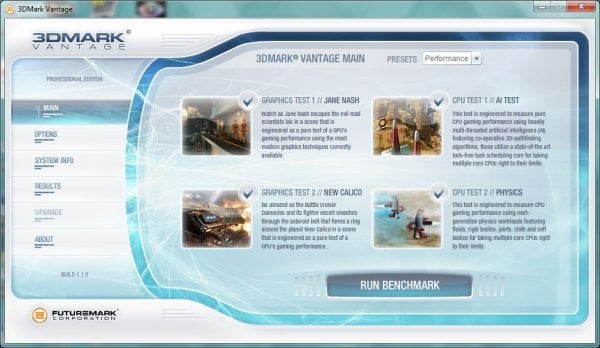
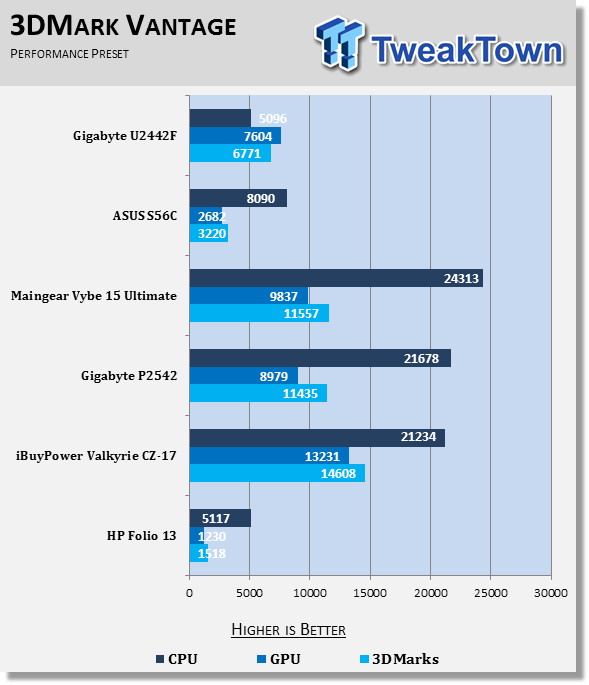
3DMark Vantage tests both processor and graphics performance and is a good indication of how systems compare. The results are generally more repeatable and consistent than other forms of benchmarking. Vantage uses DirectX 10 and can handle multi-core CPUs.
 25
25The GIGABYTE U2442F is an Ultrabook, and that needs to be kept in mind while looking at the following results. Compared to the other Ultrabook's we've tested, the U2442F blows them all out of the water, doubling the score of the S56C and quadrupling the score of the Folio 13. Keep in mind that the U2442F is twice the price of the S56C.
Looking at individual scores, the ASUS S56C actually beats the U2442F in the CPU test, but loses out in the graphics and overall scores. Comparing just graphics scores, the U2442F isn't too far off some of our other test systems, such as the P2542, but with only a dual-core CPU, the overall score doesn't reflect this.
3DMark 11
Version and / or Patch Used: 1.0.1.0
Developer Homepage: http://www.futuremark.com
Product Homepage: http://www.3dmark.com/3dmark11
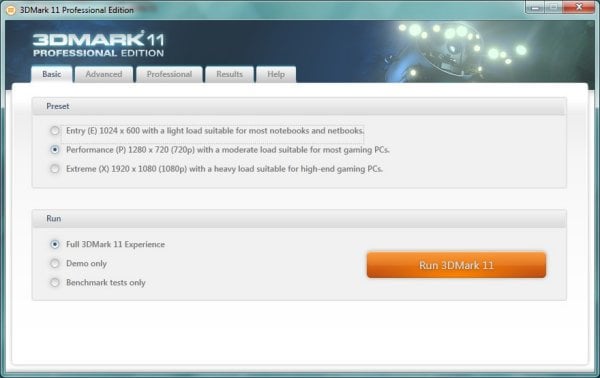
3DMark 11 is the latest version of the world's most popular benchmark. Designed to measure your PC's gaming performance 3DMark 11 makes extensive use of all the new features in DirectX 11 including tessellation, compute shaders and multi-threading. Trusted by gamers worldwide to give accurate and unbiased results, 3DMark 11 is the best way to consistently and reliably test DirectX 11 under game-like loads.
 25
25Due to the inclusion of a discrete GPU, this Ultrabook will get the pleasure of running 3DMark11. This means it is up against some stiff competition as only gaming notebooks had previously been tested.
As you can see, the overall score isn't too far off of a gaming machine (2144 vs 2569). CPU scores are definitely a far cry, again due to the dual-vs-quad issue.
GPU-wise, the system hangs with some of the smaller gaming machines we've tested that use the 660M, a slightly better version of the 650M.
System Performance
PCMark 7
Version and / or Patch Used: 1.0.4.0
Developer Homepage: http://www.futuremark.com
Product Homepage: http://www.pcmark.com/benchmarks/
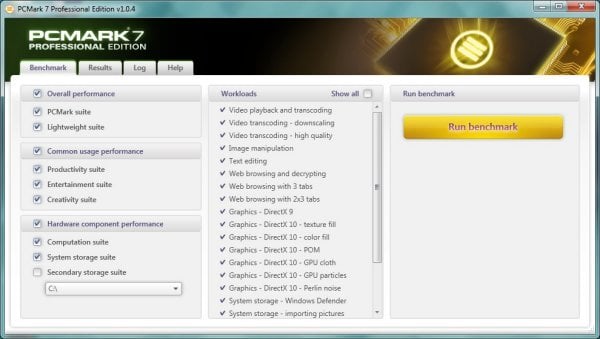
PCMark 7 is a great utility for testing a PC's all-around capabilities. It tests all aspects of the computer, from graphics performance to hard disk performance and attempts to put a score on it, which is not an easy task.
 25
25PCMark 7 shows that the GIGABYTE U2442F is a good all-around machine. A score of 4243 is only 700 below the highest machine tested and is well above some of the other machines tested. The SSD is partially to thank for this high score, as the machines without one tend to be at the bottom of the test results.
Mobile Mark 2012
Version and / or Patch Used: 1.0.0.118
Developer Homepage: http://www.bapco.com
Product Homepage: http://bapco.com
MobileMark 2012 is a premier benchmarking tool produced by BAPCo. It has several different scenarios built-in and allows you to choose which to run. It runs the test on battery life so that it produces both a score for the performance aspect and a run time for battery life.
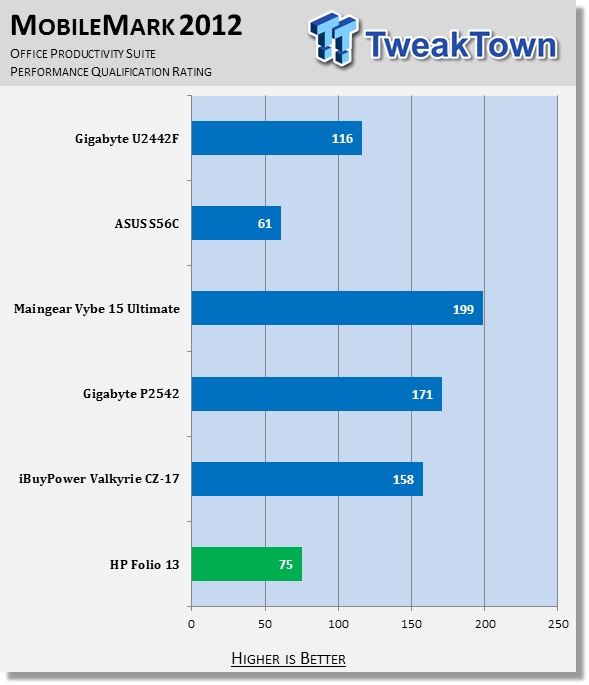
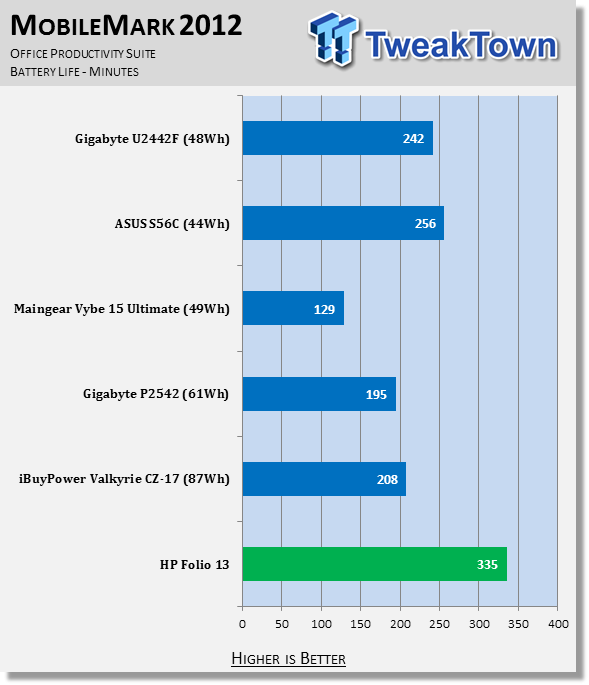
For our testing, we chose the Office Productivity line of testing. The "Performance Qualification Rating" and battery life (in minutes) is reported below in the charts.
 25
25A dual-core is never going to be as powerful as a quad-core, given they are the same generation, but that doesn't mean that it isn't a capable processor. The U2442F averaged a score of 116 in our Office Productivity test, which easily smashes the other Ultrabooks. While it's unable to hang with the higher-powered gaming machines, it certainly is the best Ultrabook we've tested.
 25
25All of this performance comes at a price. The battery is slightly larger than the ASUS S56C, yet the battery life is 14 minutes shorter. The discrete GPU is supposed to turn itself off when not in use, but during parts of the benchmark where it is used, it really sucks the power.
CrystalDiskMark
Version and / or Patch Used: 3.0 Technical Preview
Developer Homepage: http://www.crystalmark.info
Product Homepage: http://crystalmark.info/software/CrystalDiskMark/index-e.html
Download here: http://crystaldew.info/category/software/crystaldiskmark
CrystalDiskMark is a disk benchmark software that allows us to benchmark 4K and 4K queue depths with accuracy.
Key Features:-
* Sequential reads/writes
* Random 4KB/512KB reads/writes
* Text copy
* Change dialog design
* internationalization (i18n)
Note: Crystal Disk Mark 3.0 Technical Preview was used for these tests since it offers the ability to measure native command queuing at 4 and 32.
 25
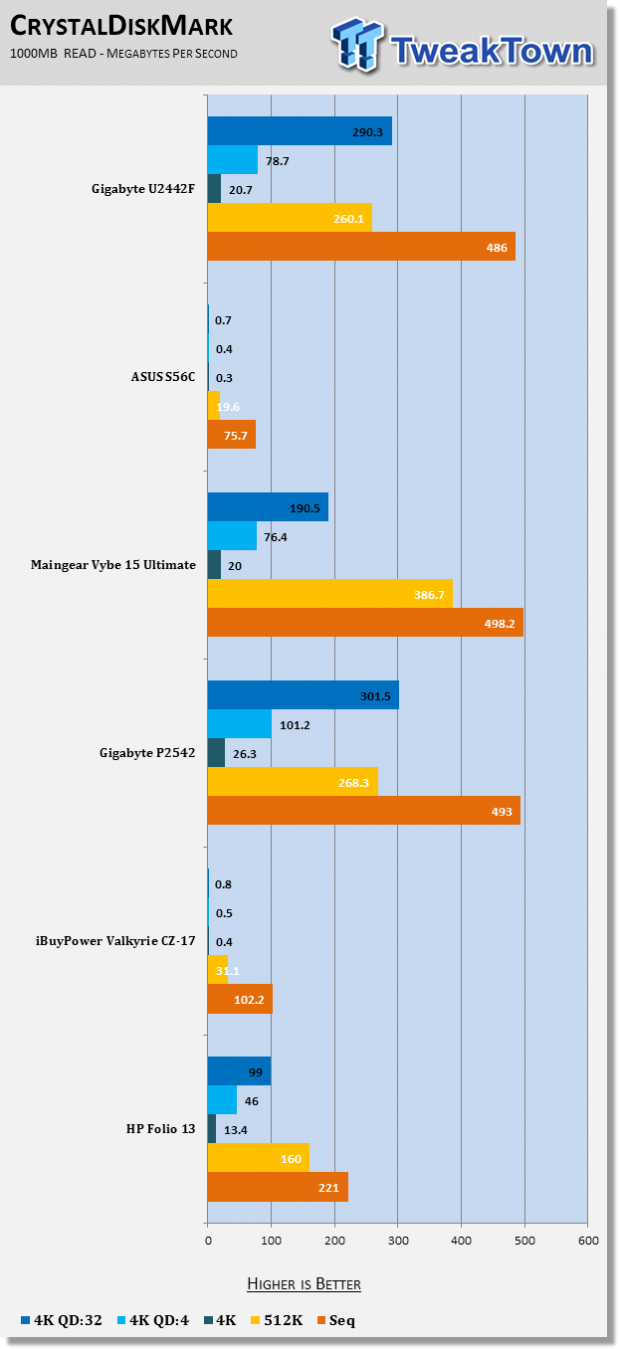
25The mSATA solid state drive that GIGABYTE included in the U2442F is quite fast. It manages a sequential read of 486MB/s, which is close to the two other fastest systems. Looking at the 4K test, it manages 20.7MB/s, which is just behind the 26.3MB/s produced by the GIGABYTE P2542G.
 25
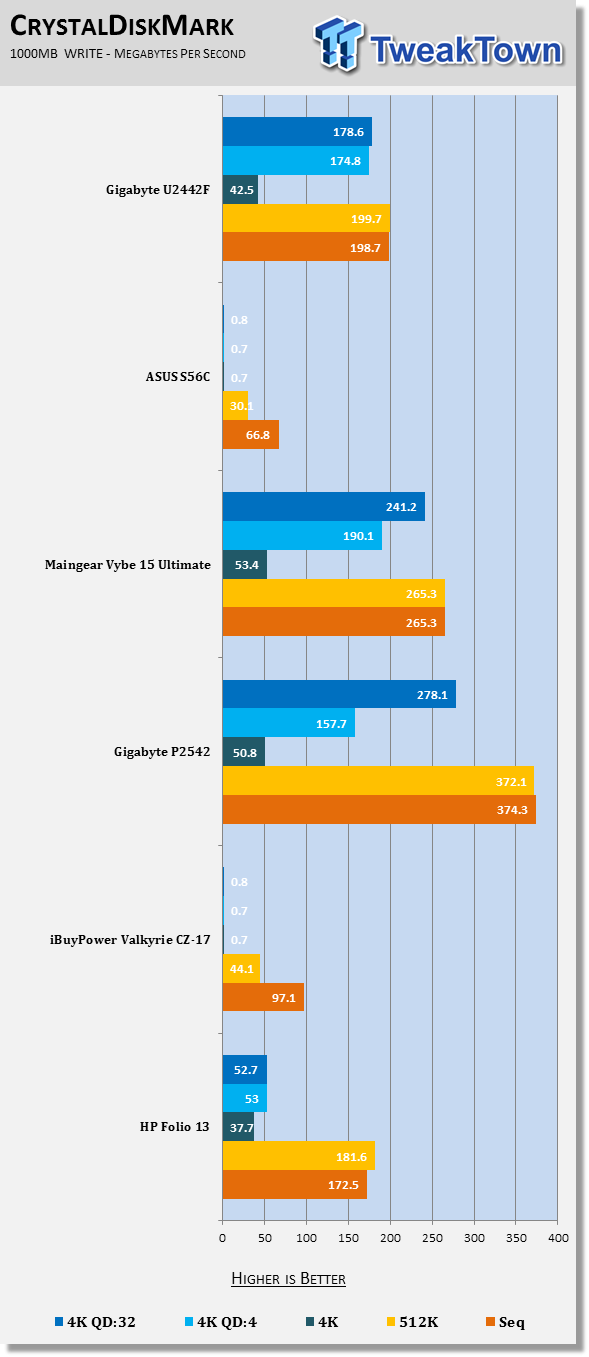
25Write speeds follow the same trend. The U2442F manages 198.7MB/s, behind the 374.3MB/s of the P2542G. At the 4K test, the U2442F puts up 42.5MB/s, which is just behind the 53.4MB/s of the Maingear Vybe.
Battery Life Performance
PowerMark
Version and / or Patch Used: 1.1.1
Developer Homepage: http://www.futuremark.com
Product Homepage: http://www.futuremark.com/benchmarks/powermark/
Download here: http://www.futuremark.com/benchmarks/powermark/
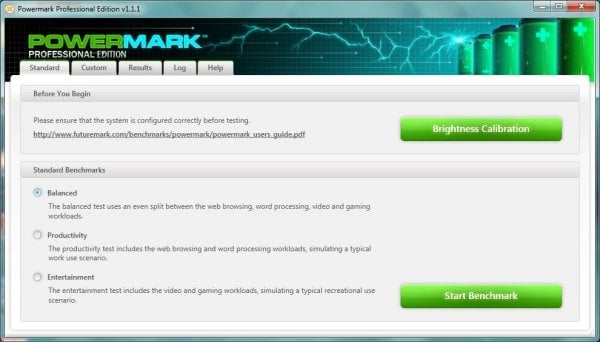
PowerMark is a benchmark produced by Futuremark that simulates different usage scenarios in order to determine battery life. It loops these different scenarios infinitely until the battery hits 15% and then gives us an estimated battery life time. For our testing, we use all four different scenarios. These are video playback, gaming, web browsing and word processing.
Tests are ran twice, once with the computer's Power Options set to Balanced and another with the computer's Power options set to High Performance.
 25
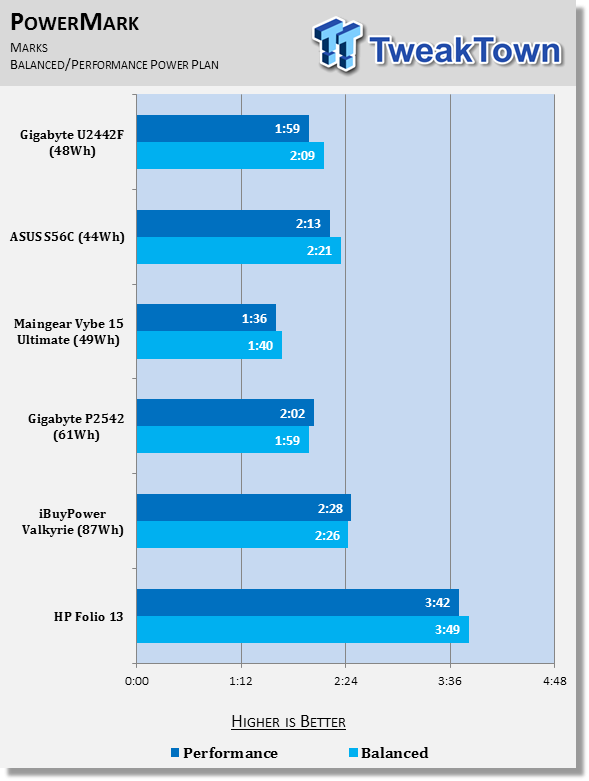
25Here again, the U2442F follows the trend set in MobileMark. While it performs higher, it does this at the cost of battery life. The system manages to run for 2 hours and 9 minutes on the Balanced power plan, which the S56C manages 12 minutes longer with a smaller battery.
The Folio 13 still features the longest battery life of any system we've tested. If you're going to need to use a system all day, the U2442F might not meet your needs due to a somewhat short battery life.
Final Thoughts
So, we've taken a look at the hard data and have seen some very curious and interesting results. Through all of our testing, this machine has shown top-notch performance, considering the size and weight. I'd be tempted to classify it as a basic gaming machine due to its performance.
It's exactly what an Ultrabook should be: light, powerful, sleek and thin. However, it does fall short in two departments: the very opinionated keyboard test and the battery life test. While the keyboard test is an opinion, and yours may vary, the battery life deficiency can be explained away by the performance seen.
However, no discussion would be complete without the price being included. This U2442F is expected to launch in the United States in February with a recommended retail price of $1299. When you consider the price, this machine isn't quite as attractive. For the same price, you can get a more powerful gaming machine, though it won't be as portable and light. Or for a lesser price, you can get a slightly less premium Ultrabook that won't have discrete graphics.
When considering the price, you can see how GIGABYTE was able to afford not to compromise on a single aspect of this machine. It is a great machine that will handle nearly every task you through at it, including many games, though the detail may have to be turned down on some of the newest games.
The portability of the machine can only be matched by other systems of the same class. You will be hard-pressed to find another machine as capable as this, while maintaining the thinness and lightness present on this machine. The 14-inch 1600x900 screen is decent and will provide more desktop space than a 1366x768 screen. While viewing angles are somewhat confined, when looking at the screen directly on, it will meet or exceed your needs. The equipped 8GB of RAM is plenty for most users, especially when limited by a dual-core processor and the dual-core i7 processor is more than most people need.
It eventually all works down to price and that is something that you'll have to ask yourself. Do I really need all of these features and premium options? What am I really going to be using the system for? $1299 is a lot of money to spend on a system that can be outperformed by similarly priced systems. But if you need portability and performance in the same machine, look no further as the machine fits that bill perfectly.
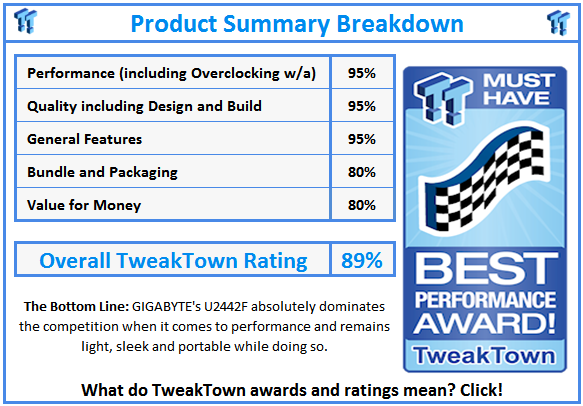
Because of the above and the fact that the performance of this machine absolutely kills the other Ultrabooks we've tested, I'm awarding it TweakTown's Best Performance award.
 United
States: Find other tech and computer products like this
over at
United
States: Find other tech and computer products like this
over at  United
Kingdom: Find other tech and computer products like this
over at
United
Kingdom: Find other tech and computer products like this
over at  Australia:
Find other tech and computer products like this over at
Australia:
Find other tech and computer products like this over at  Canada:
Find other tech and computer products like this over at
Canada:
Find other tech and computer products like this over at  Deutschland:
Finde andere Technik- und Computerprodukte wie dieses auf
Deutschland:
Finde andere Technik- und Computerprodukte wie dieses auf 


 Windows 11 could get some big changes: Start menu 'companions' and Copilot in Settings
 The iPhone 16 Pro could have a 20% brighter display than your boring old iPhone 15 Pro
 New iPhone 16 dummy unit leak shows off its refreshed camera design and more
 Analysts expect an iPad Pro sales slowdown despite new models, here's why
 WhatsApp announces a design refresh for its iPhone and Android apps
 Corsair 6500X Mid-Tower Dual Chamber Chassis Review
 Corsair MP700 Pro SE 4TB SSD Review - As Fast as They Come
 Corsair MP600 Mini 2024 Edition 1TB SSD Review - Fastest Tiny Drive on the Planet
 Lexar SL500 1TB Portable SSD Review - The best of native USB
 Corsair Platform:6 Elevate Modular Desk Review
 True Lies (1997) 4K Blu-ray Review
 Fractal Design North XL Full-Tower Chassis Review
 Western Digital WD Gold 24TB HDD Review - High-Capacity Masterpiece
 AOC U27G3X 27-inch Gaming Monitor Review - 4K 160Hz for $500
 MSI Vector GP68HX Gaming Laptop Review
 Building the Ultimate Home Entertainment Server with an ASUSTOR NAS and Viper Gaming NVMe SSDs
 Everything you need to know about the latest ASUS NUC Mini PCs - NUC 14 Pro and ROG NUC
 How to Overclock Your GPU and Boost Your PC Gaming with ASUS GPU Tweak III
 ASUS's AMD Radeon RX 7000 Series GPU lineup has something for every gamer
 ASUS OLED Premium Care defends the ROG Swift OLED PG32UCDM gaming monitor from burn-in