











Our Verdict
Introduction
Most regular readers of TweakTown will know that I'm heavily invested into cryptomining, something that quickly took over my life some six months ago now where I started out mining from proper Windows-based PCs.

It all started out fine but then I was expanding quicker than I could handle in multiple ways: I was running out of PCIe slots, higher-end PSUs, cooling, motherboards, RAM, cases, and more. I dumped $30,000 or more into the setup over a few months with new shelving, 9 of the same motherboard/CPU/RAM combos, and a slew of new Corsair PSUs.
This was all well and good as it was winter in Australia, but then the warmer weather started as we began to spin into summer and I had to change it all over again. In the middle of this, the difficulty of mining Ethereum was going through the roof and it quickly started not being worth it - especially if I had to invest thousands of dollars into air conditioning.
Then it all stopped; the difficulty of mining Ethereum was put on pause for a year while the price of ETH itself skyrocked towards $800+ up from the stagnant $400-$500 mark it couldn't break out of. Suddenly, mining Ethereum became a very viable thing - right after I sold 20 or so of the graphics cards I had spend thousands of dollars on in that time. I put this money into cryptocurrency itself, making even more money, and then now investing back into my ETH mine.
MiningSky 8-GPU Mining Rig V1 Configuration
Configurations
MiningSky offers their MIning Rig V1 in two different flavors: one without GPUs, and one pre-configured with GPUs. The former is $899 and includes a 1600W PSU (this is the one we're reviewing here today), while the MiningSky Custom Mining Rig V1 with 8 GPUs comes with 8 built-in GPUs and costs $5100.

MiningSky says that the Custom Mining Rig V1 with 8 GPUs is good for around 220MH/s of ETH mining, or 5900H/s mining XMR. Not too bad at all, and definitely an improvement upon what I'm doing here with mis-matched Radeon RX 580 graphics cards.

I wouldn't mind trying the system with 8 x GPUs, which is something I'm going to try and organize with MiningSky once this review is up.
Our Latest Editorials Review Coverage
- How to Overclock Your GPU and Boost Your PC Gaming with ASUS GPU Tweak III
- TweakTown GPU Test Bed 2022 Update: Ready For Next-Gen GPUs
- ASUS + MSI GeForce RTX 3090 Ti Tested: GDDR6X at 24Gbps+ in ETH Mining
- MSI MEG Z490 Unify + Core i9-10900K: RTX 3080/3090 SUPRIM X Tested
- TweakTown GPU Test Bed Upgrade for 2021, But Then Zen 3 Was Announced
Unboxed + Detailed Look
The box was plain but well packaged and protected, something I was surprised with. I expected it to be a bit banged up, but it was protected incredibly well inside as you can see from the picture below.

MiningSky packs it with protective plastic on each side, with the instruction manual on top and the PSU towards the front.
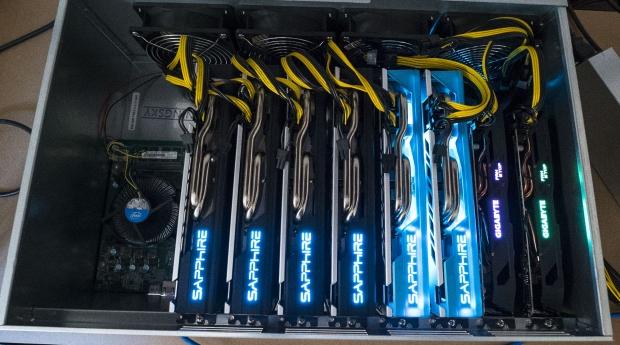
We all want to look inside of the mining rig, right? Here's what you'll see opening up the MiningSky 8-GPU Mining Rig V1: 8 x PCIe x16 slots, the Intel CPU to the left, 4GB SO-DIMM to the left, and between the first and second PCIe slots is a 64GB SSD.

MiningSky is using a 64GB BiWin SSD, with the model number of M7001.

The 4GB of RAM comes from Ramaxel.

There are 9 x 6-pin PCIe power connectors that are plugged into the motherboard, that then feed into your graphics cards. MiningSky sent me over splitter cables that split these to 2 x 8-pin PCIe power connectors, so I could plug all of my cards in without drama.


These 9 x 6-pin PCIe power connectors get their power from the side of the mining rig, which you can see here. You'll plug the 1600W PSUs connectors into this, so that the entire system has enough power draw to handle your load of mining GPUs.

Here are the 9 x PCIe power connectors plugged into the mining rig directly from the 1600W PSU.

These four fans do an incredible job inside of the system at keeping your 8 x graphics cards cool.
Setup & Let's Start Mining
I wanted to get this article out before Christmas, so I've done absolutely no customization to the graphics cards in the form of modding BIOSes and overclocking. All I've done is cranked the fans up to 100% and let it ride.

I couldn't secure 8 x SAPPHIRE Radeon RX 580 Nitro+ graphics cards and had to substitute two of them for GIGABYTE cards that have crappy VRAM that doesn't push 25MH/s out of the box. Damn.
Still, we're looking at 180MH/s without optimization and just 1300W of power draw (without any adjustment to power settings just yet). That will begin when I've got more time to pump into configuring this beast.
Final Thoughts
I'm blown away.
I've got 50+ graphics cards in my garage right now on rickety shelves with blistering heat (30C+ outside today and we're heading into a 40C+ heatwave next week) yet the MiningSky 8-GPU Mining Rig V1 solves virtually all of my problems.
- Self-contained unit
- Supports 8 x GPUs
- 1600W PSU can power virtually any configuration of cards
- Windows pre-installed & stripped down to bare essentials
- Claymore Ethereum miner pre-installed
- Great cooling (loud, but effective)
- Less than 5 minutes to set up
I had the entire MiningSky 8-GPU Mining Rig V1 set up in less than 5 minutes, which seems ridiculous compared to the many hours it takes to build, set up, configure, install Windows and so on of any other standard PC that you use for mining.
This is the biggest thing here: time. My time is valuable and after the hundreds of hours of deploying mining machines I don't want to spend another 5 hours setting them up individually.

MiningSky has stepped in and completely transformed the way I've been doing mining, and within the first 10 minutes of it being operational the first thought that came to mind was: I need 10 more of these MiningSky 8-GPU Mining Rig V1 systems.
I now want to shift my entire mine from those rickety shelves and into MiningSky 8-GPU Mining Rig V1 systems, as it is not only more convenient but it is better on the cards cooling-wise. It's near impossible to cool graphics cards on a shelf, but in an enclosed system? Easy.
MiningSky: you've blown me away here with your MiningSky 8-GPU Mining Rig V1 system, and for just $900... I have no problems recommending it. It is more expensive than buying the components yourself, but remember that'll include CPU, motherboard, RAM, SSD, case, cooling, and a PSU.
MiningSky gives it all to you with the MiningSky 8-GPU Mining Rig V1, with Windows pre-installed and Claymore ready to go. I can't think of any reason why you'd want to save maybe $100-$200 on the required components when you can have this system up and running in 5 minutes.
Blown away, MiningSky - I love the MiningSky 8-GPU Mining Rig V1. It has completely changed the way I look at my mine, and I'm so angry I received this sample four days before Christmas or else I would've been nagging the company for a bunch more of them so I could transition the entire mine.
Amazing work, MiningSky!


 SAPPHIRE Radeon RX 9070 GRE PULSE OC Review - A New 1440p Challenger Has Arrived
 ASRock Radeon RX 9070 GRE Steel Legend Review - The RDNA 4 Mid-Range Reshuffle
 ASUS ROG Strix GeForce RTX 5070 Ti 16GB OC Edition Review - Premium Design, Premium Performance
 SAPPHIRE Radeon RX 9070 XT NITRO+ PhantomLink Review - RDNA 4's Beast Mode
 COLORFUL iGame GeForce RTX 5070 Ultra OC Review - When Style and Performance Meet
 Assassin's Creed Hexe is reportedly going to launch earlier than expected
 NVIDIA's open-source NVK Vulkan driver gets experimental DLSS support in Mesa 26.2 for Linux gamers
 ASUS ROG Astral RTX 5090 reportedly causes discoloration on ASUS motherboard after six months
 Nothing has cancelled the CMF Phone 2 Pro's successor, blaming memory prices for making it unaffordable
 Intel Core 3 304 'Wildcat Lake' CPU appears on PassMark, matches the MacBook Neo
 Sony focuses heavily on AI in its recent summary, drops any mention of PC gaming
 Halo remake on PS5 requires two PS Plus subs for split-screen couch co-op
 Enthusiast attempts to install second 12V-2x6 connector on RTX 5090, is rewarded with a hole punched through the PCB
 Activision to release Black Ops 1 & 2 on PS4, PS5 to get past Sony's lack of PS3 backward compatibility
 AMD plans to increase the price of its graphics cards by 10-15% in the second half of 2026
 UGREEN FineTrack Mini 2 Air Tracker Tag Review - Long battery life, lesser performance
 Speed Racer (2008) 4K Ultra HD Blu-ray Review: a stunning remaster of the cult classic
 MOAIPLAY ORA PRO G1 850W ATX 3.1 PSU Review: high efficiency and 10-year warranty for $119.99
 Navman MiVue Smart True 4K Surround Dashcam Review - Seeing In All Directions At Once
 IQUNIX Magi96 Pro Aluminum Low Profile Mechanical Keyboard Review - Premium Build, Satisfying Sound
 Asetek Forte S-Series Racing Simulator Bundle Review
 Razer Pro Type Ergo Wireless Split Ergonomic Keyboard Review - Built for Comfort and Support
 ASUS ROG Strix Morph 96 Wireless Gaming Keyboard Review - Great Performance, More Affordable
 NZXT H6 RGB+ Compact Dual-Chamber Chassis Review
 I stopped Windows 11 notifications from interrupting me with Do Not Disturb, Focus, and a priority list
 7 ways to transfer data from Android to Windows PC quickly and easily
 I read the Windows Backup app screen carefully, and it does not back up what most people think
 Low Sound Volume on Windows 11? How to fix audio issues and restore normal volume
 8 Critical Warning Signs You Should Never Ignore in Windows 11
 This Windows security feature protects Documents from ransomware, but it is off by default
 Windows 11 already has a voice typing tool, and it is the one most people are not using
 Quick Assist is the only remote-support tool I open when a relative calls about their PC
 The PowerToys utilities I keep enabled on every Windows 11 PC, and the ones I turned off within a week
 TweakTown's Best of Computex 2026 Awards - The Best Hardware, Gaming Gear, and AI