












Introduction & Drive Details
There seems to be a pattern emerging these days as we have yet another SSD that has us scratching our heads. What we've been seeing lately is the reemergence of what used to be considered "value" drives, sometimes selling for as low as 5 cents per gigabyte, reimagined as "mainstream" SSDs that somehow are compelling performance options for the DIY PC consumer segment.
The subject of today's review fits this recent development perfectly. What we have in Samsung's 990 is another overpriced, mediocre-performing Gen4 SSD that is being hailed as an improvement over its predecessors - which is really the part that has us shaking our heads in disbelief. Now, at first glance, or better stated, at the investigative realization that the 990 2TB comes arrayed with superfast ninth-generation VNAND, this drive could indeed be something extraordinary; at least the potential is there anyway.
The drive is marketed as offering generous space for all your games and streams, which is indeed accurate; however, it is also marketed as high-capacity storage without the premium price tag, which is not borne out by reality, at least not at its current MSRP. The 4-channel, PCIe Gen4, DRAMless, QLC-arrayed Samsung 990 has all the attributes that have always signaled a bargain in storage good enough to overlook the negative aspects that go together with 4-bit flash.
One could surmise that Samsung's first consumer QLC arrayed NVMe SSD would indeed be priced lower out of the gate, or at least on par with its immediate predecessor, the TLC arrayed 990 EVO Plus, to make a compelling case for consumer consideration, but as we've seen lately, that just isn't the reality once we get past the marketing hype. Well, with an MSRP of $530, or roughly $130 more than the current street pricing of the 2TB 9100 Pro, 990 Pro, and 990 EVO Plus, our 2TB test subject should at least offer better performance and endurance, something? Anything?
The answer, as we see it, is nothing but misleading marketing hype. Performance is inferior, endurance is inferior, and the pricing is ridiculous in comparison to what you can buy better SSDs for. As we see it, the only "advantage" that this drive has going for it is power efficiency, but even there we are a bit skeptical.
Okay, let's get into this review so we can get past the marketing hype and see first-hand what the newest member of the 990 family can do by the numbers.
Our Latest SSD Review Coverage
- Phison E37T SSD Controller Exclusive Preview - The Fastest DRAMless SSD Platform Yet
- Seagate FireCuda X1070 4TB SSD Review - A New Mainstream Contender
- Micron 3610 2TB SSD Review - DRAMless QLC at 11,000 MB/s
- SK hynix Platinum P51 2TB SSD Review - A Powerful Gen5 Alternative
- Biwin Black Opal X570 Pro 8TB SSD Review - Massive Capacity with Elite Performance

Best Deals: Samsung 990 2TB SSD
Prices last scanned 2 hours and 25 minutes ago


Drive Details
| Item | Details |
|---|---|
| Model | Samsung 990 2TB |
| MSRP | $530 |
| Model Number | MZ-V9V2T0 |
| Interface | PCIe Gen4 x4 |
| Form Factor | M.2 2280 |
| Performance | Up to 7,250 MB/s |
| Warranty | 3-Years Limited |

MSRP for the 2TB 990 is higher than we would like to see, as we've laid out above.

Although Samsung won't divulge the bit count of the VNAND that arrays the 990 2TB, we can tell by its mediocre 3-year warranty and TBW rating that what we are looking at is 4-bit or QLC flash.

Frequently Asked Questions
TweakBot answers common questions about this review using TweakTown's own coverage from this page and related content from our archive. Tap a question to reveal the answer, or type your own below.
How does the Samsung 990 2TB's QLC (4-bit) VNAND affect its endurance and warranty compared with the 990 EVO Plus?
What real-world gaming performance did the 990 2TB deliver in the 3DMark SSD Gaming Test versus other Samsung drives?
Does the 990 2TB meet Sony's PS5 requirement of 5,500 MB/s read for M.2 expansion and is it recommended for PS5 use?
How do the 990 2TB's sequential read and write speeds measured in CrystalDiskMark compare to Samsung's advertised speeds?
Have a question not listed here? Ask below and TweakBot will answer it.



As always, when you buy a Samsung SSD, you get free supporting software that makes maintenance and system migration simple and free. Click HERE to download it.
Jon's Test System Specifications
Intel Test System
| Item | Details |
|---|---|
| Motherboard | ASUS Z890 APEX (Buy at Amazon) |
| CPU | Intel Core Ultra 9 285K (Buy at Amazon) |
| GPU | MSI SUPRIM X RTX 3080 12GB (Buy at Amazon) |
| Cooler | Alphacool Eissturm Hurricane Copper 45 (Buy at Amazon) |
| RAM | Patriot Viper Xtreme 5 8000 48GB (Buy at Amazon) |
| Power Supply | be quiet! Dark Power Pro 12 1200W (Buy at Amazon) |
| Case | PrimoChill's Praxis Wetbench (Buy at Amazon) |
| OS | Microsoft Windows 11 Pro (Buy at Amazon) |
AMD Test System
| Item | Details |
|---|---|
| Motherboard | ASUS ROG Crosshair X870E APEX (Buy at Amazon) |
| CPU | AMD Ryzen 9 9950X (Buy at Amazon) |
| GPU | MSI SUPRIM X RTX 3080 12GB (Buy at Amazon) |
| Cooler | Alphacool Eissturm Hurricane Copper 45 (Buy at Amazon) |
| RAM | Sabrent Rocket DDR5 32GB (Buy at Amazon) |
| Power Supply | be quiet! Dark Power Pro 12 1200W (Buy at Amazon) |
| Case | PrimoChill's Praxis Wetbench (Buy at Amazon) |
| OS | Microsoft Windows 11 Pro (Buy at Amazon) |
Please note: We employ an M.2 AIC for testing on our Intel Core Ultra 9 285K platform.
Sony PlayStation 5 - M.2 Storage Expansion
PS5 Read Performance
With Sony's wildly popular PlayStation 5 console now enabled for M.2 NVMe SSDs to be used as fast storage expansion, we are including results for PS5-compatible SSDs we test as a part of our reviews going forward.


For SSDs that don't have an adequately sized PS5-compatible heatsink or other SSDs where the heatsink provided doesn't fit right and can be removed, we both use and recommend Sabrent's unparalleled PS5 heatsink available HERE.


We only chart SSDs that can deliver a minimum of 5,500 MB/s read, which is Sony's original recommendation.
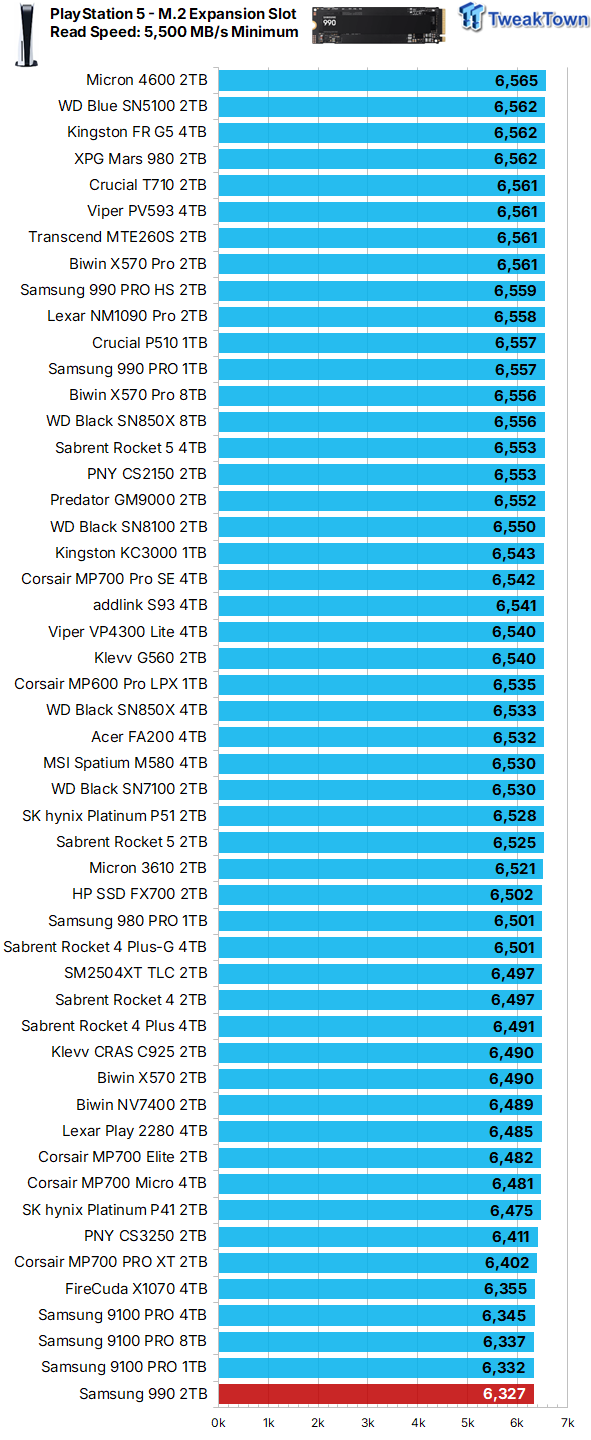
Its sequential read speed in a PS5 environment suggests the 990 2TB makes for a decent choice for PS5 M.2 storage expansion.
Synthetic Benchmarks: CDM, Max IOPS, ATTO
CrystalDiskMark
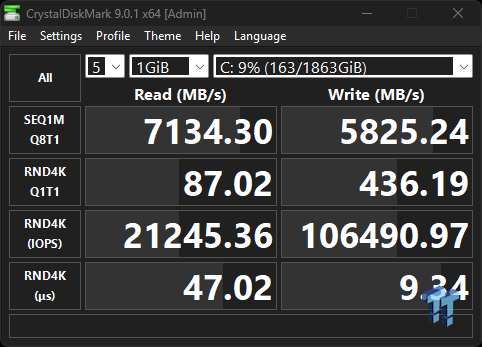
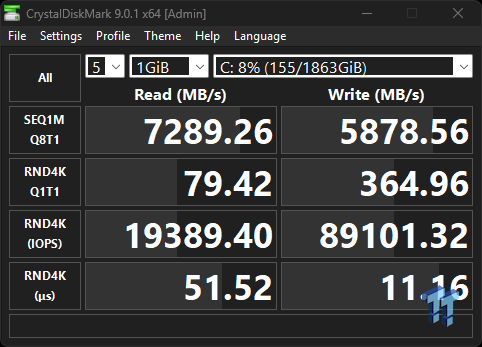
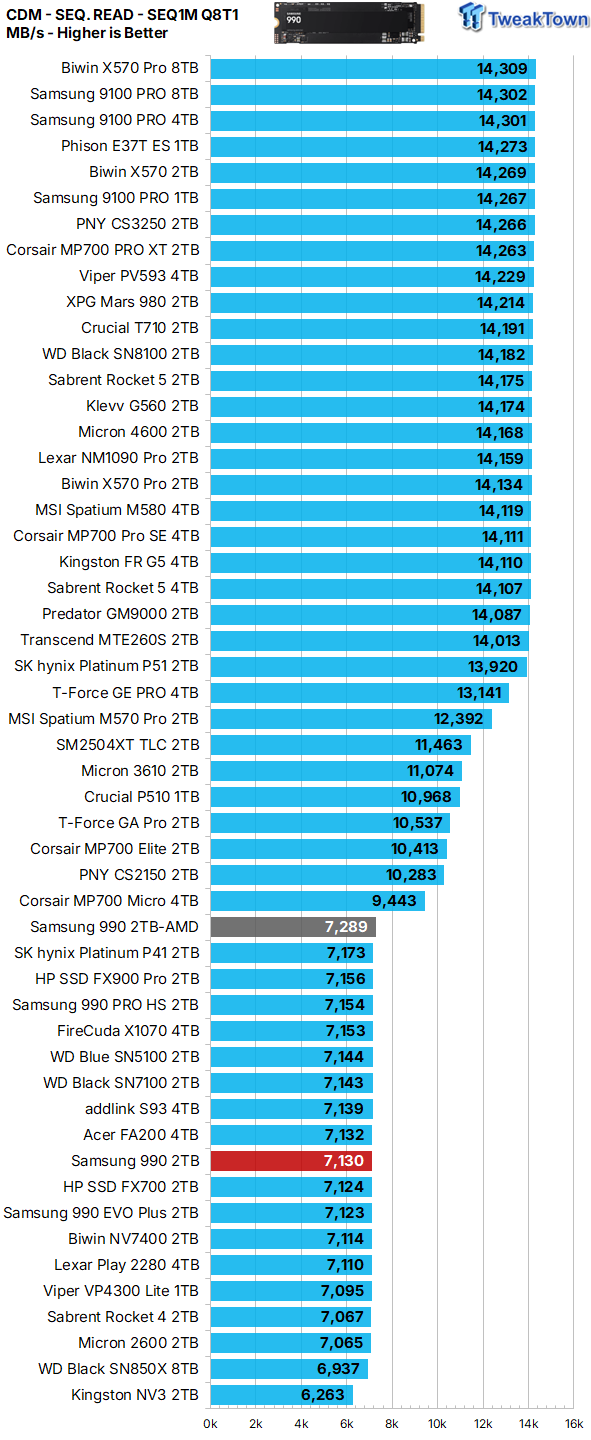
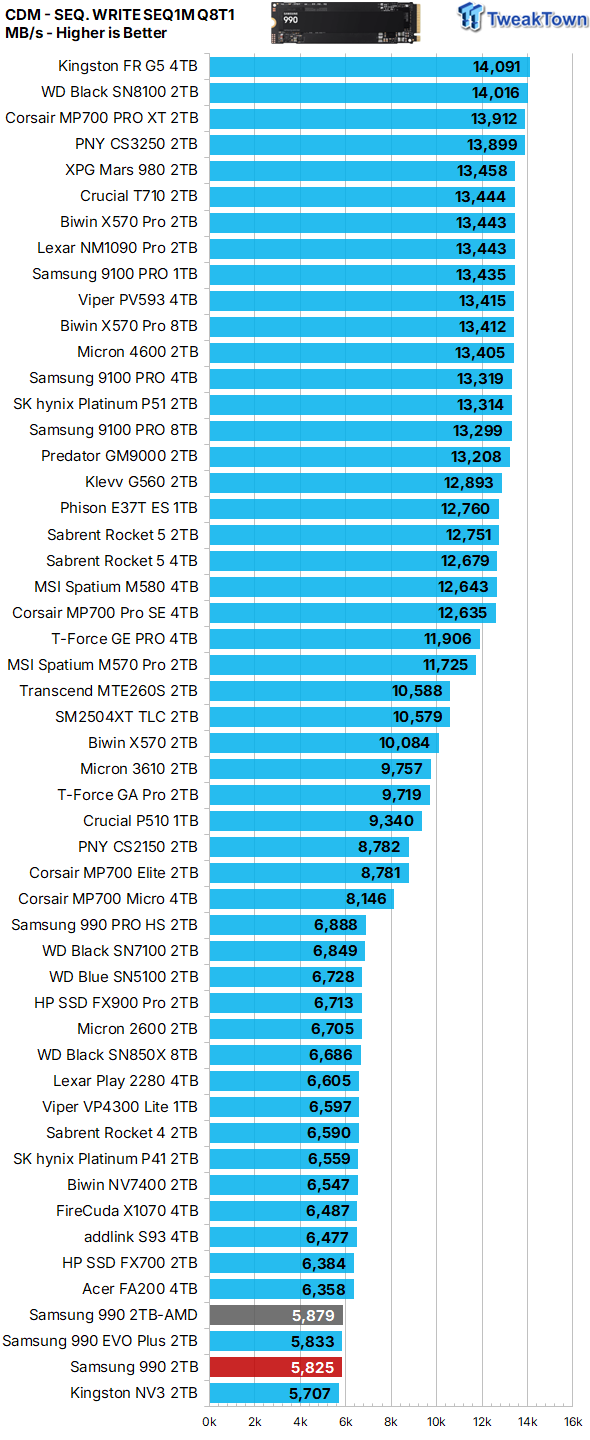
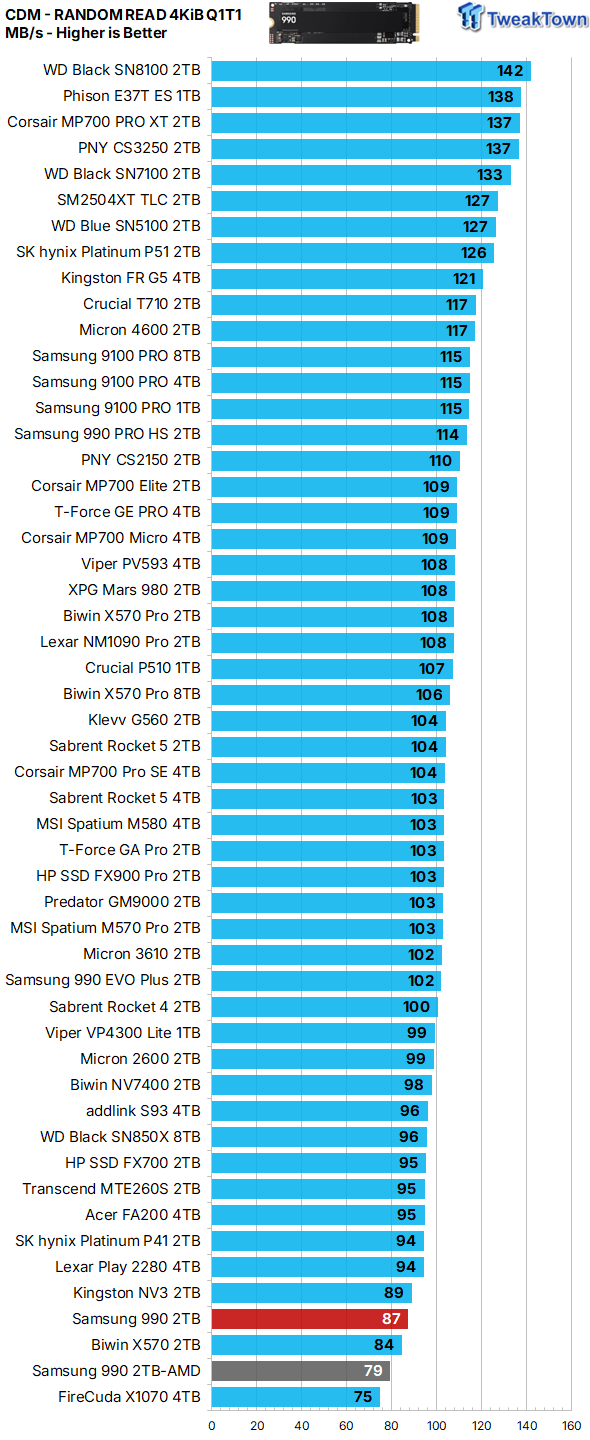
We employ CDM as our standard measurement for both sequential throughput and Q1T1 random read. In terms of sequential read throughput, the 990 2TB delivers exactly as advertised. Sequential write speeds as given by CDM are falling way short of the advertised speed of up to 6,450 MB/s, which is not a deal breaker for us considering how little value we place on write speeds in the consumer space. However, looking at the all-important Q1T1 random read speed, we must do a double take as it's among the lowest we can remember ever seeing coming from a "mainstream" SSD.
Max IOPS
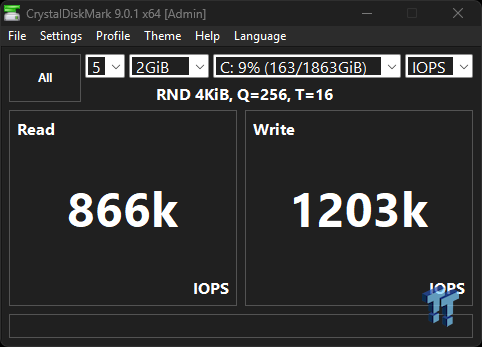
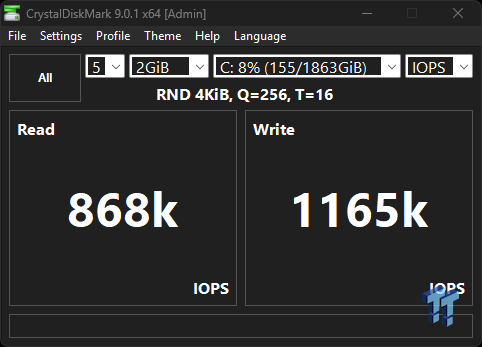
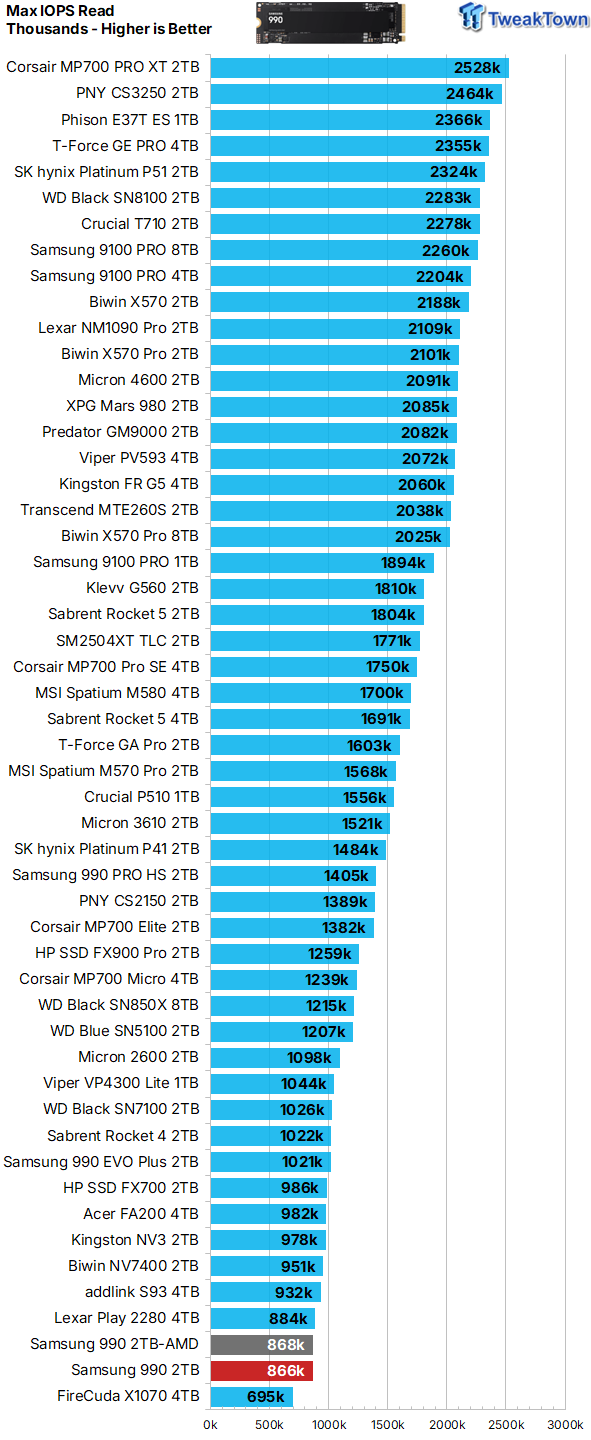
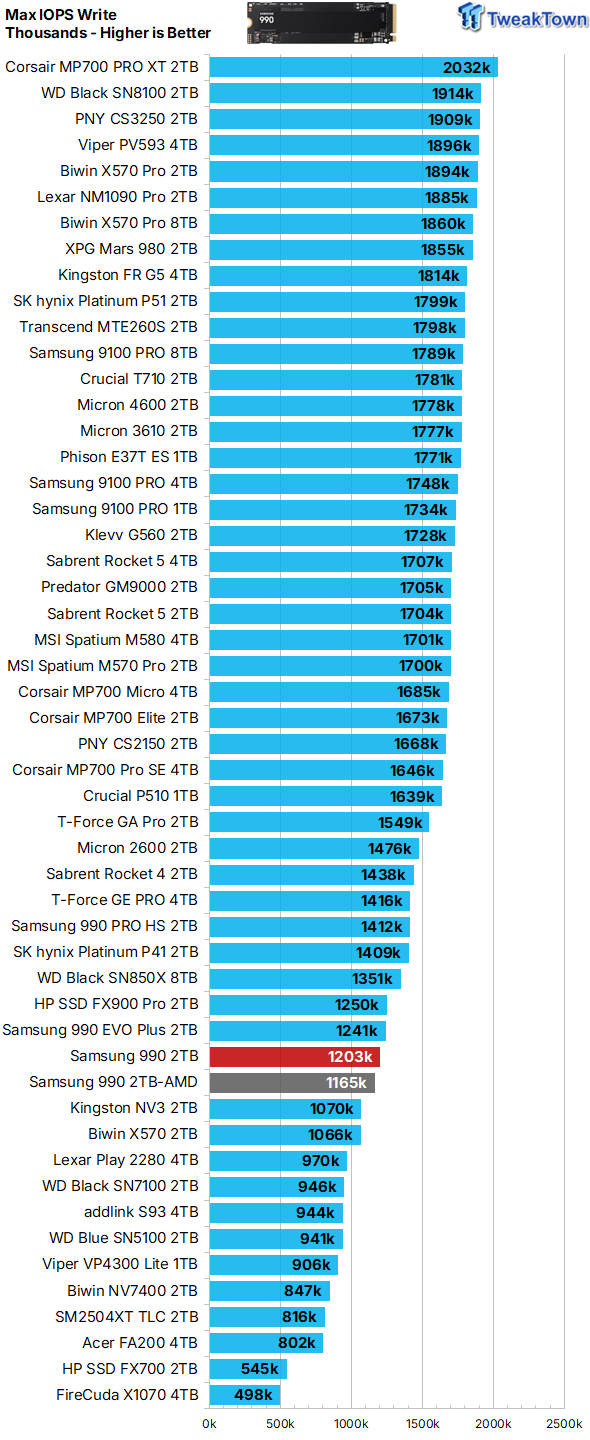
Max IOPS match advertised up to specs, so that is good to see. That is, until we see where that lands on our read chart.
ATTO
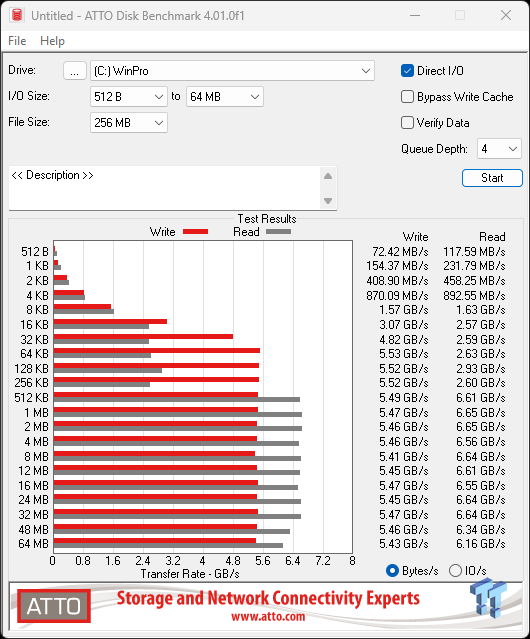
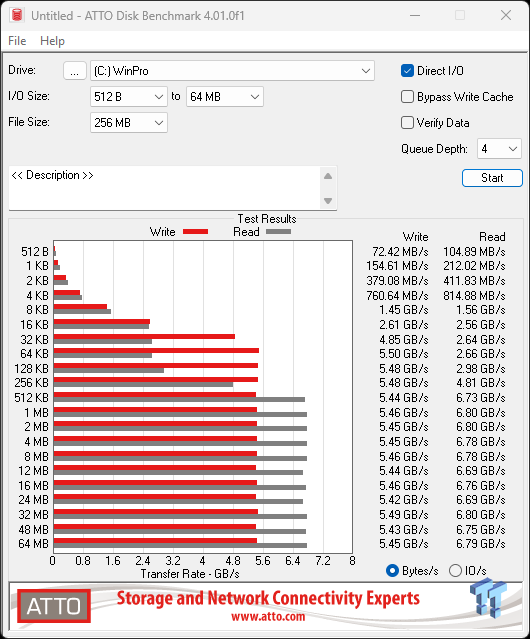
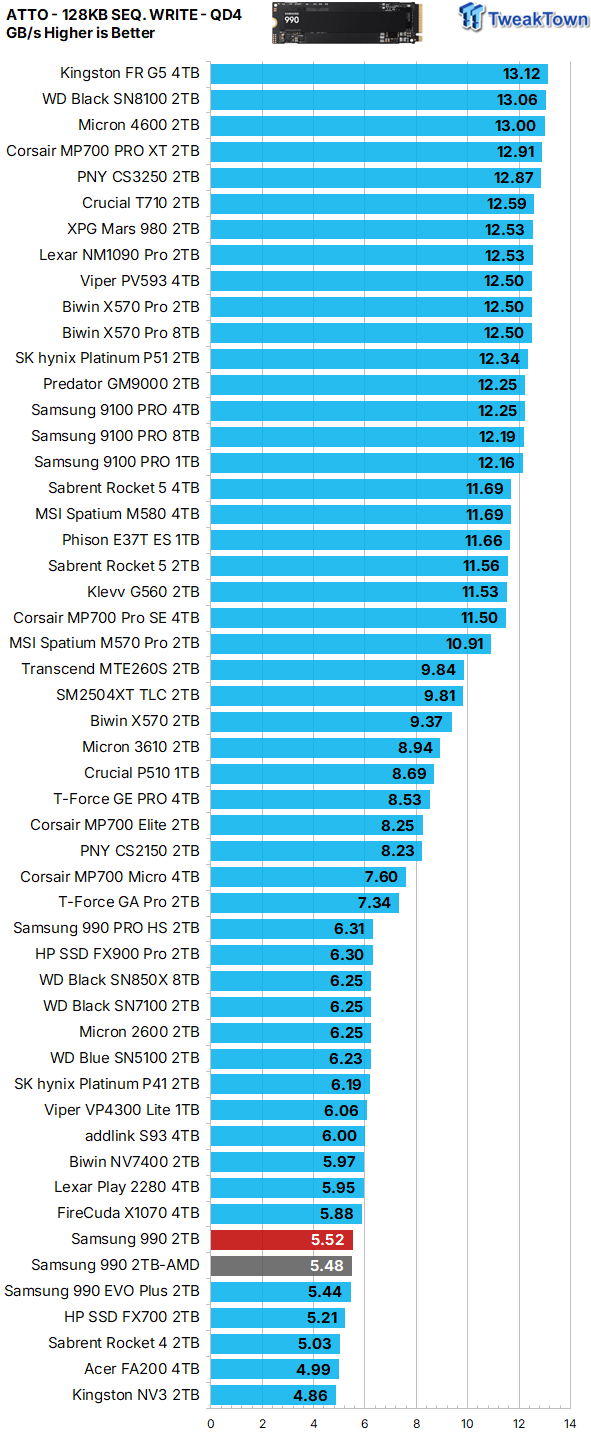
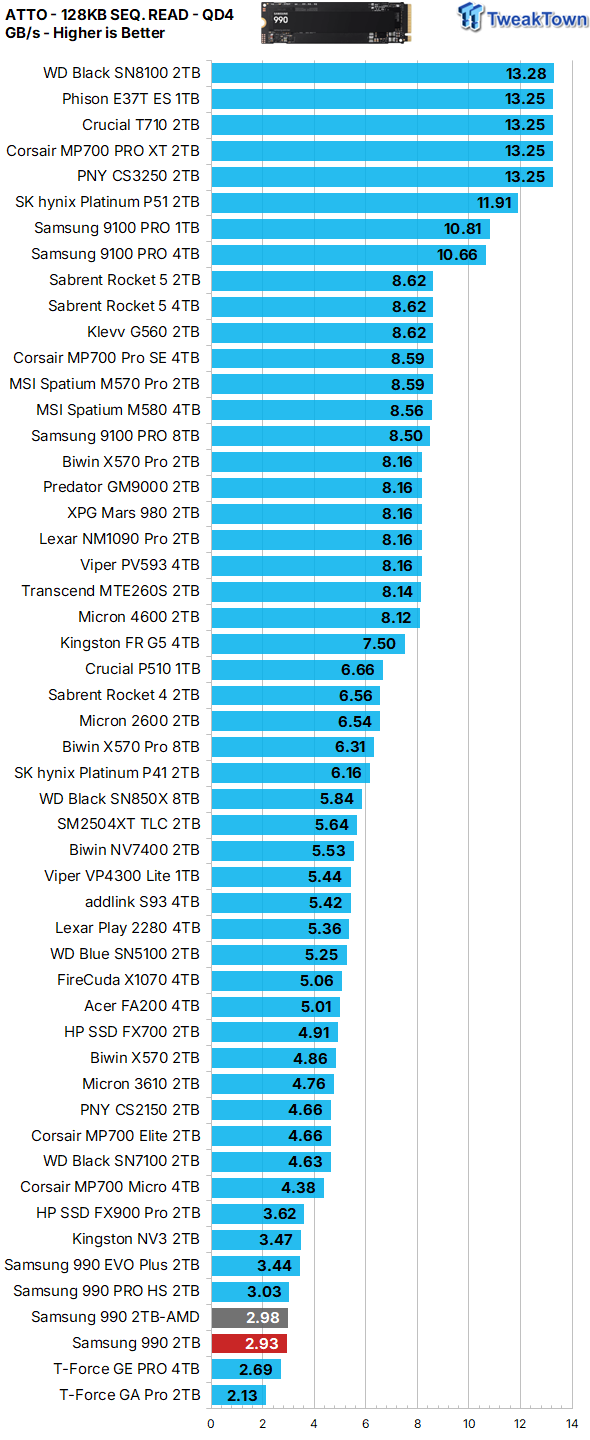
ATTO gives us a clear picture of what transfer sizes a particular SSD favors in terms of QD4 sequential throughput. We chart 128K transfers. At a queue depth of four, the 990 2TB favors sequential transfers of 512KB or larger when serving data to the host (reading) and 64KB or larger when programming (writing) data.
Real-World Testing: Transfers, 3DMark SSD Gaming Test, PCM10 Storage
Transfer Rates
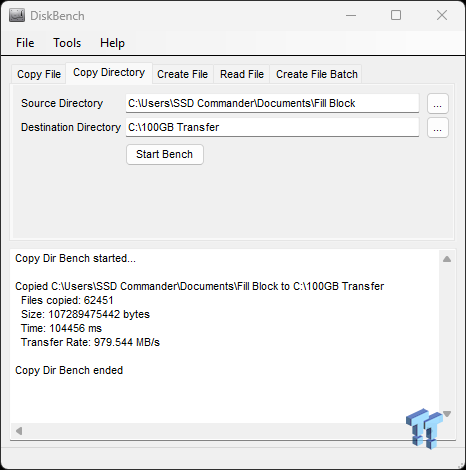
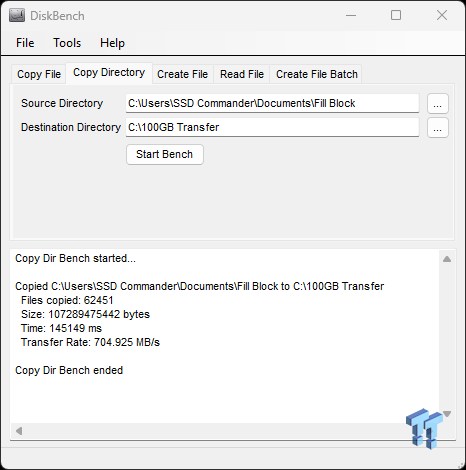
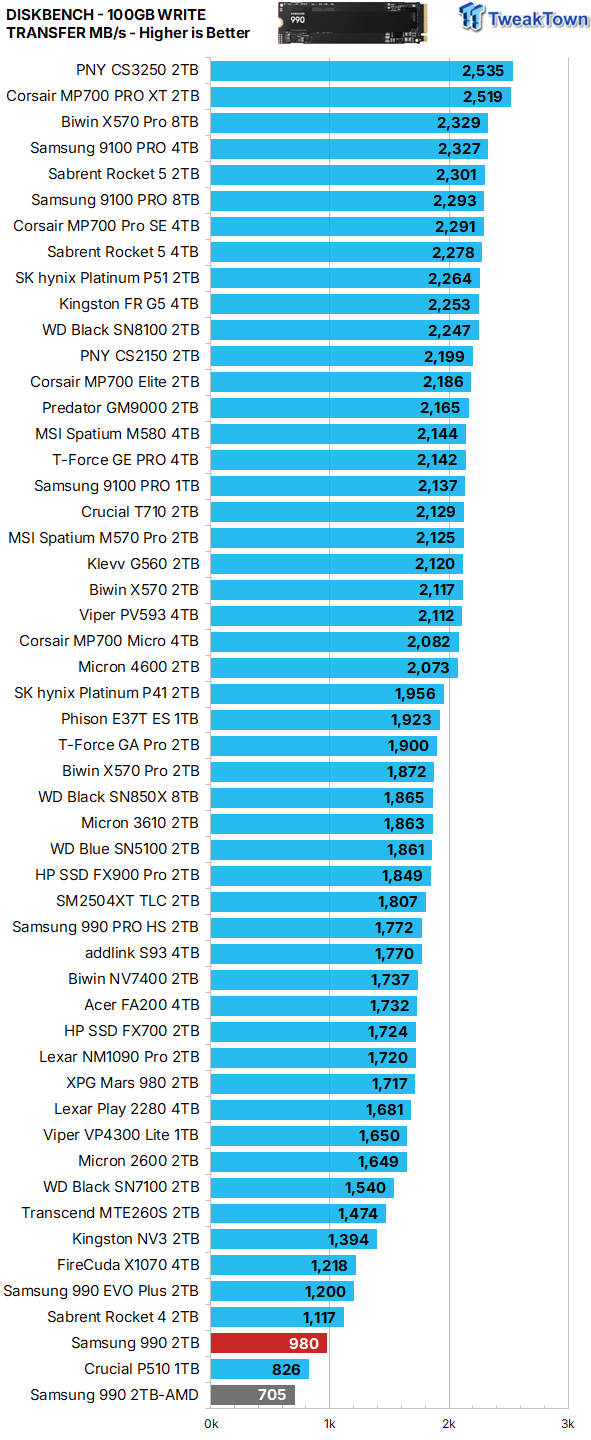
Our 100GB data transfer test is not your ordinary 100GB of data; ours is a crushing mix composed of more than 62K files. Write performance, random or sequential, is an infrequent operation, and as such, we do not consider it to be an important performance metric in the consumer space. An example being how many times a game is installed vs. how many times it's played. Speeds here are again at the bottom of the barrel.
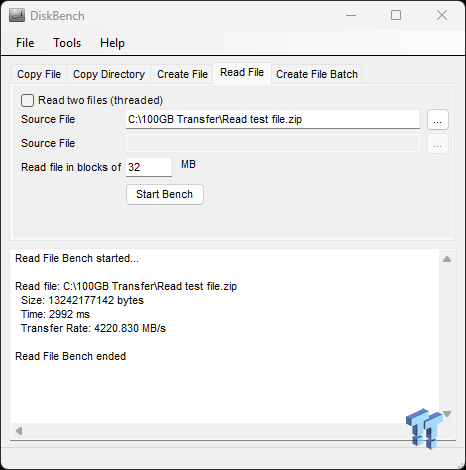
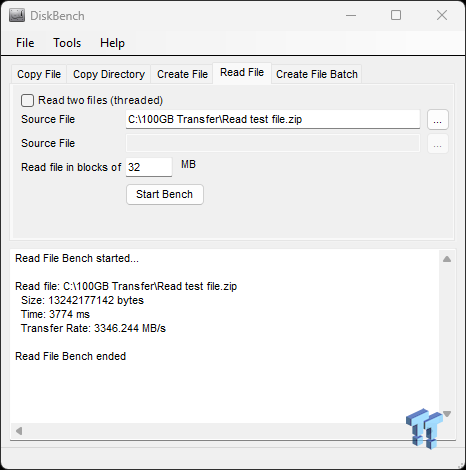
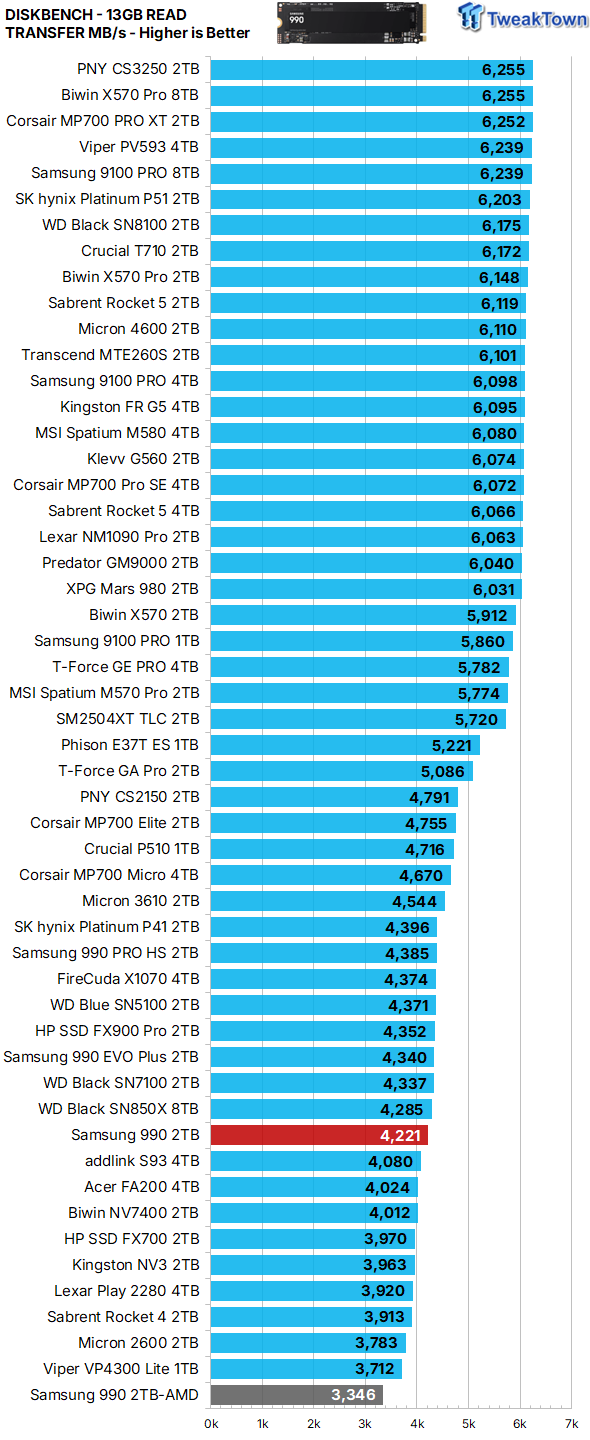
Unlike programming (writing) data, serving data to the host (reading) is typically an important performance metric as it relates to the consumer space. Speeds here, at least on our Intel platform, are pleasantly surprising.
3DMark SSD Gaming Test
UL's newest 3DMark SSD Gaming Test is the most comprehensive SSD gaming test ever devised. We consider it superior to testing against games themselves because, as a trace, it is much more consistent than variations that will occur between runs on the actual game itself. This test is the same as running the actual game, just without the inconsistencies inherent to application testing. In short, we believe that this is the world's best way to test an SSDs gaming prowess and accurately compare it against competing SSDs. The 3DMark SSD Gaming Test measures and scores the following:
- Loading Battlefield V from launch to the main menu.
- Loading Call of Duty Black Ops 4 from launch to the main menu.
- Loading Overwatch from launch to the main menu.
- Recording a 1080p gameplay video at 60 FPS with OBS (Open Broadcaster Software) while playing Overwatch.
- Installing The Outer Worlds from the Epic Games Launcher.
- Saving game progress in The Outer Worlds.
- Copying the Steam folder for Counter-Strike: Global Offensive from an external SSD to the system drive.


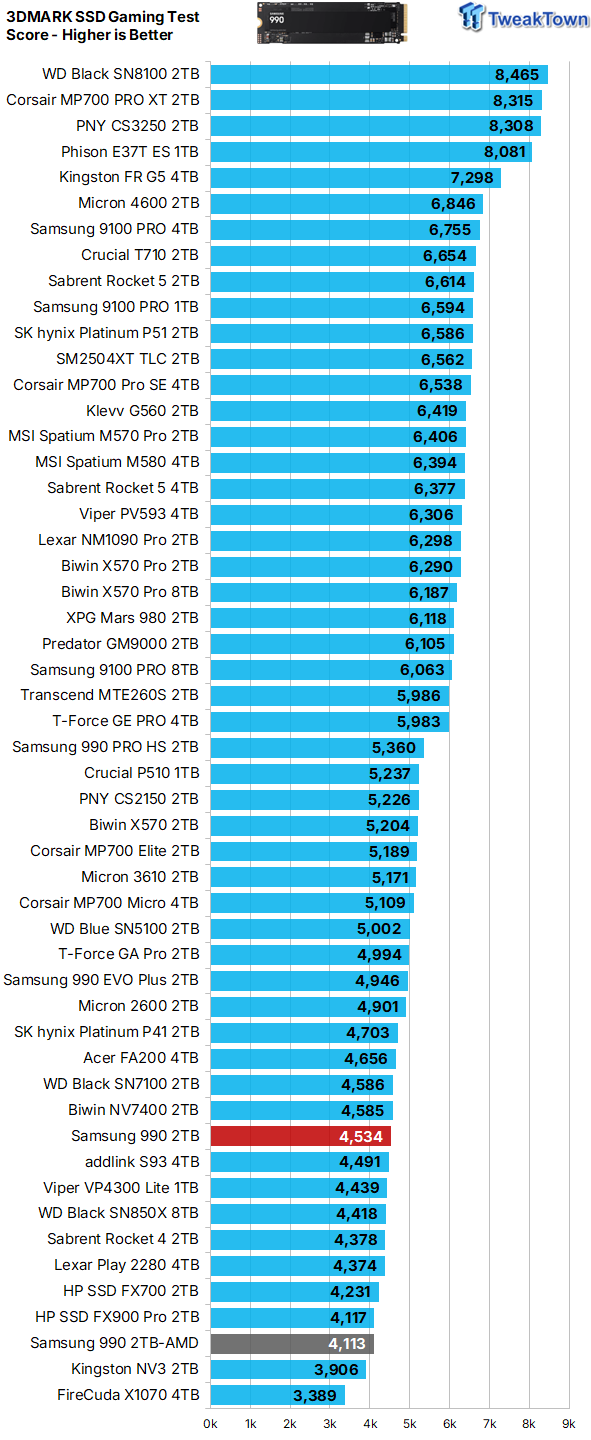
Gaming is a performance metric that matters to most DIY consumers, especially for the enthusiast crowd that TweakTown caters to. Now we've reached the point where results start to matter as they are a direct reflection of user experience.
The performance exhibited here is not terrible per se, but it is way lower than other cheaper options coming from Samsung themselves.
PCM10 Storage Tests
PCMark 10 Storage Test is the most advanced and most accurate real-world consumer storage test ever made. There are four different tests you can choose from; we run two of them. The Full System Drive Benchmark and the Quick System Drive Benchmark. The Full System Drive Benchmark writes 204 GB of data over the duration of the test. These tests directly correlate with mainstream user experience.
PCMark 10 Full System Drive Benchmark
This test writes 204GB of data and covers a broad range of common consumer tasks, including booting Windows 10, file transfers, Adobe and Office applications, and startup times for games such as Battlefield V, COD Black Ops 4, and Overwatch. Unlike synthetic numbers, this is comprehensive real-world data, which is why we use it to rank SSDs in terms of user experience.


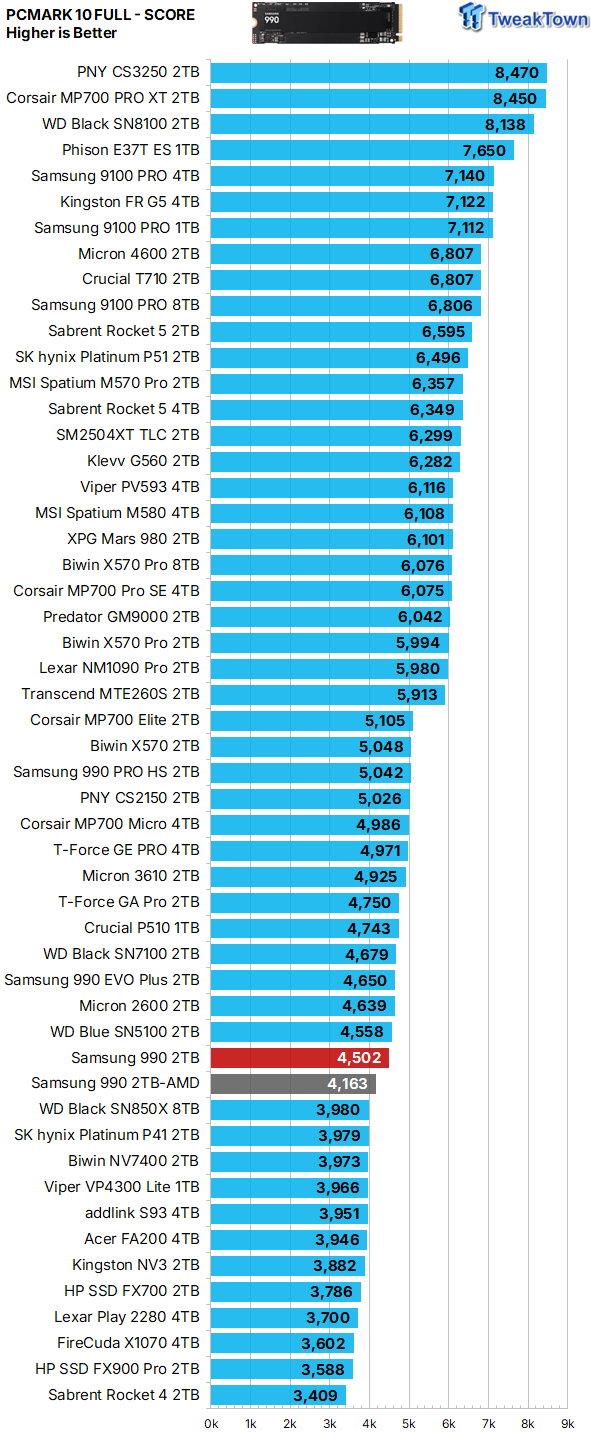
Again, performance here is not terrible per se, but it is slightly too much lower than other cheaper options coming from Samsung themselves.
PCMark 10 Quick System Drive Benchmark
The Quick System Drive Benchmark writes 23 GB of data over the duration of the test.


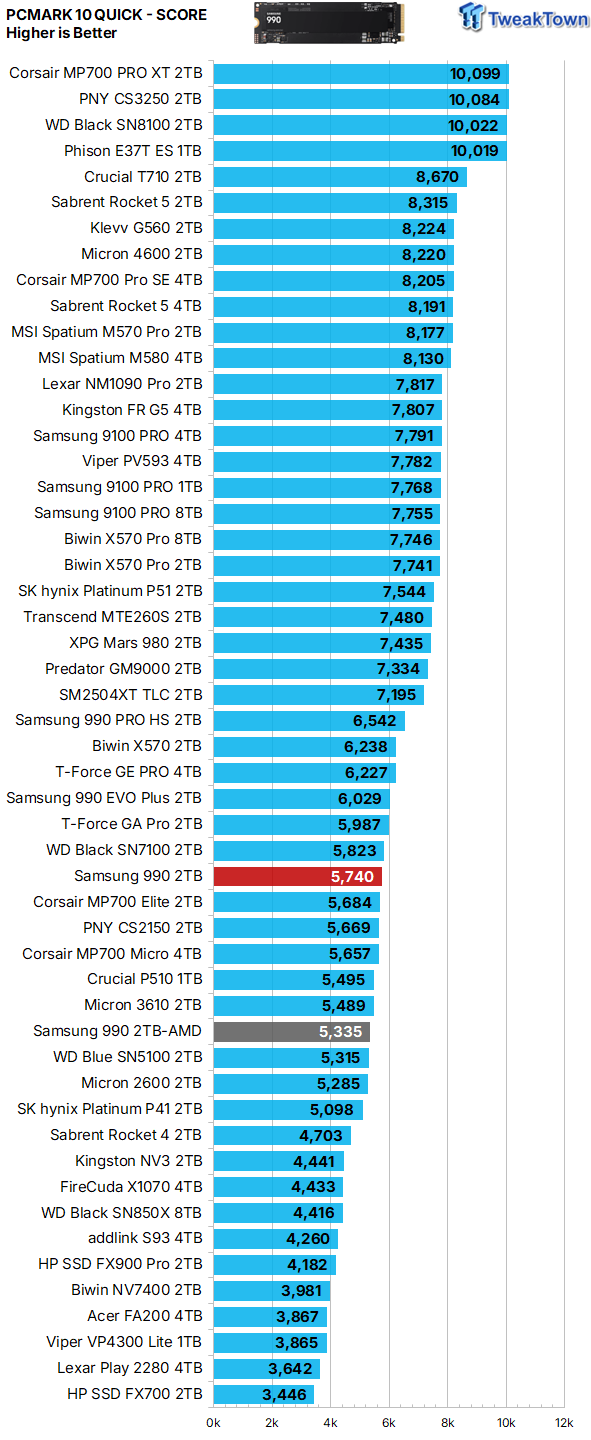
Of all the benchmarks we run, it can be argued that this one offers the best reflection of a typical consumer use case scenario. Again, results here, while lower than other Samsung options, are more than acceptable if the price is right, but in this case the price is wrong.
Final Thoughts
For the most part, QLC-arrayed SSDs offer a bargain to the consumer that is compelling enough to overlook the inherent performance and endurance inferiorities that go hand-in-hand with 4-bit flash. Not this time though. Priced as it currently is, Samsung's 990 doesn't give us even a sliver of something we can point to as a compelling reason for consideration of this drive over others in Samsung's own vast stable of SSD goodness.
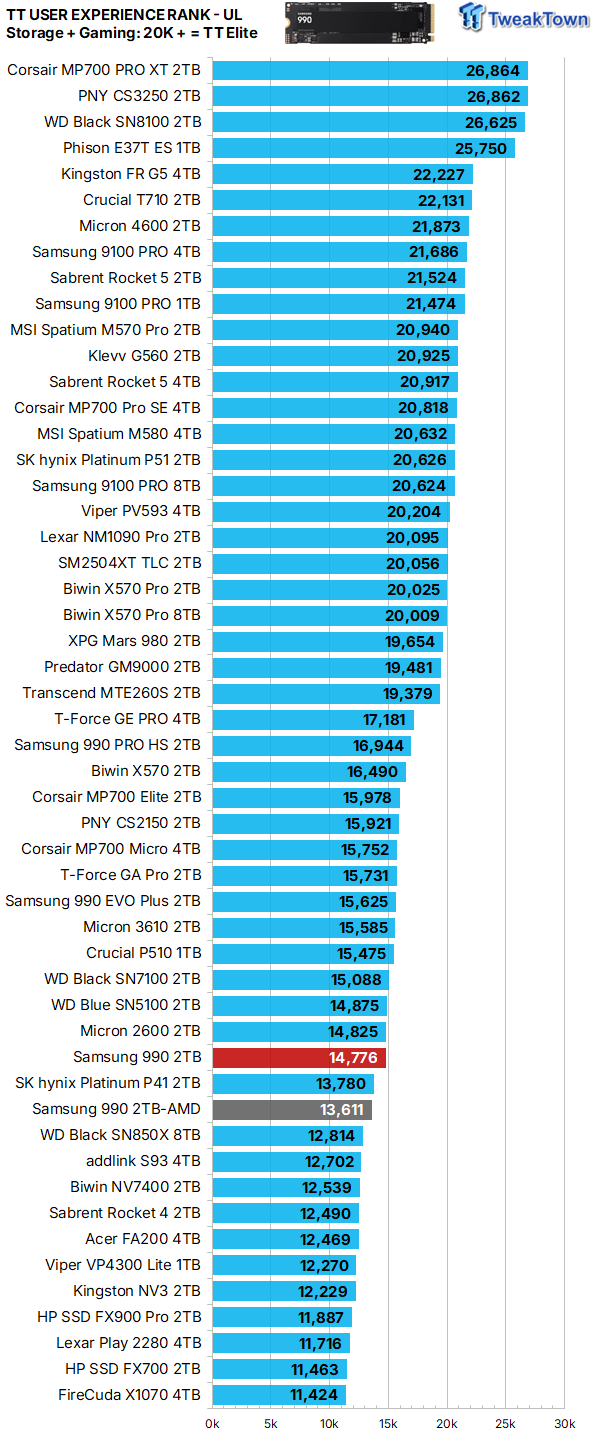
We rank SSDs in terms of overall user experience (performance where it matters most) as expressed by PCMark 10 storage and 3DMark gaming storage tests. Currently, we consider a user experience score of 20K or more to verify an SSD as a TweakTown Elite performer.

Overpriced and underperforming, with a shorter warranty period than its predecessors, make for an SSD that has us wondering what Samsung is thinking with this one.


 HighPoint Rocket 1604L Gen5 x16 NVMe Software RAID AIC Review: half the price with full 59 GB/s speed
 UGREEN NASync DXP4800 GT Review: powerful 4-bay NAS with AMD Ryzen and dual 10GbE ports
 Phison E37T SSD Controller Exclusive Preview - The Fastest DRAMless SSD Platform Yet
 Seagate FireCuda X1070 4TB SSD Review - A New Mainstream Contender
 ASUSTOR Lockerstor 2 Gen2+ AS6702T v2 NAS Review - Fast Performance
 100% of Japanese online game developers are using generative AI, reveals new poll
 Windows 11 tested on Steam Machine, provides nearly identical gaming performance to SteamOS
 Starlink V5 is smaller, lighter and uses half the power - but it's also slower
 Rumors claim Logitech already working on G Pro X2 Superstrike 2 with improved magnetic switches
 PS5 emulator boots GTA V on PC as first 3D games begin running
 NVIDIA cuts over half of Asian buyers from AI chip whitelist in China crackdown
 This new smartphone lets you snap on a second display when you actually need it
 Your Wi-Fi router could be helping Russian hackers, confirms US government in new warning
 NVIDIA and SEGA collaborate to bring Virtua Fighter and more SEGA games to RTX Spark
 Intel will make the majority of its next-gen Nova Lake-S CPUs in-house as 18A process yields improve
 ASUS ExpertBook Ultra (Panther Lake) 14" Business Laptop Review
 ASUS ROG Raikiri II Xbox Wireless Controller Review - Ready to Take Control
 MOZA FMP18 Panel Bundle Review: authentic F/A-18 Hornet cockpit controls for flight sims
 Micron 6600 ION 245.76TB Enterprise SSD Review - Best in Class Programming Speeds
 MOZA MA3F EFCM Flight Control Module Review: authentic Airbus A320 autopilot panel for simulators
 Turtle Beach Stealth Pro II Wireless Gaming Headset Review - Premium Sound, Fantastic Features
 MOZA MGX1000 Instrument Panel Review: a realistic Garmin G1000 replica for immersive flight sims
 Simagic Zeus Formula Steering Wheel Review: premium build and advanced inputs for F1 racing
 GIGABYTE X870E Aero X3D Dark Wood Review - A woody goody
 The Super Mario Galaxy Movie (2026) 4K Ultra HD Blu-ray Review
 I stopped digging through Windows menus after I set up this one folder
 Don't sell your Windows laptop until you do these things
 6 PC cleaning mistakes to avoid for safer hardware maintenance
 Phison and Intel Take Aim at Local AI's Memory Wall with aiDAPTIV
 How to Remap Keyboard Keys in Windows using Microsoft PowerToys
 7 tips to organize your Windows files for faster, easier access
 Intel Arc G3 Extreme first impressions with MSI's Claw 8 EX AI+ - Incredible power for an extreme price
 How to fix Wi-Fi Adapter Not Working on Windows laptops: troubleshooting tips
 Hisense U7SG 4K TV: Modern Entertainment for the New Age
 6 underrated Microsoft Word features worth using to boost your productivity