











Our Verdict
Pros
- Value
- Build quality
- Included fans / hub
- Thermal performance
- BTF compatible
Cons
- Poor GPU support bracket
Should you buy it?
AvoidConsiderShortlistBuyIntroduction, Specifications, and Pricing
SAMA is one of those companies that don't immediately come to mind when I am looking for a new PC case. In fact, I honestly don't know if I have ever seen one of their cases before, that is, until the all-new SAMA S50 turned up on my doorstep. This is probably because I am based in the UK, but something new or different isn't always a bad thing. While we are all probably guilty of sticking with what we know, afraid to try something new, sometimes it's worth taking a punt and seeing what else is on offer. Staying within your comfort zone is always reassuring, but if you are brave enough to step out into the unknown, you are likely to find something different to try, and you never know, you might even like it.
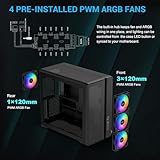
The SAMA S50 is a dual-chamber mid-tower case available in black or white. It supports BTF motherboards, comes with four preinstalled 120mm ARGB fans, 360mm AIO support, and a fan/ARGB hub for just $109.99. That right there is a lot of case for the money, especially with the included fans and hub. SAMA is concentrating on thermal efficiency with the S50, and that's a good thing, right? No one wants a case that insulates the components within, and the high-density mesh panels that clad the front and top of the S50 help with airflow in and out of this case. Getting air moving faster can be achieved by installing up to 11 120mm fans, while there is plenty of storage support, too. Right then, let's take a look and step into the unknown.
| Item | Details |
|---|---|
| Model | SAMA S50 |
| Form Factor | Mid-Tower |
| Dimensions | 475mm x 235mm x 426mm (LxWxH) |
| Weight | 7.3kg |
| Materials | SPCC / Tempered Glass / ABS |
| Color | White / Black |
| Motherboard support | ATX/M-ATX/ITX |
| BTF Motherboard Support | ATX/M-ATX |
| Cooling Compatibility | Top: 3x120mm or 120mm / 240mm / 360mm Radiator I Front: 3x120mm (Included) I Side: 1x 120mm I Bottom: 3x120mm or 120mm / 240mm / 360mm Radiator I Rear: 1x 120mm (Included) |
| ARGB / FAN Hub | Yes (6 Port /4 Pre-Installed) |
| Drive Support | 3x 3.5" or 4x 2.5" |
| Front I/O | Power, LED, USB3.2 Gen2x2 Type-C x1, USB 3.0 x2, HD Audio x1 |
| CPU cooler height (max.) | 165mm |
| PSU Length (max.) | 160mm |
| GPU Card Length (max.) | 410mm |
| Warranty | 1 year |
| Today | 7 days ago | 30 days ago | ||
|---|---|---|---|---|
 | $109.99 USD | - | ||
| $109.99 USD | - | ||
| $109.99 USD | - | ||
 | Check Price | Check Price | ||
* Prices last scanned 5/18/2026 at 1:14 pm CDT - prices may be inaccurate. As an Amazon Associate, we earn from qualifying purchases. We earn affiliate commission from any Newegg or PCCG sales. | ||||

Packaging

Given the low price point, I didn't expect grand packaging for the SAMA S50, but what we do get is sufficient. White print on a brown cardboard box is minimal, with a small, full-color sticker of the case on the front. I am guessing SAMA probably uses the same default boxes for all their products, with some changes to the printing to keep costs down.

Information on the SAMA S50 specs is listed on one side of the box, with the case weighing 7.3kg and measuring 475mm x 235mm x 426mm (LxWxH). It's not a behemoth, and it isn't tiny, then.


There is nothing else really to note about the box; it's minimal, and sometimes that's okay.

The SAMA S50 is packed in closed-cell foam, and the traditional clear plastic bag is included for transport. Our sample arrived fully intact, but I broke the foam when removing the case from the box.
Our Latest Mid-Tower Cases Review Coverage
Outside the SAMA S50 Mid-Tower

First impressions are always important, and here, the S50 does look good. It doesn't seem to try and do anything outrageous; it's just nicely proportioned, and here to do a job. White print surrounds the 4mm tempered glass side panel, and overall, the color-matching between the steel frame and ABS components seems fairly good for the price of the case.

Starting at the top, the high-density mesh sits within the plastic top panel and is split into two sections rather than being a plain, single, full-coverage piece. The mesh also curves around the front and back sides of the panel. I like the design, and you can just see the internal frame below.


The modern, high-density mesh on the front covers the front fan intake, with the split into what I would almost call a retro-style side that houses the IO. I don't know if this was SAMA's intention, but it does remind me of some '90s cases, and I think it suits the front well. IO on the front of the SAMA S50 is quite standard for 2026, including 1x USB 3.2 Type-C, a combo HD Audio jack, 2x USB 3.0 ports, with the backlit power button sitting at the top, above the LED control button. The front of the case also runs all the way to the floor.

The back panel of the case is fairly plain with a honeycomb-style vent towards the front. With the PSU at the front, it allows the power supply to draw in fresh air, while the bottom portion accommodates the optional side-mounted fan. Unlike the front panel, there is a gap below to provide air to the bottom of the case.


The SAMA S50 case feet include rubber pads, and there is sufficient clearance for the case to suck in fresh cool air. Here and throughout the case, a frameless, full-coverage magnetic dust filter is included. Peeling away the filter reveals the bottom mount, which can accommodate up to three 120mm fans.

Covering the rear, the dual-chamber design means that we have a power pass-through cable to the top left, with venting next to it. Below, the motherboard IO cutout and the included 120mm fan can be seen, with some vertical adjustment of the fan's height possible. Seven PCIe slots complete the back of the case, with the screws housed within a door-style cover. Finally, the case includes external tie-down points towards the rear edge, while there are no thumbscrews for the sides or the top panel, as all are tool-less for easy removal.
Inside the SAMA S50 Mid-Tower


Now, we move inside for a good look at the SAMA S50's internal layout. Once again, we start at the top, and with the top mesh panel removed, we are greeted with the mount for up to three 120mm fans, or a 360mm AIO. Above the fan mount, the rear-most part of the case frame is solid steel, while the front is cut out for installing the ATX power supply.
The plastic top panel, viewed from underneath, is also shown, and since this is intended for use as an exhaust, it does not include a dust filter. I would have liked to see SAMA use more of the honeycomb-style venting on the top, solid part of the case structure, to let more hot air escape from the case and make better use of the mesh on the top panel.


Removing the tool-less front panel reveals the pre-installed 120mm fans and the front IO housing. These fans are PWM-controlled, with a 700~1500 (±10%) range, pushing 64.9 CFM of air and resulting in noise levels of 26.8dB. As with the top, some of the case frame is solid, so air can only enter where SAMA has included fan placements. I am guessing this is down to cost, and it's understandable given the price of the S50.

Now, with the main chamber front and center, you can see the BTF-compatible motherboard tray, power supply shroud, and the 120mm fan mount at the bottom right. Important specs for the interior include 165mm of clearance for CPU coolers, with a maximum GPU clearance of 410mm.
The SAMA S50, so far, appears quite well laid out and sensible. SAMA, with optimized airflow in mind, demonstrates an ideal airflow path in their marketing: front and bottom as intakes, with the rear and top as exhausts. This configuration isn't groundbreaking or even new, but it works well in a number of cases and, if fully populated with 11 fans, should provide great airflow and cooling. It's also worth mentioning that in the marketing guide I received, SAMA points out that the S50 gained A+ chassis thermal performance certification from PPLP.INFO.

Cutouts around the case feature rolled edges to prevent any nasty surprises to your fingers, or more importantly, any cables you will be running. There are plenty of them, too, providing good routing options. Supporting ATX, M-ATX, ITX, and Back-connect ATX and M-ATX motherboards, the SAMA S50 is comprehensive in its motherboard support.


The bottom is also fairly well detailed; more cutouts are included, with a vertical slot provided for attaching the included GPU anti-sag bracket, next to the optional fan side mount.


Here are some more images showing the included rear 120mm exhaust fan and the angled design of the power supply shroud. The front fan cabling passes through the shroud and into the rear part of the case.


Popping off the rear side panel, the magnetic frameless filter can be seen for easy cleaning and maintenance. Then, with the panel out of the way, you are greeted with 47mm of cable management space in the rear part of the case. A storage sled runs from the top to the bottom, and is easily removed using the single screw at the top. The sled can accommodate three 3.5" HDDs, or four 2.4" drives for plenty of storage space. If you are going NVMe-based and need more room at the back, it can be removed completely.


Removing the drive sled reveals that most of the internal wiring is color-coded, which is a real bonus. The only part that differs is the ARGB and PWM connectors for the motherboard that run from the fan hub. Given that the case is pre-populated with four fans, they are already connected to the hub with two additional ports available to add to the system. I do like to see a hub match the number of fans that can be installed in a case, but it is still nice to have one included, and that can be controlled via the front IO button or in software. SAMA also includes plenty of tie-down points around the motherboard tray and power supply area.


Finally, taking a quick look at the included accessories. SAMA provides a user guide and all the screws needed to install a system. They also include some Velcro and zip ties, along with a replacement side panel latch, and the small rubber-topped GPU anti-sag bracket. When I opened up the case, this additional dust filter was laid in the bottom, and at first I didn't know where it was from, but soon found its place within the case, used to blank off the side-mounted fan mount.
Test System, Installation, and Finished Product


Installation, as with most mid-towers nowadays, was straightforward. I was careful with the front fan wiring, as some of it sits within the power supply bay, but once that was managed, the power supply went in and was hooked up to the lengthy extension from the back of the case.
There is plenty of room to run the two 8-pin CPU power connectors, while the GPU and 24-pin connectors were routed with ease. Given the graphics card I am using, the anti-sag bracket was not needed due to the card's length. The bracket is fairly basic, though, with no adjustment other than vertical, so an aftermarket one might be useful, depending on the card you are installing.
The be quiet! CPU cooler is a perfect fit, just shy of the tempered glass side panel, making the most of the space available within the case. All in, the build took me around 25 minutes, and I made sure to connect a SATA cable to the fan hub and the PWM and ARGB cables to the motherboard.
If I were building this for long-term use, the tie-down points around the back are well laid out, and the 47mm of clearance is ample for cable management. Adding some chunky drives to the sled would reduce the available space, but it would still be manageable. Overall, the case feels well built, with screws tightening as expected and no real flex in the chassis itself.
The system I have built for testing includes an AMD Ryzen 5 9600X CPU, housed in an MSI B850 Tomahawk Max Wi-Fi Motherboard, paired with two sticks of 16GB Corsair Vengeance DDR5-6000 memory. Our CPU is kept cool using the be quiet! Dark Rock Elite. For storage, I am using a Corsair MP700 Elite 1TB NVMe M.2 drive. Finally, for graphics, I have an ASUS Prime RTX 4070 12 GB Super. Testing is completed with PBO enabled, AXMP1, and MSI Smart fan configuration.
All testing was completed using Aida64 Engineer's System Stability Test v7.65.7400 for 2 hours. Other software used was HWiNFO 64 v8.34-5870, TechPowerUp GPU-Z v2.68.0, and CPU-Z v2.15.0 x64.
Kris' Test System Specifications
| Item | Details |
|---|---|
| CPU | AMD Ryzen 5 9600X (Buy at Amazon) |
| Motherboard | MSI MAG B850 Tomahawk MAX WiFi (Buy at Amazon) |
| GPU | ASUS Prime GeForce RTX 4070 Super OC (Buy at Amazon) |
| RAM | Corsair VENGEANCE DDR5 16GB (2x8GB) (Buy at Amazon) |
| SSD | Corsair MP700 Elite 1TB (Buy at Amazon) |
| Cooler | TBC (Buy at Amazon) |
| Power Supply | TBC (Buy at Amazon) |
| Monitor | Acer Nitro XV322QK (Buy at Amazon) |
| OS | Microsoft Windows 11 Pro (Buy at Amazon) |
Testing in the SAMA S50, the preinstalled fan configuration provides positive pressure within the case, and what the rear fan can't get rid of heat-wise, will naturally vent out of the top. All testing was carried out at 19 °C ambient.

Test results are good across the board, but not the best we have ever seen. Starting with the GPU temperatures, the SAMA S50 reached a maximum of 67.7 °C and an average of 67 °C. This puts the case mid-pack when delta is considered, sitting between the Montech King 45 Pro and the GAMDIAS ATHENA M4M. Both of these cases also included fans.
The CPU temperatures were again good, but not outstanding, with a maximum of 70.4 °C and an average over two hours of 68.6 °C. Once again, with delta factored in, the SAMA S50 sits proudly between the Corsair Frame 5000D and the HAVN HS420 VGPU. Note here: the 5000D comes with fans; the HS420 does not.
If we look at cases between $90 - $120 at the time of testing, the SAMA S50 performs well, just behind the InWin DLITE for CPU temperature, and third overall for GPU performance, beaten by the Antec Flux SE and the Montech King 45 Pro.
Final Thoughts

For saying I hadn't heard of SAMA before the S50 showed up, it is a name I will remember, and I look forward to hopefully checking out more of their cases in the future, because, for the price, the S50 is a really nice case that performs well. Maybe being in the UK hides a few brands that make good products from our US counterparts, and with SAMA, I would certainly like to see more of them.
Having four fans included, and a hub plays a big part in the value prospect, and the test results are certainly reasonable. The SAMA S50 offers ample space thanks to its well-laid-out design. Throw in a bunch more fans to bring those temperatures down even more, and with a top-mounted AIO added, performance would increase, and the numbers would keep getting even better.


The ARGB quality of the fans isn't up there with some $60 fans, but I don't expect it to be. If you want to spend more on a set of fans than this case costs, you also have that option. What is included does the job, and I checked out some of the pre-conjured light patterns using the LED control button on the front, and it's perfectly fine for what it is. If you want to sync it to your motherboard, then be my guest. As with many cases I cover, the GPU support bracket is lackluster, but this isn't just a SAMA problem; it's most case manufacturers who treat it as an afterthought. It makes no sense at all to balance a $1,500 card on a $0.15 bracket that hardly contributes anything to resolve the problem.


The likes of Montech and GAMDIAS, for example, seem to be ticking quite a few boxes at the moment, and if SAMA continues to produce cases like the S50, they could be the next name I've never heard of that becomes one of my favorite cases to cover. The fit and finish of the S50 is good, and the numbers are perfectly acceptable. Long gone are the days when the likes of Corsair or Cooler Master were the default go-to case options.
While I wouldn't be looking to pack in a water-cooled build in the SAMA S50, it's not built for that, a 360mm AIO and a few extra fans will serve you well, and for quite some time. It's a case that doesn't do anything for the sake of it; everything has purpose, and they have kept it basic and straightforward, without the need to add things just because they could. " Could" doesn't always mean "should," and SAMA has done well here.
There are so many new players in the mid-tower case market, and it can be a hell of a game to find one that fits your needs, is well built, and actually performs. With the market being so congested, you don't have to necessarily do something spectacular, but if you nail the basics, with good build quality, performance, and value, it goes a long way to getting you noticed. SAMA has checked all those boxes here if you hadn't noticed already.
Cheap doesn't always mean it's bad, and if you do want to get out of your comfort zone, as I said at the start, then there are far worse options you could go with, both in terms of value and performance.


 Montech Ten SFF Chassis Review
 PCCooler CPS RZ620M X CPU Cooler Review
 Cooler Master Cosmos Alpha Full-Tower Chassis Review
 SAMA L70 360mm ARGB AIO Liquid CPU Cooler Review
 Corsair 3200D Mid-Tower Chassis Review
 LEGO Batman: Legacy of the Dark Knight confirmed hacked and uploaded hours before official launch
 Huawei unveils 4K 160Hz/320Hz dual-mode monitor with 100W USB-C charging
 Apple Watch to get new blood pressure sensing feature, slated to launch in 2026
 Krafton CEO's ChatGPT legal strategy backfires as Subnautica 2 breaks records
 Elon Musk loses OpenAI trial: statute of limitations prevented a Musk victory
 NVIDIA hand-delivers the first Vera CPU systems to Anthropic, OpenAI, SpaceXAI, and more
 Alienware 15 Laptop is a new, affordable, entry point for portable PC gaming
 LG breaks the 1000Hz barrier at 1080p - here's who should buy it
 ZOTAC celebrates 20 years and is giving away custom GeForce RTX 50 Series GPUs
 Lisuan Technology's LX 7G100 DirectX 12 gaming GPU launches in China
 Memblaze PBlaze 7 7A40 Ocean 61.44TB Enterprise SSD Review - Oceans of QLC at 3.3 million IOPS
 MOZA SGP Sequential Sim Racing Shifter Review
 COLORFUL iGame GeForce RTX 5070 Ultra OC Review - When Style and Performance Meet
 GIGABYTE Z890 AORUS Elite WiFi7 Plus Motherboard Review - Right in the sweet spot
 PNY GeForce RTX 5080 Slim OC Review - A Compact 4K Powerhouse
 HP OmniBook 7 (Panther Lake) 16" Laptop Review
 ASUS ROG Strix X870E-E Gaming WiFi7 NEO - A Crosshair by any other name
 Fast Internet on Your Phone but Slow on Your PC? Try These Fixes
 The Snipping Tool quietly became the only screenshot app I keep installed on Windows 11
 How to Set Up a Windows Computer for a Senior User
 Bluetooth Toggle Missing in Windows? Try These Fixes
 GPU Overclocking Basics in Windows 11: Safe Performance Gains Without the Guesswork
 GIGABYTE's new Ultimate OLED Gaming Monitor Bundle includes Xbox Game Pass
 I automated 5 annoying Windows maintenance tasks, and my PC basically runs itself
 How to Fix Windows 11 Black Screen on Boot or After Login
 The first 8 settings I disable on every fresh Windows 11 install in 2026
 Is Your Ethernet Performance Slower Than Wi-Fi? Here's How to Fix It