Our Verdict
Pros
- Affordable
- Built for competitive gaming
- 320Hz refresh rate
Cons
- Only 90PPI (Pixels Per Inch)
- Lackluster HDR performance
- Inverse ghosting at 0.5ms GtG (Extreme)
Should you buy it?
Introduction & Specification Details and Close-up
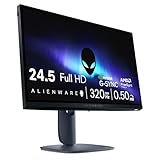
Alienware has recently debuted the AW2525HM, a 25-inch 1920 x 1080p gaming monitor featuring a 320Hz refresh rate and a low response time of 0.5/1ms GtG.

Firstly, who is this monitor aimed at? Given the refresh rate, size, and response time of this display, Alienware is clearly targeting competitive gamers more than gamers who opt for their slower-paced, more cinematic titles. Additionally, the price of the AW2525HM being $349 suggests this display won't have many bells and whistles found on your higher-end gaming monitors, and will be more so rocking the bare minimums to produce an adequate high-refresh rate 1080p display.
Who should be considering this monitor? If you are currently using a 1080p (FHD) display that has a refresh rate of anywhere between 60Hz and 120Hz, and can't afford the necessary PC components to make the jump to a 2560 x 1440p (QHD) panel, the AW2525HM could be a viable upgrade route. The AW2525HM becomes even more of an attractive option if you are a type of gamer that mostly sinks their teeth into competitive titles, which would be games such as Counter-Strike, Valorant, Rocket League, League of Legends, Overwatch 2, and any other fast-paced title that can full advantage of that 320Hz maximum refresh rate and 0.5ms response time.
Specifications
| Item | Details |
|---|---|
| Model | AW2525HM |
| Size | 25-inch |
| Resolution | 1920 x 1080 |
| Pixels Per Inch (PPI) | 90 |
| Panel Type | Fast IPS |
| Refresh Rate | 320Hz |
| Response Time | 1ms GtG / 0.5ms GtG |
| Brightness | 400 nits |
| Contrast Ratio | 1000:1 |
| Aspect Ratio | 16:9 |
| Viewing Angle | 178° |
| Color Coverage | 99% sRGB (CIE 1931) |
| HDR Support | Yes |
| Video Ports | 2x HDMI 2.1 , 1x DisplayPort 1.4 |
| USB Ports | 1x USB 5Gbps Type-B upstream, 1x USB 5Gbps Type-A downstream, 1x USB 5Gbps Type-A downstream with BCI1.2 charging |
| VESA Mounting | 100 x 100 |
| Adjustments | Swivel Angle: -20° to 20°, Height: 110mm, Tilt: -5° to 21°, Pivot: +/-90° |
| Warranty | 3 years |
| Net Weight (Kg) | With Stand: 6.07 kg (13.38 lb), Without Stand: 3.69 kg (8.14 lb) |
Close-up


Best Deals: Alienware 25 AW2525HM Gaming Monitor
Price Trend:
Prices last scanned 13 hours and 10 minutes ago

7 days ago: $199.99 USD30 days ago: $229.99 USD

7 days ago: $199.99 USD30 days ago: $249.99 USD
7 days ago: $349.99 CAD30 days ago: $299.99 CAD
7 days ago: $529.98 CAD30 days ago: $529.98 CAD
7 days ago: £427.2930 days ago: £431.95


Design
The AW2525HM stays true to Alienware's new sci-fi-inspired design that the company calls Interstellar Indigo, which is an attempt to combine minimalistic aesthetics with functionality. As with all of the Alienware monitors I have tested with this design, I believe the company has knocked it out of the park here in both aesthetics and functionality. Consider this physical design a goal scored, as Interstellar Indigo sets Alienware apart from the competition, while also providing the user with a slick, subtle, and expertly crafted aesthetic.

Kicking things off, we have the back of the monitor, which features Alienware's 360-degree ventilation system. For those who haven't already noticed where it is, Alienware has integrated the ventilation system into the physical design of the display with the small puncture holes found dotted around the back of the monitor in a circular fashion. Keeping to the back of the monitor, the AW2525HM features a smooth curved aesthetics that are reminiscent of the typical depiction of a UFO, fitting perfectly into the "Alienware" brand.
The monitor shell is made of high-quality plastics that feature a premium matte finish. These plastics make the AW2525HM maintain a light total weight, which comes in at 3.69 kg / 8.13 lbs without the stand, and 6.07 kg / 13.38 lbs with the stand. The low weight and the 100 x 100 VESA mounting support mean the AW2525HM can be mounted onto most monitor arms without the owner having to upgrade from their previous monitor arm. If monitor arms aren't what you are into, the AW2525HM's stand is also versatile in terms of its adjustability, with height adjustment up to 100mm, tilt from -5 ° to 21°, swivel to ±20°, and pivot to ±90° (for vertical/portrait mode).

On the back of the AW2525HM is the inclusion of an RGB Alienware head logo, which can be controlled through the monitor's On-Screen-Display (OSD). Moving down to the connectivity, Alienware has equipped the AW2525HM with a variety of different ports for both PC and console gamers. The AW2525HM comes with 2x HDMI 2.1 ports, 1x DisplayPort 1.4, 1x USB 3.2 Gen 1 5Gbps Type-B upstream, and 2x USB 3.2 (5Gbps) Type-A downstream, with one of those ports supporting BC1.2 for up to 7.5W charging.
Our Latest Monitors Review Coverage
- Alienware AW3426DWM 34-inch 240Hz Gaming Monitor Review
- ASUS ROG Strix OLED XG34WCDMS Review: Tandem OLED Takes Ultrawide Gaming Further
- GIGABYTE MO27Q2A Gaming Monitor Review: 1440p, 280Hz, and QD-OLED is a winning combination
- ASUS ROG Strix XG129C Review: A $199 Gaming Monitor You Don't Play Games On
- KTC H49S66 5K2K (5120x1440) 49-inch 180Hz Gaming Monitor Review
Alienware includes cables to all of the ports within the box, and with the ports available, the AW2525HM can be utilized by both PC and console gamers. The HDMI ports can support up to 255Hz, which far exceeds what any current-gen console can produce, while the DisplayPort 1.4 is what PC users will need to use to take full advantage of the maximum 320Hz refresh rate. The three video ports mean the AW2525HM can be used in multi-device setups, such as a user having their console plugged in via the HDMI and their PC plugged in via the DisplayPort.

The user can simply switch between input sources to dance between their platform of choice. Additionally, the HDMI ports can be used for streaming or even a second PC if the user wants to stream high-refresh rate gaming. All cables can be routed through the circular cutout found in the lower portion of the stand, keeping them more organized and resulting in a cleaner look.
Panel Breakdown
The AW2525HM rocks a Fast IPS (In-Plane Switching), which is a pixel technology intended to deliver rich color accuracy and wide viewing angles, along with the speed necessary for esports gaming. At a specific 24.5 inches (but classified as a 25-inch monitor), and a resolution of 1920 x 1080p, the AW2525HM has 90 Pixels Per Inch (PPI), which unfortunately means it falls below my general recommended PPI for any display, 100PPI.

However, this is a 1080p high refresh rate panel, meaning sharpness of the visuals isn't what is of value here, nor does Alienware intend it. Moreover, 90PPI is quite standard for 24.5 to 25-inch monitors, and a lower resolution means lower latency and a much easier time driving 320Hz. The AW2525HM is an esports-centered monitor, so I can make the concession on the visual clarity for the ultra-fast refresh rate. But, this means that if you are looking to use this monitor for more than just gaming, such as for text-based workflows, editing, or any creative work, I unfortunately cannot recommend it due to its lack of sharpness. The AW2525HM has one purpose: games.

With a 99% sRGB (CIE 1931) color gamut, a 1,000:1 contrast ratio, and 400 nits of brightness, the AW2525HM performs exceptionally given its price point. Alienware does say the AW2525HM comes with HDR support, but given its low brightness and certification of DisplayHDR 400, I wouldn't recommend turning it on.
I also verified my suspicions throughout my testing by switching it on in a few games (listed in the Performance section of the review), and I was correct. HDR performance is extremely poor and caused more problems than it solved. This isn't totally surprising considering the price of the AW2525HM and the target customer - competitive gamers don't care about HDR performance.

The Fast IPS panel comes with three Overdrive modes. Fast, which is the default. Super Fast, and Extreme. Each of these modes changes the response time, with the monitor shipping in Fast, a 1ms response time, Super Fast, 0.7ms response time, and Extreme at 0.5ms GtG. Throughout my testing, I found the Super Fast response time to provide the most consistent performance, as Extreme did produce some inverse ghosting. Fast also performed stably, but Super Fast did feel slightly better in games, particularly first-person-shooter titles. However, I would say the average user wouldn't be able to tell the difference between Fast and Super Fast.

The OSD settings are outlined quite well, with the main settings just being front and center. I did find that out of the box, the AW2525HM was a little bit dull when it came to brightness, but this was easily fixed by bumping it up just 10 to 20 points, depending on the game.
Performance
As with all of my gaming monitor reviews, I like to run the display I have under the spotlight through a variety of different games to see which type of gamer would best enjoy the display. That way, you can rule yourself/in or out depending on what type of games you play. Here are the games I tested on the AW2525HM: Overwatch 2, DOOM: The Dark Ages, League of Legends, God of War: RagnarÜk, Cyberpunk 2077, Valorant, Apex Legends, Age of Mythology: Retold, Black Myth: Wukong, Counter Strike 2, and The Witcher 3: Wild Hunt.

Unsurprisingly, the AW2525HM performed the best in competitive titles, which out of the games listed above were: Valorant, League of Legends, Overwatch 2, Apex Legends, and Counter-Strike 2. The AW2525HM performed best in these titles because none of these games rely on stunning visual fidelity to have a great experience; they prioritize frame rate. With the AW2525HM's 320Hz refresh rate and the frame ceilings of all the above games exceeding 320FPS, I was able to utilize the AW2525HM's capabilities fully.

Another game to highlight is DOOM: The Dark Ages, and while it isn't a competitive multiplayer game, it does have a very high frame ceiling and is extremely well optimized for high refresh rate displays. DOOM: The Dark Ages stands as an example of the AW2525HM excelling even in single-player first-person shooter titles.

Ultimately, the AW2525HM will kick ass in any game that requires fast motion tracking, and doesn't necessarily need outstanding graphical fidelity. Just make sure the game you play the most has a frame ceiling of at least 320Hz, and of course, your PC is capable of reaching that. If you can check the box in both of those categories, you are going to have a great gaming experience with the AW2525HM.
Final Thoughts
So, should you buy the AW2525HM? For a price of $349, I can comfortably recommend the AW2525HM to any gamer who is looking to upgrade from their 60Hz or 120Hz gaming monitor, but isn't looking to make the jump to QHD (2560 x 1440).

The AW2525HM is solely built for competitive gamers in my eyes, and while single-player cinematic games can be used with the AW2525HM, I would steer any buyer away from the AW2525HM if those are the types of games they play the most.
A potential owner of an AW2525HM should be spending 70% of their gaming time in fast-paced, competitive titles such as Counter-Strike 2, Overwatch 2, League of Legends, Rocket League, and Valorant. In each of these games, the full capabilities of the AW2525HM can be taken advantage of.
For $349, buyers will get a purpose-built gaming monitor that provides an extremely good experience in games that can max out its specifications. Additionally, the Alienware design of monitors is second to none on the market right now. So, not only do you get a blisteringly fast gaming monitor for a budget setup, but also a gaming monitor that looks awesome as well.