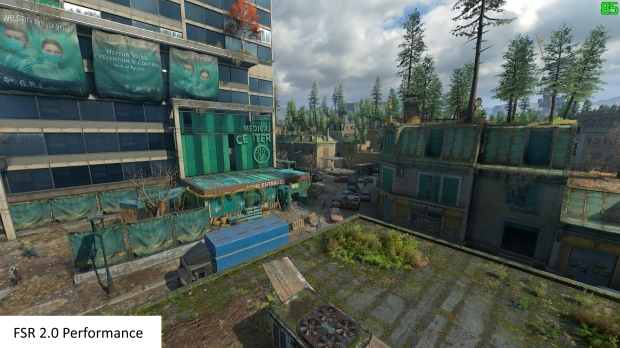
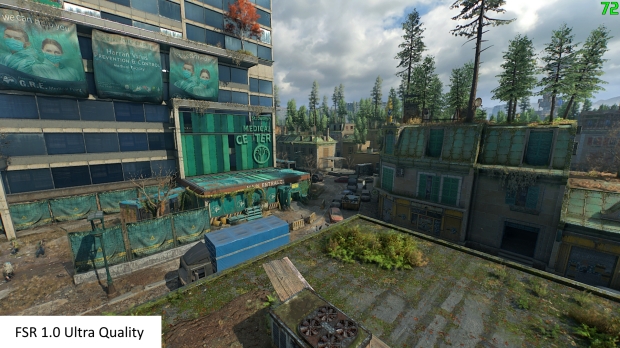
Dying Light 2 has received a new mod that enables unofficial support for AMD FidelityFX Super Resolution 2.0 (FSR 2.0) technology. I've attached a great comparison video by MxBenchmarkPC on YouTube, which compares Dying Light 2 running on a GeForce RTX 3080 graphics card in FSR 1.0 vs FSR 2.0 vs DLSS 2.4 upscaling technologies:
The PC modding community has been working wonders in the last week since AMD unleashed FSR 2.0 upscaling technology into the wild, especially in open source. Dying Light 2 has support for NVIDIA DLSS (Deep Learning Super Sampling) but now there's AMD FSR 2.0 upscaling support, of which you'll need to run Dying Light 2 in DX12 mode for it (the mod) to work.
- You can download the Dying Light 2 FSR 2.0 mod right here.
The Dying Light 2.0 FSR 2.0 mod isn't perfect -- which is to be expected -- with the creator of the mod warning gamers that it's obviously not as good as if the developer added official support for AMD FSR 2.0 technology. We have issues like ghosting and smearing, lighter shadows, and lower resolution skybox textures will be what plagues the Dying Light 2.0 FSR 2.0 mod.
You can still however enjoy the performance and visual benefits of FSR 2.0 up from FSR 1.0 support that Dying Light 2 has by default.
- Read more: AMD FSR 2.0 plugin launches for Unreal Engine 5 + 4: download it now
- Read more: AMD pushes FSR 2.0 out to Xbox developers, PS5 devs are in the dark
- Read more: AMD FidelityFX Super Resolution 2.0 is now officially open source
- Read more: AMD FSR 2.0 gets more support, 19 games will soon have FSR 2.0 tech
Make sure that the game has the Renderer Mode set to D3D12 in the Advanced Video Settings. Run the game and select one of the now-available DLSS Upscaling options in the Video settings:
- DLSS, quality is FSR 2.0 Quality: Upscale by a factor of 1.5x
- DLSS, balanced is FSR 2.0 Balanced: Upscale by a factor of 1.7x
- DLSS, performance is FSR 2.0 Performance: Upscale by a factor of 2.0x
As for FSR 2.0, I'll let AMD put it in their words: "AMD FidelityFX Super Resolution 2 (FSR 2) technology is our brand-new open source temporal upscaling solution. FSR 2 uses cutting-edge temporal algorithms to reconstruct fine geometric and texture detail, producing anti-aliased output from aliased input".
"FSR 2 technology has been developed from the ground up, and is the result of years of research from AMD. It has been designed to provide higher image quality compared to FSR 1, our original open source spatial upscaling solution launched in June 2021. Note that FSR 1 can still be exposed as its own upscaling option in addition to FSR 2 in game titles. Both technologies have different characteristics which may be suitable for a wider range of platforms and user preferences. For example, our FSR 2 partner title DEATHLOOP exposes both!"