Doom Eternal's new Carmack Reshade mod adds a whole new dimension of depth, vibrancy, and brutality to your favorite demon-slaying shooter.
We just tried out the Carmack Eternal Reshade mod from Nexus Mods, and the results are pretty crazy. The mod itself is basically a Vulkan effects editor that lets you adjust various graphics, lighting, and visual settings in the game, including ambient light, simulated HDR, monochrome black-and-white filters to make everything into a 1950's gorefest, godrays, bloom--the works.
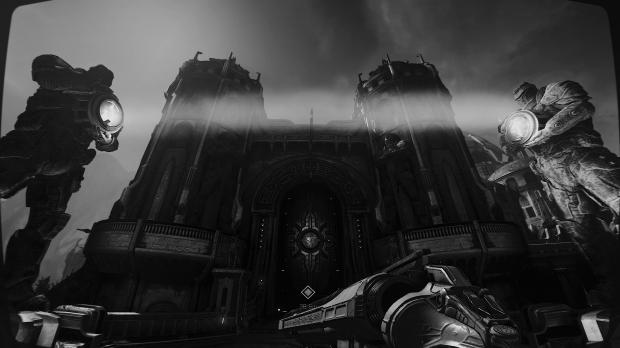
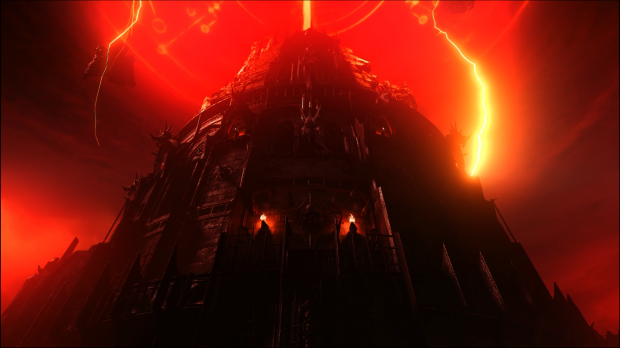
You can download the Reshade mod and customize everything yourself and experiment with all the awesome effects, or just use the presets designed by the mod's uploader. Either way, the game will look even better than it already did...which is saying a lot.
The best part is that it's a breeze to install. Check below for installation instructions, and keep a look out for our side-by-side Reshade vs vanilla video coming soon!
DOWNLOAD LINK:
Carmack's Eternal ReShade Download - www.nexusmods.com/doometernal/mods/4?tab=files&file_id=9
INSTALLATION:
- Launch the ReShade_Setup_4.5.4.exe, click "Enable/disable ReShade in Vulkan globally" option.
- Enable hidden files via Control Panel - Folder Options - View - Show hidden files, folders, and drives
- Copy everything from the Carmack Eternal Reshade Main Files folder into your "C:ProgramDataReShade" folder.
- Launch Doom Eternal
Use HOME key to open Vulkan settings editor, and END to close panel.
Start-up without presets (make your own customizations from the get-go):
- Launch Reshade Setup
- Click "click here to select a game and manage its installation"
- Select Doom Eternal from the list
- Click "use selected application"
- Launch Doom Eternal