Newsletter IconFacebook IconX IconThreads IconInstagram IconYouTube IconPinterest Icon
Giveaway: Win an NZXT H6 RGB+ Case, Kraken Elite AIO, RGB Fans and 1200W PSU

Nintendo Switch update 7.0.0: new icons and languages

Nintendo has issued out their new firmware update 7.0.0, numerous new additions such as languages and icons.

Comments
Tech and Science Editor
Published
Updated
45-second read time
Voice: Jak Connor
0:00 / --:--
Use left and right arrow keys to seek audio.

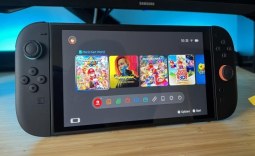
The new firmware update for the Nintendo Switch has been issued out and is now live. The new version brings brand new icons and languages for users.

Nintendo Switch update 7.0.0: new icons and languages | TweakTown.com

Version 7.0.0 for your Nintendo Switch has now been made live. While the update didn't add many new features to the Switch, Nintendo has instead added support in the 'home' menu for more languages such as "Chinese (simplified), Chinese (Tradional) and Korean". Nintendo also give a step-by-step tutorial on how to change languages; "To change the language, head to the System Settings > System > Language".

Languages additions weren't the only thing Nintendo brought within their 7.0.0 update, six new Super Mario Bros. U Deluxe icons have also been added. After the update has been downloaded and installed, Nintendo Switch users can edit their user icon by following these steps; "head to your My Page > Profile on the top left of the HOME menu". Just like most firmware updates, "general system stability improvements to enhance the user's experience" have also been added. It is unclear what these improvements are, but they are welcomed.

News Source:mynintendonews.com

Comments

Tech and Science Editor

Email IconX IconLinkedIn Icon

Jak joined TweakTown in 2017 and has since reviewed 100s of new tech products and kept us informed daily on the latest science, space, and artificial intelligence news. Jak's love for science, space, and technology, and, more specifically, PC gaming, began at 10 years old. It was the day his dad showed him how to play Age of Empires on an old Compaq PC. Ever since that day, Jak fell in love with games and the progression of the technology industry in all its forms.

Stay Updated

Follow TweakTown for breaking tech news, reviews, and daily updates.

Add TweakTown as a preferred source on GoogleFind TweakTown on Apple News
Newsletter Subscription