












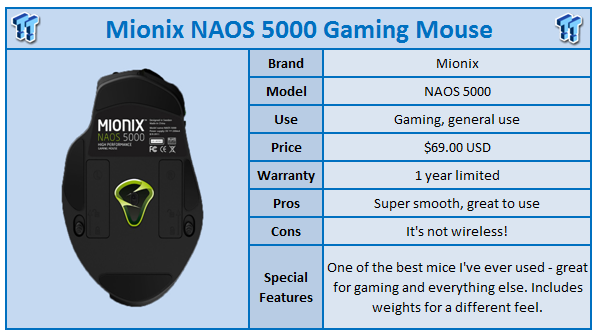
Let's start off with me admitting that before I had started this review, I had never heard of Mionix. As I was offered the mouse for review, I did my usual bit and started checking out their products, website and various other user reviews and thoughts.
I looked at their website for the NAOS 5000 and thought it looked plain and wrote it off as a mouse that would be mediocre at best. Oh, how wrong I was.
The NAOS 5000 arrived at my house and I put it aside for a day or two until I had a few good hours to sit down and really thrash it playing games. I opened it out of the box and was met with impressions of the mouse and included kit. It comes with a cool metallic casing that the mouse weights fit into, which was surprising and also the usual booklet and of course, the NAOS 5000 itself.
[img]2[/img]The NAOS 5000 upon first hands-to-mouse action is lackluster. I think this is because your hand builds a bond to whatever mouse you use. Think about it, you might use your mouse 20 - 30 hours per week; it kinda molds to your hand and becomes one with you. Changing this is like buying a new pair of shoes. Sure, they feel great, but it feels like you're cheating on your old pair.
Once I had the mouse set up, I installed the associated software and began my testing. I used Team Fortress 2 for testing and played with it a few hours at a time, over a two week period. In the first 10 minutes, I couldn't get used to it. I had to push through with persistence; the only thing holding me back was the shape.
After 15 - 20 minutes, my love began to grow exponentially. I went from 'meh' to 'omfg' - it was a massive transformation of feelings. The NAOS 5000 became an amazing piece of kit to use. I play on a 120Hz triple-screen setup, so smoothness is something important to me. Even dipping to 80fps becomes "egh", and a mouse that can't keep up or feels 'laggy' really annoys me.
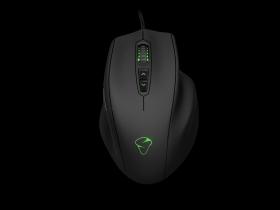
The Mionix NAOS 5000 was epic. It felt smooth, the shape I become accustomed to and after an hour or so with the mouse (and at the top of the TF2 game leader board), I told the NAOS 5000 that it would be my wife - it would be mine forever.
Our Latest Mice Review Coverage
- Razer Viper V4 Pro Wireless Gaming Mouse Review - Built for Competition
- Corsair SABRE v2 PRO CARBON FIBER Wireless Gaming Mouse Review - The Premium Option
- Corsair SABRE v2 PRO Wireless MG Gaming Mouse Review - A Strong Contender
- Logitech G PRO X2 SUPERSTRIKE Wireless Gaming Mouse Review - Competitive Gaming Perfected
- ASUS ROG Harpe II Ace Wireless Gaming Mouse Review - Performance, Comfort, and Versatility
I used the NAOS 5000 in various different ways and found TF2 some of the best ways of testing it. Going from the quick Pyro action to slower-moving Sniper, to the even slower-moving Heavy, the NAOS 5000 performed admirably. It felt like your secret weapon, sidekick, Robin, or even an extension of yourself.
The scroll wheel is a pleasure to operate; it doesn't feel too light on the scrolling so you scroll through 1022 weapons in 3 seconds, and it doesn't feel heavy enough that Superman has to be invited over to turn the mouse wheel once.
The buttons themselves are very click-friendly (of course) and by this I mean that they are a joy to press. Again, like the wheel, they don't feel too soft to press nor do they feel too hard either. It's a magical balance of perfection.
Mouse movement is also glorious - it's ever so smooth to move across the mouse pad and even being a wired mouse, I didn't feel restricted versus my wireless Mamba. If I had to match the NAOS 5000 with any other mouse as for how it feels to hold, it would be close to the Logitech G9 or G9X, so if you like the size of that, you'll be in love with the Mionix NAOS 5000.
I will note I used the Mionix Propus 380 gaming mouse mat and it was an absolute pleasure to use along side the NAOS 5000 gaming mouse. They are absolutely magical together. I was hands-down impressed with how well they worked together.
The Mionix software has a cool trick up its sleeve - along with the usual sensitivity and DPI adjustment, there's a LED adjuster too. I changed my LED to blue so I felt like I was using a TweakTown colored mouse. Oh yeah, I live life ON THE EDGE!
The included weights are a user-to-user choice; I felt the mouse was too light for my liking and installed all of the weights to give it some weight in my hand. Once I had them installed, it felt better (for me) to move around on my mouse pad and for the slower moving tasks (such as Windows), it was much easier to use.
One of the best things about it? Newegg only list it at $69.99 USD! Damn, such good value for money Mionix, stop tempting everyone!
A little sprinkle of Mionix seasoning here; I also tested their Propus 380 mouse pad and I must say, it compliments the NAOS 5000 like Coke does to Scotch. It is one of the smoothest, yet most precise mouse mats I've had the pleasure of using (and I've had probably 10+ gaming mouse pads in my time).
It feels as though it was literally created to be with the NAOS 5000, so I suggest if you take a look at the Mionix NAOS 5000, please do take a serious look (and if you can, play test) of the Propus 380 mouse mat.
I tested the mouse mat on various other mice, my Razer Mamba and Logitech MX500 - it was ultra-smooth and has again become my everyday mouse pad and replaced my Razer Vespula. The Propus 380 is quite large, but not too big to be on your desk. I had it laying vertically as I do with any mouse mat I own and it was still wide enough for the "oh my god, there's a spy behind me, quick, quick turn around and kill him" movements.
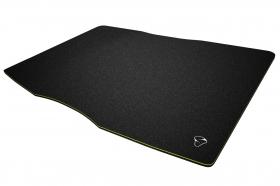
I've seen other reviews tear it down because it's too wide...I never use a large mouse mat in a wide sitting; always portrait. As for "gritty" texture, I find it very smooth.
It also has a...sparkle? Yeah, a sparkle to it. The same kind of effect snow has in the sunlight; it glistens. It just adds to the awesomeness that is the Mionix NAOS 5000 and Propus 380 combo. It's a one-two punch that has really bowled me over.
Color me impressed, Mionix.
[img]3[/img]I think the only negative things about the NAOS 5000 are two things. One, it's a wired mouse. If it were a wireless mouse (ala the Mamba) it would be in my opinion the perfect gaming mouse. Secondly, the covers to install the weights on the mouse are pretty crap. I tried for two or three minutes before I got the "ohhh, it goes THAT way" and got them installed.
Mionix have a definite winner in my eyes and anyone in the market for a gaming mouse should definitely stop and smell the roses with the NAOS 5000. Looks can be deceiving.

 ASUS ROG Raikiri II Xbox Wireless Controller Review - Ready to Take Control
 IQUNIX Magi96 Pro Aluminum Low Profile Mechanical Keyboard Review - Premium Build, Satisfying Sound
 Razer Pro Type Ergo Wireless Split Ergonomic Keyboard Review - Built for Comfort and Support
 ASUS ROG Strix Morph 96 Wireless Gaming Keyboard Review - Great Performance, More Affordable
 Corsair MAKR PRO 75 Hall Effect DIY Keyboard Review - Pre-Built and Ready for Action
 Elder Scrolls 6 roadmap not affected by layoffs, Bethesda says
 Intel and AMD are locking Chinese customers into long-term CPU deals as server chip prices climb more than 40%
 Ubisoft CEO says Sony's PlayStation disc shutdown will not disturb the industry too much
 Vibe coding is flooding the App Store with new apps - on track for record submissions in 2026
 Geekbench 7 is out with CUDA support, smarter multi-core scoring, and new AI workloads across all major platforms
 GTA 6 physical copies in Japan have a 170-day expiration date
 Ubisoft believes remakes can be more profitable than new releases, after Black Flag Resynced exceeds expectations
 AMD is preparing the 8-core Ryzen 7 9800HX3D CPU for laptops with 96MB L3 cache
 Blizzard fires World of Warcraft game master for abusing god-like powers
 GIGABYTE adds CXMT DDR5 support to AM5 motherboards, supporting speeds up to 8200 MT/s
 Thrustmaster T.Flight HOTAS 5 MSFS Edition Review
 SteelSeries Arctis Nova Pro Omni Wireless Headset Review - One Headset to Rule Them All
 SteelSeries Arctis Nova 7 Wireless Gen 2 Headset Review - New and Improved, But Is It Enough?
 AMD Ryzen 7 7700X3D Review - Days of Future Past
 Samsung 990 2TB SSD Review - Ninth Gen QLC at PCIe Gen4 Speeds
 ASUS ExpertBook Ultra (Panther Lake) 14" Business Laptop Review
 MOZA FMP18 Panel Bundle Review: authentic F/A-18 Hornet cockpit controls for flight sims
 Micron 6600 ION 245.76TB Enterprise SSD Review - Best in Class Programming Speeds
 MOZA MA3F EFCM Flight Control Module Review: authentic Airbus A320 autopilot panel for simulators
 How to Turn Your Windows Laptop Into a Second Monitor with Miracast and Wireless Display in Minutes
 6 Mistakes to Avoid When Buying a Windows Laptop
 I capped Windows Update's bandwidth with Delivery Optimization, and my downloads stopped choking
 I use this decade-old free tool that finds files faster than Windows Search does
 I install and update most of my apps with this Windows command now, and I stopped downloading sketchy installers
 Hisense U6SF 65-inch MiniLED TV: High Performance Meets Leisurely Convenience
 I stopped digging through Windows menus after I set up this one folder
 Don't sell your Windows laptop until you do these things
 6 PC cleaning mistakes to avoid for safer hardware maintenance
 Phison and Intel Take Aim at Local AI's Memory Wall with aiDAPTIV