













Our Verdict
Pros
- Performance
- Colorway
- Aluminum construction
- Daisy-chained power
- Fan guards
Cons
- Cost
- Noise
- Heft for air coolers
Should you buy it?
Introduction, Specifications, and Pricing

When we got into PCs, fans were almost an afterthought to many case designers. 40mm fans, 80mm fans- they all moved air, but they offered a slow stream of airflow, typically with a ton of added noise. When we wanted better cooling, we had to look to server fans for extra power. Companies like Nidec, Lian Li, Scythe, and Delta all had something on the table ready for a normal PC guy to grab and use for ghetto liquid cooling with a car's heater core, or those with coolers like the Thermalright True Copper, who wanted a bit more performance, hearing be damned.
In today's market of chambered cases, huge towers, and the upsizing of mid-towers, most gamers and PC users find that the standard options in cases do the job, and if you were to swap them out, it would likely be for something colorful and LED-lit. Even CPU coolers come with good fans these days, but with TDPs going up and more cores in play every day we pass, sometimes "enough" isn't enough for you to push further with boost or an overclock. There are times we wished we had kept all of the 30mm and 38mm fans that passed through our hands, as it seems like forever since they were the new thing in cooling, but we are glad someone brought them back and was not afraid to buck the current trends.
If you are looking for the next best thing in fans with all the LEDs and mini screens on the hubs, these are not the fans you want. Cooler Master decided to make more nondescript fans with aluminum frames and aluminum blades and a ton of power behind them. For those with high FPI radiators, you need a ton of flow and pressure to make any headway against OEM fan choices. On the flip side, when we reviewed cases, especially mini-ITX options and SFF designs, it can be tough to get an average fan to keep things chilled inside. This is where the MasterFan A120 and A140 fans come into play. Anyone wanting some of the highest-rated fans on the planet to eliminate airflow and pressure as reasons for holding you back? If this sounds like what you are in the market for, stick with it, as Cooler Master has jumped in their time machine and brought back something from the past that we dearly missed.
| Item | Details |
|---|---|
| Model | MFZ-P2NA-25NPK-R1 |
| Street Name | MasterFan A120 |
| MSRP | $39.99 |
| Color | Silver |
| Material | Aluminum |
| Dimensions | 120 x 120 x 30mm |
| Speed | 0 - 2500 RPM ?10% |
| Air Flow | 76.9 CFM |
| Air Pressure | 6.1 mmH2O |
| MTTF | > 200,000 Hours |
| Noise Level | 29.7 dB(A) |
| Bearing Type | Two-ball bearing |
| Connector | 4-Pin PWM |
| Rated Voltage | 12 VDC |
| Rated Current | 0.17A |
| Power Consumption | 2.04W |
| Weight | 305g per fan |
| Warranty | 6 Years |
| Item | Details |
|---|---|
| Model | MFZ-P4NA-19NPK-R1 |
| Street Name | MasterFan A140 |
| MSRP | Unknown |
| Color | Silver |
| Material | Aluminum |
| Dimensions | 140 x 140 x 30mm |
| Speed | 0 - 1900 RPM ?10% |
| Air Flow | 104 CFM |
| Air Pressure | 3.41 mmH2O |
| MTTF | > 200,000 Hours |
| Noise Level | 30.4 dB(A) |
| Bearing Type | Two-ball bearing |
| Connector | 4-Pin PWM |
| Rated Voltage | 12 VDC |
| Rated Current | 0.15A |
| Power Consumption | 1.8W |
| Weight | 379g per fan |
| Warranty | 6 Years |
Cooler Master asked that even though we only have the 120mm version in hand, we also address the 140mm versions, both for awareness and to show off what they are delivering in the MasterFan A-series. Just to make everyone aware, Cooler Master also has Axxx FC fans, which feature a fan-controller button that turbocharges the fan speeds well beyond their listed specifications. In other words, if what we show isn't enough to get you by, Cooler Master still has something up their sleeve for the most demanding situations.
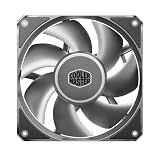
Our MasterFan A120 comes with the long part number MZF-P2NA-25NPK-R1 and is all-silver with black accents. Rather than plastic or composites, Cooler Master made the fan blades and frames out of solid aluminum, which eliminates all sorts of wobbles, wiggles, vibrations, and breakage.
Best Deals: Cooler Master MasterFan A120 Case Fan
Prices last scanned 18 hours and 27 minutes ago

7 days ago: $41.33 USD

7 days ago: $39.99 USD
7 days ago: $89.98 CAD
7 days ago: £96.68

By size, they seem normal at first glance, at 120mm square, but it has been a while since 30mm-thick fans were mainstream. Being all-aluminum in construction does add weight, and we see that the MasterFan A120 weighs 305 grams. Pretty hefty to add to an air cooler- doable, but a lot; although on a chassis or a radiator, the weight is more easily handled.
The speed range for the MasterFan A120 is 0-2500 RPM. At maximum speed, you can expect near 80 CFM and an astounding 6.1 mmH2O of static pressure. The fans are said to last over 200,000 hours while spinning on their ball bearings, drawing 2.04W of power via the 4-pin PWM connector.
Our Latest Cooling Fans Review Coverage
- Ocypus Sigma F36 BK ARGB Cooling Fan Review: high airflow and unified design in one frame
- TRYX ROTA Pro 120 Black Cooling Fan Review
- XPG Hurricane MAG 120 ARGB PWM (4-Fan Kit) Review
- ENDORFY Fluctus 120 PWM and Fluctus 120 PWM ARGB Cooling Fans Review
- InWin Jupiter AJ120 High Airflow Addressable RGB Fan Kit Review
As for the MasterFan A140, it is 140mm square, still 30mm thick, and its speed range is from 0 to 1900 RPM. However, it's shown to push 104 CFM at 3.14 mmH2O while using slightly less power than the A120, but weighing in at 379 grams per fan.

Frequently Asked Questions
TweakBot answers common questions about this review using TweakTown's own coverage from this page and related content from our archive. All answers are generated from TweakTown content and not outside sources. Tap a question to reveal the answer, or type your own below related to this content.
How much do the MasterFan A120 and A140 weigh and will that weight affect mounting on CPU air coolers or radiators?
What connector and power requirements do these fans use, and do they support PWM control?
Does the MasterFan A120 ship with mounting hardware suitable for radiators and chassis installation?
Have a question about this content not listed here? Ask below and TweakBot will answer it.

The MasterFan A120 can be found almost anywhere you shop. At $39.99 a fan, it feels a bit steep, but remember, this isn't an average plastic fan with lights; it is a high-end, industrial-grade aluminum fan designed for one thing: moving a ton of air. Overall, we like the price, as we see the same price for iCUE fans and the like, and they don't ship with any of the power Cooler Master provides. As to the MasterFan A140, we cannot find them for sale on this side of the pond just yet, but with those specs, we can see people gravitating towards them, even if they sold at nearly $50 a pop. With what Cooler Master delivers in these MasterFan A120 fans, you will be hard-pressed to ask more from a fan, at any speed, with whatever fan curve you set.
Packaging

The MasterFan A120s were shipped to us in a set of three. The boxes containing them are plain cardboard, with a bright colored sticker applied to the front and left side of the box. The sticker shows the fan's name, a look inside the box, and the Cooler Master logo.

If you are unsure what is inside the box, on the bottom we find 22 ways to tell customers that this is a "Fan 120mm," just in case you were confused.

The right edge of the box is where Cooler Master drops all their company information, symbology, and disposal information.

On the back, below the logo, is a specifications chart showing everything we mentioned earlier, although the CFM rating is a touch higher than their product page shows. To the right are codes to get a digital manual and to visit the main site, with the model and serial numbers near the bottom.

Inside each fan box, at the top, before you get to remove the fan, you will find some of the hardware. What you find initially is the 100mm extension cable to power the fan, a set of long screws, and a set of nuts to secure those screws. Next to the fan, behind a layer of paper, is a fan grill. If you have never used a metal fan before, the grill isn't there for looks; it's there to save fingers and knuckles when we tinker inside of a running system.
Cooler Master MasterFan A120

Out of the box, the trio of silver fans is a choice we typically don't see: black, white, even brown, sure, but silver is a bit rarer. The large black rubber isolation pads at the corners and the black-and-gray logo stickers on the hubs deliver good contrast around the seven metal blades.

On one side of the fans, the braided cable exits the frame, and with the MasterFan A120, we get standard 4-pin, daisy-chained connectors, simplifying wiring and installation. As for the frames, they are thick and beefy, enclose the screws, yet still leave openings near the central round frame.

Opposing sides share the same designs. While the two sides are smooth, without any flow or spin-direction arrows, the other sides feature the same embossed Cooler Master logo. IT leaves users the choice to have a clean look or brag about the manufacturer on the visible side when installed.

The back of the fan has the product sticker centered in the specially designed frame. The frame is curved and aerodynamic, and even where the wire runs, they use tabs versus a channel to help open where air flows. The sticker on the hub lists the name and model but shows 4000 RPM, which is more in line with the FC fans, not the speeds we see in our samples.

Fan grills were everywhere a couple of decades ago, but in this instance, they are there for safety. At 2500 RPM, we would not want to check how those fan blades react to the touch of any portion of our skin. We are not saying this is a "will it blend" episode, but we have a feeling that the fan is not going to give in the slightest in that battle.
Test System Setup & Findings
Chad's Fan Test System Specifications
| Item | Details |
|---|---|
| Motherboard | ASUS ROG STRIX X870E-E Gaming Wi-Fi (Buy at Amazon) |
| CPU | AMD Ryzen 9 9900X (Buy at Amazon) |
| RAM | Patriot Viper Elite 5 32GB @ 7000MT/s (Buy at Amazon) |
| GPU | GIGABYTE GeForce RTX 4070 Ti Super Windforce OC 16G (Buy at Amazon) |
| SSD | Patriot Viper 2TB VP4300 PCIe m.2 Gen4 x4 (Buy at Amazon) |
| Case | be quiet! Light Base 900 DX (Buy at Amazon) |
| Case Fans | be quiet! Light Wings White 140mm PWM High-Speed ARGB (Buy at Amazon) |
| Power Supply | be quiet! Dark Power Pro 12 1500W (Buy at Amazon) |
| OS | Microsoft Windows 11 Home 64-bit (Buy at Amazon) |
| Software | AIDA64 Engineer 7.60.7300, and CPU-z 2.14.0 x64 |
Findings
After hooking the MasterFan A120s together and connecting the extension cable to them and our channel five fan header, we could see what these beasts are all about. The first thing we did was drop into the BIOS and open Q-Fan control. With it, we can set custom curves and use a few ASUS presets, allowing us to compare speeds, noise, and flow across any submission. The four settings we will use are Silent, Standard, Turbo, and Full Speed.
With silent mode activated, the fans immediately changed their tune from the initial full-speed boot-up. The MasterFan A120 ran at a maximum of 1418 RPM yet still delivered quite a bit of airflow and pressure. Noise levels are tolerable, peaking at 35 dB - more in line with what most fans offer at full speed.
We then selected standard mode for fan control, and the fans took the cue and ramped up slightly, with speeds topping out at 1575 RPM and a minimal increase in noise to 38 dB. The difference from silence is tough to feel at this little of a jump, but we can assure you the CFM and mmH2O are climbing.
Turbo mode gets us close to the MasterFan A120's maximum at 2213 RPM. While online literature insinuates these fans are nearly silent, hitting 48 dB, the fact that we still haven't maxed them out is a sign they are not as silent as we were led to believe.
Aside from setting a custom curve, our last option is to set the Q-fan to full speed and wait for the MasterFan 120s to spool up. 2532 RPM is where our fans topped out, with a sizable bump in noise levels, hitting 59 dB a foot away from these fans.
On a side note, at full speed, we set the fans down to see if they would hover or float. In that, we didn't get any magic levitation, but these fans are so strong that in the tiny gap between the blades and the frames, we could feel air circling back at us! Most fans slow down, and we have yet to feel air being pushed back through another fan, which goes to show how well the MasterFan A120 is set up to force air through even the tiniest gaps, helping users get the most airflow possible in confined or dense situations.
Final Thoughts
If you want a fan that eliminates airflow and pressure issues, look no further. While we are sure someone has been making something similar out of plastic, we haven't seen a fan like this in a couple of decades. Metal fans were nearly exclusive to the server environment, and with market trends always changing, it makes a ton of sense to bring the idea of an industrial fan back to the masses. While the aging comparisons were nothing special to look at - boring, in fact - Cooler Master is sure to dress up these MasterFan A120s, bringing them to a level we expect in 2026.
If aluminum wasn't out of left field enough, painting them silver makes them stand out from the crowd even more. There are no signs of machining left on any of the surfaces, just smooth, elegant curves of the beefy frame and surround. The frame is one thing, but opting for aluminum blades also means beefier, much stronger blades. Excess noise from more flexible solutions is eliminated in this design. The black accents on the fan hub, the sticker on the back, and the isolation pads do bring up the contrast while also lending some complementary color to most builds. So far, we have a tank-like fan that looks the part, but does it do everything Cooler Master insinuated it would?
When it comes to the specifications, we wholeheartedly believe the CFM rating and have no doubt that these fans deliver beastly amounts of pressure at that flow. No matter where you decide to set their control- normal PWM, or in BIOS with various presets or custom profiles; same goes for software control. Even at lower RPM, there is more flow than we see from many silent fans in the game, and at half speed, they beat more than half of what ships on coolers every day. If you can bear the noise, at full speed these MasterFan A120s show their stuff and deliver airflow and pressure in amounts you are not used to seeing unless you lived in the 90s and 00s. We also love the fan guards, which not only take us back to our early days of fan use but also help prevent mishaps should you want to try your luck with them running.
Even though these fans sell individually with no "packs" shown yet, at $39.99 we feel Cooler Master is right on the mark. The amount of aluminum you could recycle could get you a third of that cost back, and you haven't looked at the extras: the multi-phase motor, the ball bearing, or any of the R&D it took to come out with these monsters. All told, not only do we feel you get a ton of nostalgia for us old-timers, but you get one of the best fans in the game, perfect for those looking for the best thermals, no matter how small the case or how tight the fins are; these fans find a way to get those impressive figures through whatever you strap them to. With a six-year warranty, you will be well into another build before that gives out. We don't see a defect in the frame or blades as a thing, so the motor and wiring are covered under that term. At 200,000 hours of use, even with it on all the time, these are more of a long-term investment strategy. You get all the slick appeal now along with the benefits of the MasterFan A120, and it should still be running a couple of decades from now. With everything in mind, if you need more from your fans, seriously consider the Cooler Master MasterFan A120 or MasterFan A140.


 Cooler Master V8 ACE 3DHP BLACK CPU Cooler Review
 Cooler Master HAF II 500 Mid-Tower Chassis Review
 CPS PCCOOLER YS1200 ATX 3.1 80 PLUS Gold PSU Review
 Montech TG3 Mid-Tower Chassis Review
 Noctua NL-LC1-36 Liquid CPU Cooler Review
 Giveaway: 12 Winners Will Score MONTECH NX400 and NX600 CPU Coolers
 STALKER 2 receives massive performance boost with new 2.0 update, game gets upgraded to Unreal Engine 5.5.4
 Sandisk NAS 800 NVMe SSD delivers PCIe Gen5 speeds for demanding NAS environments
 RayNeo announces new iO Smart Glasses and GT Series with 'cinema-grade' display
 IQUNIX launches premium EC75 Hall Effect keyboard with 0.01mm Rapid Trigger
 AVerMedia announces new pro-grade HDMI capture devices with up to 4K RGB24 True Color support
 Beyerdynamic announces new affordable MMX 100 and MMX 130 wireless gaming headsets with studio-grade sound
 AMD's latest Radeon driver adds support for Star Wars Zero Company, Call of Duty, and Radeon RX 9050 4GB GPU
 Razer's new Huntsman is the 'world's first low-profile analog optical esports keyboard'
 GTA 6 appears to have leaked from Rockstar India, also suspected to be a PC version
 Xbox struggles to move physical discs, accounts for only 4% of disc sales in the US this year
 GIGABYTE MO27Q2A Gaming Monitor Review: 1440p, 280Hz, and QD-OLED is a winning combination
 ASUS ROG Strix XG129C Review: A $199 Gaming Monitor You Don't Play Games On
 Corsair HS35 v3 Wireless Gaming Headset Review - An Affordable Winner
 D-Link F518 5G Wi‑Fi 6 AX1800 Mobile Hotspot Review: All-Day Mobile Hotspot
 Bose Lifestyle Ultra Speaker Review - Impressively Detailed Room-Filling Sound
 MSI Z890 Gaming Plus WIFI6E Review - Z890 for under $200
 Mortal Kombat (1995) 4K Ultra HD Blu-ray Review
 Using Multiple Monitors? Change these Windows settings for a Better Experience
 Windows Sandbox is The Windows Security Feature Most People Never Use
 I ditched the Windows 11 context menu for this open-source tool, and here's why
 Windows 11 may be encrypting your drive already, and I checked where my recovery key went
 GIGABYTE's 40 Days of INFINITY celebrates 40 Years of Innovation with stunning GeForce RTX graphics cards and rewards
 I swapped File Explorer for this free file manager and finally got the layout I wanted
 How to tell if someone has been using your Windows PC without your permission
 6 Task Manager tips for troubleshooting Windows performance problems
 ASUS ROG's 20th Anniversary Line-up of Premium PC Gaming Gear has Arrived - Here's Everything You Need to Know
 Six File Explorer tips every Windows user should know