










Our Verdict
Pros
- Can play games, even on battery
- Very fast, matte screen
- Great all-rounder
Cons
- Not the most colorful screen
- Heavy
- Awkwardly located charging port
Should you buy it?
AvoidConsiderShortlistBuyIntroduction, Specifications, and Pricing
HP's OmniBook 7 is the first Intel Core Ultra (Series 3), aka 'Panther Lake', laptop we've reviewed. Like its Series 2 predecessor, Series 3 represents a significant jump in terms of performance and power efficiency, with the headline benefit arguably being the significant bump given to 3D and gaming performance. You can read more about Panther Lake at our dedicated Hub, but for now, it's worth reiterating the core benefits:
The new Performance, Efficient, and Low Power Efficient cores are now manufactured using Intel's own 18a process for more power and power efficiency. There are now 12 third-gen (TSMC-manufactured) Xe cores in the GPU, and these offer superior ray-tracing performance. RAM has been moved off-die, giving laptop vendors more options with regard to memory quantities and speeds (and pricing), although Intel has set minimum speeds to avoid slow RAM causing bottlenecks.
The OmniBook 7 itself sports an Intel Ultra X7 358H processor, which wields four Performance cores, eight Efficient cores, and four Low Power Efficient cores that can operate between 1.5 and 4.8GHz. When idling using the latter, the processor consumes just 2.5 watts, which is lower than that of a Raspberry Pi. There's still no Hyperthreading, but the smoothness in engaging the more-powerful cores when required has been tightened and made even more energy efficient. The other CPU components include a 50 TOPS NPU and a 12-core Intel Arc B390 GPU, which has 12 Xe cores and operates at 2.5GHz.

On our review sample, this was all partnered by a 1TB NVMe SSD and 32GB of DDR5-8533 RAM.
The 16-inch screen is a fast, 2,560 x 1,600 IPS display with a (unexpectedly) rapid 240Hz refresh rate. Above it is a 1,440p Poly-enhanced webcam and microphone array. There's a (mostly) full-sized keyboard. Connectivity includes two USB-A 3.2 ports, two Thunderbolt ports, HDMI 2.1, and a microphone jack. It also features Wi-Fi 7 and Bluetooth 6. On paper, it's looking very good so far.
Availability is limited around the world, but we found it on sale at Newegg with a 2TB hard drive for $1,879. While that's not cheap, it's much less expensive than traditional gaming laptops are right now, so can it prove to be an attractive alternative?
Our Latest Standard Laptops Review Coverage
- GEEKOM GeekBook X14 Pro (Intel Core Ultra Series 1) Laptop Review
- HP OmniBook 5 14" AI PC (Snapdragon X) Laptop Review
- Lenovo Yoga 7 2-in-1 Gen 10 (Krackan Point | Radeon 860M) Laptop Review
- MSI Stealth A16 AI+ (Strix Point | RTX 5070 Ti) Laptop Review
- Acer TravelMate P6 14 AI (Lunar Lake) Business Laptop Review

| Today | 7 days ago | 30 days ago | ||
|---|---|---|---|---|
 | $1249.99 USD | - | ||
| $1249.99 USD | - | ||
| $1249.99 USD | - | ||
 | Check Price | Check Price | ||
* Prices last scanned 5/18/2026 at 6:03 pm CDT - prices may be inaccurate. As an Amazon Associate, we earn from qualifying purchases. We earn affiliate commission from any Newegg or PCCG sales. | ||||

Features, Details and Design

The display is bright and colorful, and it displays a crisp and clear Windows desktop. Colors aren't as vibrant as OLED, but the matte coating also means there aren't any of the annoying reflections caused by OLED's glossy coating. Contrast is generally good (for IPS), but there's no HDR. Blacks can't match OLED for richness, but you can see a great deal of detail in shadows. Some details get blown out in the brighter highlights, though. Both colorful and black-and-white transitions exhibit only very minor stepping and very little noise in videos, which is very good for a non-HDR IPS screen. The 240Hz refresh rate partners with a quick pixel response time to banish blurriness to a point where only pro FPS players might grumble.
The webcam and microphone array above the screen are among the best on the market for web-conferencing and streaming, thanks to the AI-enhanced firmware/software by Poly, which supports them. Video only exhibits very minor grain in low light, and the Poly software provides many useful background options and overlay features (things like business card details and logos). The microphone array captures particularly clear audio, even in noisy environments.
The twin speakers provide good fidelity from top to bottom end, and there's a respectable amount of bass. They're not the loudest, though. The keyboard is just the right side of firm to be comfortable and accurate to type upon for extended periods. The trackpad has no issues.
I/O

On the left of the HP OmniBook 7 is a USB-A 3.2 Gen 1 port and a 3.5mm audio jack.

On the right are two Thunderbolt 4 ports, an HDMI 2.1 port, and a USB-A 3.2 Gen 2 port. Inside, there's Wi-Fi 7 and Bluetooth 6. Beyond Thunderbolt 5, that's all the best bases covered.
Portability
At 1.96KG, the HP OmniBook 7 isn't particularly lightweight - even for a 16-incher. Still, its magnesium-alloy chassis is very stiff and robust, and there's only a slight flex when the lid is twisted. It should survive life on the road.

There is more good news on this front, though: the phone-style power supply only weighs 245g and is capable of fast-charging the laptop to 50 percent in just 30 minutes. Our only gripe is that, when connected to a Thunderbolt 4 port for charging, it sticks out right where a mouse might be.
Still, you won't be needing to plug it in too much, as it lasted 22 hours and 20 minutes in our UL Procyon Office Battery Life benchmark. It would be longer if the screen got a bit darker at its lowest setting (which is relatively bright).
Benchmarks
We ran our standard set of benchmarks for business and productivity laptops, plus a few extra game tests to see how far we could push the HP OmniBook 7 into the gaming laptop space.
CrystalDiskMark

In the CrystalDiskMark benchmark, the OmniBook 7 registered a very quick 10,312 MB/s read speed, which is one of the fastest scores we've seen from a single-SSD laptop. The write speed of 7,913 is also very fast. We don't expect there to be any hard drive bottlenecks.
CineBench
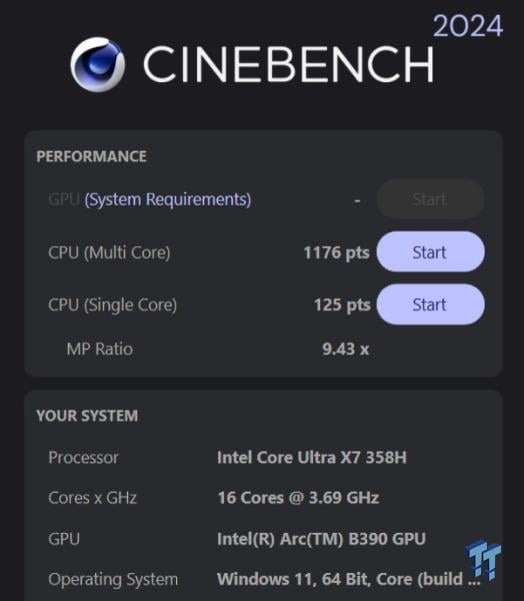
The single-core score in the Cinebench R24 CPU-based rendering test was 125, which is quick but still some way behind Apple's performance (175 on an M4 MacBook Air). To be frank, I find the multi-core performance score far more important as it dictates how long you'll be waiting around on major workloads. Here, the score was 1,176, which is very quick for a laptop processor - even edging ahead of the much-fancied AMD Strix Halo CPU in the HP ZBook Ultra G1a, which scored 1,169 in this test.
GeekBench 6 CPU
In the single-core test, the OmniBook 7 scored 2,904, which is just behind many faster (PC-based) laptop rivals. It performed similarly in the more important multi-core CPU test with its score of 16,687.
GeekBench 6 GPU
In the GPU version of the GeekBench test, the OmniBook 7 scored 56,508, which is some way ahead of other laptops with integrated graphics. It's a broad, synthetic benchmark, so let's break its 3D performance down some more...
3DMark Speed Way + Steel Nomad

In the difficult, gaming-PC-oriented, 1,440p, ray-tracing-heavy 3DMark Speed Way benchmark, the OmniBook 7 scored 993, which is an average framerate of just 10fps. While low, this is a better attempt than many other laptops with integrated graphics. But it's not significantly different compared to older Lunar Lake rivals.

Things improved in the Steel Nomad 4K gaming test, where it scored 1,618. While that's an average of 16fps, it's almost double the score of Lunar Lake predecessors.
3DMark Solar Bay + Night Raid

In the Solar Bay test, which runs at 1,440p with highly optimized ray tracing, the OmniBook 7 scored 30,064, which is an impressive average framerate of 114fps. Only Strix Halo laptops have done better (137fps) when it comes to integrated graphics - and they're much more expensive.

In the older, easier, Full HD Night Raid test, it scored 49,559, which is an average of 373 FPS, so no issues for basic, casual games (as usual with modern laptops).
Game Benchmarks
Since starting this review, Intel has been making a big noise about the potential for Panther Lake laptops being good for gaming on battery. Not having a power-hungry NVIDIA GPU should certainly make a difference, but does Intel have a point?
Game Benchmarks

I started by running Shadow of the Tomb Raider. At Native resolution with the Lowest detail settings and the OmniBook 7 averaged 86fps. The game might not look as good as it can, but that's very playable. Unplugging the laptop, saw the score only drop to 83fps. Very impressive.
In Black Myth: Wukong, the OmniBook 7 averaged a playable 61fps at native resolution with Medium detail settings. It achieved this both when plugged in and on battery(!)
Finally, I ran Cyberpunk 2077 and got memed. At native resolution with the Ultra preset settings, the OmniBook averaged 67fps. On battery, it averaged 69fps. Nice.

Dialing up default settings to Ray Tracing: Ultra saw the score move from 50fps to 43fps on battery, so there'll likely be some stuttering. Nonetheless, these scores illustrate that this game is very playable on the OmniBook 7.
NPU Testing
In the UL Procyon Ai Computer Vision (Windows, CPU, Float32) benchmark, the OmniBook 7 scored 148 in the CPU test (390 in the GPU test). A leading Lunar Lake laptop (Core Ultra 7 258V) managed 96 (266 GPU) by comparison. That means that Panther Lake's NPU is 52 NPUs better. All good.
Adobe Creative Cloud
Finally, in the UL Procyon Video Editing benchmark (which uses Adobe Premiere to encode four 900MB UHD files), the OmniBook 7 scored 15,640, which meant it took 155 seconds to complete. While a top-tier gaming laptop can do this in 30 seconds, this is still impressive for an integrated GPU. The Snapdragon-sporting OmniBook 5 took 912 seconds by comparison. The AMD Kracken Point-sporting Lenovo Yoga 7 2-in-1 did it in 260 seconds.
Cooling

HP's OmniBook 7 runs totally silently most of the time. The fan can ramp up to a low whoosh when under sustained load, but it never got more than warm. Our extended, 30-minute Cinebench rendering test score only dropped by 1.5 percent, so there's no significant thermal throttling at play.
Final Thoughts
On the surface, the HP OmniBook looks and sounds like it should be a rather dull, mid-range laptop - the company's Omen gaming laptops look much more exciting, and its forthcoming business-class EliteBooks look stunning by comparison. But the OmniBook 7 doesn't really put a foot wrong. With some new gaming laptops now appearing at *coughs* over nine thousand dollars more, laptops like this could well be what everyone should be looking at. It's a great all-rounder and just a little bit heavy.


 GEEKOM GeekBook X14 Pro (Intel Core Ultra Series 1) Laptop Review
 HP OmniBook 5 14" AI PC (Snapdragon X) Laptop Review
 HP Omen 16 (Core i9-14900HX + RTX 5070) Gaming Laptop Review
 Lenovo Yoga 7 2-in-1 Gen 10 (Krackan Point | Radeon 860M) Laptop Review
 MSI Stealth A16 AI+ (Strix Point | RTX 5070 Ti) Laptop Review
 Krafton CEO's ChatGPT legal strategy backfires as Subnautica 2 breaks records
 Elon Musk loses OpenAI trial: statute of limitations prevented a Musk victory
 NVIDIA hand-delivers the first Vera CPU systems to Anthropic, OpenAI, SpaceXAI, and more
 Alienware 15 Laptop is a new, affordable, entry point for portable PC gaming
 LG breaks the 1000Hz barrier at 1080p - here's who should buy it
 ZOTAC celebrates 20 years and is giving away custom GeForce RTX 50 Series GPUs
 Lisuan Technology's LX 7G100 DirectX 12 gaming GPU launches in China
 Nintendo's new Pictonico app gamifies digital photos, coming May 28
 Xbox is undergoing more change in the next few years than in its entire 25-year history
 Steam has finally given Vampire Survivors and similar games its own genre tag
 Montech Ten SFF Chassis Review
 PCCooler CPS RZ620M X CPU Cooler Review
 Memblaze PBlaze 7 7A40 Ocean 61.44TB Enterprise SSD Review - Oceans of QLC at 3.3 million IOPS
 MOZA SGP Sequential Sim Racing Shifter Review
 COLORFUL iGame GeForce RTX 5070 Ultra OC Review - When Style and Performance Meet
 GIGABYTE Z890 AORUS Elite WiFi7 Plus Motherboard Review - Right in the sweet spot
 PNY GeForce RTX 5080 Slim OC Review - A Compact 4K Powerhouse
 ASUS ROG Strix X870E-E Gaming WiFi7 NEO - A Crosshair by any other name
 Cooler Master Cosmos Alpha Full-Tower Chassis Review
 Thrustmaster T598 Direct Axial Drive Force Feedback Racing Wheel Bundle Review
 Fast Internet on Your Phone but Slow on Your PC? Try These Fixes
 The Snipping Tool quietly became the only screenshot app I keep installed on Windows 11
 How to Set Up a Windows Computer for a Senior User
 Bluetooth Toggle Missing in Windows? Try These Fixes
 GPU Overclocking Basics in Windows 11: Safe Performance Gains Without the Guesswork
 GIGABYTE's new Ultimate OLED Gaming Monitor Bundle includes Xbox Game Pass
 I automated 5 annoying Windows maintenance tasks, and my PC basically runs itself
 How to Fix Windows 11 Black Screen on Boot or After Login
 The first 8 settings I disable on every fresh Windows 11 install in 2026
 Is Your Ethernet Performance Slower Than Wi-Fi? Here's How to Fix It