









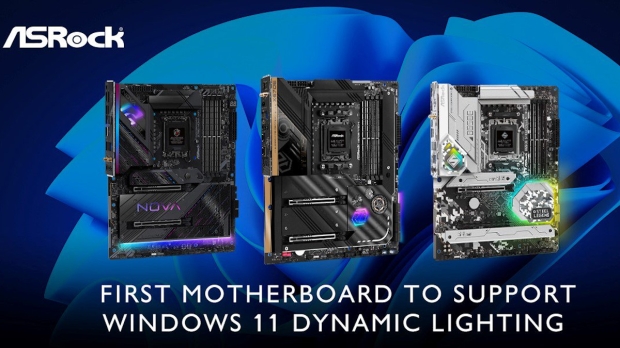




Windows 11 got a pretty nifty feature this year in the form of Dynamic Lighting controls which provide a centralized hub to cater for all the devices with RGB lighting attached to your PC - and ASRock now supports this.
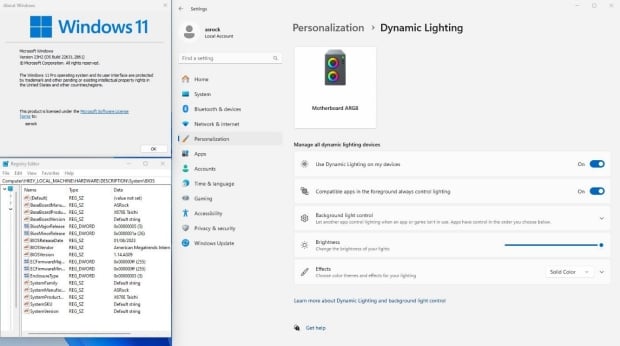
Naturally, a new feature is all well and good, but not much use until vendors support the functionality, so it's good to see a motherboard manufacturer come forward in this respect with Dynamic Lighting.
ASRock announced that its motherboards now support the Dynamic Lighting hub, which allows for all your (supported) RGB lighting to be synced via Windows - thus avoiding having to install multiple pieces of software to configure your lighting.
The functionality is now available with the latest beta firmware (so officially, it's still in testing).
The company wrote:
"ASRock leads the industry in supporting Microsoft's Dynamic Lighting feature, a pioneering step in motherboard RGB lighting synchronization support. To enable the Dynamic Lighting feature, users are required to update their Windows 11 OS to the 23H2 version and install the Beta firmware which can be downloaded from the ASRock official website.
"Once activated, users can control the motherboard LED lighting, RGB gaming mice, keyboards, and other RGB lighting devices via Windows 11 OS."
Windows 11's Dynamic Lighting hub allows you to quickly adjust the brightness of all supported lights, and the effects shown, while helping to keep system bloat down by not having to install separate utilities from different hardware vendors as noted.
Microsoft is working on various fronts to reduce bloat in Windows 11 of late, giving users the ability to uninstall some default apps, for example. Some users - those in Europe - are even getting the option to ditch the Edge browser, a move that many folks are hoping will see a wider rollout.


 NZXT announces new panoramic dual-chamber H6 Series Cases and RGB fans
 MSI now lets you adjust your PC's RGB lighting by opening up a browser page
 ASRock Radeon RX 9070 and 9070 XT Steel Legend spotted, an RDNA 4 GPU for RGB fans
 HyperX Cloud Alpha 2 Wireless headset has a programmable RGB Base Station
 Windows 11 24H2 arrives out of the blue - here's what to expect on normal (non-Copilot+) PCs
 Assassin's Creed Black Flag Resynced has $80 worth of cosmetics and time-saving DLC
 Need For Speed seemingly on ice as Criterion becomes a Battlefield studio
 51 Ubisoft employees who worked on the successful Assassin's Creed Black Flag Resynced have just been laid off
 AMD expands Ryzen 200 and 100 'Hawk Point' APU lineup with 11 new SKUs
 Open-Source Windows alternative ReactOS runs Half-Life 2 on a GTX 960
 NVIDIA and Sega to celebrate 30 years of partnership at a 'Guerrilla event' in Japan
 Mysterious AMD Ryzen 7 4700LE 'Zen 2' desktop CPU appears in a new prebuilt PC paired with an RTX 3050
 Apple bucks the PC market downtrend with 10.1% growth amid global supply constraints
 New iPhone generation could cost $300 more while Apple keeps similar profit margins
 Meta's next smart glasses to be secretly always watching, always listening
 Turtle Beach Stealth Pro II Wireless Gaming Headset Review - Premium Sound, Fantastic Features
 MOZA MGX1000 Instrument Panel Review: a realistic Garmin G1000 replica for immersive flight sims
 Simagic Zeus Formula Steering Wheel Review: premium build and advanced inputs for F1 racing
 GIGABYTE X870E Aero X3D Dark Wood Review - A woody goody
 The Super Mario Galaxy Movie (2026) 4K Ultra HD Blu-ray Review
 KTC H49S66 5K2K (5120x1440) 49-inch 180Hz Gaming Monitor Review
 HighPoint Rocket 1604L Gen5 x16 NVMe Software RAID AIC Review: half the price with full 59 GB/s speed
 Next Level Racing ERS3 Haptic Seat Review: immersive sim racing comfort with integrated haptics
 ASUS TUF Gaming X870-Pro WiFi7 W NEO Review - Tuffed up
 GIGABYTE GO27Q24G Gaming Monitor Review: Glossy OLED Gaming at 240Hz
 Don't sell your Windows laptop until you do these things
 6 PC cleaning mistakes to avoid for safer hardware maintenance
 Phison and Intel Take Aim at Local AI's Memory Wall with aiDAPTIV
 How to Remap Keyboard Keys in Windows using Microsoft PowerToys
 7 tips to organize your Windows files for faster, easier access
 Intel Arc G3 Extreme first impressions with MSI's Claw 8 EX AI+ - Incredible power for an extreme price
 How to fix Wi-Fi Adapter Not Working on Windows laptops: troubleshooting tips
 Hisense U7SG 4K TV: Modern Entertainment for the New Age
 6 underrated Microsoft Word features worth using to boost your productivity
 Level Up Your PC Gaming with these Fantastic ASUS Prime Day Deals on GPUs, Motherboards, and More