













RGB lighting on a modern PC, especially a gaming rig, is standard in 2023. What isn't standard is how you can customize and sync all of the various lighting protocols across different brands - and often, you'll need multiple pieces of software to make lighting changes to your motherboard, keyboard, and so on.
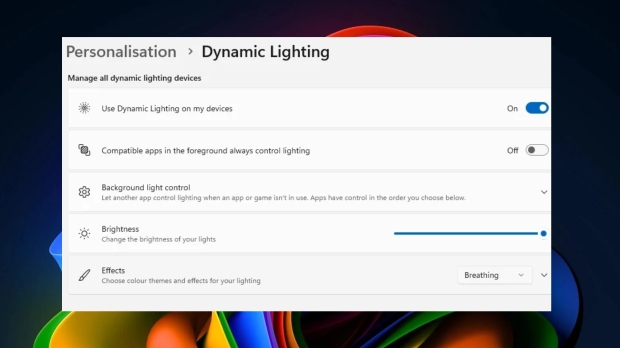
Microsoft has been teasing the addition of dedicated RGB lighting controls coming to Windows 11 for a while now, and it finally looks like the feature is here and available for everyone to check out if they toggle the "receive the latest updates as soon as they are available" toggle in the Windows Update menu.
Having RGB control software within Windows 11 could be a game changer for RGB lighting across various peripherals and other bits of hardware, as it could mean third-party apps having to be installed and a shift to a more unified way lighting is handled. Assuming, of course, that Microsoft can provide robust customization tools as lighting is about more than simply setting a color and leaving it at that. Which is what the tool is at the moment.
The lighting controls appear as a Dynamic Lighting option in the Personalization menu in Settings, which will display all of your RGB-compatible devices. From here, you can customize each device to set the color, the RGB lighting effect, and brightness and save different profiles.
The controls are pretty basic - and limited to Razer peripherals and a few others at launch. So, there's still a long way to go before we reach a stage where Microsoft's controls are a go-to for most, especially when you've got per-key lighting for keyboards and other more robust tools and RGB systems. Currently, a big part of the RGB scene is also about synchronizing lighting across multiple devices and integrating that with software and games - ala Razer, ASUS, MSI, and others.
The big plus could be a situation where hardware manufacturers create RGB lighting and systems that integrate seamlessly with the official Windows 11 lighting tools as they expand over time.



 MSI now lets you adjust your PC's RGB lighting by opening up a browser page
 Hands-on with Corsair's K100 AIR keyboard has me throwing my Logitech G915 X in the trash
 Razer Soma Chroma is a new RGB Gaming Chair that syncs up with over 300 games
 Giveaway: Win an NZXT H6 RGB+ Case, Kraken Elite AIO, RGB Fans and 1200W PSU
 Copilot Vision is a new AI assistant that also sees everything on your Windows 11 display
 Assassin's Creed Hexe to be revealed 'relatively soon' according to insider
 LG claims that you can improve your aim by up to 38% by playing on a 480Hz OLED monitor
 Pixel 11 Pro Fold leak may reveal Google's next big foldable upgrade
 Sony's $500 million lawsuit heats up after choice to end PlayStation disc production
 Spacecraft confirmed to be approaching one of Earth's seven mysterious 'quasi-moons'
 AI models could soon get cheaper as OpenAI, Meta, and xAI enter a new price war
 SAP escapes EU penalty by easing customer lock-in concerns
 Cursor builds AI agent 'Sand' to rival Anthropic's Claude Cowork
 PocketMage is a distraction-free pocket computer with a wizard-themed operating system
 Samsung is holding your health data hostage to train its AI
 MOZA FMP18 Panel Bundle Review: authentic F/A-18 Hornet cockpit controls for flight sims
 Micron 6600 ION 245.76TB Enterprise SSD Review - Best in Class Programming Speeds
 MOZA MA3F EFCM Flight Control Module Review: authentic Airbus A320 autopilot panel for simulators
 Turtle Beach Stealth Pro II Wireless Gaming Headset Review - Premium Sound, Fantastic Features
 MOZA MGX1000 Instrument Panel Review: a realistic Garmin G1000 replica for immersive flight sims
 Simagic Zeus Formula Steering Wheel Review: premium build and advanced inputs for F1 racing
 GIGABYTE X870E Aero X3D Dark Wood Review - A woody goody
 The Super Mario Galaxy Movie (2026) 4K Ultra HD Blu-ray Review
 KTC H49S66 5K2K (5120x1440) 49-inch 180Hz Gaming Monitor Review
 HighPoint Rocket 1604L Gen5 x16 NVMe Software RAID AIC Review: half the price with full 59 GB/s speed
 I stopped digging through Windows menus after I set up this one folder
 Don't sell your Windows laptop until you do these things
 6 PC cleaning mistakes to avoid for safer hardware maintenance
 Phison and Intel Take Aim at Local AI's Memory Wall with aiDAPTIV
 How to Remap Keyboard Keys in Windows using Microsoft PowerToys
 7 tips to organize your Windows files for faster, easier access
 Intel Arc G3 Extreme first impressions with MSI's Claw 8 EX AI+ - Incredible power for an extreme price
 How to fix Wi-Fi Adapter Not Working on Windows laptops: troubleshooting tips
 Hisense U7SG 4K TV: Modern Entertainment for the New Age
 6 underrated Microsoft Word features worth using to boost your productivity