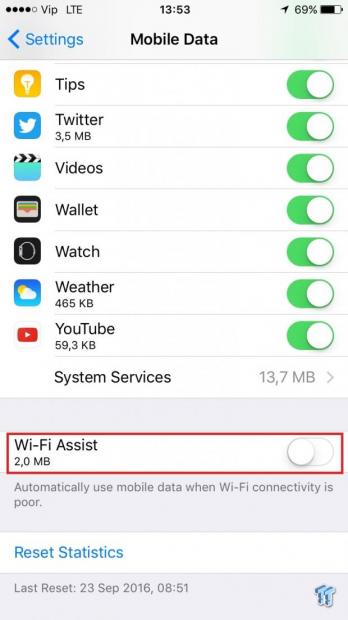
The Wi-Fi Assist feature on iOS was introduced last year in iOS 9, and Apple is sticking with it. This feature is designed to prevent the use of a poor Wi-Fi connection but it could cause you a headache and a larger phone bill, especially for those who don't have unlimited data traffic.
Both iOS 9 and iOS 10 have this feature enabled by default and it is set to automatically switch to the mobile internet when your Wi-Fi is weak.
This can be useful for maintaining a good internet connection when, for example, leaving the house, but if you do not have unlimited data traffic, this could affect your phone bill.
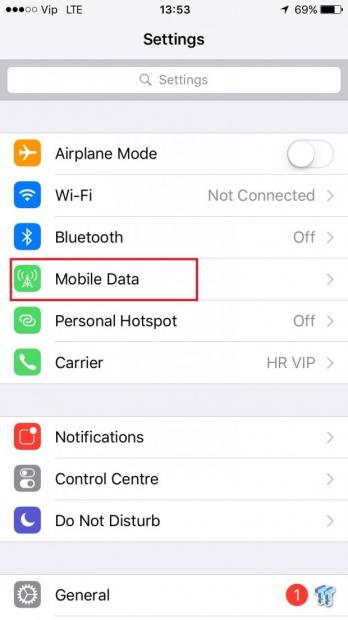
If you want to turn the Wi-Fi Assist off, go to Settings and open Mobile Data (or Cellular Data).
Scroll all the way down and you will see the Wi-Fi Assist feature.
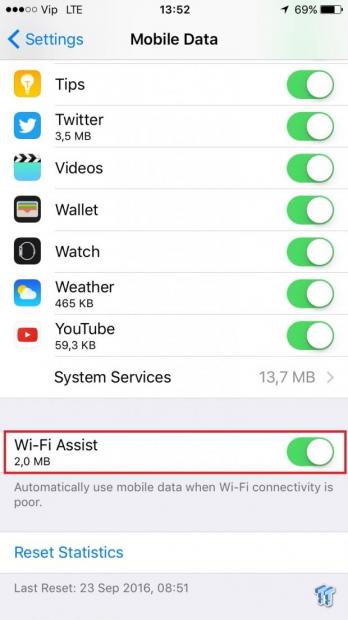
It's turned on by default but if you don't want to use your mobile data when Wi-Fi connectivity is poor, turn it off.