









Beyond Adobe Acrobat: How UPDF Harnesses AI to Revolutionize Your Document Workflow
Large PDFs are a normal part of modern technical work. Product specifications, compliance documents, research papers, and software documentation all require more than simply opening a file. They need editing, searching, converting, and organizing without disrupting existing layouts. While AI can quickly explain complex information, it still depends on dedicated software for precise document processing. UPDF brings both capabilities together, making it a compelling Adobe Acrobat alternative for Windows users.
Artificial intelligence summarizes documents and answers questions, while dedicated tools ensure accurate processing every time. UPDF combines GPT-5.6 with editing, conversion, OCR, and organization inside one lightweight application. This guide explains where each capability fits in practical technical workflows for maximum productivity.
Part 1. The Line Between What AI Guesses and What Software Guarantees
Large language models understand information, summarize documents, and answer questions using contextual reasoning. They cannot guarantee identical results whenever technical document tasks demand precise, repeatable processing consistently.
Technical professionals need artificial intelligence for understanding content and dedicated PDF tools for precision. The table below shows which UPDF capability best matches common technical document tasks accurately.
| Real-World Task | What It Actually Demands | Which Engine Handles It |
|---|---|---|
| Summarize a 300-page technical standard | Understanding and synthesis | UPDF AI (GPT-5.6) |
| Export 400 invoice tables into Excel | Consistent, repeatable data extraction | PDF Conversion |
| Read a scanned specification sheet | Accurate character recognition | OCR engine |
| Update a clause without changing layout | Precise object and formatting control | PDF editing |
Keeping both capabilities together lets professionals understand, edit, convert, and organize documents inside UPDF. Users avoid switching applications while maintaining consistent results across technical document workflows.
Part 2. Built for Windows Workstations, Not Background Services
UPDF loads AI features only when needed, avoiding unnecessary startup resource usage. Performance reportedly stays under three seconds while using up to 90% less RAM. A 2 GB technical manual opens while software builds continue running smoothly without interruption nearby.
Beebom measured UPDF's installation size at 14 MB despite including editing, OCR, conversion, and AI. This lightweight design delivers powerful document capabilities without unnecessary background overhead, completely installed locally.
Part 3. The Toolset Behind the Workflow
UPDF offers many capabilities, with 5 key tools highlighted below. Together, they show why UPDF is a practical Adobe Acrobat alternative.
Edit PDF: Change Content Without Rebuilding the Layout
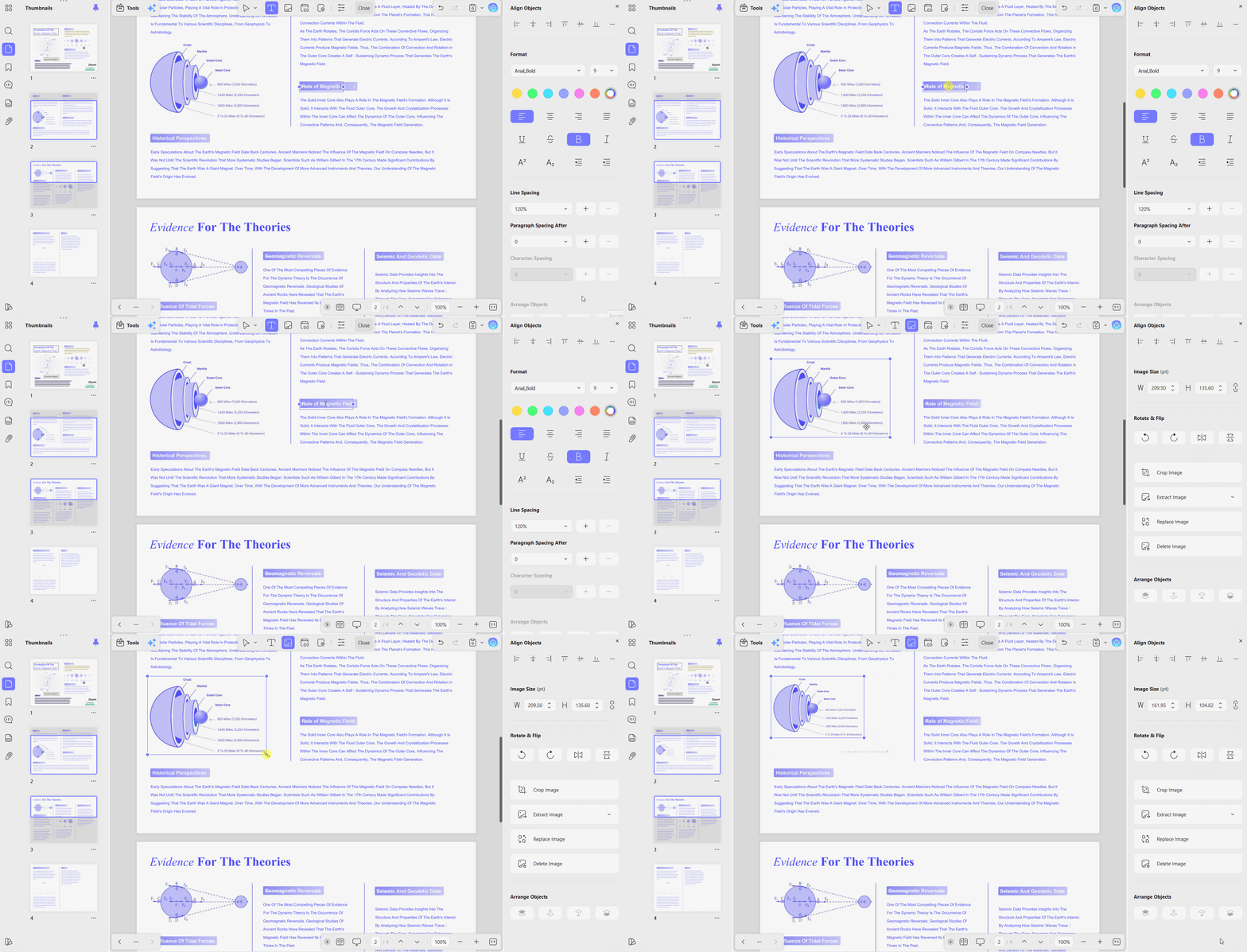
Edit PDFs like Word while preserving document structure across every editable page element seamlessly. Text, images, watermarks, links, backgrounds, headers, footers, forms, and pages remain directly editable. Original layouts, fonts, tables, and formatting stay unchanged without requiring conversion before editing.
Practical Use Cases
- Correct specification table values without pushing remaining content onto the following page unexpectedly.
- Select individual objects precisely, preventing displaced blocks from breaking technical document figure references.
Convert PDF: Move Data Out With Its Structure Intact
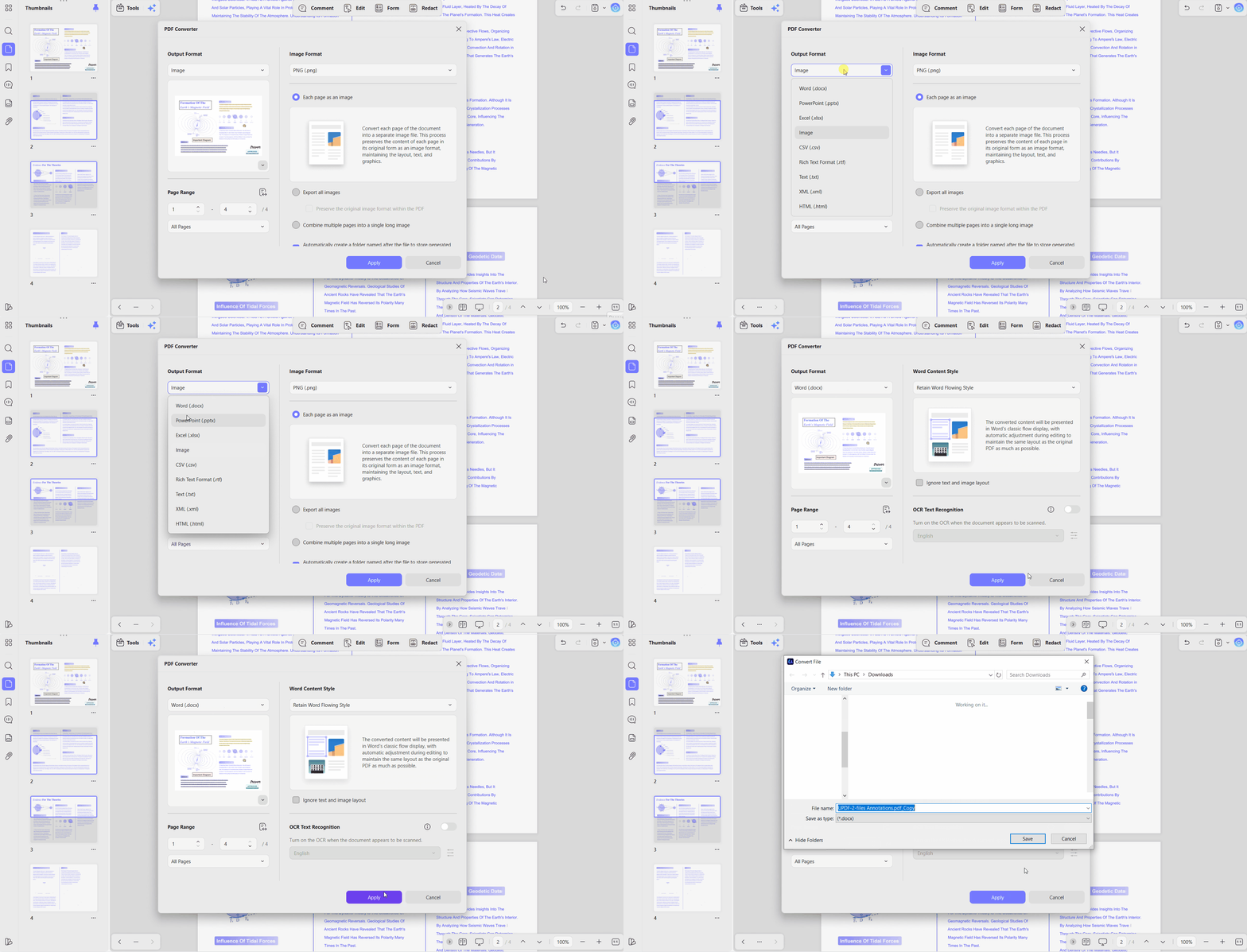
PDF conversion supports Word, Excel, PowerPoint, text, and common image formats without losing structure. Legacy documents remain usable instead of becoming unformatted text after conversion into editable formats. Batch tools combine, insert, print, convert, and encrypt multiple files together during processing.
Practical Use Cases
- Export bills of materials into Excel with usable rows and columns for accurate calculations.
- Migrate 400 document archives through one queued batch job instead of repeated manual processing.
UPDF AI Assistant: The Reasoning Layer, Powered by GPT-5.6
GPT-5.6 arrived in July 2026, improving multilingual support and document question answering capabilities. Document chat stays inside files, keeping every response anchored to its original pages. AI also creates PDF mind maps, converts content, analyzes images, and answers unlimited questions.

Practical Use Cases
- Generate mind maps revealing long standards' structure quickly for easier understanding and navigation everywhere.
- Scholar Research and Paper Search reduce literature workload for frequent technical paper readers.
OCR: Turning Scanned Documents Back Into Real Text
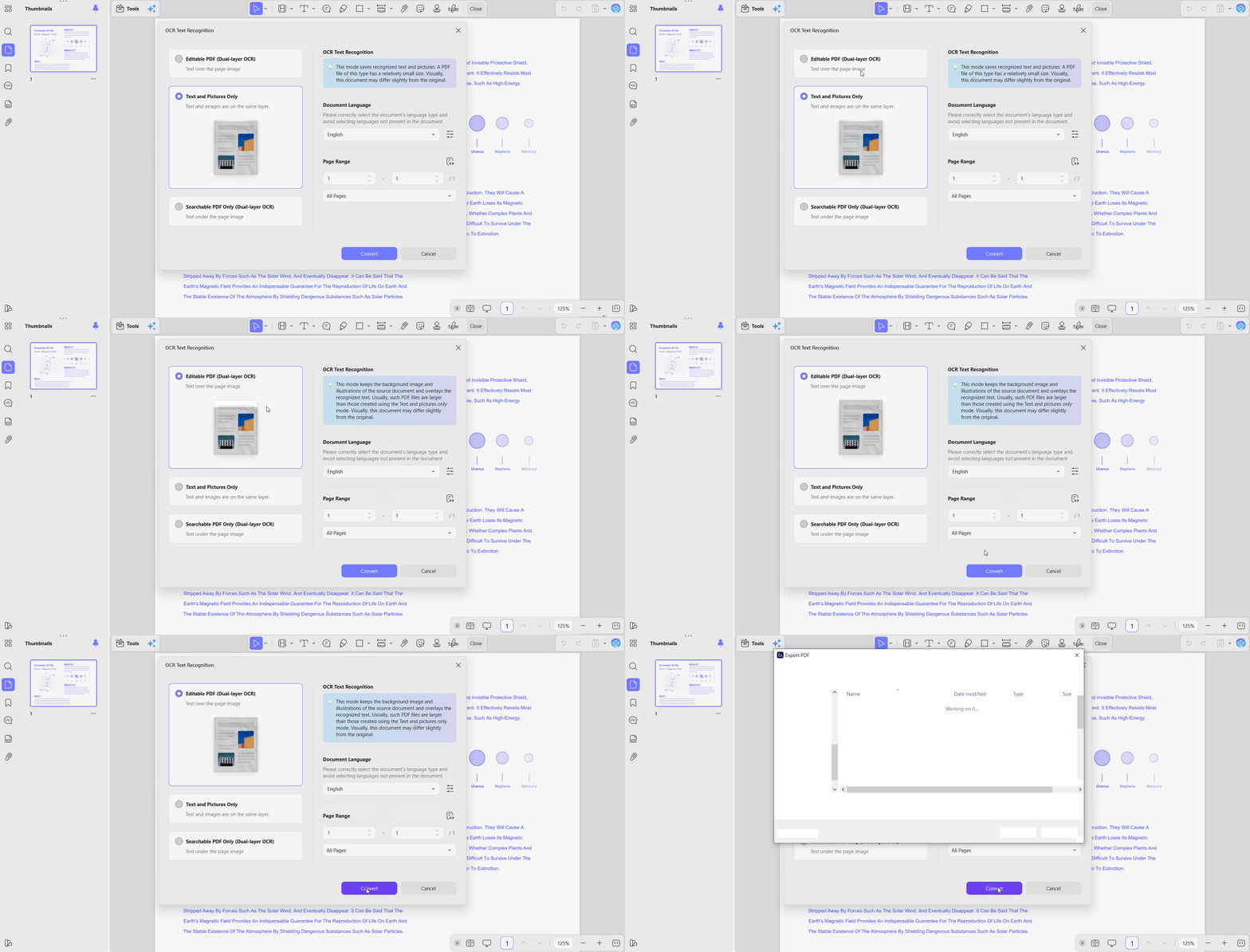
One click converts scanned documents and image-based PDFs into editable, searchable text. OCR supports 38 languages, accurately reading documents containing multiple scripts across pages. Recognition remains deterministic, reporting actual page characters instead of assuming text merely appears correct.
Practical Use Cases
- Convert archived paper specification sheets into editable, searchable documents without manually retyping everything afterward.
- Specify document languages before scanning, allowing accurate recognition across mixed-language pages together automatically.
PDF Organization: Restructuring Documents at Page Level
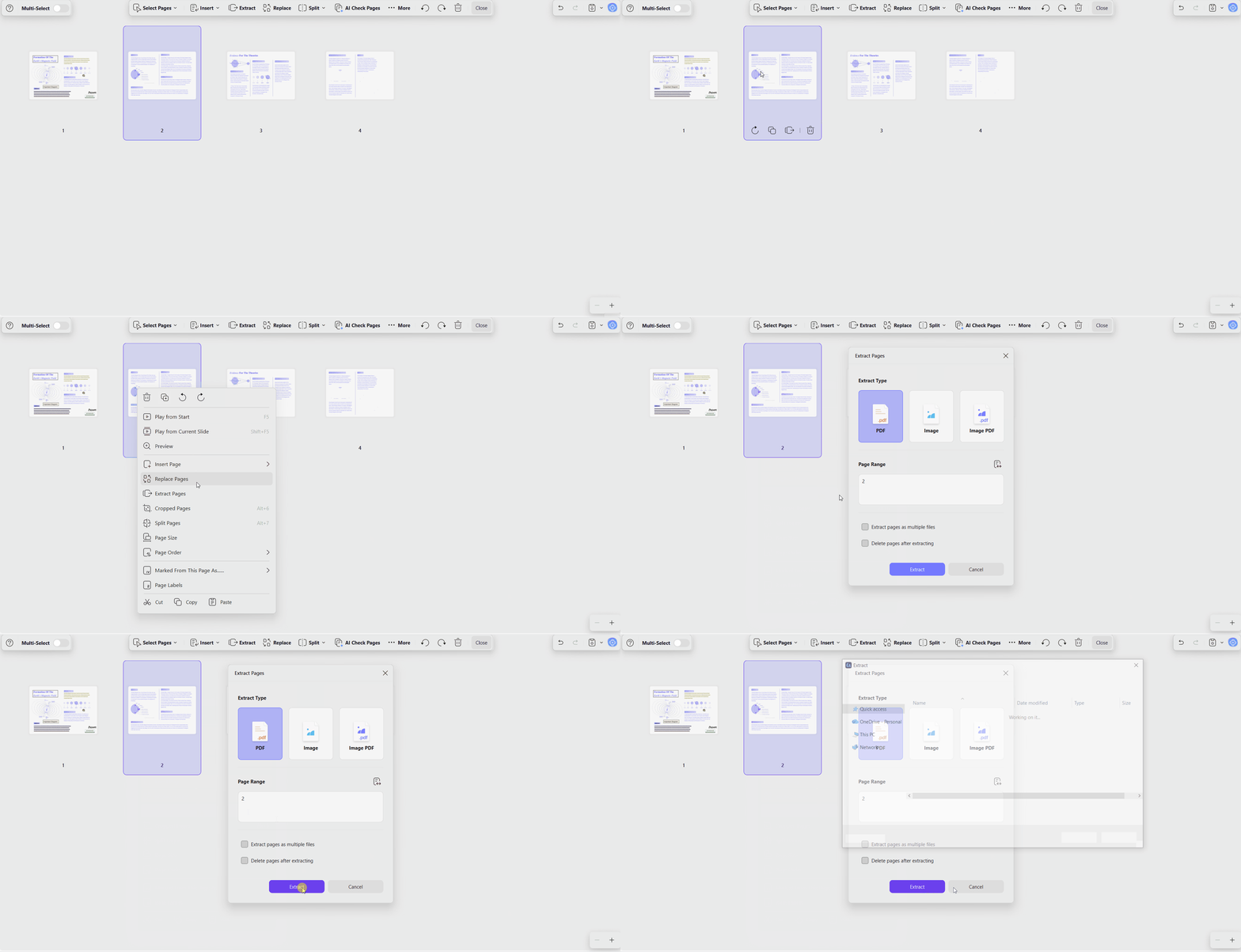
With UPDF, you can add, delete, rotate, replace, extract, split, crop, and reorder PDF pages. Page organization changes document structure without modifying existing content or page formatting during editing. Automating page management recovers hours otherwise spent handling large document collections and revisions.
Practical Use Cases
- Assemble submission packs from 6 source files using simple drag-and-drop page organization tools.
- Reduce repetitive page management across large document collections instead of performing manual document organization.
Part 4. What the License Actually Includes
Choosing an Adobe Acrobat alternative also means comparing licensing, support, and long-term value. UPDF combines practical licensing, reliable support, and competitive pricing beyond powerful PDF editing and annotation features.
- Cross-Platform Support: One purchase covers Windows, macOS, iOS, and Android for uninterrupted work across every supported device.
- Multi-Device Licensing: One account supports 4 devices across desktop apps, mobile devices, and web browsers.
- Affordable Pricing: Around 20% of Adobe's price, with Acrobat Pro costing $239.88 annually for comparable functionality.
- Enterprise Features: Includes digital signatures, certificate validation, PDF/A compliance, enterprise auditing, and centralized account management together.
- Privacy and AI: Local processing protects sensitive files while GPT-5.6 powers AI features only when requested automatically.
- Security and Support: Monthly updates strengthen security, while customer support remains available 6 days every week consistently.
 Battlefield 6 Season 4 update fixes RTX 50 series crashing without requiring an NVIDIA driver update
 Assassin's Creed Black Flag Resynced's new update will let you hide Edward's blowpipe
 A $10 indie game bundle with 100+ games has raised over $100,000 in three days to support laid-off developers
 Microsoft warns travelers of Russian hackers hijacking hotel Wi-Fi networks to steal account credentials
 Microsoft plans to make Xbox 360 games playable on PC through the Xbox app, leaked document reveals
 GIGABYTE, ASUS, and MSI plan to raise motherboard prices by at least 50% in Q3 2026
 Arc Raiders' developer introduces new Elytra anti-cheat to The Finals for testing
 It's time to dust off GTA 5 - if you want to check out the latest easter egg hint showing what GTA 6's map will look like
 Noctua showcases one of its 'custom-built torture-test rigs' that it uses to test its fans
 More PC gamers are using GPUs with 16GB of VRAM than 8GB, according to the latest Steam data
 Thinkware U3000 Pro Review - Smart Dashcam with Wi-Fi quirks
 Montech TG3 Mid-Tower Chassis Review
 ASUS ROG Strix X870E-A Gaming WiFI7 Neo Review - A New Enticing Option
 Noctua NL-LC1-36 Liquid CPU Cooler Review
 Logitech G316 X 98 Wired Gaming Keyboard Review - Retro-Inspired Board that Falls a Little Short
 Biwin M560 2TB SSD Review - Best Overall Retail-Ready DRAMless SSD
 Logitech G512 X 98 Analog Mechanical Gaming Keyboard Review - An Innovative Two-in-One
 Thrustmaster T.Flight HOTAS 5 MSFS Edition Review
 SteelSeries Arctis Nova Pro Omni Wireless Headset Review - One Headset to Rule Them All
 SteelSeries Arctis Nova 7 Wireless Gen 2 Headset Review - New and Improved, But Is It Enough?
 I swapped File Explorer for this free file manager and finally got the layout I wanted
 How to tell if someone has been using your Windows PC without your permission
 6 Task Manager tips for troubleshooting Windows performance problems
 ASUS ROG's 20th Anniversary Line-up of Premium PC Gaming Gear has Arrived - Here's Everything You Need to Know
 Six File Explorer tips every Windows user should know
 I switched my PC to encrypted DNS in Windows 11, and browsing felt more private
 Printer Not Working in Windows? How to fix detection, print queues and drivers
 The Ultimate Guide to Personalizing Your Windows 11 Taskbar
 How to Turn Your Windows Laptop Into a Second Monitor with Miracast and Wireless Display in Minutes
 6 Mistakes to Avoid When Buying a Windows Laptop