



AMD has added a new feature to its tools for game developers using the Radeon Developer Tools suite. It's called Driver Experiments, and it gives developers low-level control of AMD's graphics driver to improve troubleshooting and assist with optimizing games for PC.
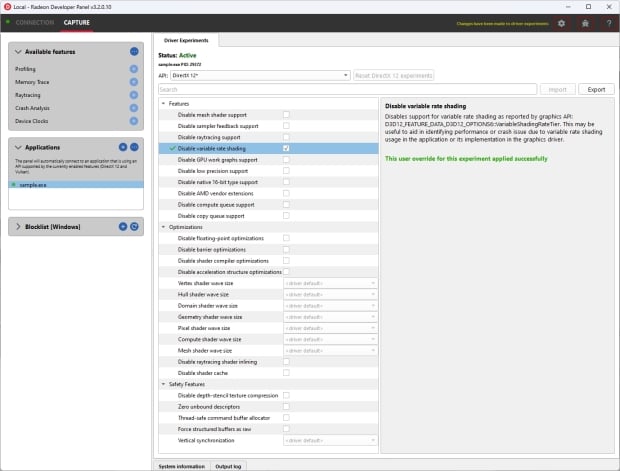
With a Radeon RX 5000, 6000, or 7000 Series GPU, Windows, and a recent version of AMD Software: Adrenalin Edition, developers can access graphics settings at the driver level to identify bugs or areas that require additional work to improve performance.
For example, developers can disable individual settings such as ray-tracing support, mesh shaders, GPU work graphs, shader caches, vertical sync, and more. "Driver Experiments expose lower-level controls of the graphics driver that may influence the behavior, performance, or even stability of an application," AMD writes. "So they should be only used carefully and consciously by graphics programmers."
AMD notes that even though bugs and issues can be determined through low-level graphics or API calls, the root cause generally sits on the application side.
Driver Experiments offer a way to change the behavior and performance characteristics of a game or other graphics application without modifying its source code or configuration. They control the low-level behavior of the graphics driver. This tool exposes some of the driver settings that were previously only available to AMD engineers who develop the driver, e.g., disabling support for ray tracing or some optimizations in the shader compiler. It may be useful for debugging issues in graphics applications - alone or together with other tools, like Radeon GPU Detective (RGD), Radeon GPU Profiler (RGP), Radeon Memory Visualizer (RMV), or Radeon Raytracing Analyzer (RRA).
For a complete breakdown of the dozens of settings Driver Experiments allows access to, check out AMD's Adam Sawicki's GPUOpen article.
- Read more: Radeon RX 7700 XT for $350 is a pretty good deal, and it comes with Space Marine 2
- Read more: AMD's RX 7900 XT has dropped to $659 - just be careful where you grab your bargain GPU
- Read more: AMD Fluid Motion Frames 2 exits Technical Preview with optimizations for PC gaming handhelds
- Read more: AMD's next-gen RDNA 4 GPU rumored delay: now Q1 2025 because of RDNA 3 oversupply