

Introduction
 21
21This is the second product we've seen from Synology with the first being the DS411+II. Our first run with the DS411+II was an eye opener and we walked away with a firm admiration for the products Synology is releasing on the market. NAS appliances are not like video cards or other traditional computer components, these aren't components that get swapped out every couple of years and because of that most people don't get to see everything the market has to offer. Because of that you need to determine what it is you are looking for first and the options are vaster than you may imagine.
The Synology products I've seen so far tend to excel in the ease of use category. I would be comfortable dropping a DS212 off at my mother's house and letting her sort the installation and connections. I couldn't say the same thing about the typical QNAP or Thecus products I've tested in the past. Those products are easy for TweakTown readers to setup, but nothing like the Synology DS212.
A large reason for that is the way Synology configures their software layer. The QNAP and Thecus products are more tech based while the DS212 is more laymen, like a toaster, you get a couple of dials and a big lever to pull before everything works exactly like you want it to. Users looking to go head on into technology bliss still have all the other options to fine tune their NAS appliance, but it isn't a requirement.
So, in short the Synology DS212 is a consumers NAS built for your mom to hold pictures that you wish she didn't scan from your youth, is easy to setup and has an attractive price. The DS212 is also a NAS for you too with lots of bells and whistles and that is what we are going to focus on today.
Read on to see why this tame entry can easily turn into a tiger.
Specifications, Availability and Pricing
 21
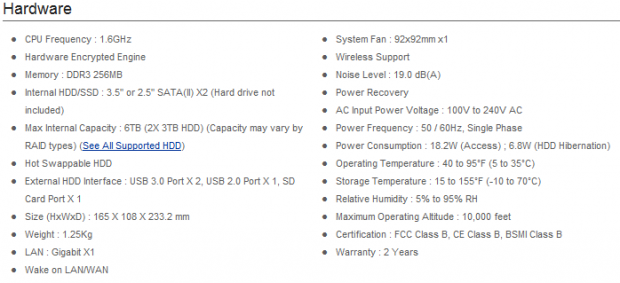
21When it comes to the hardware Synology managed to squeeze a powerful 1.6GHz processor in the slim DS212 chassis. The system uses 256MB of DDR3 memory and has a whole host of connectivity options including dual USB 3.0, a single USB 2.0 port and a SD memory reader slot for easy file transfers from your cameras. The main I/O device is the gigabit Ethernet port that allows your DS2212 to talk to all of the computes on your home network.
With its slim size and small footprint the DS212 holds two hard drives and you can purchase the system with or without hard drives. Our system shipped with drives installed and the system was configured for redundancy for increased data security. Being a consumer unit the DS212 was designed for quiet operation; you can put this NAS right next to your computer and not hear it over your rooms' ambient noise.
 21
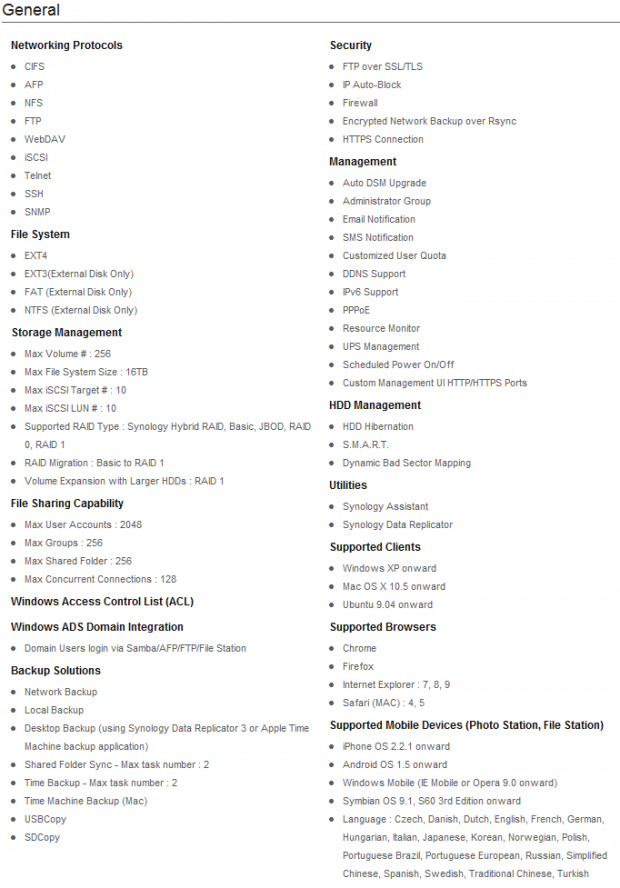
21The general features list is more for out tech audience, but you can be assured Synology has included all of the bells and whistles for the most demanding users including those who want to incorporate their mobile devices.
We noted the Synology DS212 on sale for a little over $300 without hard drives included.
Software Features and The Packaging
Software Features
 21
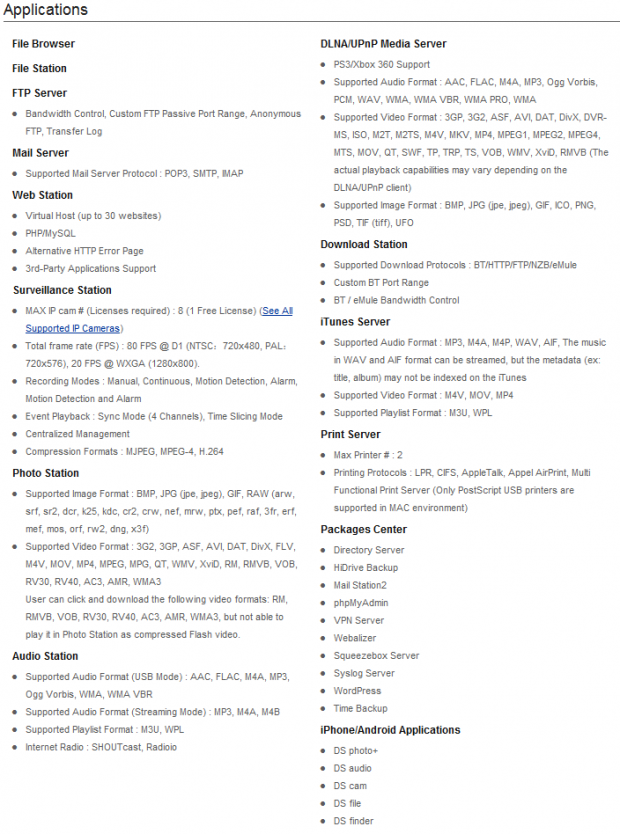
21NAS appliances are more than just a drop box for your data. The DS212 can play a large role in your computing and mobile experience.
Personally I really like the ability to play data back on my TVs in the house on DLNA devices. With a little setup you can also play music, movies and pictures back on your mobile devices as well since many of them also support DLNA.
The Packaging
 21
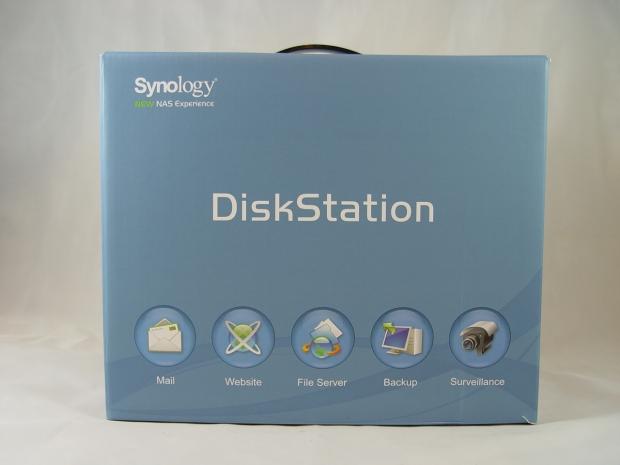
21The Synology DS212 uses a retail friendly package that gives users shopping at a brick and mortar store a lot of information.
 21
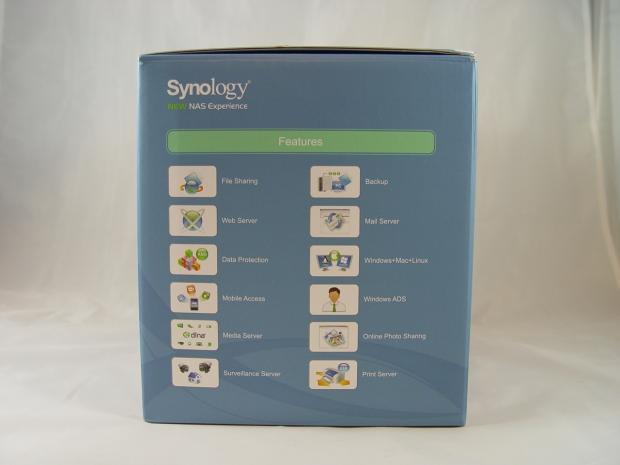
21On one side we found the features list.
 21
21On the back of the package Synology lists a graphic that shows some connectivity options and general uses.
 21
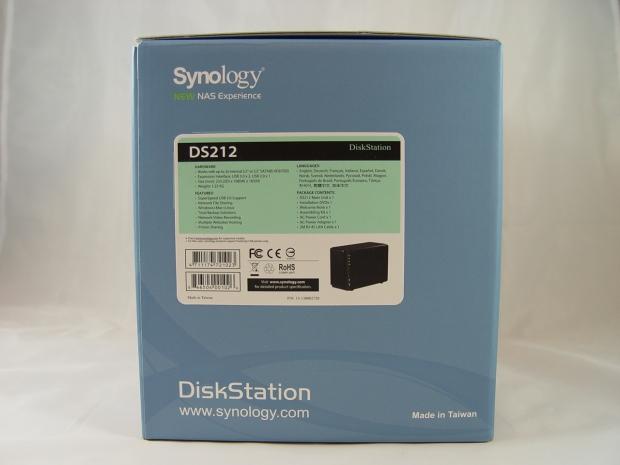
21On the final side Synology lists all of the hardware specifications and some of the features as well as the package contents.
 21
21Here we see some of the included manuals and accessory bits. The content disk included a quick install guide, full user manual, software setup utility and Data Replicator 3 for data backup from your MAC or PC.
The Synology DS212
 21
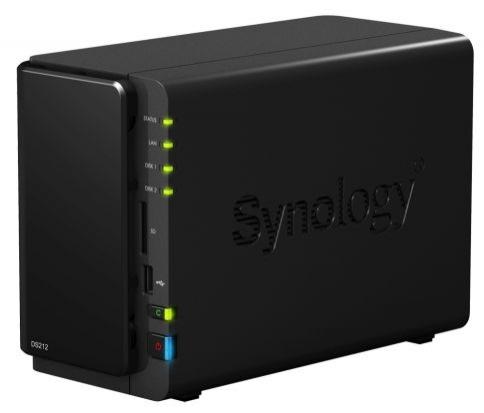
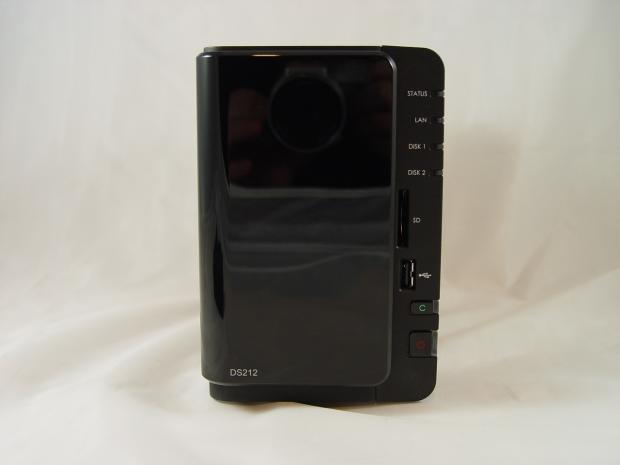
21Here we get our first look at the Synology DS212 NAS appliance. The piano black cover hides the two 3.5" hard drives that shipped with our system. On the right side a set of four LEDs light up and give the user a quick glance status update on the system. Further down we see the front USB 2.0 port and the SD card reader as well as the green icon button that allows you to copy the data from the two front ports easily. A power button is at the very bottom and is also lit by an LED.
 21
21The DS212 is as attractive as it us functional. On the sides Synology has their company logo.
 21
21The unit is cooled by one large fan to keep the audible noise down. The power supply is outside of the main box and comes in the form of a power brick. Dual USB 3.0 ports are on the back side as is the gigabit Ethernet port.
 21
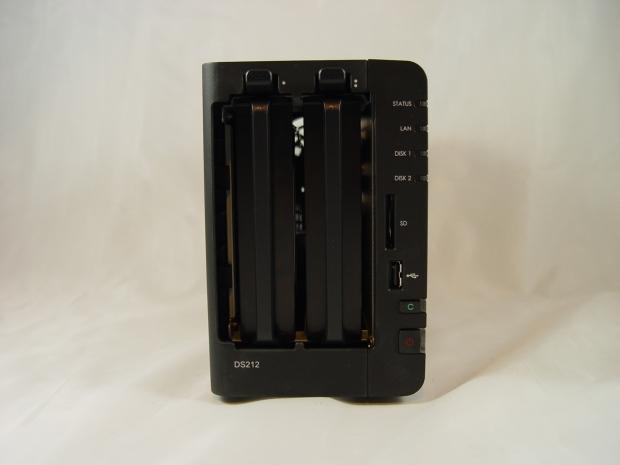
21Here we see the front without the cover on it. The cover allows air to flow over the drives and acts as a sound diffuser as well.
 21
21Included in the package is the power brick, power cable and a decent length Ethernet cable.
 21
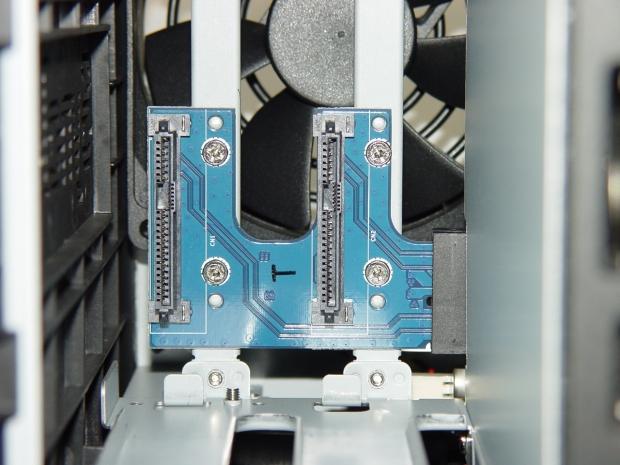
21After pulling the drives I was very excited to see SAS connectors in the DS212 since I have several 3TB SAS drives. The DS212 does not support SAS though, so my drives are back on the shelf.
 21
21One of the most overlooked areas on NAS servers is the drive sleds. Here you want plastic instead of aluminum or steel because the plastic absorbs vibration and doesn't transfer it to the drive like the metal sleds. Synology also uses rubber grommets between the drive and the sled, another vibration arrestor.
Test System Setup
 21
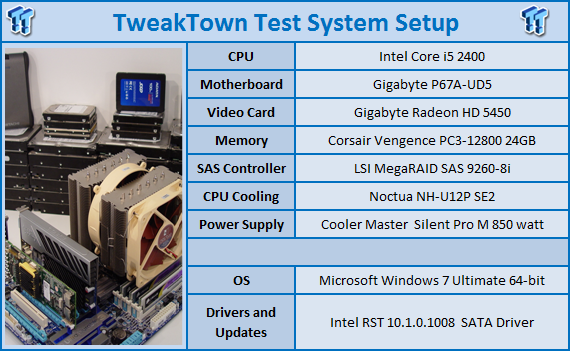
21We would like to thank the following companies for supplying and supporting us with our test system hardware and equipment: AVADirect, GIGABYTE, Cooler Master, LSI, Noctua, Seagate, Crucial and Corsair.
Intel NASPT
The Intel NAS Performance Toolkit (NASPT) is a file system exerciser and analysis tool designed to enable direct measurement of home network attached storage (NAS) performance. Designed to emulate the behavior of an actual application, NASPT uses a set of real world workload traces gathered from typical digital home applications. Traces of high definition video playback and recording, office productivity applications, video rendering/content creation and more provide a broad range of different application behaviors.
- RAID Level Description
JBOD: Combine multiple drives and capacities into one drive.
RAID 0: Normally used to increase performance and useful for setups such as large read-only NFS servers where mounting many disks is time-consuming or impossible and redundancy is irrelevant.
RAID 1: Create an exact copy (or mirror) of a set of data on two or more disks. This is useful when read performance or reliability are more important than data storage capacity.
RAID 5: Use block-level striping with parity data distributed across all member disks.
RAID 6: Extend RAID 5 by adding an additional parity block; thus it uses block-level striping with two parity blocks distributed across all member disks.
RAID 10: A Stripe of Mirrors. Multiple RAID 1 mirrors are created and a RAID 0 stripe is created over these.
RAID 50: Combines the straight block-level striping of RAID 0 with the distributed parity of RAID 5.
RAID 60: Combines the straight block-level striping of RAID 0 with the distributed double parity of RAID 6.
Benchmarks - 2 Drive Redundant Test
 21
21Synology has a feature called SHR (Synology Hybrid RAID) and it allows you to mix disk capacity sizes. Our unit was tested with two identical drives, but the NAS ships in SHR mode which makes future upgrades to your drives very easy.
With just two drives users can't run RAID 5 or RAID 6, so you are limited to RAID 1 for data redundancy and RAID 0 for performance. In our tests we quickly learned there wasn't much performance difference between the two modes and as long as you don't need massive capacity you should keep your NAS in a redundant format for data protection.
Normally we test large drive NAS servers and appliances; it's been several years since we've tested a dual bay system. That is changing though as we now have three dual bay units in for review. We'll see how these smaller units fair by using the Synology DS212 as a baseline for performance.
The Synology DS212 was much faster than we expected and much faster than the last dual bay NAS we looked at. I was very surprised to see the unit achieving over 100MB/s in several of our tests. The numbers reached are what we expect from four and five bay systems and not small, inexpensive dual bay consumer appliances such as this one.
Benchmarks - 2 Drive RAID 0
 21
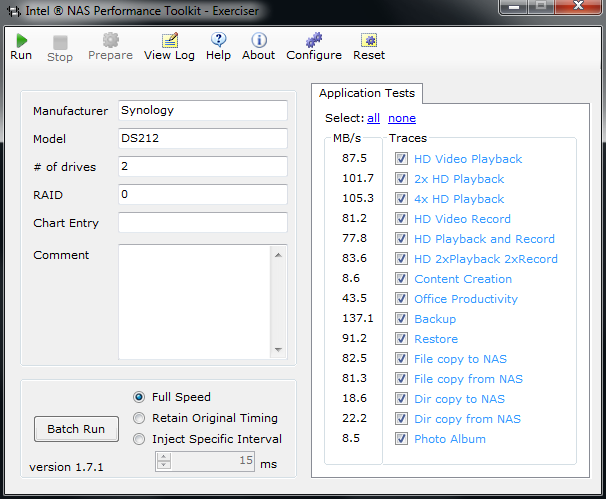
21The surprises just keep coming from this little NAS. With such impressive performance coming from the redundant test there wasn't much room for RAID 0 to improve upon. The 1.6GHz processor does a really good job of delivering performance all the way around, but the limits of gigabit Ethernet eventually come into play.
The DS212 should be used with a redundant array like SHR or RAID 1 99% of the time. RAID 0 does not keep your data safe from a drive failure, but with RAID 1 and SHR you can have one disk completely fail and not lose data.
Final Thoughts
 21
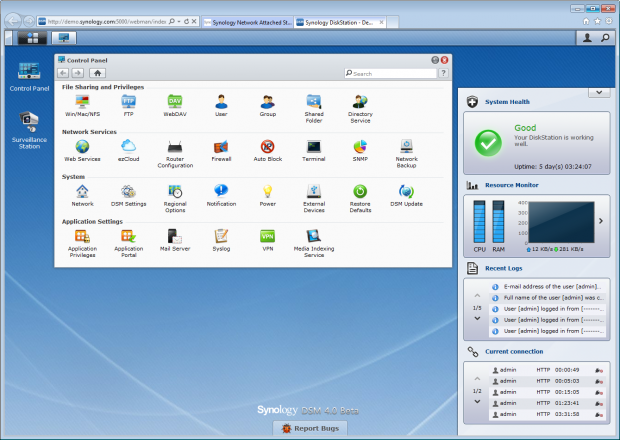
21In the time between testing and our review Synology released a new beta version of their DiskStation Manager Software. The new version, 4.0 retains the software's ease of use organization and brings in new functionality. New features include cloud data and improvements to how portable devices based on Android and iOS. Even before the new update, the DS212 was very easy to configure and use with other devices.
When it comes to data transfer performance I have to admit my surprise to the 100+ MB/s performance from this small dual bay NAS. The DS212 must have not been told that it wasn't a four or five bay NAS because it runs with the larger units as far as speed goes.
There are some draw backs though with a dual bay NAS. The first is the ability to store massive amounts of data. If you want your data safe in a redundant array you are limited to the largest capacity hard drives on the market. At this time that means 4TB. For many users 4TB is more than they need and that is the type of user the DS212 is built for.
The DS212 also costs much less than the larger drive units. Using Google Product Search we managed to find the DS212 for just over $300 without drives. This is a bit higher than some of the very low cost dual disk NAS appliances, but the very low cost products are not built with the same quality or deliver the same 100+ MB/s data transfer performance.
Overall the DS212 is a very good NAS, one that was designed without flaws. Synology made a checklist of every option, every feature and excellent build quality and achieved a mark inside each box.

 United
States: Find other tech and computer products like this
over at
United
States: Find other tech and computer products like this
over at  United
Kingdom: Find other tech and computer products like this
over at
United
Kingdom: Find other tech and computer products like this
over at  Australia:
Find other tech and computer products like this over at
Australia:
Find other tech and computer products like this over at  Canada:
Find other tech and computer products like this over at
Canada:
Find other tech and computer products like this over at  Deutschland:
Finde andere Technik- und Computerprodukte wie dieses auf
Deutschland:
Finde andere Technik- und Computerprodukte wie dieses auf 


 LG's 32-inch gaming OLED monitor with 480Hz refresh rate is imminent, with pre-orders live now
 Google Pixel 8a leak boasts 7 years of security updates but leaves one question unanswered
 Apple has plummeted from first to fifth place in the Chinese smartphone market, analysts warn
 You can blame Tim Cook for 8GB Macs, it seems
 Apple removes three AI apps capable of creating nude images of people from the App Store
 SteelSeries Arctis Nova 4X Wireless Gaming Headset Review
 ACEMAGIC AD08 "Core i9 11900H" Mini PC Review
 Lenovo ThinkPad X1 Carbon Gen 12 Review
 ASUS ROG Swift Pro PG248QP Gaming Monitor Review - Frames, frames, and more frames
 FlexiSpot C7B-Mesh Ergonomic Office Chair Review
 Samsung G8 34-inch QD-OLED Gaming Monitor Review - 175Hz for $900
 ASRock NUCBOX-155H Mini PC Review
 NuPhy Air96 V2 Wireless Mechanical Keyboard Review
 TEAM T-FORCE Siren DUO360 RGB Liquid CPU Cooler Review
 AVerMedia Live Streamer ULTRA HD Review
 Building the Ultimate Home Entertainment Server with an ASUSTOR NAS and Viper Gaming NVMe SSDs
 Everything you need to know about the latest ASUS NUC Mini PCs - NUC 14 Pro and ROG NUC
 How to Overclock Your GPU and Boost Your PC Gaming with ASUS GPU Tweak III
 ASUS's AMD Radeon RX 7000 Series GPU lineup has something for every gamer
 ASUS OLED Premium Care defends the ROG Swift OLED PG32UCDM gaming monitor from burn-in