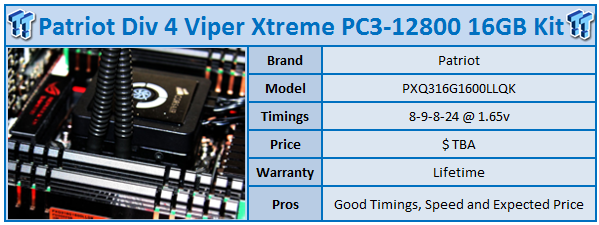
At the moment it feels like we've got an almost 1 to 1 ratio when it comes to X79 motherboards and accompanying Quad Channel kits, especially over the last week as we see less boards coming in, but more RAM arriving with the latest company to offer us a Quad Channel Kit of RAM being Patriot.
The kit we're looking at today is part of the new Division 4 series which refers to being a Quad Channel kit in the way the Division 2 referred to Dual Channel kits. At the same time, it's a part of the Viper Xtreme series and I've said it so many times; when it comes to the heatsink side of things, this is one of the best quality heatsinks when it comes to RAM.
You can see that the four module kit carries that typical Viper Xtreme which consists of both aluminium and copper and there's just so much weight to each module that the kit always feels great when you're dealing with it. Looking at the kit, the one thing I would've loved to have seen from Patriot is a black PCB as it would look so great against the black / copper heatsink.
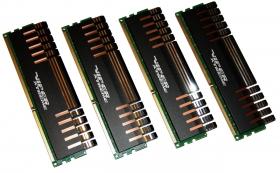
If we move in a bit closer to the kit, we get a better idea of the heatsink and we can see that on one side we've got the Viper Xtreme branding while the other side gives us a sticker that gives us a run down on the main details of the kit which we'll look at in just a second.
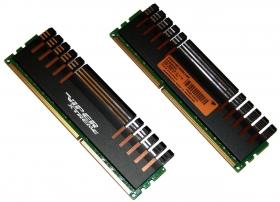
Having a look closer at the kit, though, you can again see how good a black PCB would look against the heatsink as opposed to the green PCB that is present in this case. Moving in a little closer on the label, though, we can see what's going on with the speed and timings side of things.
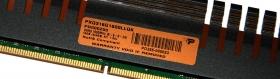
Moving in closer, we can see what's going on with the specification side of things. We're dealing with a PC3-12800 kit which means we've got a stock speed of 1600MHz DDR. This isn't the highest clock we've seen by any means, but the most attractive setting on the kit comes in the form of the timings which are 8-9-8-24-1T. We're also dealing with a total of 16GB of RAM across those four modules.
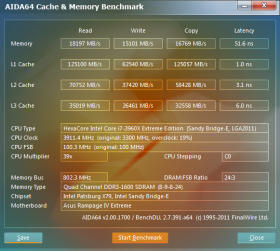
Getting up and running at those speeds wasn't an issue which comes as no surprise. With the kit chugging along at stock, though, it was time to get back into the BIOS and see what kind of overclock we could get out of the kit.
Our Latest DDR-3 Memory Review Coverage
- KLevv Urbane 2800MHz DDR3 16GB Dual-Channel Memory Kit Review
- KLevv Genuine 2666MHz DDR3 16GB Dual-Channel Memory Kit Review
- KLevv Neo 2400MHz DDR3 16GB Dual-Channel Memory Kit Review
- G.Skill TridentX PC3-12800 16GB Dual-Channel Memory Kit Review
- ADATA XPG V2 PC3-19200 16GB Dual Channel Memory Kit Review
Messing around in the BIOS, we didn't really have any luck at all when it came to the overclocking side of things. The first thing we did was move to a 2T command rate and see if we could get up and running at 1866MHz; unfortunately we couldn't.
We started to mess around with our BCLK to push the kit up over 1650MHz DDR at the default timings and we didn't have any joy. The next thing we did was just loosen the timings a bit to 9-9-9-24 and again we didn't really get anywhere in the end.
This isn't the most uncommon thing; quite often we'll see these lower latency kits have little head room. This is really one of those prime examples. So with no real movement on the speed of the RAM, we instead opted to overclock our CPU.
This is one of the best things about the Sandy Bridge and Sandy Bridge-E platform, though, because of the massive memory dividers on offer and the ability to adjust the multiplier. So with our memory continuing to run at 1600MHz DDR 8-9-8-24-1T, we were able to throw our CPU up to 4.7GHz via the 47x multiplier.
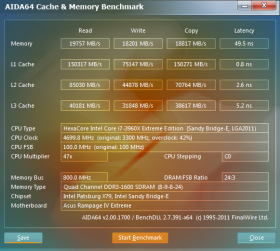
With the kit up and running at those two different setups and our typical 1600MHz DDR base line score, we're able to have a look at the performance of the kit in some RAM benchmarking programs.
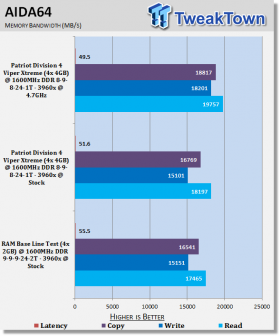
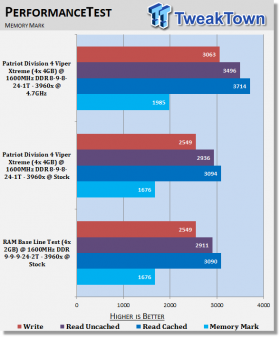
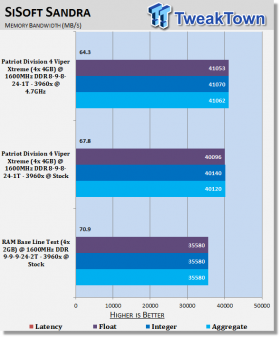
Looking throughout our benchmarks, we can see that comparing the lower latency kit against our base line 1600MHz DDR kit sees little difference under AIDA64 and PerformanceTest. You can see under Sandra, though, which has shown us the best difference in Quad Channel Performance so far, that the lower latency kit from Patriot offers us a nice boost in performance.
As usual, when we look at the kit running at the same speed, but with our CPU at 4.7GHz, we again see a really nice boost in performance and this is seen across all our benchmarks as opposed to just SiSoft Sandra.
At the moment we don't have the price on the new Division 4 Viper Xtreme, but if you have a look at the Division 2 kits you get a good idea of what the price will probably look like and to be honest, it should be extremely aggressive coming in a good chunk under $150 US.
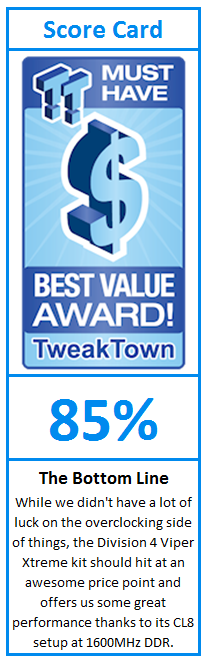
The Division 4 Viper Xtreme is no doubt probably the cheapest kit we've so far, but in no way is the kit cheap. On the overclocking side of things we found ourselves really limited with no real headroom, but with that said, we've got some awesome performance out of the kit thanks to the more aggressive timings.
You also get to see that while you're dealing with a lower speed kit with the speed coming in at 1600MHz DDR, thanks to the huge memory divider options these days we're still able to achieve a really strong overclock.
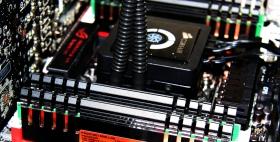
If you're looking for a high quality kit and you don't find yourself wanting speed that goes into the 2000MHz DDR plus region, then this is a really nice kit that should hit us at a really aggressive price point.