Introduction and Package
Introduction
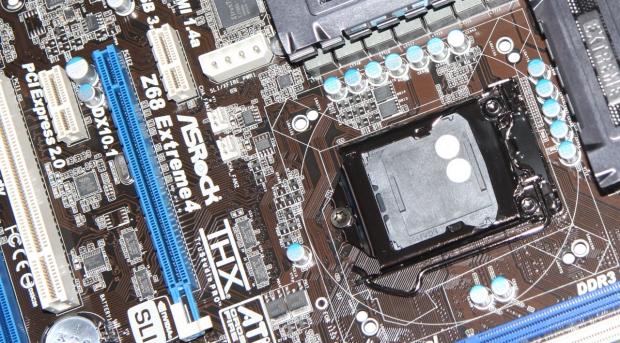
Having already previewed three boards that use the Z68 chipset, we already have a good idea of what's going on with the new chipset launched by Intel today. If you haven't already looked at our previews, I'd recommend checking out the ASRock Z68 Pro3 and Extreme4 Preview along with the MSI Z68A-GD80 Preview to get a better idea of what exactly we're dealing with here today.
Also, because we went into so much detail on the motherboards in those previews, we won't be looking at the board or package here today, as everything is covered in extensive detail already. So because we've been able to have a look at this board and others in great detail already, we'll be able to instead get stuck straight into the fun stuff like the BIOS, Overclocking and of course, performance.
Just looking over the boards and the tech documentation that we've received, it seems fairly safe to assume that the Z68 isn't going to be something you'll upgrade to if you're a P67 owner. Instead, it's a slight step up with a couple of new features like Intel Smart Response Technology and fast video encoding via Lucid Virtru. At the same time, you'll probably start to see people pick this chipset over the P67 if the pricing of both is similar.
For now, though, that's all neither here nor there. Let's get into the BIOS and see what ASRock are offering us before looking at overclocking and performance of the board.
BIOS
ASRock have opted for the UEFI BIOS which doesn't come as a surprise since they used it on their P67 motherboards. That means you can of course use the mouse, but most will probably find it easier and faster to use the keyboard.
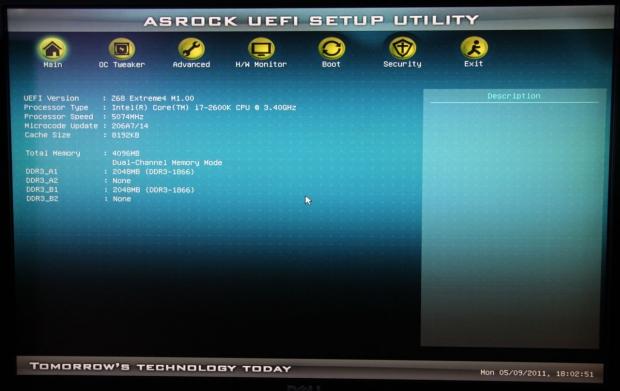
The first screen you're greeted with just gives us a quick rundown of what we're dealing with. As you can see, these pictures were taken when our CPU was overclocked.
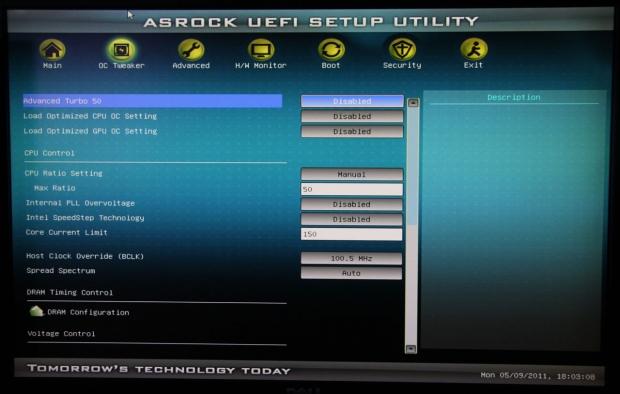
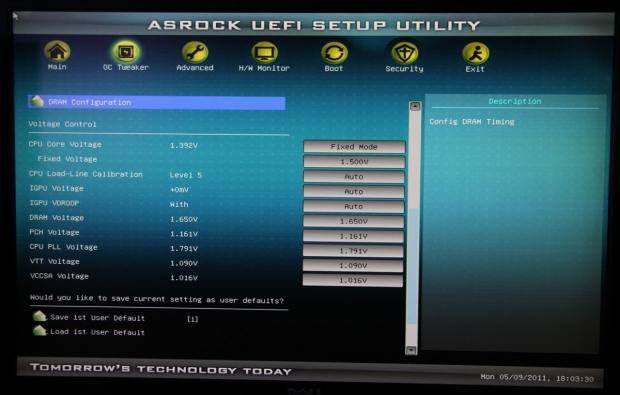
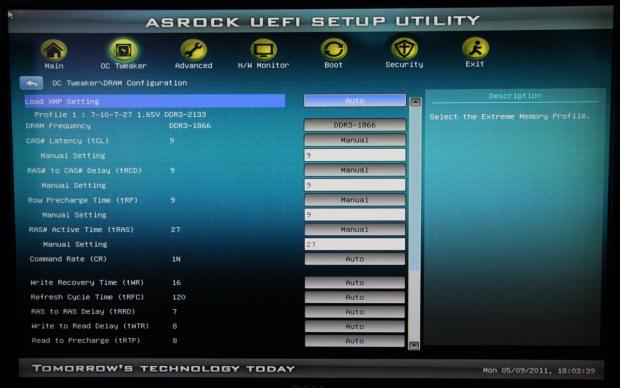
The OC Tweaker section gives you really everything to do with overclocking. Unlike the P67 Extreme6, though, DRAM settings have been thrown into a separate menu.
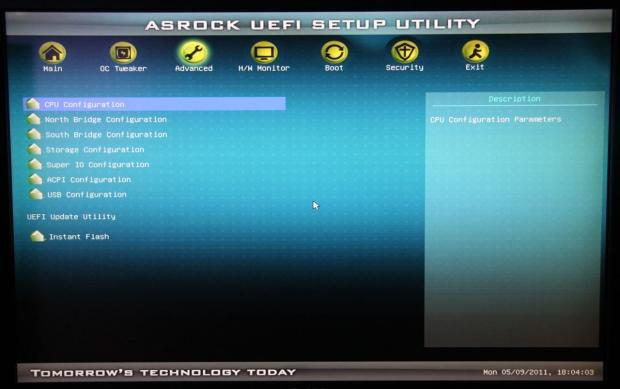
Advanced lets you dive deeper into the configuration of the board. Most won't have a need to go into this area; some may venture into the CPU area, though, to disable some of the tech that can limit overclocking potential.
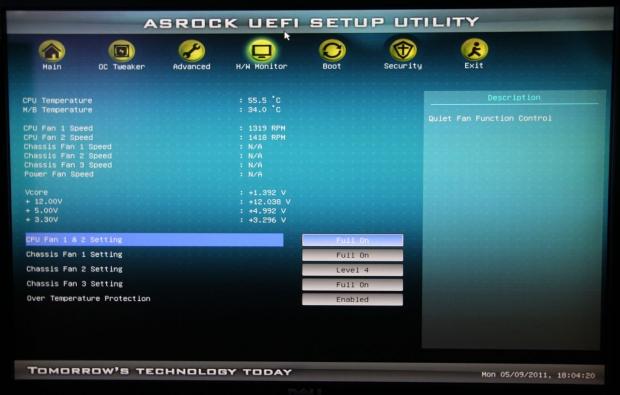
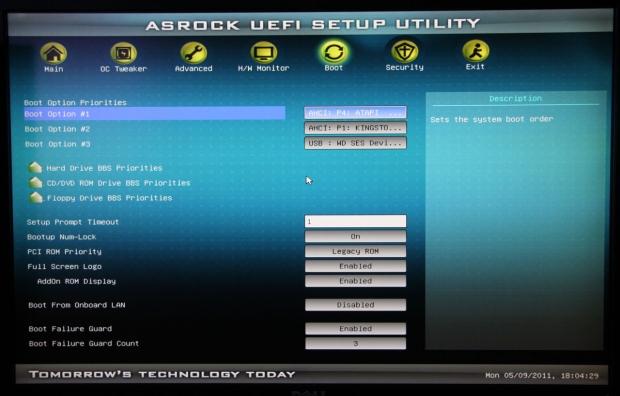
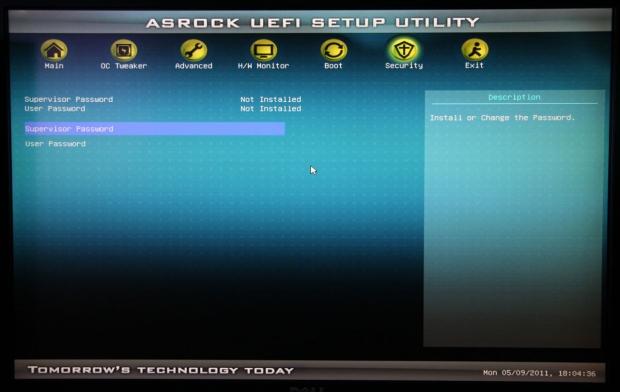
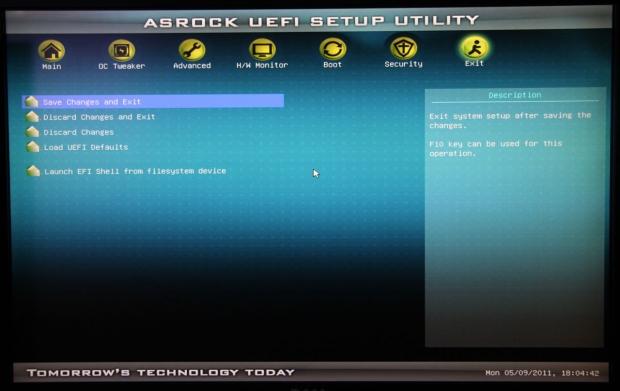
Scrolling through the rest of the screens doesn't hold any surprises with H/W Monitor, Boot, Security and Exit all being quite self-explanatory.
Test System Setup and Overclocking
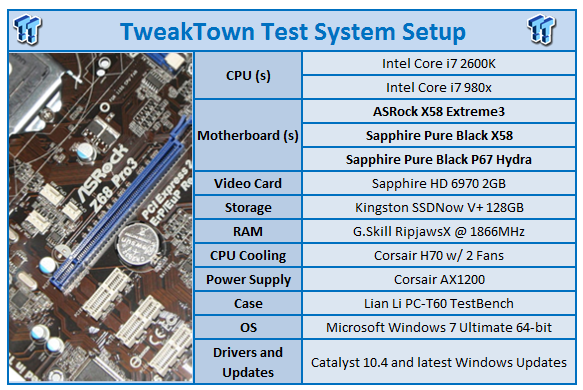
We would like to thank the following companies for supplying and supporting us with our test system hardware and equipment: Intel, G.Skill, Kingston, Mittoni and Corsair.
Today we'll be looking at the ASRock Z68 Extreme4 against the Sapphire Pure Black P67 Hydra, Sapphire Pure Black X58 and ASRock X58 Extreme3. Our 1155 socket boards will of course be using our Intel i7 2600k CPU while our X58 1366 socket boards will be using our Intel i7 980x.
Of course, we'll also be comparing the Z68 Extrem4 against itself as we test it in both stock form and overclocked form. In the overclocking department we pushed our multiplier up to 50x and had absolutely no problem booting and getting into Windows at what showed as just under 5GHz.
Firing the BIOS back up, we pushed the BCLK to 102, but we couldn't get the board to boot up again. 101.5 and we could get the board to boot, but it was extremely flakey in Windows while 101 seemed absolutely perfect with our CPU at 1.475v.
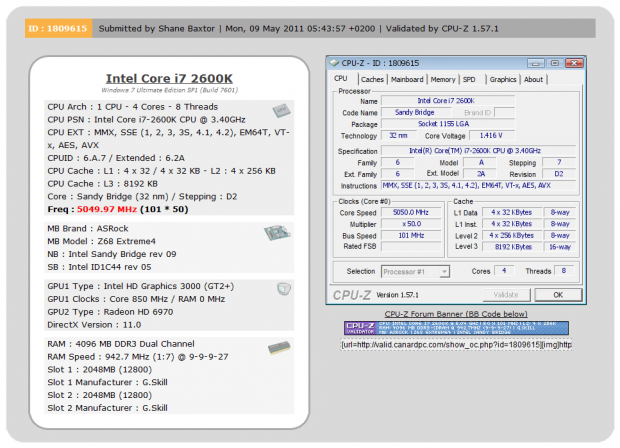
As you can see above, that meant we got into Windows at 5050MHz and because of the slight boost in BCLK, our memory went from 1866MHz DDR to 1884MHz DDR. The board was rock solid in all our testing, but you can see there seemed to be a bit of droop as CPU-Z was reporting only 1.416v.
This seems to be the wall we tend to hit with our 2600k, so the ASRock Z68 Extreme4 being able to achieve that with no problem is good news.
Let's get started!
CPU Benchmarks
AIDA64
Version and / or Patch Used: 1.00.1035BETA
Developer Homepage: http://www.aida64.com
Product Homepage: http://www.AIDA64.com
Buy It Here
Replacing Everest in our labs is AIDA64. This new testing suite is from the core development team from Lavalys and continues that tradition. The guys have thrown in better support for multithreaded CPUs as well as full 64 bit support. We use this to test memory and HDDs for now, but may find ourselves opening this up to other areas of the motherboard.
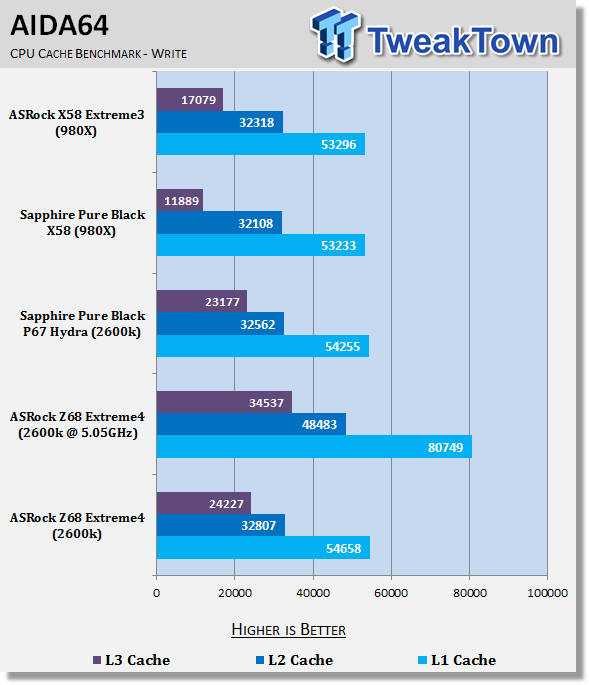
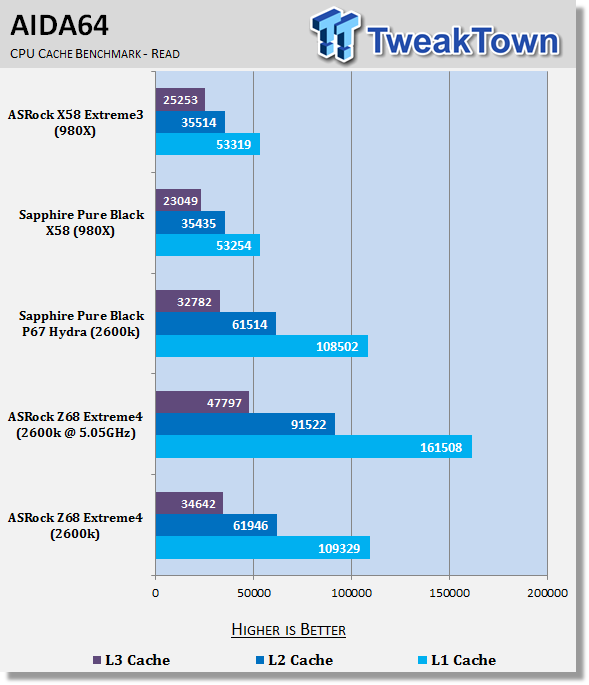
There's little difference between the performance of our P67 and Z68 boards when looking here. Of course, when we overclock you can see a massive performance increase which comes as no surprise considering the speed we're dealing with.
CPU Benchmarks Continued
HyperPi 0.99
Version and / or Patch Used: 0.99
Developer Homepage: www.virgilioborges.com.br
Product Homepage: www.virgilioborges.com.br
Download It Here
HyperPi is a front end for SuperPi that allows for multiple concurrent instances of SuperPi to be run on each core recognized by the system. It is very dependent on CPU to memory to HDD speed. The faster these components, the faster it is able to figure out the number Pi to the selected length.
For our testing we use the 32M run. This means that each of the four physical and four logical cores for the i7 and the four physical cores of the i5 is trying to calculate the number Pi out to 32 million decimal places. Each "run" is a comparative to ensure accuracy and any stability or performance issues in the loop mentioned above will cause errors in calculation.
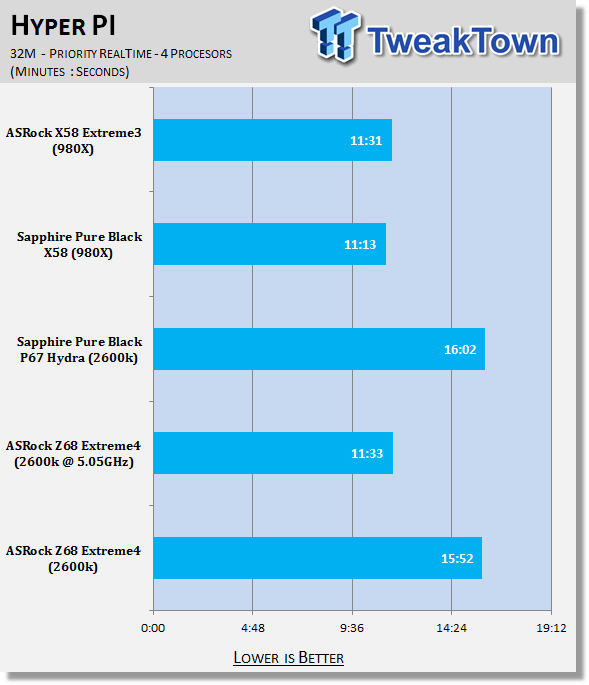
Looking at HyperPi performance, it seems that the ASRock Z68 Extreme4 is a little faster than the P67 offering. Overclocked, though, we again see a massive boost in performance with the CPU and board competing with our more expensive stock i7 980x / X58 setup.
AutoGK
Version and / or Patch Used: 2.55
Developer Homepage: http://www.autogk.me.uk/
Product Homepage: http://www.autogk.me.uk/
Download It Here
AutoGK stands for Auto Gordian Knot; it is a suite of transcoding tools that are compiled into an easy to install and use utility. It allows you to transcode non-protected DVDs and other media to Xvid or Divx format. For our testing purposes we use a non-DRM restricted movie that is roughly 2 hours in length. This is transcoded to a single Xvid AVI at 100% quality.
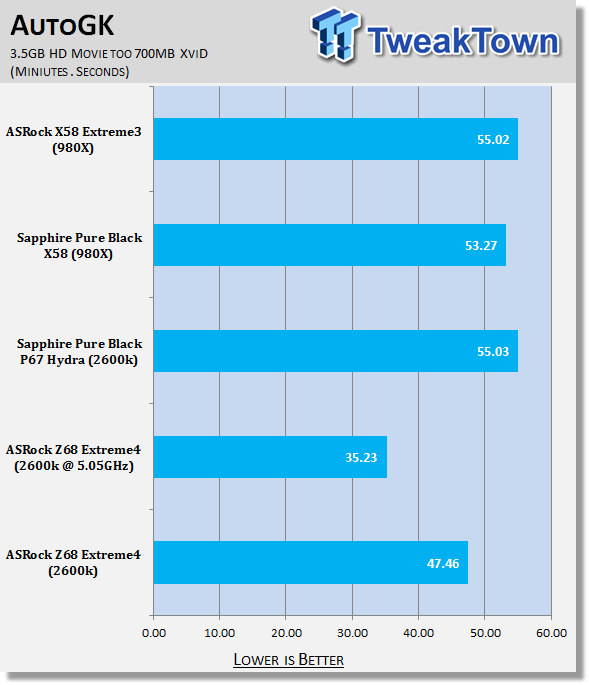
Under AutoGK we can see that encoding performance on the board is extremely strong; overclocked improves that time even more and by quite a large margin as you can see.
Storage Benchmarks
AIDA64
Version and / or Patch Used: 1.00.1035BETA
Developer Homepage: http://www.aida64.com
Product Homepage: http://www.AIDA64.com
Buy It Here
Replacing Everest in our labs is AIDA64. This new testing suite is from the core development team from Lavalys and continues that tradition. The guys have thrown in better support for multithreaded CPUs as well as full 64 bit support. We use this to test memory and HDDs for now, but may find ourselves opening this up to other areas of the motherboard.
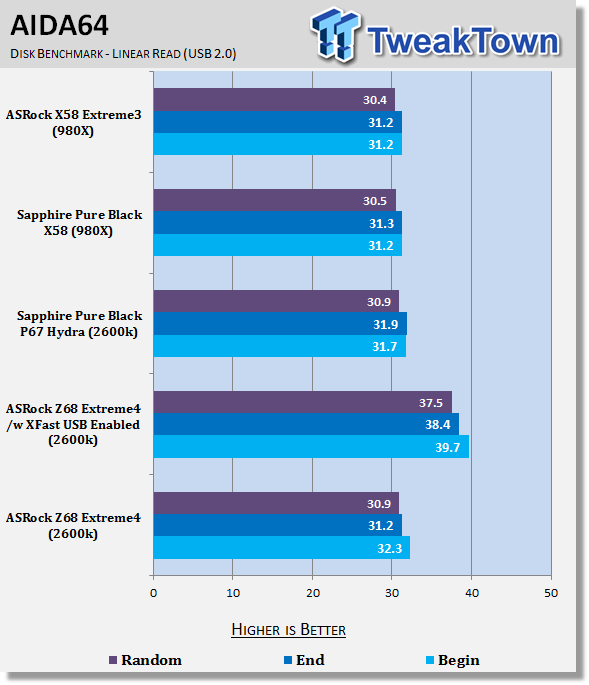
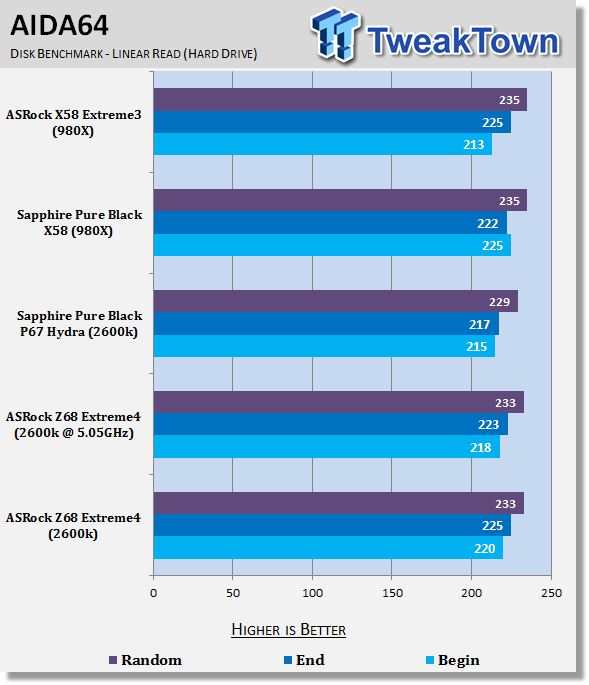
Looking at our SSD performance, there's not a big difference between all the setups and of course overclocking doesn't affect performance at all. USB 2.0 performance out of the box is also fairly in line with what we see from other boards. Installing the XFast USB software that comes from ASRock, though, and following the prompts to unplug and plug in our portable HDD, you can see a really nice and noticeable boost in performance. This is the first time I've used the XFast software and it's clear that it works.
Memory Benchmarks
Sisoft Sandra
Version and / or Patch Used: 2011
Developer Homepage: http://www.sisoftware.net
Product Homepage: http://www.sisoftware.net
Buy It Here
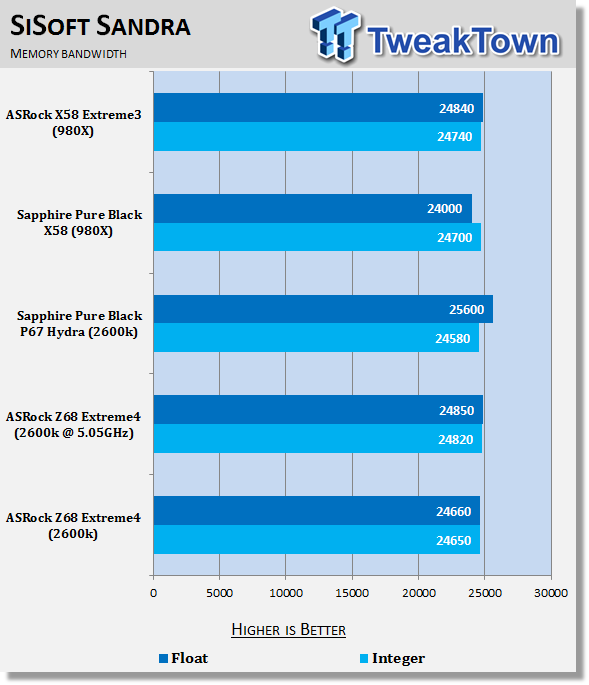
Under SiSoft Sandra we can see that memory performance between all the boards is quite similar.
AIDA64
Version and / or Patch Used: 1.00.1035BETA
Developer Homepage: http://www.aida64.com
Product Homepage: http://www.AIDA64.com
Buy It Here
Replacing Everest in our labs is AIDA64. This new testing suite is from the core development team from Lavalys and continues that tradition. The guys have thrown in better support for multithreaded CPUs as well as full 64 bit support. We use this to test memory and HDDs for now, but may find ourselves opening this up to other areas of the motherboard.
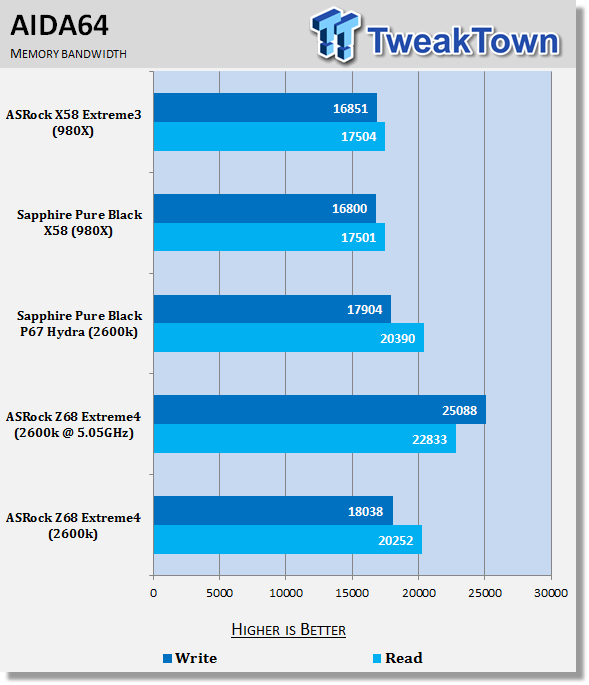
Under AIDA64 we can see that the memory performance is a bit more separated than above. The P67 and Z68 platform while only Dual Channel, does manage to perform extremely well. Comparing the two platforms, there's little between them, but when overclocking, even though our RAM speed is increased only slightly, we see a strong boost in performance thanks to that 5GHz+ CPU speed.
Gaming Benchmarks
3DMark 11
Version and / or Patch Used: 1.0
Developer Homepage: http://www.futuremark.com
Product Homepage: http://www.3dmark.com/3dmark11/
Buy It Here
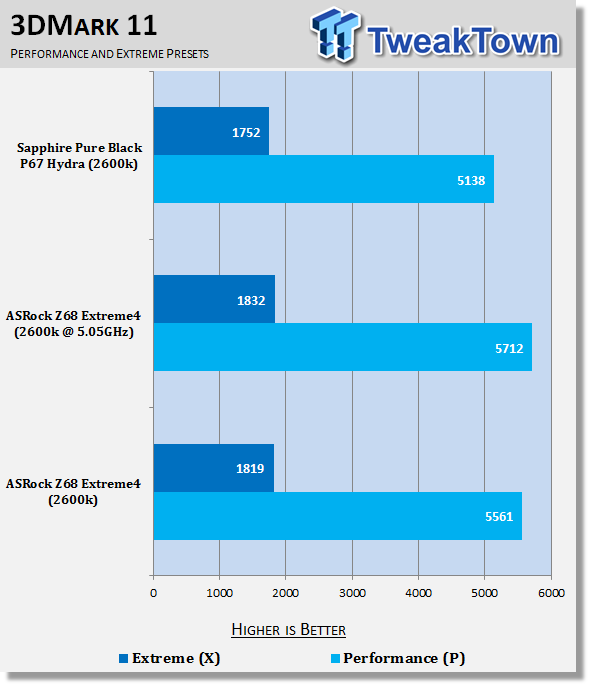
3DMark 11 is the latest version of the world's most popular benchmark. Designed to measure your PC's gaming performance 3DMark 11 makes extensive use of all the new features in DirectX 11 including tessellation, compute shaders and multi-threading. Trusted by gamers worldwide to give accurate and unbiased results, 3DMark 11 is the best way to consistently and reliably test DirectX 11 under game-like loads.
Aliens vs. Predator
Version and / or Patch Used: Standalone Benchmark
Timedemo or Level Used: Built in Benchmark
Developer Homepage: http://www.rebellion.co.uk/
Product Homepage: http://www.sega.com/games/aliens-vs-predator/

Aliens vs. Predator is a science fiction first-person shooter video game, developed by Rebellion Developments, the team behind the 1999 original PC game, and published by Sega for Microsoft Windows, the PlayStation 3 and the Xbox 360. The game is based on the Alien vs. Predator franchise, a combination of the characters and creatures of the Alien franchise and the Predator franchise. There are three campaigns in the game, one for each race/faction (the Predators, the Aliens and the Colonial Marines), that, while separate in terms of individual plot and gameplay, form one overarching storyline.
Following the storyline of the campaign modes comes the multiplayer aspect of the game. In this Multiplayer section of the game, players face off in various different gametypes in various different ways.
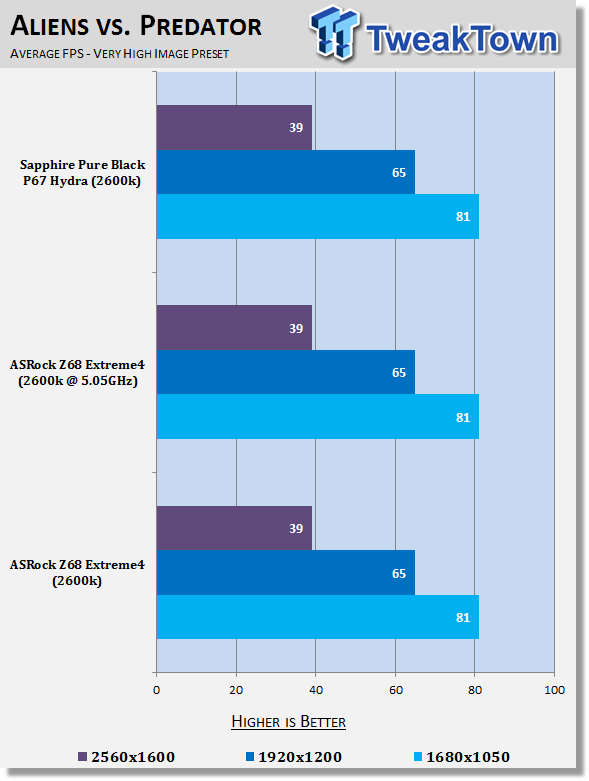
Performance under a gaming environment is very minute between the P67 and Z68. Even when overclocking we see almost no difference. This is because we're not being limited by the CPU and instead we're being limited by the graphics card.
Temperature and Power
Core Temperature
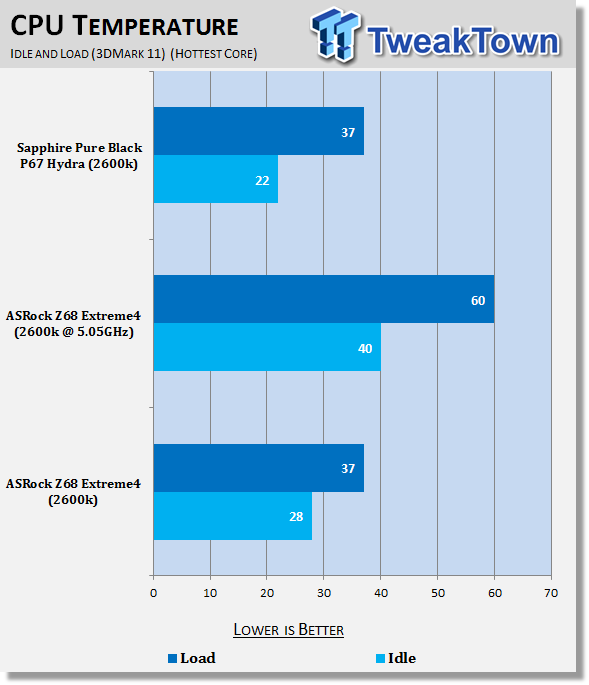
Load saw our CPUs when at stock reach the same temperature; at idle the CPU was running a little warmer on the Z68 Extreme4. When overclocking it comes as no surprise that we see a big spike in heat due to the extra voltage that is being ran through the CPU.
Power Draw Tests
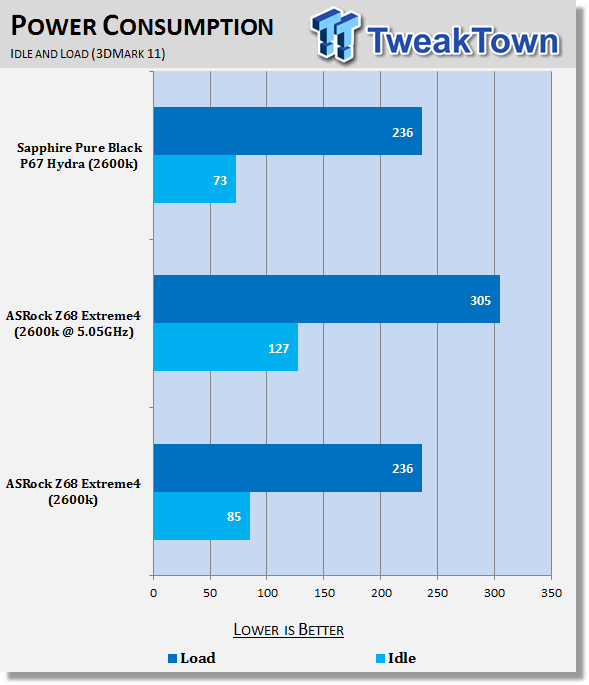
Power draw at idle saw the ASRock Z68 Extreme4 sit a little higher than our Sapphire Pure Black P67 board. Under load, though, we can see both are very close to each other. Of course, when we overclock we see big jumps in both the idle and the load wattage.
Z68 Specific Tests
Lucid Virtru
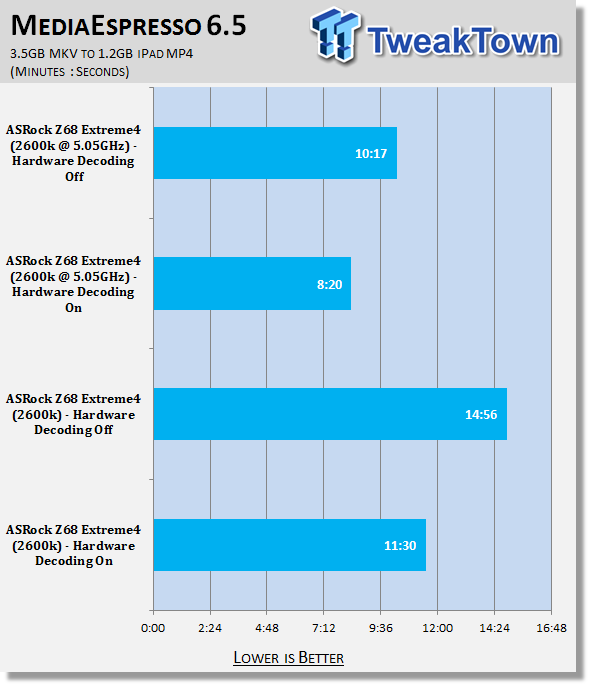
Using Cyberlink MediaEspress 6.5 we're able to test the encoding of a 3.5GB MKV file down to a 1.2GB iPad friendly MP4 one. At our stock speeds you can see over 3 minutes is shaved from the encoding time when we turn on Intel Quick Sync.
Overclocking our CPU sees a big improvement in encoding times. You can see that at 5.05GHz with Quick Sync off we're able to encode faster than when the CPU is at default speeds and Quick Sync is on. Of course at 5.05GHz if we turn Quick Sync On encoding time comes down to just over 8 minutes. This is almost half the time of our stock clocked, Quick Sync off test.
Onboard Video
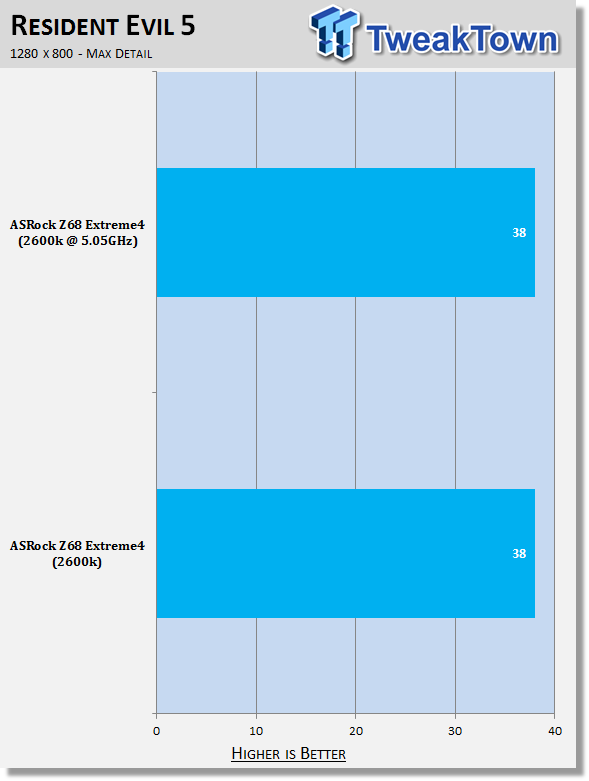
Looking at something older like Resident Evil 5 which runs in DX10, you can see that the onboard graphics indeed struggles to offer us playable FPS at even quite a low 1280 x 800 resolution. We still wait for the day that onboard video can offer us something that's really playable; today isn't that day.
Final Thoughts
Our suspicions are confirmed today now that the curtain has been lifted on the new Intel Z68 chipset. If you're a P67 user there's really very little reason to move to this new chipset outside of you wanting to make use of Intel Smart Response Technology or Lucid Virtu.
Even then, out of those two main features you'll probably find yourself not having any need for Lucid Virtu if you only have a semi decent discrete video card, and that's because there's encoding programs that make use of both the AMD Stream technology and NVIDIA CUDA technology.
Where you could see it come in handy, though, is little home based servers, home theater PCs, office machines and other areas like that where a discrete video card might not be used. With so many people having portable devices, the ability to convert a HD rip or even a full blown Blu-ray with this kind of speed is unreal. Especially using programs that let you queue movies; you could go to bed and wake up to a dozen iPad friendly movies that just need to be synced with iTunes.
Intel Smart Response Technology on the other hand is a fantastic technology and while similar technology has been around for a while now with other companies, the native support on offer from Intel is what makes it so appealing. Intel SRT doesn't give you that same quickness an SSD provides, but does indeed help boost performance over a typical mechanical only system. It's a really good meet-in-the-middle kind of technology for people who don't have or want to spend the money associated with a large SSD only "C Drive", but would love to see that added performance boost that's associated with the technology.
When we added a 30GB Kingston SSD to our 2TB Western Digital Black edition there was just that quickness that was associated with having an SSD. Everything opens a little faster and shuts down a little faster. A great example is in some testing that we saw Cameron do which shows a great video of the startup and shut down process.
Of course, if you haven't got a P67 board already, there's no real reason not to go the Z68. With a small price difference between the P67 and the new Z68 chipset you'd be better off opting for the new Z68 one. The only reason you wouldn't is if you wanted a more specialized higher end board like the P67 Fata1ity. It seems companies are transitioning quick to make sure their popular P67 lines are part of the Z68, though, so it might be worth holding out just slightly, or at least 'till Computex where we'll no doubt see a lot of companies release fancy versions of the new chipset.
Getting into the specifics on the ASRock version of the Z68 board, it's overall a strong board. It lacks some of the flair that we see from other companies when it comes to PCB design and heatsinks, but its performance is strong and achieving over 5GHz on our i7 2600k was easy.
You've also got that onboard video and while you can't do really any gaming with it, I have to say it's a nice addition in the situation where your video card dies, or you're maybe waiting for your video card to come from somewhere else. You can at least get up and running now, and then when it arrives all you have to do is install it and its drivers.
The aggressive pricing also associated with the ASRock brand is going to be appreciated on a board that has a good amount of features, performs rock solid and offers us some great overclocking potential on the "K Series" Intel CPUs.

Our Latest Socket LGA 1155 Review Coverage