











The TRON: Legacy Mouse from Razer is inspired by the movie and it seems to have done the original and the sequel justice. If you're a true fan you'll immediately spot the details of the finger-scroll being similar to the lightcycle's wheel.

The first sign that this is a mouse inspired by a Hollywood movie comes when you plug the mouse in. The lights flicker madly and it sounds like it's a car being turned on. Neat the first time, but how great is it going to be the thousandth time? As there is no way to turn it off. It sounds like the movie, but I think that ultimately it makes your mouse sound like a cheap toy.
[img]2[/img]
No one can argue that this mouse looks fabulous, but how does it feel? Well, it's made of plastic, shiny plastic, not that smooth rubberized plastic we've come to love from gaming mice. Apart from the main mouse buttons there's an extra two on each side, and by default the left side buttons are assigned to browse forward and backward functions in your browser, while the right button's for on the fly DPI switching. However, when you start to click the buttons you notice that the top buttons are very 'clicky' while the sides are a little more solid cushioned.
[img]3[/img]
What about performance? It turns out that the 5600dpi sensor can work on fabrics, books, tablets, the back of your hand, a pair of jeans, and anything that isn't glossy. The mouse felt a little big in my hand at first, but I quickly adapted. It must have been the right angles that surround the entire mouse that made me keenly aware of its size. Other gaming mice tend to have curved rounded edges that form to your hand. It is unavoidable to have such angular construction in the mouse. After all, it wouldn't be TRON inspired without it!

Looking at connectivity, it's 100% reliable since it's a wired mouse. This is a con in my book since we are living in a wireless age and I am a laptop user, there was too much cord cluttering up my desk. However, desktop users would the extra length handy.

To summarize, I'll firstly run back over the things that appeal most to me about this mouse. Firstly, there's that superb 5600dpi 3.5G sensor, and the fact that it's inspired by such an epic blockbuster would be a plus to many (although no doubt a con to others). The funky lights during usage are a nice touch, but you may wish to (and can) turn them off via the settings panel.
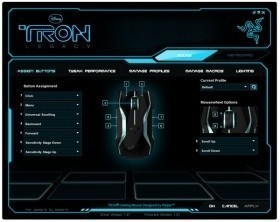
The other cool thing is the sound it makes when you boot up, but as mentioned earlier, there's no way to turn that off and eventually it may annoy. And did I mention the fabulous design? This mouse really looks the part!
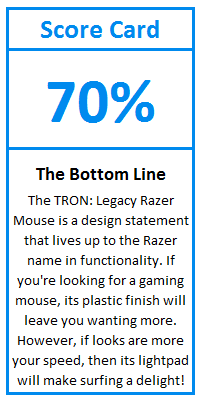
So, what didn't I like? - Not much I'm happy to say, though the fact it's built completely out of plastics is disappointing, as is the fact that it's wired-only. A bit of rubber aside from the finger-scroll would have made all the difference to the feel of this mouse.
Our Latest Mice Review Coverage
- Razer Viper V4 Pro Wireless Gaming Mouse Review - Built for Competition
- Corsair SABRE v2 PRO CARBON FIBER Wireless Gaming Mouse Review - The Premium Option
- Corsair SABRE v2 PRO Wireless MG Gaming Mouse Review - A Strong Contender
- Logitech G PRO X2 SUPERSTRIKE Wireless Gaming Mouse Review - Competitive Gaming Perfected
- ASUS ROG Harpe II Ace Wireless Gaming Mouse Review - Performance, Comfort, and Versatility
 ASUS ROG Raikiri II Xbox Wireless Controller Review - Ready to Take Control
 IQUNIX Magi96 Pro Aluminum Low Profile Mechanical Keyboard Review - Premium Build, Satisfying Sound
 Razer Pro Type Ergo Wireless Split Ergonomic Keyboard Review - Built for Comfort and Support
 ASUS ROG Strix Morph 96 Wireless Gaming Keyboard Review - Great Performance, More Affordable
 Corsair MAKR PRO 75 Hall Effect DIY Keyboard Review - Pre-Built and Ready for Action
 PlayStation 6 will reportedly ditch the PS5's liquid metal cooling in favor of something else
 GeForce RTX 50 Series hotspot temperature readings won't be added to MSI Afterburner
 Samsung is using titanium to finally tackle the foldable crease problem with the Galaxy Z Fold 8
 PALIT introduces GeForce RTX 3060 Infinity 2 OC GPU, a 'brand new' design
 A hacked Xbox player beat Microsoft in court after it suspended his account and told him to buy his games again
 Dead Space creator Glen Schofield announces retirement after 35 years in the video game industry
 Steve Buscemi to star in new Far Cry anthology TV show
 Assassin's Creed Hexe DLC leaked before the game is even revealed
 100% of Japanese online game developers are using generative AI, reveals new poll
 Windows 11 tested on Steam Machine, provides nearly identical gaming performance to SteamOS
 Samsung 990 2TB SSD Review - Ninth Gen QLC at PCIe Gen4 Speeds
 ASUS ExpertBook Ultra (Panther Lake) 14" Business Laptop Review
 MOZA FMP18 Panel Bundle Review: authentic F/A-18 Hornet cockpit controls for flight sims
 Micron 6600 ION 245.76TB Enterprise SSD Review - Best in Class Programming Speeds
 MOZA MA3F EFCM Flight Control Module Review: authentic Airbus A320 autopilot panel for simulators
 Turtle Beach Stealth Pro II Wireless Gaming Headset Review - Premium Sound, Fantastic Features
 MOZA MGX1000 Instrument Panel Review: a realistic Garmin G1000 replica for immersive flight sims
 Simagic Zeus Formula Steering Wheel Review: premium build and advanced inputs for F1 racing
 GIGABYTE X870E Aero X3D Dark Wood Review - A woody goody
 I stopped digging through Windows menus after I set up this one folder
 Don't sell your Windows laptop until you do these things
 6 PC cleaning mistakes to avoid for safer hardware maintenance
 Phison and Intel Take Aim at Local AI's Memory Wall with aiDAPTIV
 How to Remap Keyboard Keys in Windows using Microsoft PowerToys
 7 tips to organize your Windows files for faster, easier access
 Intel Arc G3 Extreme first impressions with MSI's Claw 8 EX AI+ - Incredible power for an extreme price
 How to fix Wi-Fi Adapter Not Working on Windows laptops: troubleshooting tips
 Hisense U7SG 4K TV: Modern Entertainment for the New Age
 6 underrated Microsoft Word features worth using to boost your productivity