

Introduction

There are times that we all find ourselves wishing for wireless connectivity. It usually happens when you have an older piece of equipment that was developed before WiFi was a common item and you are not ready to give that part up.
For me it came when I wanted to put my green Xbox on to a temporary WiFi network to use up an Xbox Live gift card. The problem was the Xbox I have does not have the option for wireless and I did not feel like running a cable across the floor just to use up some points. I started looking around and found something that could be a decent solution. This is the NETGEAR WNCE2001 Universal Wireless Adapter.
At $59.99 from NewEgg.com it is not a bad deal at all considering it connects via a standard Ethernet port and is powered by either a wall adapter or right from an available USB port. So let's kick on the old Xbox and see if this Universal Adapter can get it back online.
The Box and What's Inside
Package and Contents
The packaging for the WNCE2001 was pretty big for what you are getting. I really expected a much smaller box, but the size of the box is really not that big of a deal. Still, the box does give you almost all of the information you need to make an informed product decision. The front has a picture of the WNCE2001 and also tells you exactly what it is, complete with pictures of the devices this is intended for (just in case you did not know).

The back is a little more on the informative side and gives you a more general description along with some scenarios of where this would work best.

Inside we do find something to be happy about, though. It looks like the majority of the packing material is recycled and recyclable. That at least is something. Of course, the look inside is not too bad either.


One of the items that caught our eye was the USB power cable. This is handy for those times when you do not want to have too many things plugged into the wall or are simply on the go. It is very interesting that they included an adapter, though. We are not sure about that one.

The WNCE2001
The WNCE2001 is a small piece of hardware. It is wedge shaped and strongly reminds of another product we tested not that long ago.

As you can see, the similarities are uncanny. Even on the backside you can see that the housing is made by the same company.


The difference is that on the other product you have multiple options for the way it runs, while on the WNCE2001 you only have the option to use it as a wireless adapter.

The back of the WNCE2001 has the RJ-45 port along with the power port, a reset switch and a Wireless Protected Setup button. This one can be very important if you are setting this up on a system that does not have an OS to allow you to configure it. Overall, the WNCE2001 is a pretty simple device, but it is one that can certainly have an impact.
Setup
There are two ways you can setup the WNCE2001. The first is through the use of WPS (Wireless Protected Setup). If you have that option already enabled in your home network then things are pretty simple. You push the WPS button on the WNCE2001 until the light blinks amber and green. Then you push the WPS button on your router. From there it should automatically set itself up and you are off and running.

The second way is a little more involved, but still pretty simple. With this method you need to connect it to a PC. Once the drivers are installed then you open up a browser. Once you open the browser it is going to ask you a couple of questions about language preference and location.

After that it saves that information for later and you get into the meat of the setup. Again, it is pretty simple as it walks you through connecting the WNCE2001 to an existing wireless network.

The next thing you are greeted with is a survey of nearby wireless access points. It is up to you to pick the one you want.

The next page is where you put in the security key, if there is one.

After another few minutes of viewing a progress bar you are given a recap of what you put in. I was a little disappointed to see the WPA password in plain text on the screen. This raises some concerns about the security of the WNCE2001.


The WebUI
Interestingly enough, the WNCE2001 does have a small but functional WebUI that you can use to configure one or two settings and also update its firmware through.

The landing page shows the current status of the WNCE2001. One item that is nice to see is the connection speed. This does let us know that we are dealing with a real N spec product. Of course, the 10/100 port on it kills some of that speed, but in the end it is usually more than fast enough.

You can set the WNCE2001 to a static IP if you want. Nothing major really, but nice to have that option.

The advanced wireless options are not really much, but can help if you are having a few performance issues.
Again, the WebUI is very simple, but does give you some flexibility and even a knowledge base and documentation right on some the UI. You can also backup your configuration and upgrade the firmware easily through this UI.
Testing
We used PerformanceTest 6.1 by PassMark which you can find out more information about here. It has a handy Advanced Networking section which is perfect for our testing.
Doing our best to emulate a real-world performance scenario, I setup a server running Windows 2008 (x64) Server, (2x Xeon Quad Core 3.0 GHz 1333MHz FSB, 4GB DDR2 FB-DIMMS, 2x 146GB SAS drives in RAID 1) and the client PC was an MSI Wind200 With built-in Intel 802.11n adapter and also using various other adapters. The results were gathered by sending data from the Wind to the server at different distances; average transmission speeds were recorded for each.
- Connection Speed
The WNCE2001 can connect at up to 300Mbps; however, there is a slight catch to that. Due to it only having a 10/100 Ethernet port, it cannot operate faster than 100Mbps. So while the extra bandwidth is there, you cannot use it.
- Bandwidth
As usual, to test the speed of the WNCE2001 I chose three common working points inside my house. One was in the lab within 10 feet our router; the next was in the bedroom roughly 35 feet away and requiring the signal to travel through a wall containing the main house electrical panel and a "wet wall". The last was outside on the back porch, roughly 45 feet from the router. Both the second and third positions were out of the direct line of sight of the router.
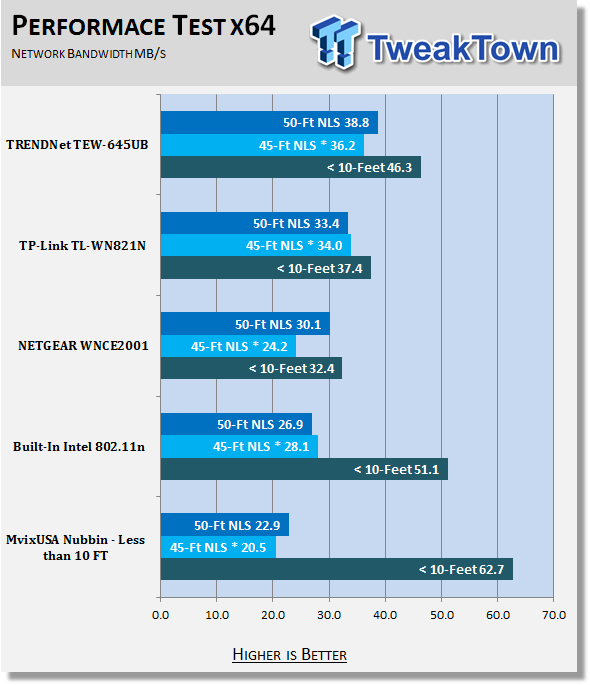
*signal travelling through wet wall and main house electrical panel
The WNCE2001 did not do all that bad considering it is hobbled by the 10/100 port limitation. Still, as we have said, the bandwidth available here is more than enough for the appliances that you would use this with. The only place you might have an issue is with online gaming, but to be honest, we doubt it as most people's internet connections are not going to saturate the amount of bandwidth you have available.
Final Thoughts
So, what is our verdict on the NETGEAR Universal Wireless Adapter? It is a solid product. Now, I know what you are thinking. You are looking at the performance numbers and the 10/100 Ethernet port. Those are all valid points IF you are connecting this to a PC. But this is for a TV, a Game Console, and/or a Blu-ray player (for BD Live).
All of these devices (with the exception of the game console) are not bandwidth hogs. They are going to take up a very minimal amount of your WiFi network. Even the gaming console is not going to max things out. After all, the average connection in the US is around 6MBps with some people maxing out at 40Mbps. That is still less than half of what you can get through that 10/100 port.
So in the end, the performance is more than sufficient to handle even the needs of online console gaming. Plus, for only $59.99 at NewEgg.com, it is a pretty good deal.

 United
States: Find other tech and computer products like this
over at
United
States: Find other tech and computer products like this
over at  United
Kingdom: Find other tech and computer products like this
over at
United
Kingdom: Find other tech and computer products like this
over at  Australia:
Find other tech and computer products like this over at
Australia:
Find other tech and computer products like this over at  Canada:
Find other tech and computer products like this over at
Canada:
Find other tech and computer products like this over at  Deutschland:
Finde andere Technik- und Computerprodukte wie dieses auf
Deutschland:
Finde andere Technik- und Computerprodukte wie dieses auf 


 Windows 11 could get some big changes: Start menu 'companions' and Copilot in Settings
 The iPhone 16 Pro could have a 20% brighter display than your boring old iPhone 15 Pro
 New iPhone 16 dummy unit leak shows off its refreshed camera design and more
 Analysts expect an iPad Pro sales slowdown despite new models, here's why
 WhatsApp announces a design refresh for its iPhone and Android apps
 Corsair 6500X Mid-Tower Dual Chamber Chassis Review
 Corsair MP700 Pro SE 4TB SSD Review - As Fast as They Come
 Corsair MP600 Mini 2024 Edition 1TB SSD Review - Fastest Tiny Drive on the Planet
 Lexar SL500 1TB Portable SSD Review - The best of native USB
 Corsair Platform:6 Elevate Modular Desk Review
 True Lies (1997) 4K Blu-ray Review
 Fractal Design North XL Full-Tower Chassis Review
 Western Digital WD Gold 24TB HDD Review - High-Capacity Masterpiece
 AOC U27G3X 27-inch Gaming Monitor Review - 4K 160Hz for $500
 MSI Vector GP68HX Gaming Laptop Review
 Building the Ultimate Home Entertainment Server with an ASUSTOR NAS and Viper Gaming NVMe SSDs
 Everything you need to know about the latest ASUS NUC Mini PCs - NUC 14 Pro and ROG NUC
 How to Overclock Your GPU and Boost Your PC Gaming with ASUS GPU Tweak III
 ASUS's AMD Radeon RX 7000 Series GPU lineup has something for every gamer
 ASUS OLED Premium Care defends the ROG Swift OLED PG32UCDM gaming monitor from burn-in