

Introduction, Specifications, Pricing and Availability

Introduction
Based in White City, Oregon, Smooth Creations sells built-to-order gaming PCs and is known for their high-quality custom paint jobs. The company hooked us up with an HD 5970-equipped, Phenom II X6 based system with a custom "Battlefield: Bad Company 2" paint scheme.
Let's take a look.
Specifications, Pricing and Availability
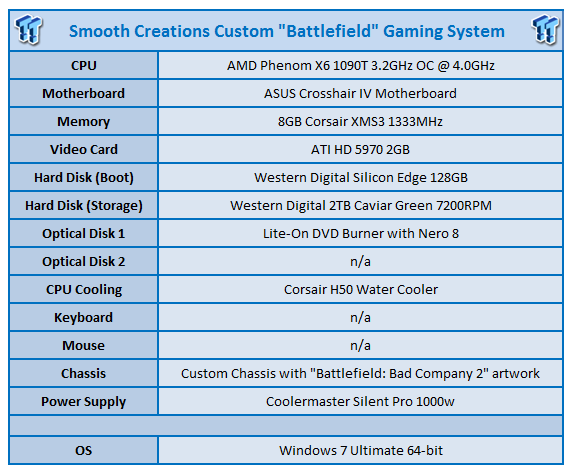
All Smooth Creations systems are built-to-order and available only through smoothcreations.com. The company is, in the full sense of the term, a custom builder. Although the company's website showcases a few models and offers several options on the configuration pages, the company seems to prefer you call them up and talk to one of their reps to discuss options for a new system. One of the main selling points for the company's systems is the free custom case paint, and it probably is in the customer's best interest to discuss what is and isn't feasible in that regard with an actual person.
The website also emphasizes that Smooth Creation's chassis' are meant to last well beyond a single hardware-obsolescence cycle. When you're ready for a new computer, send your chassis back to the company for a free interior cleaning and a buff and polish of the artwork. Then they'll build a new system to your specs in your existing chassis.
While that might at first seem a bit gimmicky, take a look at the custom chassis' Smooth Creations offers, and you'll soon recognize that they are works of art unto themselves. These aren't just off-the-shelf cases with a coat of auto paint on them. They're functional art designed by an in-house team of artists and engineers.
Check out Smooth Creation's Youtube channel as well as its web gallery for a sampling of various chassis art. We particularly liked this one.
Built on an ASUS Crosshair IV motherboard, the system packs an AMD 1090T overclocked to 4.0GHz (up from the stock 3.2GHz), and a Corsair H50 liquid cooler keeps the processor in its thermal comfort zone. ATI's flagship 5970 2GB provides graphics processing.
Smooth Creations classifies this as a "mid-range" system, and based on other configurations they offer we can see why the company considers it as such. However, compared to most of the machines we've seen recently, we would probably put this in the "upper mid-range" category, if not "high-end." We expect to see some pretty serious gaming performance from this system.
The rest of the hardware compliment includes 8GB of Corsair XMS3 1333MHz RAM, a Lite-On DVD burner, and a Coolermaster 1000 watt power supply. The storage subsystem consists of a 128GB Western Digital Silicon Edge SSD and a 2TB Western Digital Caviar Green 7200RPM drive.
As configured, this system goes for approximately $3150 USD as of October 2010.
Packaging, Internals and Set-Up
Packaging


The review system arrived via FEDEX Freight in a wooden crate on a pallet. A Smooth Creations rep stated that the company's high-end systems all ship this way, and its mid-range systems either ship in this manner or by regular FEDEX, depending on what the customer requests.
A quick note: This particular system has been making the rounds among various publications, which means we didn't receive this system directly from Smooth Creations. As such, some of the packaging might not be what a retail customer would receive. Similarly, the hard drive contained test software from other reviewers, so we aren't able to comment on the software configuration.


After removing the side of the crate, we see the interior box wedged among several pieces of foam blocking. Two smaller boxes hold the accessories/software binder and the separately packed video card.


After removing the white fabric cover, we get our first good look at this custom-painted chassis. The artwork looks great. The graphics are quite sharp, not grainy or pixilated. Given the chassis's large size, the non-windowed side of the computer serves as a rather large canvas, and the familiar Battlefield: Bad Company 2 is quite eye-catching.


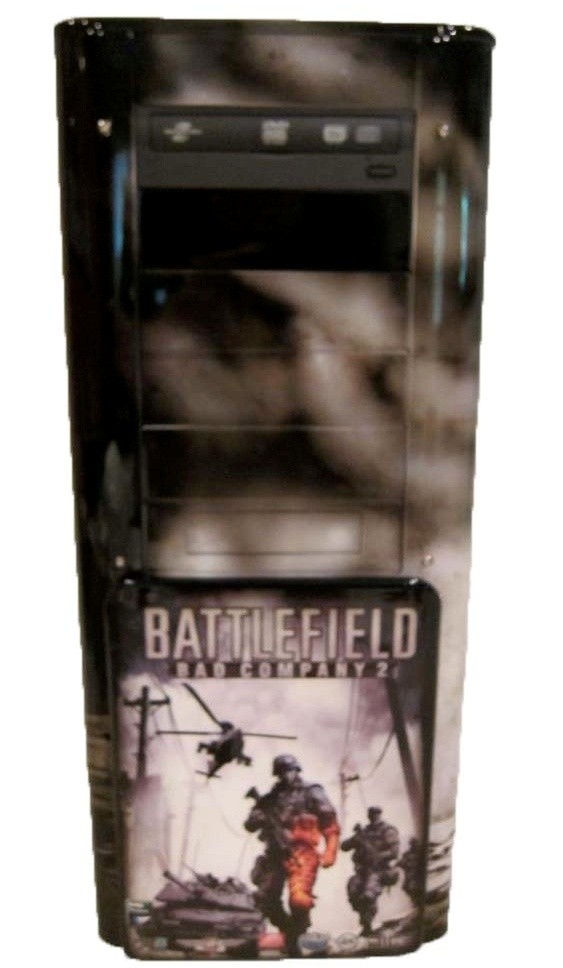

Airbrushing on the rest of the chassis gives the system a smokey look.


Obviously, we had to pop the side panel off in order to install the video card, which shipped in an anti-static bag wrapped in thick bubble wrap. Some companies do this, others don't. Packaging the card separately (so the theory goes) just gives the GPU an extra measure of protection during transit. While we can't vouch for the overall efficacy of this method, it worked in this case. The builder had all the necessary connections in place, and installing the card was as simple as slipping it into the slot and plugging it in.

The top of the chassis sports a pop-up panel with 4xUSB 2.0, FireWire, mic & headphone jacks, and an eSATA port.

On the rear of the chassis, we find 6xUSB 2.0, a single PS/2 keyboard input (who still uses a PS/2 mouse anyway?), a CLR_CMOS button for resetting the BIOS, S/PDIF optical out, eSATA, FireWire, Ethernet port, multichannel analog audio outs and a "ROG Connect" port, which allows on-the-fly overclocking.

We also get two fan speed control knobs and a switch to turn off the case lighting.
Internals
Removing the side panel requires the loosening of three thumbscrews-two on the rear lip of the panel, and one securing the mechanism that unlocks the top edge of the panel.
Inside, we find an uncluttered layout. Cables are properly secured and tucked out of the way so as not to restrict airflow. This is a large chassis with plenty of room, which adds to the interior's neat appearance.

The chassis sports six hard drive bays and six 5.25" bays.
Documentation & Accessories

In addition to the separately packed video card, the accessories box held a black binder containing software and documentation. We received discs for Far Cry 2 and Nero 8.


The documentation in the binder consisted of various build checklists, benchmarks, system stats and warranty information.
General Hands-On Usage and Performance
General Hands-On Usage
Here's a CPU-Z screenshot showing some detailed specs of what's running under the F131's hood:

And here's a GPU-Z screenshot showing the status for the graphics card.
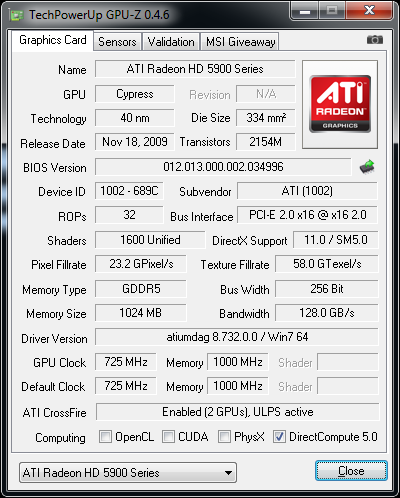
As you can see in the CPU-Z screenshot, the Phenom II X6 1090T is overclocked up to 4GHz from the standard 3.2GHz clock speed. We didn't experience any problems related to the overclocked processor. Having a Corsair liquid cooler on the CPU really helps with thermal stability, which in turn provides solid overclocked performance.
As we saw with the Maingear F131, a properly overclocked and stable CPU adds significant value to a system since you're getting a performance boost without having to buy a more expensive CPU. This is definitely something we expect from boutique builders, and Smooth Creations certainly gets it right with this system.
Along with the oc'd processor, the incorporation of a solid-state hard drive (SSD) delivers super-fast OS performance, including any programs installed on the SSD. Our review model has the best of both worlds in terms of storage-the speed of the SSD and the large capacity of the 2TB spinner.
The system proved pleasurable in terms of everyday computing tasks. Programs opened and closed quickly, and we didn't experience any crashes or hangs during the review process.
From a usability standpoint, we really liked having USB ports and the headphone jack on the top side of the chassis. With the system sitting on the floor, this configuration made it quite easy to use a thumb drive or plug in a pair of 'phones for some late-night gaming.

Boot Time
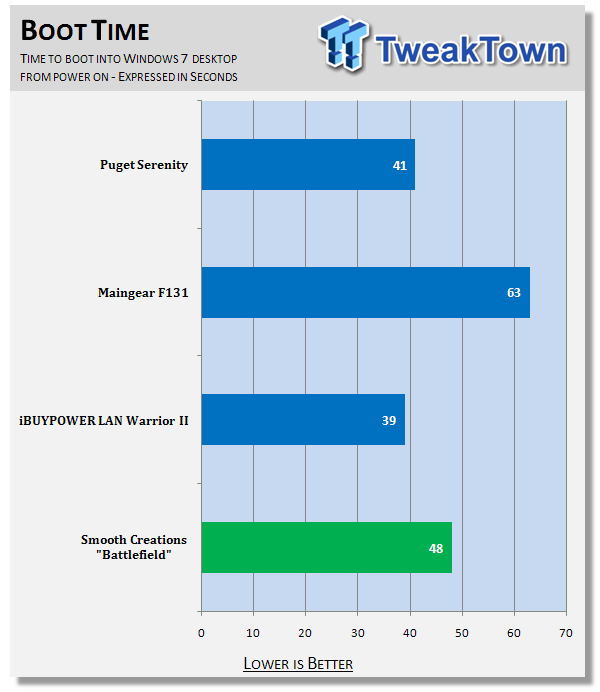
The system took 48 seconds to boot, a time on par with the other SSD-equipped systems we've seen.
Power Consumption
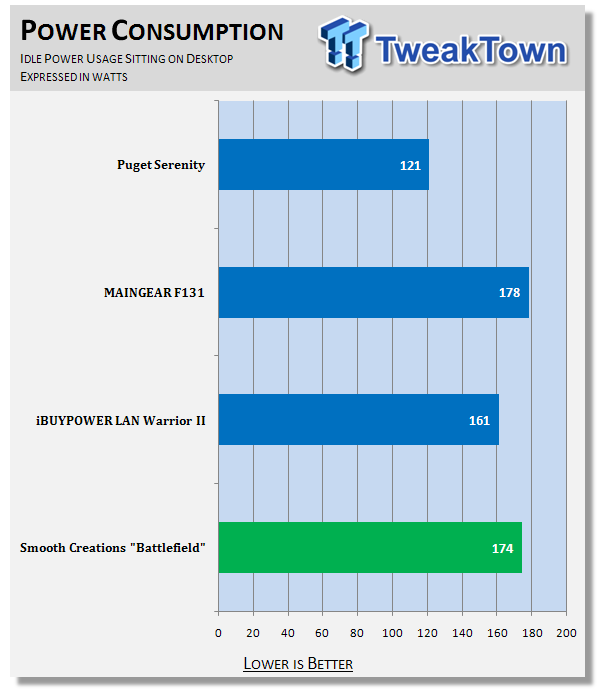
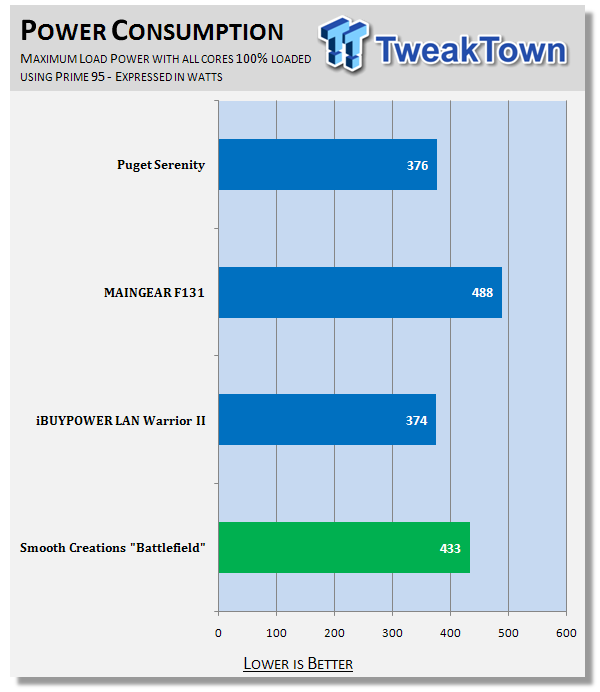
This machine idled at 174 watts and jumped up to 433 watts under load.
Audio Performance
We ran this custom rig through the standard media encoding test regime here at TweakTown, which includes music and video transcoding.
All systems are tested "as is", which means operating systems and drivers can and do vary and some come pre-installed with applications that may or may not affect performance.
Any anti-virus or security applications are disabled and uninstalled before any testing is started, as they can affect test numbers.
For the iTunes encoding test we took the White Stripes - Under Great White Northern Lights album in MP3 format and encode it to AAC format using iTunes and time the results with a stopwatch.
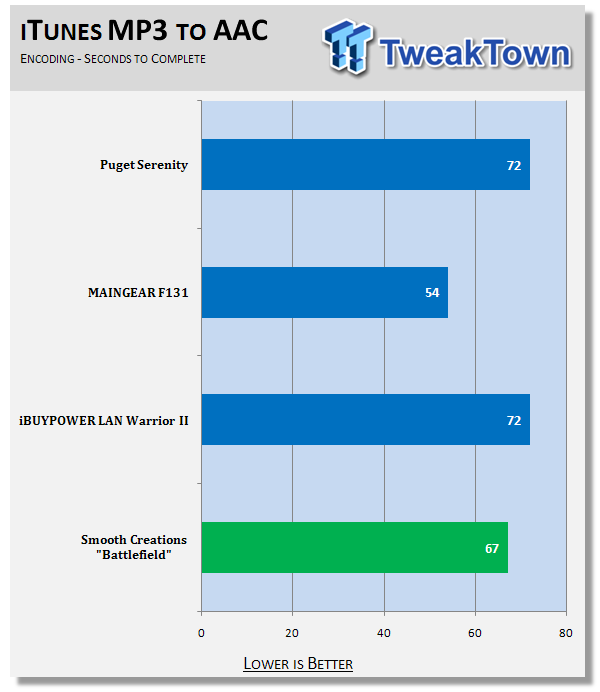
The computer performed this task in 67 seconds.
Video Performance
For the movie-encoding test, we took the Microsoft Magic of Flight VC-1 WMV (1080p HD) video with six-channel audio and transcode it to XviD (1080p HD) with LAME MP3 two-channel audio and an MP4 container using MediaCoder 0.7.3.4616 32-bit edition.
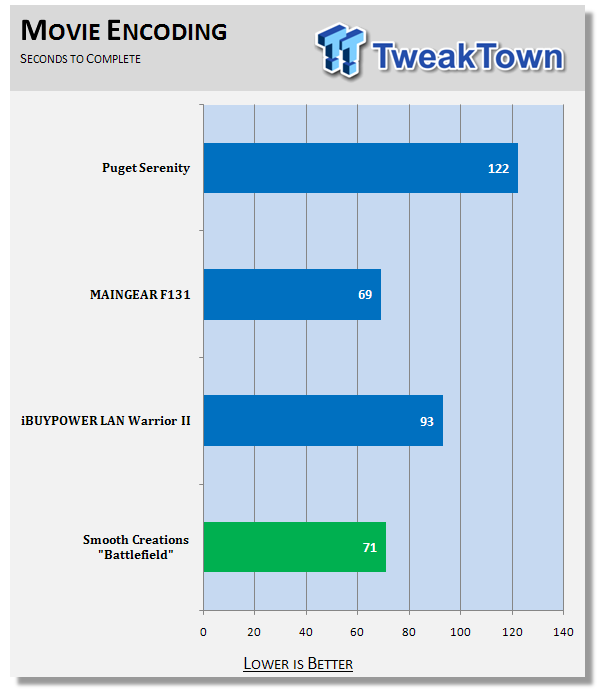
The machine took a mere 71 seconds to complete this, which is remarkably fast. The video itself is 122 seconds long, so we're getting better-than-real-time transcoding speed on this task.
This system didn't come with a Blu-ray drive, but we did watch some excellent DVD footage of The Secret to a Happy Ending - A Documentary About the Drive-By Truckers using the included Nero 8 software.
Benchmarks - CINEBENCH R10 64-bit
CINEBENCH R10 64-bit
Version and / or Patch Used: Release 10
Developer Homepage: http://www.maxon.net/
Product Homepage: http://www.maxon.net

CINEBENCH is a real-world test suite that assesses your computer's performance capabilities. MAXON CINEBENCH is based on MAXON's award-winning animation software, CINEMA 4D, which is used extensively by studios and production houses worldwide for 3D content creation. MAXON software has been used in blockbuster movies such as Spider-Man, Star Wars, The Chronicles of Narnia and many more.
MAXON CINEBENCH runs several tests on your computer to measure the performance of the main processor and the graphics card under real world circumstances. The benchmark application makes use of up to 16 CPUs or CPU cores and is available for Windows (32-bit and 64-Bit) and Macintosh (PPC and Intel-based).
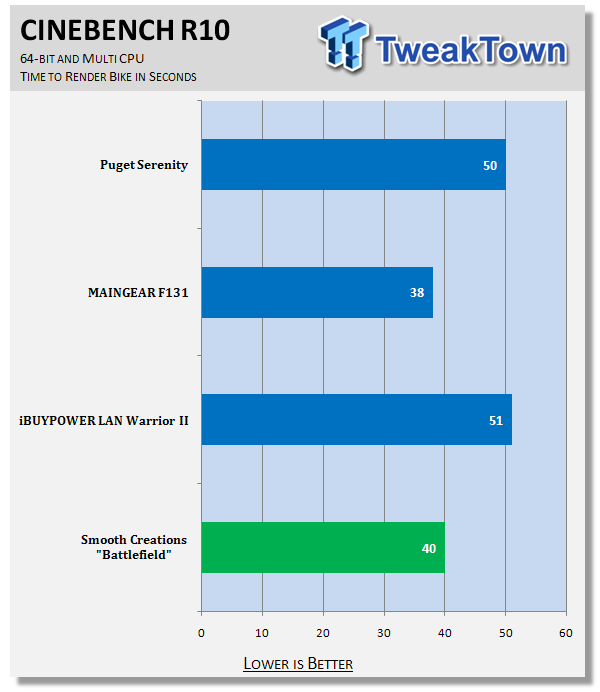
The system burned through the 3D bike rendering test in 40 seconds.
Benchmarks - Super Pi
Super Pi
Version and / or Patch Used: 1.5 Mod XS
Developer Homepage: http://pw1.netcom.com/~hjsmith/Pi/Super_Pi.html
Product Homepage: http://pw1.netcom.com/~hjsmith/Pi/Super_Pi.html
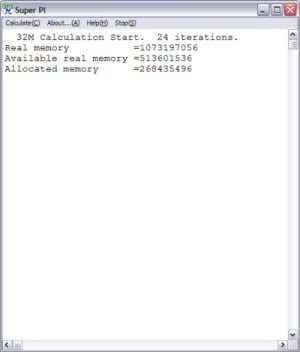
Developed by some folks from the University of Tokyo, Super PI is a small utility that does just as the name implies. It figures PI to a set number of decimal places. Since PI is an infinite number to the right of the decimal point, the utility measures the time it takes to figure a set number of places. It runs the calculations a set number of times and gives a time for the completion of the task. This is a simple and effective way to measure the raw number crunching power of the processor being used to compile the results.
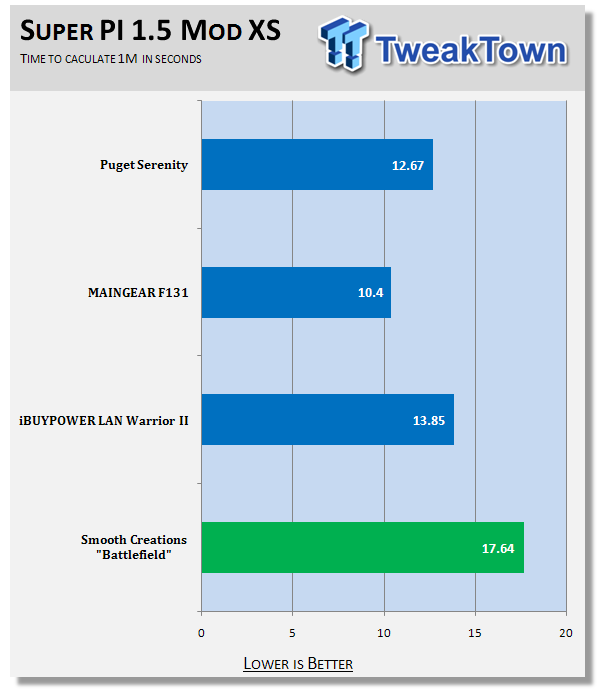
The box calculated Pi out to the 1 millionth digit in 17.64 seconds, which is a bit slower than times we've seen from recent Intel quad-core systems.
Benchmarks - 3DMark Vantage
3DMark Vantage
Version and / or Patch Used: 1.1.0
Developer Homepage: http://www.futuremark.com
Product Homepage: http://www.futuremark.com/products/3dmarkvantage/
Buy It Here

3DMark Vantage is the new industry standard PC gaming performance benchmark from Futuremark, newly designed for Windows Vista and DirectX10. It includes two new graphics tests, two new CPU tests, several new feature tests, and support for the latest hardware.
3DMark Vantage is based on a completely new rendering engine, developed specifically to take full advantage of DirectX10, the new graphics API from Microsoft.
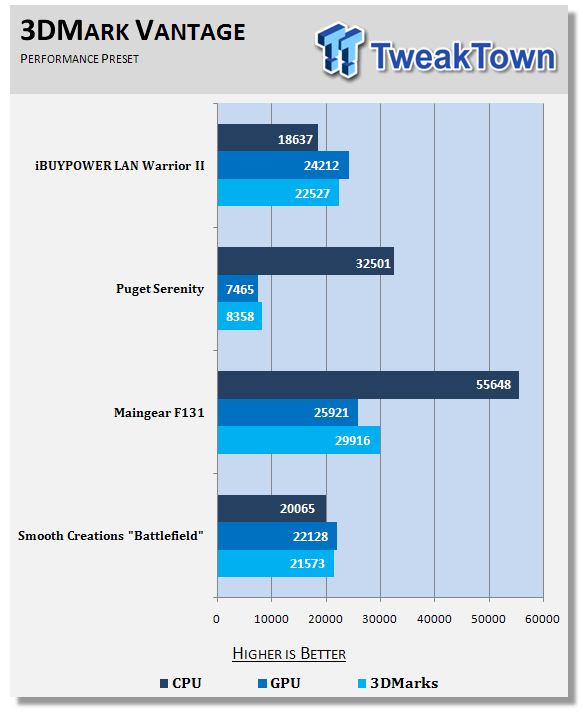
The system brought in a total score of P21573. The GPU racked up 22128, and the CPU 20065.
We run this benchmark in "Performance" mode to get an apples-to-apples data set across various systems, as opposed to the gaming benchmarks, where we push a system's hardware to its maximum abilities.
Gaming Performance
TweakTown strives to provide our readers with a reasonable expectation of what they can expect in terms of real-world performance in our gaming tests. Instead of testing all systems and titles at, say, 1280x768 with 4xAA and comparing framerates, we determine a particular system's maximum playable settings and report those settings along with the resultant framerates.
Even though this makes direct comparison between systems a bit more difficult, we feel it best reflects how the typical gamer uses a system. Most players aren't interested in getting framerates in the 100s at 1280x768 if the title is still playable at 1680x1050.
Batman: Arkham Asylum

Using Arkham Asylum's built-in benchmarking tool (included in Patch 1.1), we achieved maximum playable settings at 1920x1080 with 16xAA and "Very High" performance settings.
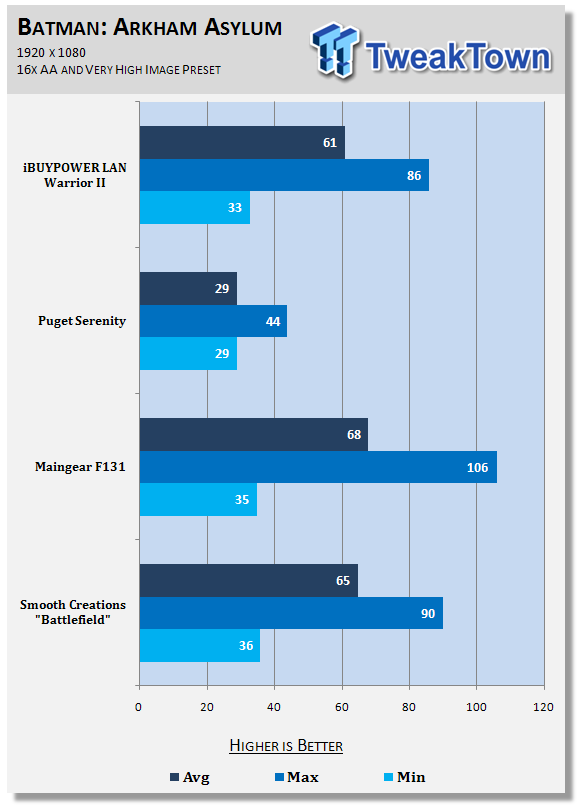
Frame rates were as follows. 90 max, 36 min, with an average of 65.
Far Cry 2

We ran Far Cry 2 with all the settings maxed out at 1920x1080, 8xAA, and Ultra High detail level.
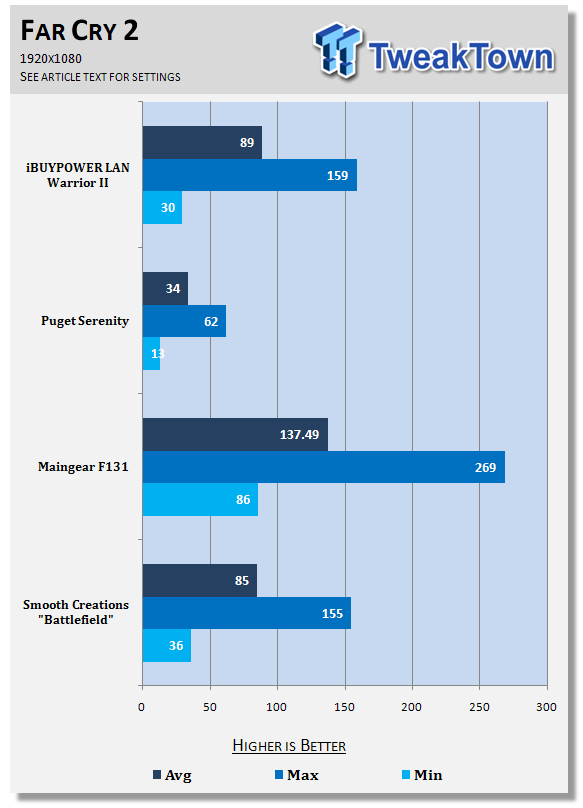
It averaged 85 fps, with a high of 155 and a low of 36.
Battlefield: Bad Company 2

And now for the machine's namesake title.
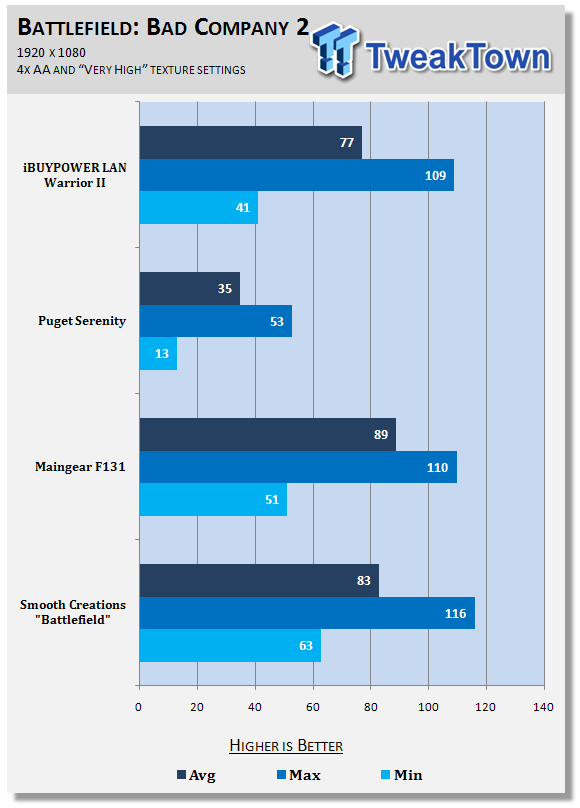
At 1920x1080, we pulled in an average of 83 fps, with a maximum of 116 and a minimum of 63.
BioShock

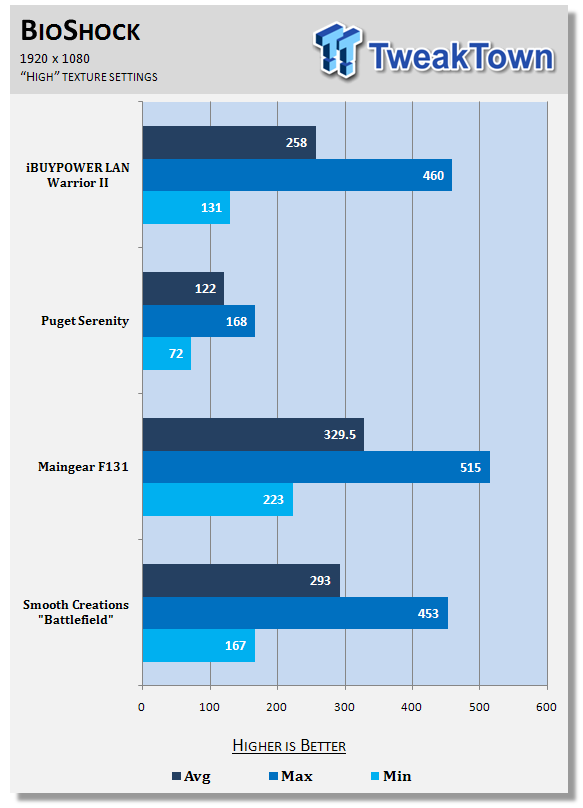
No surprise here. The system cranked out an average of 293, with a max of 453 and min of 167 at 1920x1080 and Very High detail level.
For an in-depth review of the capabilities of the ATI HD 5970, see here.
Final Thoughts
This system is more than just a pretty case. Smooth Creations has a well designed, high performing, custom machine here, and there's not much to complain about. While the $3150 price tag might at first seem a bit steep, if you add up the cost of the hardware, it's actually quite reasonable. Combine this with the fact that Smooth Creations will apply a high-quality custom paintjob of whatever artwork you can dream up at no additional charge, and the system starts to look like a bargain. The chassis has plenty of room for future upgrades, and we really like Smooth Creations' offer to build a new system in the existing chassis when the time comes.
The only ding we can find with this system (and it's a relatively minor one, all things considered) is the AMD processor. Even overclocked and with two extra cores, it didn't perform as well in our benchmarks as the stock Intel Core i7 930 we had in the iBUYPOWER LAN Warrior II. But in terms of real-world usage, most users will find the difference negligible.
The system did great in our gaming tests, delivering smooth framerates at maximum settings in all our test titles. It has all the features we've come to expect in custom systems, including the SSD/platter drive configuration and meaningful overclocking.
If you want a well-built computer in a custom chassis that's sure to impress your gaming buddies, we recommend Smooth Creations without any reservations.

 United
States: Find other tech and computer products like this
over at
United
States: Find other tech and computer products like this
over at  United
Kingdom: Find other tech and computer products like this
over at
United
Kingdom: Find other tech and computer products like this
over at  Australia:
Find other tech and computer products like this over at
Australia:
Find other tech and computer products like this over at  Canada:
Find other tech and computer products like this over at
Canada:
Find other tech and computer products like this over at  Deutschland:
Finde andere Technik- und Computerprodukte wie dieses auf
Deutschland:
Finde andere Technik- und Computerprodukte wie dieses auf 


 Synopsys and Samsung achieve production tapeout of next-gen Exynos SoC on new 3nm process node
 Windows 11 could get some big changes: Start menu 'companions' and Copilot in Settings
 The iPhone 16 Pro could have a 20% brighter display than your boring old iPhone 15 Pro
 New iPhone 16 dummy unit leak shows off its refreshed camera design and more
 Analysts expect an iPad Pro sales slowdown despite new models, here's why
 Corsair 6500X Mid-Tower Dual Chamber Chassis Review
 Corsair MP700 Pro SE 4TB SSD Review - As Fast as They Come
 Corsair MP600 Mini 2024 Edition 1TB SSD Review - Fastest Tiny Drive on the Planet
 Lexar SL500 1TB Portable SSD Review - The best of native USB
 Corsair Platform:6 Elevate Modular Desk Review
 True Lies (1997) 4K Blu-ray Review
 Fractal Design North XL Full-Tower Chassis Review
 Western Digital WD Gold 24TB HDD Review - High-Capacity Masterpiece
 AOC U27G3X 27-inch Gaming Monitor Review - 4K 160Hz for $500
 MSI Vector GP68HX Gaming Laptop Review
 Building the Ultimate Home Entertainment Server with an ASUSTOR NAS and Viper Gaming NVMe SSDs
 Everything you need to know about the latest ASUS NUC Mini PCs - NUC 14 Pro and ROG NUC
 How to Overclock Your GPU and Boost Your PC Gaming with ASUS GPU Tweak III
 ASUS's AMD Radeon RX 7000 Series GPU lineup has something for every gamer
 ASUS OLED Premium Care defends the ROG Swift OLED PG32UCDM gaming monitor from burn-in