

Introduction

One of the things that has always annoyed me about travel is the hit and miss internet connectivity. On top of this, in most hotels you cannot have multiple systems on their wireless connection without paying extra for each (somewhat understandably, though).
There are more than a few solutions to this, but many involve external devices that take up space and time to get working. However, ASUS does have a solution that can serve multiple purposes. This is the USB-N13 802.11n wireless adapter.
The USB-N13 is not just a WiFi adapter; it can also serve as a wireless access point with full support for PSP Online Gaming through the Xlink Kai interface. For $24.99 from NewEgg.com, you get a lot of options. Let's see if it can live up to the claims.
The Box and What's Inside
Package and Contents
In keeping with the small size of the adapter, the box that they USB-N13 comes in is also pretty small. Looking at the front of the box you get a great view of the USB-N13 and also find some fairly useful information on what the USB-N13 supports, including OSX and Linux.

The back is far less interesting. It does have some specifications listed (in about 20 languages).

Inside the box is a plastic shell that holds both the USB-N13 and all of the goodies you get with it.


The wrist strap and rigid extension cable are nice extras. The driver CD is something of an annoyance to anyone using Windows 7 x64. Neither the drivers nor the Utility found on the CD work. You will want to head to ASUS' website to make sure things get up and running properly if you are using Windows 7.
The USB-N13
There is not much to talk about with the physical design of the USB-N13. It is long, squarish and thin. It is also glossy black (which is nice). It looks pretty good to be honest.


This side has a few things that are worth noting. On the top there is a WPS button that allows you to setup a wireless connection very quickly. There is also a green activity LED right next to the opening for the leash.

The small size of the USB-N13 does not stop it from having some nice specifications.

Setup
We have already told you that the shipping drivers did not work with our version of Windows (Windows 7 Ultimate x64) but that does not mean that they do not work. Once we downloaded the latest driver and utility from ASUS' website we were in business.

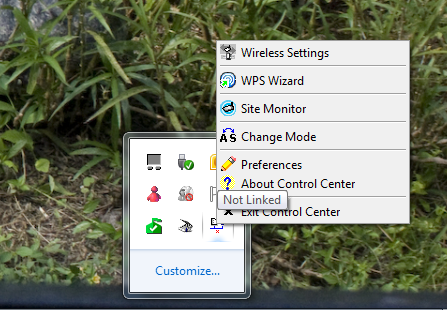
Once things are installed you are able to access the menu from the system tray icon.
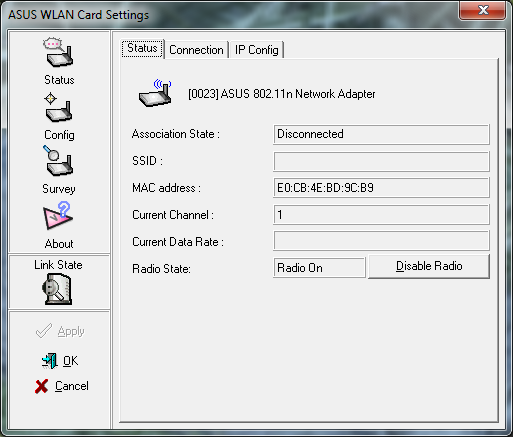
Once you are in the Configuration Utility things get more interesting. The first page looks just like any other wireless utility with information about your current connection.
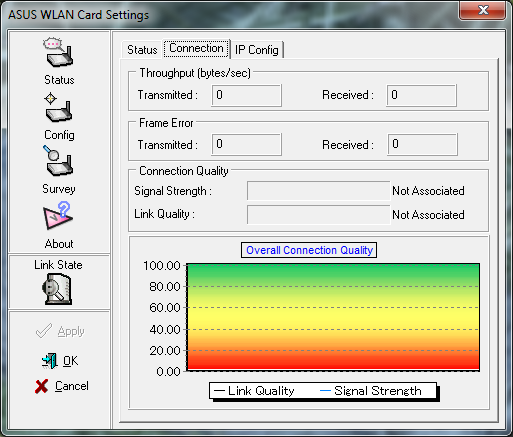
Things get really interesting when we hit the Config page. Here is where you can change the mode of the USB-N13. You can have it run as a client station or as a software based Access Point and a Client Station.
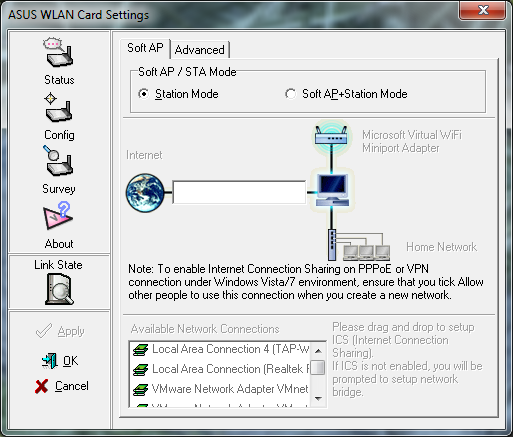
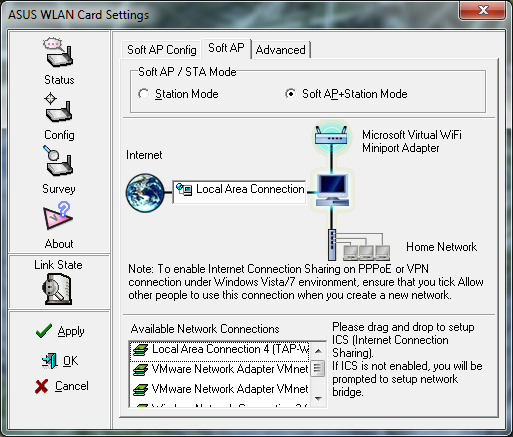
When you turn on the Soft AP you have to tell the USB-N13 which connection you are going to share with members of the wireless group. This can be an internal adapter or even a Cellular Wireless card.
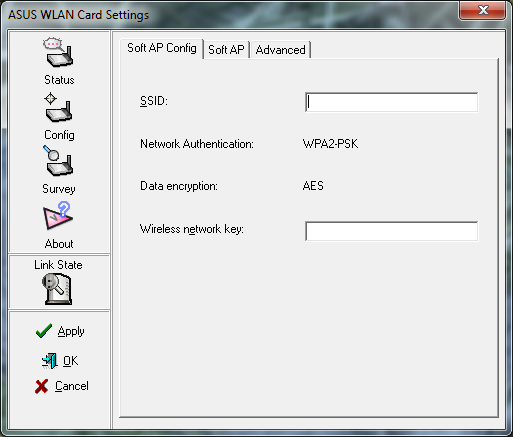
Once you decide to enable the Soft AP, you have to give it an SSID as well as establish an encryption key. You will not get the chance to change the encryption. You are getting WPA2 Pre Shared Key using AES (not that I mind at all).
There are a couple of advanced items that you can run as well. The one that I find the most interesting is the Multimedia/Gaming Environment option. Interestingly enough, there is no Xlink mode to be found on the Windows 7 version of the drivers.
Performance
Testing
We used PerformanceTest 6.1 by PassMark which you can find out more information about here. It has a handy Advanced Networking section which is perfect for our testing.
Doing our best to emulate a real-world performance scenario, I setup a server running Windows 2008 (x64) Server, (2x Xeon Quad Core 3.0 GHz 1333MHz FSB, 4GB DDR2 FBDIMMS, 2x 146GB SAS drives RAID 1) and the client PC was an ASUS G2S -X1 With built-in Intel 802.11n adapter. Results were gathered by sending data from the ASUS notebook to the server at different distances, with different adapters, and determining the average transmission speed.
We compared the ASUS USB-N13 adapter against the TRENDNet TEW-645UB, TP-LINK TL-WN821N, and the built-in Intel Pro Wireless (N) adapter on the MSI Wind 200U. All wireless tests were completed with WPA2 Personal (with the AES cipher as it has been proven to provide better performance) enabled on our TRENDNet TEW-673GRU router. The router was placed in the exact same position as well as the notebook at its various testing locations for fair comparison. For the access point we ran the same distance tests but listed them on their own to see what speeds we would achieve.
- Connection Speed
Our average connection speed showed as 220Mbps as long as we were within about 20 feet of the wireless access point. Outside that area, we saw an average of around 120Mbps up to a range of 60 feet. The Maximum range of the ASUS USB-N13 was around 80 feet; however at that range the speed was useless.
When we used it as an access point we found that the USB-N13 was not able to maintain the same speeds. Our max connection speed was just over 54Mbps.
- Bandwidth
Now for the fun part. To test the speed of the ASUS USB-N13 I chose three common working points inside my house. One was in the lab within 10 feet of the TRENDNet TEW-673GRU. The next was in the bedroom roughly 35 feet away and requiring the signal to travel through a wall containing the main house electrical panel and a "wet wall." The last was outside on the back porch roughly 45 feet from the router. Both the second and third positions were out of the direct line of sight of the router.
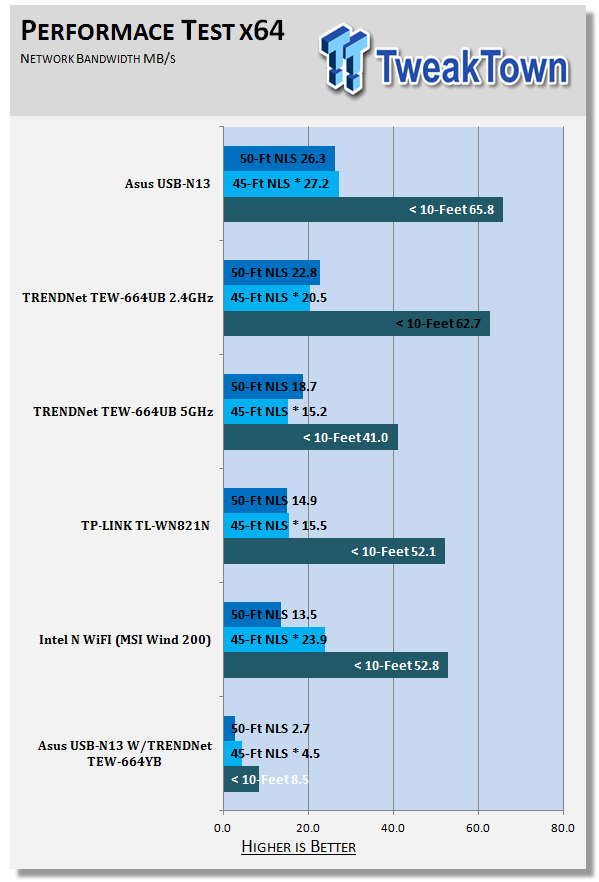
As you can see here, as a wireless adapter it is right up at the top of the list. It had better range than the others in the same class. When we played with the USB-N13 as an access point things went through the floor. I also had to setup the IP addresses manually to get the connection working.
I have a feeling that this would work perfectly with Windows XP or Windows Vista, but we hope that ASUS does come out with a version that works with Windows 7 soon.
Final Thoughts
The ASUS USB-N13 works as a great USB wireless adapter. It is hands down one of the fastest I have used. It also has some great range behind it.
However, as a wireless access point (under Windows 7) it leaves something to be desired. I am sure that ASUS will turn this around and fix it sooner or later, but for now I would not recommend its use with Windows 7.
Of course, for $24.99 at NewEgg.com, you are still getting a very fast Wireless Adapter; one that is actually smaller and lighter than the others I have here in the lab. It makes a great choice if you do not already have a wireless adapter in your laptop or PC.

 United
States: Find other tech and computer products like this
over at
United
States: Find other tech and computer products like this
over at  United
Kingdom: Find other tech and computer products like this
over at
United
Kingdom: Find other tech and computer products like this
over at  Australia:
Find other tech and computer products like this over at
Australia:
Find other tech and computer products like this over at  Canada:
Find other tech and computer products like this over at
Canada:
Find other tech and computer products like this over at  Deutschland:
Finde andere Technik- und Computerprodukte wie dieses auf
Deutschland:
Finde andere Technik- und Computerprodukte wie dieses auf 


 Synopsys and Samsung achieve production tapeout of next-gen Exynos SoC on new 3nm process node
 Windows 11 could get some big changes: Start menu 'companions' and Copilot in Settings
 The iPhone 16 Pro could have a 20% brighter display than your boring old iPhone 15 Pro
 New iPhone 16 dummy unit leak shows off its refreshed camera design and more
 Analysts expect an iPad Pro sales slowdown despite new models, here's why
 Corsair 6500X Mid-Tower Dual Chamber Chassis Review
 Corsair MP700 Pro SE 4TB SSD Review - As Fast as They Come
 Corsair MP600 Mini 2024 Edition 1TB SSD Review - Fastest Tiny Drive on the Planet
 Lexar SL500 1TB Portable SSD Review - The best of native USB
 Corsair Platform:6 Elevate Modular Desk Review
 True Lies (1997) 4K Blu-ray Review
 Fractal Design North XL Full-Tower Chassis Review
 Western Digital WD Gold 24TB HDD Review - High-Capacity Masterpiece
 AOC U27G3X 27-inch Gaming Monitor Review - 4K 160Hz for $500
 MSI Vector GP68HX Gaming Laptop Review
 Building the Ultimate Home Entertainment Server with an ASUSTOR NAS and Viper Gaming NVMe SSDs
 Everything you need to know about the latest ASUS NUC Mini PCs - NUC 14 Pro and ROG NUC
 How to Overclock Your GPU and Boost Your PC Gaming with ASUS GPU Tweak III
 ASUS's AMD Radeon RX 7000 Series GPU lineup has something for every gamer
 ASUS OLED Premium Care defends the ROG Swift OLED PG32UCDM gaming monitor from burn-in