









Feeling Blue?
The latest slick offering from the big MS mob comes in the form of a rather miniature rodent, the Explorer Mini Mouse! The little gem is touting the latest all-surface tracking technology as well as power saving features and a sporty little bag, too!

The unit comes in a standard blister pack and contains some brilliant design changes, which means you don't have to take a knife to the packet to get it open (a process that usually involves me almost losing a finger). Instead, you simply pull a tear-strip down the side and open it up.

Inside we find a CD, manual and a spiffing little carry pouch for the mouse to keep it free of scratches and dust. The mouse and receiver are nestled snugly in the blister pack display window.

A battery is supplied so we can get things happening right away. Slamming the dongle in the slot and the battery in the hole, the mouse lights up in all its blueness. The LED is bright blue and there is a blue horseshoe band around the base of the mouse that gives it a very pimp-my ride sort of look.
The specs for the mouse are as follows:
BlueTrack™Technology
Works on Virtually Any Surface
Snap-in Mini Transceiver for Portability
Sophisticated Design and Ergonomic Comfort
2.4 GHz Wireless, 30 ft. Reliable Wireless Range
Blue Lighting Effects
4-Way Scrolling
Customizable Buttons
Ergonomic Design
Designed for Notebook PCs
4+ Months Battery Life
3 Year Warranty
Let's now go and get some hands-on with this little wonder.
Any Surface, Anywhere
The most important feature of this mouse is its ability to track on almost any surface; this thanks to a new blue LED based technology called "BlueTrack" which works by giving a better image of more varied and non uniform surfaces.

This is most appreciated by the mobile users who need their mice to work on a number of surfaces as they move about, sometimes even their leg or a park bench. The mouse itself boasts full Explorer mouse features, too. With side scrolling, click-less smooth flowing wheel, forward and back buttons and an ergonomic shape that should fit most hands, it certainly packs a generous feature-set.

The choice of finish is interesting on this mouse as the texture across the top section is very smooth and is made of a glossy plastic, which can make for an odd sweaty feeling on the hand; but that does not affect grip on the mouse thanks to a matt finish on the sides, making it actually more comfortable to rest your hand on for long periods of time.

On the bottom there are two large PTFE (Teflon) feet to help the device slip along on most surfaces including clothes and rough surfaces. The blue LED is incredibly bright, blindingly so! So make sure you don't stare at it for too long...
Getting down to brass tacks, this mouse works exceptionally well with any system and all Windows systems will recognise it as an MS compliant HID device, so there really is no need for drivers. The 30ft range is no exaggeration either; with a fresh battery in the mouse it will work at some great distances, making it good as a home theatre mouse, too.
What more can I say
Final Thoughts
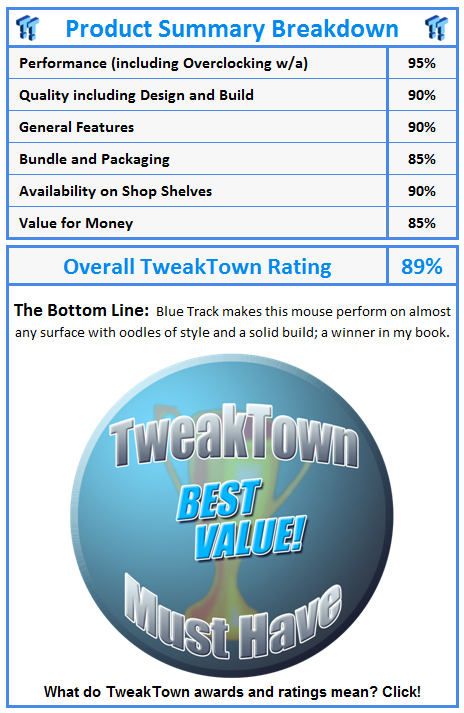
The mouse does its job and does it well, with a plethora of standard features that people have come to expect from Microsoft hardware and a solid build that can withstand the rigours of a travelling life.

Points are also given for style with the looks and aesthetics, not to mention the fit as well. The design ensures that most hands are accommodated for and the forward and back buttons are designed not to get in the way when you do your mouse lifting and shuffling.
The no-click style scroll wheel is great for document browsing, giving you a much smoother feel to the way you browse. The tracking across an uneven surface is also very precise with very little pointer wobble as it crosses the folds in the bed sheets or the knots in the polished wood desk.

This is definitely a mouse I can recommend for the business person on the go; it's light, it's usable and it's got some style. You won't be disappointed with this pint-sized squeaker.
Our Latest Mice Article Coverage
- Razer Viper V4 Pro Wireless Gaming Mouse Review - Built for Competition
- Corsair SABRE v2 PRO CARBON FIBER Wireless Gaming Mouse Review - The Premium Option
- Corsair SABRE v2 PRO Wireless MG Gaming Mouse Review - A Strong Contender
- Logitech G PRO X2 SUPERSTRIKE Wireless Gaming Mouse Review - Competitive Gaming Perfected
- ASUS ROG Harpe II Ace Wireless Gaming Mouse Review - Performance, Comfort, and Versatility

 IQUNIX Magi96 Pro Aluminum Low Profile Mechanical Keyboard Review - Premium Build, Satisfying Sound
 Razer Pro Type Ergo Wireless Split Ergonomic Keyboard Review - Built for Comfort and Support
 ASUS ROG Strix Morph 96 Wireless Gaming Keyboard Review - Great Performance, More Affordable
 Corsair MAKR PRO 75 Hall Effect DIY Keyboard Review - Pre-Built and Ready for Action
 Razer Viper V4 Pro Wireless Gaming Mouse Review - Built for Competition
 'Radically different' business models coming to Xbox, CEO Asha Sharma says
 GEEKOM's new GeekBook M16 brings a Core Ultra 9 and a 99.9Wh battery to the business laptop market for $899
 AMD warns DDR5 prices won't recover until 2028 as AI demand continues pulling supply away from consumers
 SEGA under fire for using gen AI in new Crazy Taxi game
 Halo Studios quietly establishes innovative new business model for legacy game remakes
 Zelda Ocarina of Time remake confirmed for 2026 launch on Switch 2
 ID Cooling shows off wooden PC cases and matching AIO coolers at Computex 2026
 Formula V Line's Ice Nova Pro 3 air cooler could be perfect for brass-themed PC builds
 SAMA's Computex 2026 lineup includes a curved-glass case and AIO coolers with swappable screens
 Master Chief crashes the Covenant's vacation in new Halo remake prequel missions
 Navman MiVue Smart True 4K Surround Dashcam Review - Seeing In All Directions At Once
 Asetek Forte S-Series Racing Simulator Bundle Review
 SAPPHIRE Radeon RX 9070 GRE PULSE OC Review - A New 1440p Challenger Has Arrived
 NZXT H6 RGB+ Compact Dual-Chamber Chassis Review
 ASRock Radeon RX 9070 GRE Steel Legend Review - The RDNA 4 Mid-Range Reshuffle
 ASRock Z890 Taichi Aqua Motherboard Review - Flagship features without the flagship price
 GIGABYTE Z890I AORUS Ultra Motherboard Review - Mini-ITX with surprisingly good thermals
 The PowerToys utilities I keep enabled on every Windows 11 PC, and the ones I turned off within a week
 TweakTown's Best of Computex 2026 Awards - The Best Hardware, Gaming Gear, and AI
 Phison E37T SSD Controller Exclusive Preview - The Fastest DRAMless SSD Platform Yet
 USB Ports Not Working in Windows 11? Try These Fixes
 ASUS WiFi Routers and Networking Solutions Deliver Long-term Security and Reliability with No Additional Cost
 Second Monitor Not Detected in Windows 11? Try These Fixes
 Turn Your Old Smartphone Into a Dedicated Webcam for Your Windows PC
 The Send To menu is the right-click feature on Windows 11 that nobody bothers to customize
 Windows 11 will not let you pin a folder to the taskbar, but a 30-second workaround does
 ASUS ProArt Displays Unlock Creativity with Professional Monitors for Everyone