Introduction

First Impressions
At first glance these look like a pair of pretty decent gaming mice; the grey steely look is like the cold dead eyes of a killer staring back at me, the organic shape reminding me of things you mail-order in the back of certain magazines...
On second glance, I thought I had been given two left handed mice, as the mouse is strangely elongated on the one side making it look like a lefty. But placing my hand over the blister pack window contoured to the mouse was when I realized it's a really snug fit in my right hand after all.
Flipping the box over to the back we can find the relevant details of each mouse, describing the features and some technical data. Most interestingly is that the optical mouse lists Frames per a Second where as the laser has it as Samples per a Second, we'll find out more about this later.


Laser Vs. Optical
Here I could go into great technical detail about different image processing chipsets and wavelengths of photo-emitting diodes, but you will be bored to tears and I will never be allowed to review anything again. So I will give you a condensed (and hopefully interesting) version of how optical and laser mice work.
Optical was around first; and has been since the 1980s. It's older than most people realize, but it's certainly come a long way. Optical sensors are in most modern mice that use LEDs to illuminate the patch of surface under the optical sensor; this creates a snap shot of the surface and gets compared to the last snap shot to determine how far the mouse has moved (if at all). Quite simply, if you increase the resolution of the optical sensor then you get greater accuracy. But this requires more powerful on-board image processor chips to do the grunt work of translating image differences into X and Y movement.
Laser Diodes came into use in 2004 for mice which were paired with sensors that have a much more enhanced resolution. This allowed the mouse to detect even more subtle changes of position, and therefore greater accuracy.
Technical Specs
Shinies
So why can't you use LEDs with better optical sensors? - This is because when a red LED shines onto a surface it illuminates a larger area and the optical sensor needs to have a wider field of view in order to detect more details. This would ramp up the cost of mice significantly, because we would eventually be integrating high-end sensors and much more powerful image processors to get the accuracy desired.
The laser diode on the other hand has a much tighter beam and it illuminates a smaller area (though you will not see this because the diodes operate in the infrared range), this allows the sensor to see higher resolution images of small areas. So we can still use lower-cost sensors and lower cost image processors by just changing the field of view to a smaller area.
This is a big step because often large areas contain patterns that can confuse optical mice and make them think that they have not moved. With the laser mice however, they see things like you would under a microscope and the world they see becomes much easier to track.
A simple analogy of what I mean is to look at the data side of a CD or DVD; looks shiny, right? - Maybe you can see where the data sector ends if it's a CD-R or DVD-R. Now, look at it under a microscope. That's kind of how a laser mouse sees things.
Talk Turkey
Still awake? - Good. Now that the technical lesson is over with, let's talk about the rated performances of these two mice and try and find out what that means for our head shot count.
Ripped from the website:-

Specifications for SteelSeries Ikari Optical:
- Frames per second: 6.500
- Inches per second: 40
- Counts Per Inch (CPI): 400 - 1600
- Acceleration: 15 G
- Buttons: 5
- Cord: 2 m / 6,5 ft (braided to improve durability)
- Polling: 1000 Hz
- Lift distance: 3,5 mm
- CPI high/low indicator
- Gold-plated USB connector
- Large pressure points that reduce friction for optimized glide
- Driverless, plug-and-play feature for LAN gamers
- Measurements: 130 x 83 x 36 mm / 5,1 x 3,3 x 1,4 in
- Operating systems: Win XP/Vista/Win 2000/Win 98/Win ME/Mac OS

Specifications for SteelSeries Ikari Laser:
- Samples per second: 40.000
- Inches per second: 50
- Counts per inch: 1 - 3.200 (one CPI Steps)
- Acceleration: 20 G
- Sensor data path: True 16 bit
- Lift distance: 1,8 mm (0,07 inch)
- Buttons: 5
- Cord: 2 m / 6,5 ft (braided to improve durability)
- Polling: 1000 Hz
- Gold-plated USB connector
- Measurements: 130 x 83 x 36 mm / 5,1 x 3,3 x 1,4 in
- CPI high/low indicator
- SteelSeries FreeMove Technology
- Large pressure points that reduce friction for optimized glide
- Driverless, plug-and-play feature for LAN gamers
- Operating systems: Win XP/Vista/Win 2000/Win 98/Win ME/Mac OS
Marketing and Features
I think it might be the marketing talking, but Frames per a second and Samples per a second are pretty much the same thing. If you wanted to get technical I'm sure you could argue the need for a difference, maybe due to the way the sensor measures (FPS is a whole image capture, where as SPS is just a small sample of a full image), but for simplicities sake it would be nice to have them both called FPS, as most gamers already understand it as a suitable unit of measurement.
The laser clearly leads when it comes to performance here. Over six times more samples/frames taken per a second than the optical, but this has to be processed by the on-board chip set, so performance gain gets scaled down a little bit. The inch per a second is a good indicator of just how fast you can move your mouse before it can no longer track accurately.
G-force ratings may seem like nothing but a little bit of marketing too, but it's useful to tell us how good the image processor is at coping with the mouse moving at varying velocities, so you can be sure that when you need to turn on a dime and smoke a n00b, you're covered.


CPI; this is where the two mice get a little bit different in terms of usage and not just specifications. The Optical is adjustable from 400-1600, making it quite the sensitive little rodent. The laser steps it up by having a full range of 1-3200, a trifle over-kill, but it's nice to see that you have full control over the settings.
The reason for the adjustable CPI is so that you can leave your game's mouse sensitivity multiplier set to 1 and just ramp up the mouse hardware to the perfect level. This is so that you get an equal sensitivity across all games. The laser here clearly caters to the gaming crowd with the higher CPI, and while average gamers like me could be content with the optical, the laser definitely gives an edge if you are an FPS'er.
The two extra buttons on the side of the mouse act as forward and back in windows mode, but they can be assigned in game to any desired function as expected. The button on top under the wheel is for on the fly CPI bumping, allowing switching between two presets, indicated rather nicely by a white led lit window in the side.
More Features and Testing
More Features
The laser also touts a number of useful software/hardware cross-over features. These include the ability to program macros and have them remembered by the mouse so that when you swap it in and out of a computer you don't need drivers on the other machine to play back the macros assigned. A great idea for LAN parties!
There is also a nifty feature called FreeMove that allows you to decide how much "correction" you want to your mouse movements; this may sound like a windows mouse acceleration thing, but it's much more advanced than that. See, the hand is naturally not great at straight lines, especially over distances, so the software can give you a little bit of an edge when used with a good CPI. Tight!


The best feature by far on the laser is the fact that you really don't need drivers to change the SPS! That's right, you simply plug the mouse in, select the mode using the top button, then pick the mouse up and hold the SPS selector button down until you see the currently set resolution on the LCD underneath; you then release the button and scroll the mouse wheel until you have the setting desired. Simply click the mode select button again to save. These settings will now be remembered by the mouse when you unplug it and transfer it to different computers.
Game On!
Enough with the technicals - Let's cook some fools!
Call of Duty 4
Ikari Optical:-
It plays pretty smooth and is nice having the high sensitivity to be able to turn fast. However, I had some issues with precision tracking making sniping tougher than it should be.
Ikari Laser:-
This is much smoother and the FreeMove feature really helps me out when trying to maintain accuracy. HEADSHOT!
World of Warcraft
Ikari Optical:-
There isn't a great need for super accuracy in this game, but the mouse performs well and the macro assigned buttons can save your ass in a close battle.
Ikari Laser:-
The laser doesn't benefit this game any more than the optical, but for the same reason as above the silky feel of the mouse does make playing pleasant for long periods of time.
Windows Vista
Ikari Optical:-
Good precise optical fare here. It does the job and can be a good squeaker for graphical editing.
Ikari Laser:-
I have two monitors on my current system, and hauling ass across the screen real-estate can be a chore sometimes. With the right settings on high and low I can turbo the mouse when I need to get from edge to edge in a single twitch, and then switch to get pixel perfect accuracy when touching up photos.
Final Thoughts
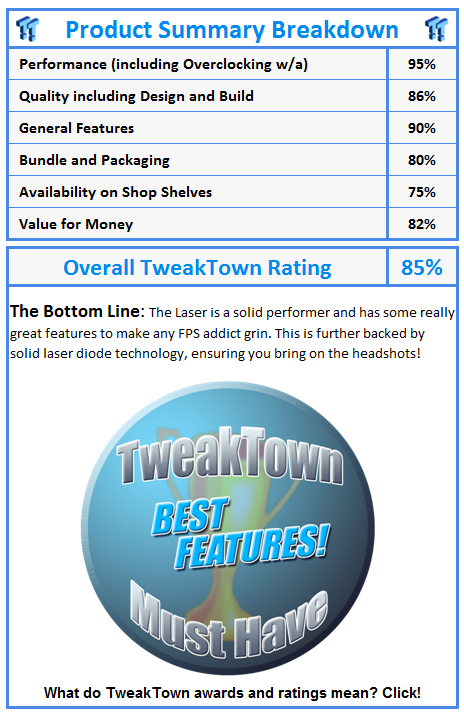
With all the innumerable gaming mice out there, it can be hard to accurately test and gauge what makes a great gaming mouse. The laser diode technology has brought about a new level of accuracy that we can take advantage of, but the LED based optical system is not out the door just yet.
This is mainly due to the price differences between the two still being too big for some people to justify spending the readies. This is evident in these two Souris with the Ikari Optical coming in at around $40 and the Laser at $60 or so, but that doesn't just cover the cost of the laser diode technology, as the Ikari Laser is a far more advanced mouse in terms of features than the Optical, and this is reflected in its pricing as well.
If you are serious about gaming and feel that your current rodent is not giving you the accuracy you deserve, then I would have to recommend the Laser. It's an ergonomic and feature packed beast that will have you covered for many years to come.
However, with the multitude of gaming mice on the market now there is something to suit every ones budget, and I would have a hard time choosing the Ikari Optical given its current pricing and the features present.
Ikari Optical

Ikari Laser
Our Latest Mice Article Coverage
- Razer Naga V3 Pro Wireless MMO Gaming Mouse Review - Transform and Roll Out
- Razer Viper V4 Pro Wireless Gaming Mouse Review - Built for Competition
- Corsair SABRE v2 PRO CARBON FIBER Wireless Gaming Mouse Review - The Premium Option
- Corsair SABRE v2 PRO Wireless MG Gaming Mouse Review - A Strong Contender
- Logitech G PRO X2 SUPERSTRIKE Wireless Gaming Mouse Review - Competitive Gaming Perfected