
Our Verdict
Pros
- Build quality
- Replica accuracy
- Immersion
- Smooth controls
- Ecosystem compatibility
Cons
- No FFB
- No twist axis for rudder
Should you buy it?
Introduction, Specifications, and Pricing
The Thrustmaster HOTAS WARTHOG was, and still is, a legendary product in the flight sim world. Replicating the joystick, dual throttle system, and control panel of the U.S. Air Force A-10C attack aircraft, it is highly regarded as one of the best premium HOTAS controls available for flight sim enthusiasts. The original provided solid metal construction, excellent performance thanks to Thrustmaster H.E.A.R.T. (HallEffect AccuRate Technology) magnetic technology, and 55 action buttons, all while making you feel like you're taking a real-life A-10C into battle, with the controls accurately replicating what was shown on screen in DCS World and other flight sim titles.
Now, Thrustmaster is stepping things up with the all-new Thrustmaster HOTAS WARTHOG MKII. Thrustmaster says this bundle features a redesigned joystick base that's smoother and sturdier, while retaining the official U.S. Air Force license through a 1:1-scale reproduction of the Viper flight stick and the legendary HOTAS throttle from the A-10C. This new generation represents a significant evolution of the first HOTAS WARTHOG, with a completely redesigned internal mechanism for enhanced smoothness and durability. At the same time, modernized electronics ensure full compatibility with the entire Thrustmaster ecosystem. The Thrustmaster HOTAS WARTHOG MKII still features H.E.A.R.T. technology, with Thrustmaster bringing 15 years of expertise in magnetic-sensor measurement to deliver exceptional, long-lasting precision.
Thrustmaster has kept pricing competitive with this generation too; the HOTAS WARTHOG MKII will be available for $599.99. While it certainly isn't the cheapest HOTAS available, if it's anything like the original, it should offer a comprehensive, plug-and-play HOTAS experience that should last for years to come, all while maintaining the A10-C experience and versatility for use on other flight and space sims. TweakTown covered the original back in 2014, and having owned it for years, I am interested to see how this new generation feels and what stands out as different, so let's jump in.
Packaging

Thrustmaster provides full glossy packaging for this premium HOTAS bundle. The front shows the Thrustmaster and HOTAS WARTHOG MKII logos in the top left; the control system sits in the center, with the right-hand side denoting the MKII version below the U.S. Air Force logo. The HOTAS WARTHOG MKII is PC compatible, with no console support, given its focus on serious flight simmers rather than casual players.


Best Deals: Thrustmaster HOTAS WARTHOG MKII
Prices last scanned 16 hours and 52 minutes ago


The back of the box shows an exploded view of the joystick base, with details provided in various languages. The left-hand side shows compatibility options, with add-ons available from Thrustmaster. Interchangeable grips and extensions are available as part of the Thrustmaster ecosystem.


Each side of the box shows further details on the button layout, with one side dedicated to the joystick and the other to the throttle.


The top and internal flap reference the A10-C. I like the inclusion of the popular, community nickname "Hell From Above" tagline, and the A10-C outline.
Our Latest Flight Review Coverage
- Next Level Racing Flight Simulator MSFS Edition Review
- Thrustmaster T.Flight HOTAS 5 MSFS Edition Review
- MOZA FMP18 Panel Bundle Review: authentic F/A-18 Hornet cockpit controls for flight sims
- MOZA MA3F EFCM Flight Control Module Review: authentic Airbus A320 autopilot panel for simulators
- MOZA MGX1000 Instrument Panel Review: a realistic Garmin G1000 replica for immersive flight sims
Unboxing the Thrustmaster HOTAS WARTHOG MKII Throttle Unit


Opening the packaging to remove the contents, I found the quick start guide, warranty information, and joystick baseplate nestled on top.

Review Q&A
Powered by TweakBot
From TweakTown's coverage of this review.
Can HOTAS WARTHOG MKI owners reuse their Thrustmaster grips and extensions with the HOTAS WARTHOG MKII?
How do you configure aircraft-specific HOTAS WARTHOG MKII profiles in DCS World and Thrustmaster T.A.R.G.E.T.?
Which rudder pedals can be used with the HOTAS WARTHOG MKII for a separate rudder axis?
What mounting dimensions should you check before installing the HOTAS WARTHOG MKII on a cockpit or desk?
Want something else? Ask TweakBot.



With the top layer removed, the rest of the contents are packaged in a cardboard egg crate. Thrustmaster includes a band of cardboard around the contents to pull this out; however, I found it easier to tip the box over and carefully slide it out. With the top of the egg crate removed, you can see the contents. Everything is well protected, with plastic bags included to keep dirt and dust out in storage.

Covering the key specs of the throttle unit, it is directly inspired by the dual throttle controls of the U.S. Air Force's A-10C and offers independent control of both engines, with a locking system that lets you attach or detach the two throttle levers as needed. The throttle is incorporated into the control panel, again faithfully reproduced, and includes the same layout and controls as the original HOTAS WARTHOG. It features backlighting for key functions, which pilots will find useful for night flights, and provides 5 programmable LEDs for button mapping. The base includes a "trim wheel" to adjust throttle tension, 15 action buttons, and numerous toggles and push buttons for a total of 22 inputs, with most featuring additional positions. Thrustmaster says that each switch and toggle includes resistance identical to that on a real airplane, using industrial metal switches, with highly realistic pressure. The back of the throttle includes engraving with the Thrustmaster and U.S. Air Force logos. The throttle unit weighs 4.3kg and measures 270mm x 153mm x 200mm (L x W x H). For mounting, the hole pattern measures 110mm wide and 258mm long, while the two threaded attachment holes are 80mm wide toward the rear of the base.


Both sides of the throttle unit are fairly plain, with the front including the USB-A cable. The cable is long, so you won't run into issues connecting to your PC or USB hub, even if it's a few feet away.

Underneath, the throttle base has holes at the front and back for attaching to a cockpit, along with two threaded holes toward the center. Four rubber pads are also included to provide grip for desk-based use.

Working my way around the included controls, starting at the bottom, EAC, RDR ALTM, and autopilot controls are provided. All the toggles and buttons are very snappy and definitive; if you have ever experienced the original version of the HOTAS WARTHOG, then it feels the same here, premium and hard-wearing. This bottom section includes backlit labels for night-time flights.

The three-position flap switch is located on the left-hand side of the throttle.

On the right-hand side of the throttles, throttle position labels are provided, including the idle/off position. Engine operation and APU toggles are located here, with the landing gear warning button below. To the right of the landing gear button is an axis slider. Like many other DCS pilots, I use this axis to zoom in and out; it's really handy. In the real aircraft, this adjusts throttle friction, so repurposing it as a slider keeps the authentic look while adding functionality. As with the bottom, most labels here are backlit for night viewing.


Slide the throttles down to see the top half of the unit; here are the fuel flow switches for both engines, again with backlit labels and a friction dial in the top left. This is how you adjust the tension on the throttle levers. The friction has a wide range, from loose and no tension to robust resistance when actuating the throttles for precise control.

The Mic Switch, Speed Brake, Boat Switch, and China Hat switch cover the right-hand side throttle. All controls here are easily accessible, with slight hand movements required for specific actions, so you can't accidentally press something in the heat of the moment. Given the different types of covers used, it's easy to identify which switch your thumb is over without glancing down. Of course, having this as the real aircraft also helps with the immersion.

The left throttle includes the large pinky switch.


The front face of the throttles has more controls: the Coolie Switch and Slew Control/Push Function on the right engine throttle, and a button on the left-hand throttle. If my memory serves me correctly, my original HOTAS WARTHOG included a tracking "nipple" in the center of the Slew Control, and from what I see here, it looks much improved without it. I believe this changed in MKI iterations around 2022, and overall it's a better implementation, since it was so difficult and fiddly to use accurately. Below is the locking lever to pair the throttles; this pin slides over and locks into place to prevent the throttles from separating.


The HOTAS WARTHOG MKII throttles feature realistic systems for off, idle, and afterburner. You can remove the central bar between the throttle handles, rotate the afterburner module, and reinstall it to provide the required position detent; the throttle must be lifted over the stop to prevent accidental selection. The pair of throttles offers a wide range and accurate control thanks to H.E.A.R.T. technology, with minute adjustments available thanks to 14-bit resolution for each throttle.
Unboxing the Thrustmaster HOTAS WARTHOG MKII Joystick

Now, the all-new HOTAS WARTHOG MKII joystick is where the real changes are. Thrustmaster has told me the base has been completely redesigned with smoothness, durability, and compatibility in mind. Its optimized metal structure ensures smoother center movement and increased durability thanks to integrated anti-stiction ball bearings. The original version used a traditional ball-and-socket gimbal design that could feel sticky or stiff near the center over time.
The Thrustmaster H.E.A.R.T. technology is again used in the joystick, providing precision and long-term reliability without drifting; the HOTAS WARTHOG MKII features 16-bit resolution to capture every micro-movement with absolute fidelity, providing a level of control that can make a difference during the most demanding flight phases. While these changes improve precision and accuracy, the all-new HOTAS WARTHOG MKII does not include a twist rudder, like the original. While it would have been great to see this feature added, I would expect simmers using this type of setup to have a set of rudder pedals too. Overall, the joystick measures 285mm tall, and with the baseplate attached, it is 275mm long and 235mm wide.


Another change from the original is the USB-C connector on the joystick base, whereas the original used a hard-wired connection on the base side. Electronically, the new design and its 6-pin connector offer full compatibility with all Thrustmaster grips and extensions, while supporting up to 128 buttons and 8 axes. Other changes include black-and-yellow warning stripes on the top of the base.

Under the base, four screws can be removed to mount it to the included base plate, or to a cockpit of your choice. The hole pattern measures 60.1mm x 60.1mm.


Attaching the grip to the base is completed in the same way as the original, with the electronics connection static within the assembly. The grip simply slots into position, and the all-metal collar screws down to firmly attach to the base. It's a quick, easy process, as long as you take care with the connection pins and ensure they are lined up.


Now that the Viper grip is installed, let's talk through that some more. This is an official 1:1 scale replica, developed under license from the U.S. Air Force. Its 100% metal structure replicates the original flight stick and cockpit experience, adding in-game immersion. The flight stick features 19 action buttons and an 8-way POV hat switch, making it the closest to a real-life hands-on experience you can get.

At the top, the Weapons Release Button is on the top left, with the Trim Switch on the right-hand side. Below, the TMS and DMS selector switches are present, making it easy to follow on-screen instructions in tutorials, get used to the A10-C onboard systems, and, of course, use them as you would in real life.

On the left shoulder are the CMS switch and push functions, again replicating the real-world equivalent and matching the original HOTAS WARTHOG.

One difference from the original is the inclusion of printed button labels on the head of the flight stick.

From the front, the two-stage trigger and Master Mode Button Control are visible. The two-stage trigger offers great control over weapons release, especially when engaging the first stage for stabilization. It has clear differences that allow precise control and prevent confusion between the two, with nice travel in the first stage and a positive engagement of the second.

The final part of the Viper flight stick to cover is the NWS button and the pinky lever. Both, like everything else around the HOTAS WARTHOG MKII, feel very well built, with adjustable travel for the lever included.


Before we get to testing, the included base plate for the flight stick is ideal for desk-mounted play. It includes four rubber pads on the bottom to prevent it from moving around, plus enough surface area for stable use.

Throughout my time with the all-new HOTAS WARTHOG MKII, I have to say it feels as well built, if not better, than the original, bearing in mind it's been a while since I last used one. When holding any part and shaking it around, there is no rattle from the buttons and nothing creaking, and the build quality was one reason the original did so well and earned a deserved reputation as an excellent all-round HOTAS system. Every single button and switch feels great, probably the best implementation I have seen for a home sim setup, be it racing or flight-related; it just feels expensive, up to the job, rugged, and will stand the test of time.

One last thing to cover is what Thrustmaster includes in the small accessory box. Here, it's fairly simple: a USB-C to USB-A cable connects the flight stick, plus a small set of screws and an Allen key to attach the flight stick and throttle to your cockpit.
Installation & Software
For testing, I am putting another product through its paces and getting ready to write another review: the Next Level Racing Flight Simulator MSFS Edition. This cockpit offers a range of mounting options for the HOTAS WARTHOG MKII, but to keep things simple, I'll use the left-side mount for the throttle unit and the central mounting point for the flight stick.


With Next Level Racing accommodating a range of sim hardware, mounting the HOTAS WARTHOG MKII was a breeze, using the included hardware. Now, with the HOTAS ready to go, it's time to drag in a monitor and PC, get everything up and running, and tell you what I think of the all-new Thrustmaster HOTAS WARTHOG MKII.
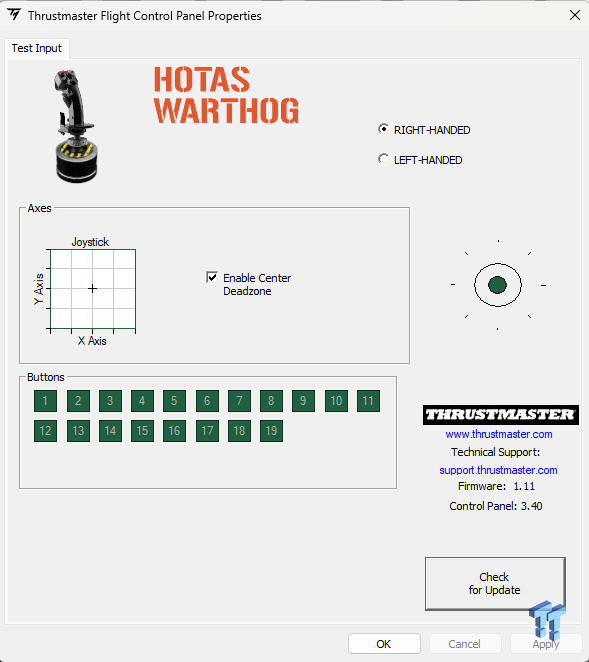
First, I'll cover the software installation: downloading the drivers from the Thrustmaster website. While the Thrustmaster T.A.R.G.E.T. software offers further customization and mapping options, I am sticking to the basics, since everything I want to map is available in DCS World. Windows detects the throttle and the joystick, and then it's over to DCS to set things up.

DCS gives you complete control over setting up the HOTAS WARTHOG MKII, and here I cleared and rebound controls to make sure everything was where I wanted it. You can spend plenty of time in the settings for each aircraft, and for testing, I have the A10-C II to deliver the verdict on this new hardware. If you are a regular DCS player, you will know custom profiles are supported, so you can set up the HOTAS WARTHOG MKII to your preference for whatever aircraft you want to fly.
Kris' Sim Racing Test System Specifications
| Item | Details |
|---|---|
| CPU | Intel Core Ultra 7 265K (Buy at Amazon) |
| Motherboard | MSI B860 Tomahawk Wi-Fi (Buy at Amazon) |
| RAM | Team Group T-Force Delta DDR5 32GB (2x16GB) 6000MHz CL30 x2 (Buy at Amazon) |
| SATA SSD | Samsung 870 QVO 1TB (Buy at Amazon) |
| NVMe SSD (Primary) | Samsung 990 EVO Plus 4TB (Buy at Amazon) |
| NVMe SSD (Secondary) | Seagate FireCuda 540 2TB (Buy at Amazon) |
| HDD | Seagate BarraCuda 2TB 3.5-inch (Buy at Amazon) |
| GPU | ASUS ROG Strix RTX 4080 OC Edition (Buy at Amazon) |
| Power Supply | be quiet! Pure Power 13 M 1000W (Buy at Amazon) |
| Cooler | be quiet! Pure Loop 3 360mm (Buy at Amazon) |
| Case | Corsair Frame 4500X (Buy at Amazon) |
| Keyboard | be quiet! Dark Mount (Buy at Amazon) |
| Mouse | Logitech G502 HERO (Buy at Amazon) |
| Sim Rig | Trak Racer TR120S V2 |
| Haptics | Trak Racer Haptic Kit 2x 100W Puck |
| Display 1 | Acer XV322QK KV (Buy at Amazon) |
| Display 2 | Acer VG272U V3 (Buy at Amazon) |
| Lighting | Govee H6056 Flow Plus Light Bar x2 (Buy at Amazon) |
| Macro Pad | Mountain Display Pad (Buy at Amazon) |
Final Thoughts


It has been a while since I was airborne in DCS, and it's not the sort of flight sim you can just hop back into and expect to remember everything. With a few hours in the ejection seat and a few references to online help guides, setting up missiles, navigation, and all the other elements that make DCS so deeply entertaining and taxing started to come back to me. Looking out into the open skies and then glancing down at the A-10C, I am greeted by the on-screen controls, and then again physically right in front of me. After a few runs on a test mission, I soon started getting competent again, firing at targets I had placed around a disused runway. The satisfaction the HOTAS WARTHOG MKII brings is fantastic, even after some time away from combat flights.
While I haven't had my original HOTAS WARTHOG for some time, I did find the new version very smooth indeed, so while I can't compare side by side, I do think the new base feels slightly better. It's not night-and-day different, but I certainly have no complaints. From getting off the ground, running a combat mission, and coming back in to land, the control the HOTAS WARTHOG MKII delivers is excellent, with fine adjustment available both on the joystick and, of course, the throttles, given the adjustable tension. Thrustmaster hasn't changed the throttle unit, and I am pleased they resisted the temptation to tinker with it. If it isn't broke, don't fix it. It still holds up and didn't need any changes, plus it helps keep costs down since it's an existing product.
I did try out MSFS 2024, but I already knew what the verdict on that would be; the HOTAS WARTHOG MKII, while primarily aimed at combat sims, is more than capable in commercial settings, allowing you the freedom and versatility to mix it up when you get sick of firing off missiles and just want to get some holidaymakers to their destination, or go drop off some cargo. With the ability to relax throttle tension, and plenty of buttons and switches at your disposal, it caters perfectly well. Add the ability to swap in an Airbus grip, and it offers even more.

If you own a HOTAS WARTHOG MKI, is it worth the upgrade? No, but only if your current unit works fine and you have no issues. When it finally gives up the ghost and you are ready to source a replacement, then I highly recommend moving over to the MKII. It will still feel like home, especially if you've invested a lot of time in using it; then you might feel the differences a bit more. Think of it as a side grade with a few tweaks, not a revolutionary experience, with the improved internals adding more to the lifespan of the product, not that the original was bad. If I were coming from a more entry-level HOTAS, the MKII would be the obvious choice, given the improvements it's received, and it then makes the first-generation HOTAS WARTHOG redundant.

If you want a twist rudder axis or FFB, the HOTAS WARTHOG MKII won't be for you, as it doesn't include either. While this might frustrate some, it doesn't take away from what you are getting with the HOTAS WARTHOG MKII, as it delivers in so many other ways that, for the price, you can't grumble too much. Who knows, Thrustmaster might follow the likes of MOZA and release a FFB base, but given the build quality that would be expected from Thrustmaster, it would drive up the price quite a bit, I would think.
Closing this up, Thrustmaster has improved, not revolutionized, with the HOTAS WARTHOG MKII, but sometimes all a great product needs is a few tweaks to stay at the top of its game amid growing competition.