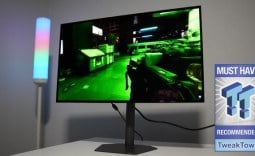
Our Verdict
Pros
- Price
- Text clarity
- 120Hz refresh rate
- 2x HDMI ports
Cons
- Motion clarity
- HDR
- No USB hub
Should you buy it?
Introduction & Specification Details and Close-up
Dell is known for producing some of the best productivity displays on the market, with high degrees of color accuracy in a slick, aesthetic design that's suitable for home and work office spaces. The Dell 32 Plus (S3225QS) is no different in this regard, but it has an edge - it's gaming capable.

Dell is looking to straddle the line between a productivity-centered display and a gaming monitor with the 32 Plus, as this monitor features a 120Hz refresh rate, which is something that isn't typically found on productivity monitors. While the 32 Plus walks the line between a productivity monitor and a gaming display, it certainly leans more toward the productivity side than it does gaming.
However, it can be recognized as an entry-level entertainment monitor, making the 32 Plus much more versatile than other production-focused monitors and, therefore, more attractive to professionals who like to have a break from their workflow by playing some games. The 32 Plus is priced at $279.99 on the Dell website, and that price has been matched by Amazon.
Specifications
| Item | Details |
|---|---|
| Model | S3225QS |
| Size | 32inch |
| Resolution | 3840 x 2160 |
| Pixels Per Inch (PPI) | 139 |
| Panel Type | VA |
| Refresh Rate | 120Hz |
| Response Time | 8ms, 5ms, 4ms |
| Brightness | 300 nits |
| Contrast Ratio | 3000:1 |
| Aspect Ratio | 32:9 |
| Viewing Angle | 178-degrees |
| Color Coverage | 99% sRGB (CIE 1931), 95% DCI-P3 (CIE 1976) |
| HDR Support | HDR10 |
| Video Ports | 2x HDMI 2.1, 1x DisplayPort 1.4 |
| USB Ports | None |
| VESA Mounting | 100x100 |
| Adjustments | Height, Tilt, Slant |
| Warranty | 1 year |
Close-up


Best Deals: Dell S3225QS 32-inch 4K Monitor
Price Trend:
Prices last scanned 2 hours and 56 minutes ago


Design
The 32 Plus features a refreshed aesthetic from Dell, with a very clean Ash White finish and quite thin bezels measuring 7.62mm and 13mm at the bottom. These bezels, paired with the Ash White finish, create a very modern, minimalist aesthetic that I personally really enjoy. With such a clean, minimalist look, the 32 Plus is perfectly suitable for home studios/office spaces.

Despite the monitor looking so clean, the materials do feel somewhat cheap in the hand, with the plastic shell and stand being quite creaky and overall lacking any premium nature. The stand is solid and provides ergonomic features, which I will get into below, but it unfortunately results in some wobble when the monitor is bumped slightly. This problem was identified while the monitor was at the maximum height of its stand, and I noticed the wobble was significantly reduced when the monitor was lowered by just an inch.

The 32 Plus doesn't offer any meaningful swivel options and doesn't come with rotate/portrait mode, which may be a deal breaker for some setups. However, it does offer tilt, enabling the monitor to be adjusted downwards slightly. Moving to the back of the 32 Plus, Dell has placed a plastic clip on the rear of the display that covers the HDMI 2 port. I found this somewhat unnecessary and potentially annoying for some users, as the U-shaped clip intended to route cables to the HDMI port may make it difficult to close the cover with bulkier or thicker HDMI cables.

Regarding connectivity options, the 32 Plus offers 2x HDMI 2.1 ports, each supporting up to 3840 x 2160 (4K) at 120Hz with HDR and VRR, and 1x DisplayPort 1.4, which also supports 4K at 120Hz. Unfortunately, I wanted to see a USB port on the 32 Plus, but Dell hasn't included a single one. I understand this is a sub-$300 monitor, but the inclusion of a single USB-C port would have gone quite a long way with the 32 Plus, especially considering productivity users are typically using external storage devices, or laptops to display out to. I would have liked to see a USB-B port along with 1x USB-C port with DP Alt mode and 1x USB-A port.
Our Latest Monitors Review Coverage
- ASUS ROG Strix OLED XG34WCDMS Review: Tandem OLED Takes Ultrawide Gaming Further
- GIGABYTE MO27Q2A Gaming Monitor Review: 1440p, 280Hz, and QD-OLED is a winning combination
- ASUS ROG Strix XG129C Review: A $199 Gaming Monitor You Don't Play Games On
- KTC H49S66 5K2K (5120x1440) 49-inch 180Hz Gaming Monitor Review
- GIGABYTE GO27Q24G Gaming Monitor Review: Glossy OLED Gaming at 240Hz

All in all, we do have to remember this is a $279.99 monitor, so we cannot expect high-end materials, extensive connectivity options, or a premium design. Albeit, the shortcomings are worth mentioning.
Panel Breakdown
The 32 Plus is a VA panel that sports a 3840 x 2160 (4K) resolution across 32 inches. With that size and resolution, we are looking at 139 Pixels Per Inch, which translates to super crisp image clarity that makes text super easy to read, images and video to appear clean and precise, even when getting up super close to the panel. With a VA panel, we get better contrast than an IPS display, which means deeper blacks, better shadow separation, and, in general, a more cinematic look in dark screens.

A VA panel also means good color performance, and the panel within the 32 Plus covers 99% of the sRGB color space and 95% of DCI-P3. These measurements mean the 32 Plus is suitable for image and video editing, as it provides rich and vibrant colors that aren't overly saturated, making it an ideal display for professionals and hobbyists who aren't looking to break the bank, but want a monitor that leans more toward productivity.
A downside of VA panels is the viewing angles, while the 32 Plus is rated for 178 degrees. I do warn that a common issue with VA panels is color shift at more extreme viewing angles. It's not a dealbreaker by any means, as most users are sitting right in front of the display; it's just something to be aware of.

Brightness comes in at 300 nits, which is adequate for at-home use but falls short of any HDR recommendation. Unfortunately, there simply isn't enough brightness for me to comfortably recommend HDR use, despite the display supporting HDR10. Notably, the HDR feature does work as intended, but I wouldn't use it for anything more than consuming HDR content.
Motion handling is completely fine for any productivity use, as the 32 Plus comes with a 120Hz refresh rate paired with several response-time modes. This is where the 32 Plus gets closer to gaming monitor territory, as the panel can be set to 8ms or 4ms, depending on the mode selected. Out of the box, the 32 Plus is set to its "Normal" mode (8ms), but offers Fast (5ms) and Extreme (4ms).

The intention behind the response-time modes is that when a user switches to gaming, they can drop the response time for an improved experience, and then, when they are done gaming, they can switch back with a few button presses in the On-Screen Display (OSD).
Performance
When it comes to productivity tasks, such as word processing, image editing, and spreadsheet work, the 32 Plus performed admirably. I have no complaints after spending some considerable time with the display, as its well-rounded performance profile provided sharpness, clarity, and satisfactory speed thanks to its 120Hz refresh rate.

My time testing the 32 Plus was spent mostly in word processing tasks, such as writing this review, and I can say that text performance was pretty great, and I can attribute this performance to the VA panel paired with the 139 PPI. The 4K resolution made text appear crisp and clear, two things that I absolutely need to carry out my daily tasks. Additionally, I used the 32 Plus in spreadsheets, and that's where the 32-inch size really showed its benefits. Spreadsheets were nice and wide, but more importantly, clear.
With a 32-inch panel, you can comfortably place two windows next to each other in each half of the display, making dancing between internet browsers, or even spreadsheets, a breeze. The 32 Plus really excelled in this department. Additionally, I edited many images and some video on the 32 Plus, and the performance was adequate. The 32 Plus provided nice deep blacks, rich shadows, and a nice cinematic look.
As for games, I tested the 32 Plus in a range of gaming titles, such as League of Legends, Apex Legends, Overwatch 2, Black Myth: Wukong, Cyberpunk 2077, The Witcher 3, God of War Ragnarok, Valorant, DOOM: The Dark Ages, Age of Mythology: Retold, Borderlands 4, Counter-Strike, and Battlefield 6.

Unfortunately, the 32 Plus didn't perform fantastically in some of the titles, and this was due to the response time of the monitor. In games that call for as fast a response time as possible, which are the competitive titles such as League of Legends, Counter-Strike, Battlefield 6, and Apex Legends, I noticed a fair amount of smearing, causing me to turn back to the 8ms mode. At this kind of response time, I really felt like I was playing with a handicap, as it appeared my clicks weren't registering at the normal speeds I'm used to, which are 1ms and below.
Due to this problem, I cannot recommend the 32 Plus for competitive games, but for cinematic titles where response time isn't needed, the performance is passable. There is still some ghosting and smearing, but due to the nature of cinematic titles, they can be overlooked or not even noticed at all if you don't know what you are looking for.
Final Thoughts
So, should you buy the Dell 32 Plus S3225QS? I would recommend the 32 Plus to someone who is going to use the display for productivity tasks 90% of the time, and gaming 10%. On top of that, I would also say the type of games that should be played on this monitor should be cinematic, and not anything that requires strong motion performance.

The 32 Plus is a $279.99 monitor, and for the price, it performed reasonably well. It does have shortcomings, but I can see it being a great entry-level productivity display for a creative hobbyist. If you are planning on using this display for work, you will get by with it, but I can't help but feel that you are probably going to want to upgrade to something with a bit more robust feature set, especially if you are in need of USB ports, further ergonomics, or better motion performance.
All in all, the 32 Plus straddles the line between entry-level gaming and productivity, but has its foot mostly in the productivity realm. It has its shortcomings, but for someone who doesn't want to break the bank, the performance for the dollar is reasonable.