Our Verdict
Pros
- Awesome gaming performance at 4K 240Hz
- Great image quality at 4K
- Intuitive OSD
- USB charging / headphone jack easily accessible
Cons
- Extremely wide stand feet
- Lackluster OLED Care features
- 1080p at 32 inches = extremely low image clarity
- Boring aesthetics
Should you buy it?
Introduction & Specification Details and Close-up
OLED gaming monitors are the best when it comes to gaming performance. They offer vibrant colors, deep blacks, extremely low response times, and, ultimately, an experience that no other pixel technology can offer.

What is making its way to OLED pixel technology is the relatively new Dual-Mode monitors, which are displays that offer both a high resolution and refresh rate in two different modes, typically one mode being the high resolution with a medium-level refresh rate and the other being a low resolution with an insanely high refresh rate.
These monitors have started being manufactured by many gaming monitor brands and are aimed at gamers who flex between cinematic experiences where high resolution is beneficial and competitive titles where a high refresh rate is what is needed most. In the lab today we have the Acer Predator X32 X3, an OLED dual-mode monitor offering 4K @ 240Hz and 1080p @ 480Hz.
Specifications
| Item | Details |
|---|---|
| Model | X32 X3 (X3BMIIPHUZX) |
| Size | 32-inch |
| Resolution | 3840 x 2160 |
| Panel Type | QD-OLED |
| Refresh Rate | 240Hz / 480Hz |
| Response Time | 0.03ms (GtG) |
| Brightness | 275 nits (typ), Peak 450 nits, Peak 1000 nits @ HDR |
| Contrast Ratio | Infinite |
| Aspect Ratio | 16:9 |
| Viewing Angle | 178° |
| Color Coverage | 10-bit / DCI-P3 |
| HDR Support | HDR10, Display HDR 400 |
| Video Ports | 1x DisplayPort 1.4 w/DSC, 2x HDMI 2.1 |
| Ports | 1x USB 3.2 upstream, 3x USB 3.2 downstream, 2x USB Type-C, 1x 3.5mm headphone jack |
| VESA Mounting | 100 x 100 mm |
| Warranty | 3 years |
| Net Weight (Kg) | 7kg (15.43lb) |
Close-up


Best Deals: Acer Predator X32 X3 OLED Dual Mode Gaming Monitor


Design
The build quality of the X32 X3 matches the premium price tag, which is currently sitting at $899 on Newegg with a 25% discount at the time of writing. Notably, the X32 X3 does have an MSRP for $1,199, making it a high-end gaming monitor. We'll get back to the price later, but first let's jump into the design.

Acer has kept things rather subtle with the back of the X32 X3, as the entire monitor doesn't feature any LED lighting besides the power indicator LED located in the center underside of the monitor. The left-hand side of the back panel features a brushed plastic strip from one corner of the back enclosure to the connectivity IO. The right-hand side features this really nice hexagonal pattern that contains what could be described as tiny crosshairs.

This aesthetic on the right-hand side really works for me, but I can't help but to think the back of the monitor is lacking some flare. If I had to describe the aesthetics of the X32 X3 in one word I would say bland, and if I'm paying for a premium gaming monitor I would also like a premium design language. I really think the Acer has dropped the ball here.

Moving down to the IO, Acer has equipped the X32 X3 with a premium array of connectivity options for users as it features 1x DisplayPort 1.4 w/DSC and 2x HDMI 2.1 for PC gamers that also have a console they would like to use on the X32 X3. Keeping to the connectivity options, Acer has equipped the X32 X3 with 1x USB 3.2 upstream, 3x USB 3.2 downstream, 2x USB Type-C, and 1x 3.5mm headphone jack. I like to see these connectivity options in a $1,199 gaming monitor, especially with Acer deciding to place a USB-C port with fast-charging capabilities next to the multidirectional joystick used to control the OSD options. Also next to this USB-C port, which Acer states has 90W PD charging, is a USB-A port and a headphone jack.
Our Latest Monitors Review Coverage
- Alienware AW3426DWM 34-inch 240Hz Gaming Monitor Review
- ASUS ROG Strix OLED XG34WCDMS Review: Tandem OLED Takes Ultrawide Gaming Further
- GIGABYTE MO27Q2A Gaming Monitor Review: 1440p, 280Hz, and QD-OLED is a winning combination
- ASUS ROG Strix XG129C Review: A $199 Gaming Monitor You Don't Play Games On
- KTC H49S66 5K2K (5120x1440) 49-inch 180Hz Gaming Monitor Review
This connectivity placement is what I have come to expect out of gaming monitors in general that want to offer USB charging capabilities, as I believe that placing the charging ports next to the Display/HDMI ports is a terrible location due to it requiring a user to stand up, and move the monitor to locate the port as it can be quite difficult to find the port while sitting directly in front of the monitor.

In most cases, gamers won't even bother with the monitor port if it's located next to the Display/HDMI port and just charge their device however they normally would. However, having the ports easily accessible on the underside of the monitor, within arms' reach, has brought it to a level of convenience that I believe will now be used regularly, especially since most devices are using USB-C. Acer has certainly gained some points for the connectivity placement, as the three most-used ports are now all within arms reach. I hope to see more gaming monitor brands adopt this.

The X32 X3 stand has probably received the most aesthetic design attention from Acer. It provides very suitable swivel and tilt support, along with a quick-release mechanism for those who want to quickly detach the display from the stand. The most impressive part of the stand is the height adjustability, with Acer giving owners of the X32 X3 150mm of adjustment range, which is quite substantial for a monitor stand. As for its aesthetics/built quality, I wouldn't worry about the X32 X3's stand ever breaking or becoming faulty, as it is extremely well built.

To the eye, it matches the same bland aesthetic as the X32 X3 panel, but it comes with a little extra functionality that I like. A quarter-inch screw is located at the top of the stand, which can be used to screw in a webcam such as an Elgato Facecam or any other webcam or camera with a corresponding quarter-inch screw. Unfortunately, the stand for the X32 X3 has one of my least favorite aspects of any gaming monitor: a tri-forked feet design that protrudes out further than the display. The feet measure 80cm in diameter from the widest point, meaning they take up an egregious amount of desk real estate.
The reason this is such a problem is that many competitive gamers, particularly first-person-shooter gamers, like to play their titles with low mouse sensitivity, meaning they are taking large swipes across the mouse pad to compensate for their low DPI. Having a gaming monitor stand with feet protruding out extremely wide runs the risk of one of those swipes colliding with the feet of the stand. If you are a competitive gamer considering this display, don't rule it out yet, as this problem can be solved by purchasing a desk-clamp monitor arm, which I recommend in general, as once you use one, you will never go back.
Panel Breakdown
OLED panels are the cream of the crop for gaming monitors; nothing beats them when it comes to visuals. The X32 X3 rocks a WOLED panel designed by LG, which is different than the QD-OLED panels we have been testing from various gaming monitor brands such as MSI, ASUS, Alienware, and others.
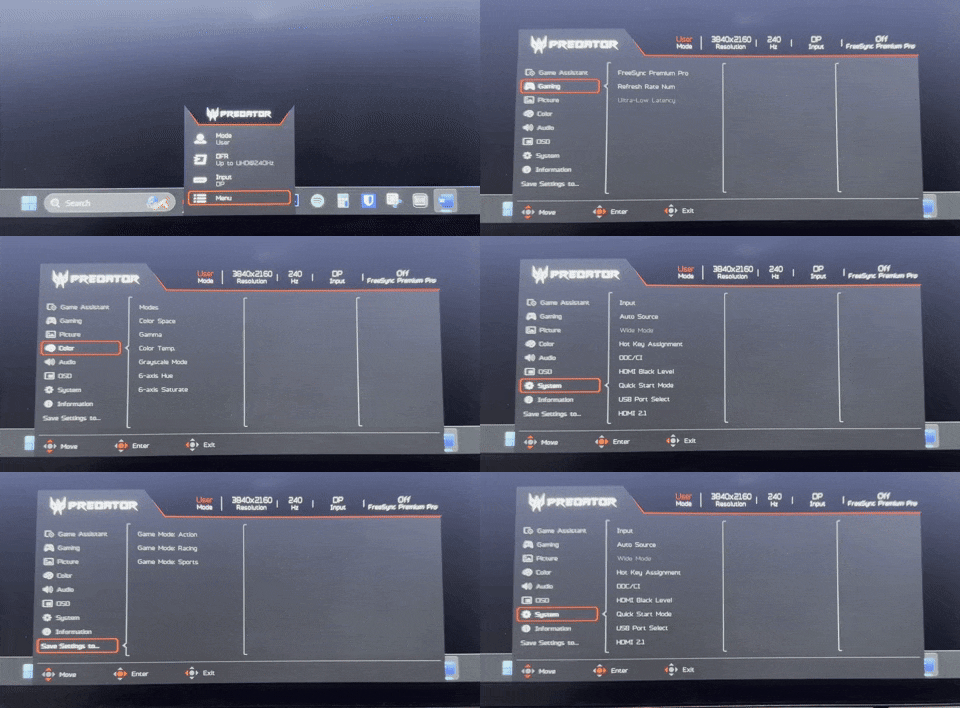
What's the difference? WOLED has been around for much longer than QD-OLED and is a very well-established pixel technology that has a much less chance of burn-in occurring, while QD-OLED is still relatively young in its existence, leading to an increased chance of burn-in that many companies are mitigating with OLED Care features.

Moreover, WOLED panels are generally cheaper than QD-OLED panels and offer comparable performance when it comes to gaming, color, response times, etc. So, what's the downside of WOLED, then? QD-OLED panels have more saturated color profiles, with the pixel technology offering better color accuracy at wider angles as its sub-pixel layout uses a more modern design. With that being said, WOLED panels, and in particular, the WOLED panel within the X32 X3, are competitive with QD-OLED panels of the same size and price when it comes to color performance.
Spotting the difference between the two is almost impossible for the untrained eye, so don't think you are getting a significantly worse monitor if you purchase a WOLED panel. You are still getting gorgeous OLED, just with a different subpixel layout that results in slightly less bright highlights and doesn't have best-in-class color performance.

The X32 X3 is a 32-inch display and at 4K offers a 137PPI pixel density, which is enough density of pixels to eliminate any text fringing that was a common problem on previous QD-OLED and WOLED panels.
Performance
So, what about games? Does the dual mode hold up with the X32 X3? Firstly, with every monitor I test, I like to include several different genres of games to see where the monitor performs the best and to hopefully inform a gamer what their experience will be like if they played their favorite type of game on the display under the spotlight. For the PGO32UFS, I tested the following games: League of Legends, Apex Legends, Overwatch 2, Black Myth: Wukong, Cyberpunk 2077, The Witcher 3, God of War Ragnarok, Valorant, DOOM: The Dark Ages, and Age of Mythology: Retold.

Let's start with the 4K at 240Hz mode. This mode was absolutely incredible. It ate up every single game I played on it, providing a peak-level gaming experience with its vivid colors, buttery smooth framerate, and deep blacks. The X32 X3 experience is on par with every other 32-inch OLED gaming monitor I have tested at this refresh rate, which is arguably the tip top of PC gaming. As for games that really stood out, Black Myth: Wukong, DOOM: The Dark Ages, Cyberpunk 2077, and God of War Ragnarok all looked absolutely fantastic on this display, with each of those games having deep blacks and a wide variety of color.
There really isn't much else to say other than 4K at 240Hz being awesome, as at this refresh rate, resolution and size, you get 137PPI, meaning image clarity is intensely good. At this level of pixel density, combination of the color profile provided by the OLED pixel technology, and the 240Hz refresh rate, you will struggle to find a game that doesn't look amazing.

What about the 1080p at 480Hz mode? As I outlined in my ASRock Phantom Gaming PGO32UFS WOLED review, which is another 4K at 240Hz and 1080p at 480Hz gaming monitor, I believe the trade-off with the 1080p mode just isn't worth it as the pixel density of the display drops down from that gorgeous 137PPI at 4K down to just 68PPI. This change is severe, and the hit in image clarity for the increasing the refresh rate ceiling just isn't worth it in my books. However, I can see the feature being attractive to some first-person-shooter games that really don't care how the game looks at all and only want as many frames as possible.
While this isn't my personal preference, I can report the feature does work as intended, which is a simple press of the multidirectional joystick and navigating down one option. Games that were particular highlights in this mode were all of the eSports titles: League of Legends, Apex Legends, and Overwatch 2. As I wrote in the PGO32UFS, I can see this feature working much better on a 27-inch panel, as it would mean your pixel density is dropping from 163 at 4K to 81 when in 1080p mode. This is a much more favorable PPI when at 1080p. 68PPI is just too harsh on the eyes on such a big display.
Final Thoughts
So, should you buy the X32 X3? Anyone considering purchasing this gaming monitor will want to be constantly flexing between cinematic gaming experiences, such as God of War, Cyberpunk 2077, Black Myth: Wukong, etc, while also jumping into fast-paced competitive eSports games that can take advantage of that 480Hz refresh rate. If you aren't doing that, I wouldn't advise a dual-mode monitor, and would steer you toward a standard 4K 240Hz OLED panel.

As for the competition for the X32 X3, ASRock is currently offering its PGO32UFS for $898, which is significantly cheaper than the MSRP of the X32 X3. However, at the time of writing, the X32 X3 is listed on Amazon for $899, possibly due to the release of the PGO32UFS, which has identical core features to the X32 X3, but with a dedicated button for the dual mode. Ultimately, the X32 X3 is a great WOLED gaming monitor that has an extra feature that I believe some gamers will take advantage of, but most will leave alone or use sparingly.
At the end of the day, the X32 X3 is still cheaper than a QD-OLED counterpart at the same specifications, so if you are shopping on a budget for an OLED, don't rule out WOLED displays, and maybe even snag yourself a dual-mode one if you fit the bill for it.