Newsletter IconGoogle IconFacebook IconX IconInstagram IconYouTube Icon
Giveaway: MONTECH Heritage PRO case, 240mm AIO, and 850W PSU Bundle

Dev builds a unique 3D operating system for multitasking, gets terrible performance

A viral X video shows a cube-shaped 3D desktop OS running on a laptop, though the multitasking demo comes with a heavy performance cost.

Dev builds a unique 3D operating system for multitasking, gets terrible performance
Facebook IconX IconReddit Icon
Comments
Senior Tech Reporter
Published
1 minute & 30 seconds read time
TL;DR: A viral clip shows a custom "3D OS" that maps apps to five faces of a cube viewed on a laptop; it uses rotation and apparent head-tracking to fake spatial multitasking but heavily taxes RAM and CPU, causing visible stuttering and making practical everyday use unlikely beyond a tech demo.
Voice: Hassam Nasir
0:00 / 2:25
Use left and right arrow keys to seek audio.

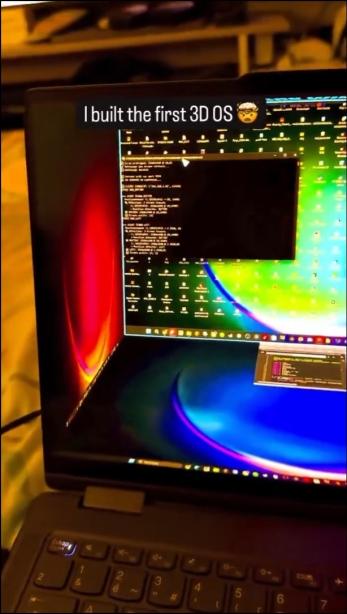
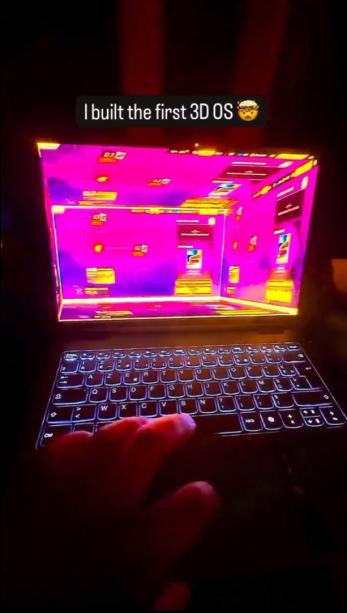
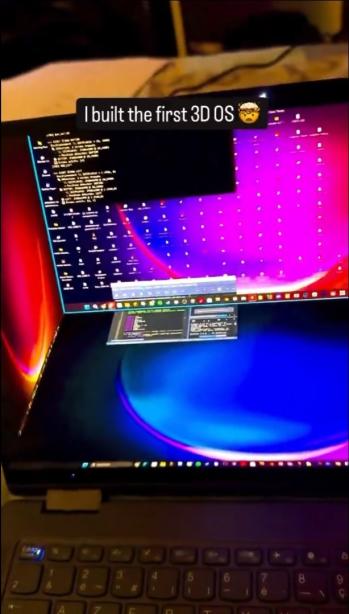
A video making the rounds on X shows what's being called a "3D OS," built around a cube-shaped desktop. It looks like there is a window mapped to each of five faces, while the viewer's perspective sits on the sixth.

The user who posted it, kapilansh_twt, captioned it "I built the first 3D OS," though that claim isn't confirmed, and it's not clear whether they're the actual developer or just sharing someone else's project. Either way, it looks like a real custom build, not a mockup.
Dev builds a unique 3D operating system for multitasking, gets terrible performance 3

In the clip, apps run on each face of the cube, and the demo drags a window from the right side across to the left, then down to the bottom, all on a normal 2D laptop screen. It's a neat trick of perspective, using rotation and depth to fake a spatial desktop without any headset involved. There seems to be some kind of head tracking involved, although that could very easily be faked using camera trickery.

The obvious catch is performance. Although no benchmark numbers are shown, the laptop is visibly struggling to keep the animation smooth, and the caption mentions RAM and CPU usage maxing out just to render the effect. That makes sense, since constantly rendering five active windows in 3D space, with transforms and depth calculations running in real time, is far heavier than a normal 2D compositor pushing flat rectangles around a screen.
Dev builds a unique 3D operating system for multitasking, gets terrible performance 2

A 3D desktop like this looks striking in a short clip, but there isn't much practical use beyond that. Multitasking is probably the closest thing to a real use case, since you could technically keep five apps loaded on five faces of the cube. In practice, reading text or tracking an app at an angled, rotated position sounds more like quite a hassle, and that's before counting the hardware overhead needed just to keep the animation from stuttering.

Dev builds a unique 3D operating system for multitasking, gets terrible performance 4

Frequently Asked Questions

Open a question for an answer from TweakTown's coverage of this news, or ask your own below.

Question #1

What hardware specs did the laptop in the video appear to struggle with when running the 3D cube desktop?

The article says the laptop was visibly struggling to keep the animation smooth, with the caption mentioning RAM and CPU usage maxing out just to render the effect. It notes the heavy load comes from constantly rendering five active windows with transforms and depth calculations in real time.
Question #2

Does the article say whether the cube desktop is a standalone OS or a custom compositor running on top of an existing OS?

The article does not say whether the cube desktop is a standalone OS or a custom compositor running on top of an existing OS. It notes the poster captioned it "I built the first 3D OS" but says that claim is not confirmed and that it looks like a real custom build rather than a mockup.
Question #3

Is there any confirmation in the article about who actually developed the 3D OS shown in the viral clip?

No. The article says the X user kapilansh_twt captioned the clip "I built the first 3D OS," but explicitly notes that claim is not confirmed and it is not clear whether they are the actual developer or merely sharing someone else's project.
Question #4

How does the demo handle input and window movement across the cube faces — does the article mention mouse, touch, or gesture controls?

Have a question that isn't listed here? Ask below, and TweakBot will answer it.

Concepts like this tend to work best as tech demos rather than daily drivers. It's fun to show off and probably even more fun to build, but turning it into something people would actually want for real work is a much harder problem than making a cube spin.

Photo of the Microsoft System Builder | Windоws 11 Home | Intended use for new systems | Install on a new PC | Branded by Microsoft

Best Deals: Microsoft System Builder | Windоws 11 Home | Intended use for new systems | Install on a new PC | Branded by Microsoft

Prices last scanned 22 hours and 21 minutes ago

* Prices may be inaccurate. As an Amazon Associate, we earn from qualifying purchases. We earn affiliate commissions from Newegg and PCCG sales.

Join Our Newsletter

Join the TweakTown Newsletter for daily tech updates delivered to your inbox.

See previous giveaways.

News Source:x.com

Comments

About the author

Senior Tech Reporter

Hassam is a veteran tech journalist and editor with over eight years of experience embedded in the consumer electronics industry. His obsession with hardware began with childhood experiments involving semiconductors, a curiosity that evolved into a career dedicated to deconstructing the complex silicon that powers our world. From benchmarking PC internals to stress-testing flagship CPUs and GPUs, Hassam specializes in translating high-level engineering into deep, unbiased insights for the enthusiast community.

Stay Updated

Follow TweakTown for breaking tech news, reviews, and daily updates.

Follow TweakTown on GoogleAdd TweakTown as a preferred source on Google
Newsletter Subscription