




Introduction
I still remember when Digital Storm unveiled their 34-inch AIO gaming PC that featured Intel's Core i7-6950X and GeForce GTX 1080 back in May 2016. It was a beast that wasn't just beautiful, but it was fast. I wanted to replicate that style, but more of a 'garage mod' version of that.
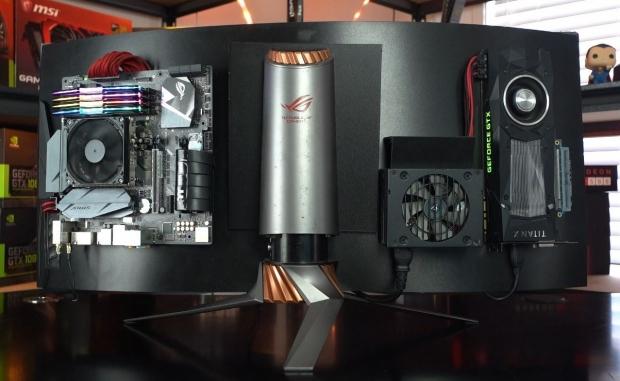
We used some great components to build the ASUS Garage Mod AIO Gaming Rig, with the most important of them all being the ASUS ROG STRIX PG348Q, a 34-inch 3440x1440 UltraWide 100Hz NVIDIA G-Sync gaming monitor. We wanted an all-in-one gaming rig that would surprise you: it's sitting there on your desk, and looks like just a monitor except it's not just a monitor. It has a super-fast gaming PC on the back that will handle anything and everything you throw at it running 3440x1440 at 100FPS.
We needed to bundle a good enough CPU so we went with the high-end Intel Core i7-8700K processor (6C/12T) while ASUS hooked us up with their ROG STRIX Z370-G Gaming motherboard. Accompanying the CPU and motherboard we have 16GB of DDR4-4000MHz RAM from ADATA with gorgeous RGBs that light up the back of the ASUS Garage Mod AIO Gaming Rig.
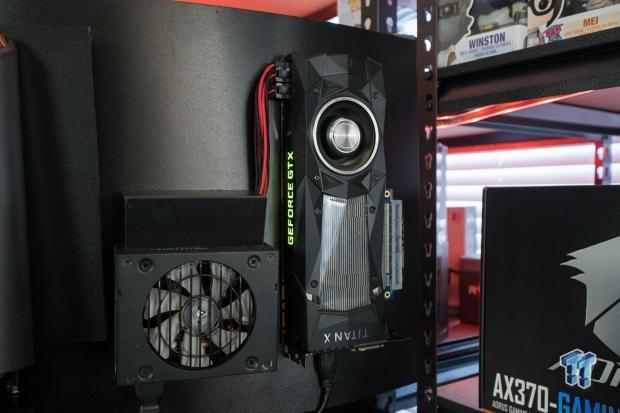
What good is the high-end CPU, motherboard and RAM without a ridiculous graphics card on the back. We would've loved to have used one of the new GeForce RTX 2080 Ti graphics cards but at the time of building it all we had spare that was better than the GTX 1080 Ti was the TITAN X from NVIDIA. This card provides enough gaming horsepower to drive games at 3440x1440 and get 100FPS average with a few tweaks to in-game visual settings.
OCZ and Toshiba were also great to us, providing a 1TB RD400 NVMe M.2 SSD that provides ridiculous 2GB/sec reads for our OS and games.
Corsair provided their SF600, a 600W small form factor PSU that is small and light enough to sit on the back of the display. It's also got enough juice to drive the 8700K and TITAN X graphics card, all while mounted on the back of the ASUS ROG STRIX PG348Q gaming monitor.

ASUS Garage Mod AIO Gaming Rig Specs
- ASUS ROG STRIX PG348Q UltraWide monitor
- ASUS STRIX Z370-G Gaming
- Intel Core i7-8700K @ 5GHz
- 16GB ADATA DDR4-4000 RGB RAM
- NVIDIA TITAN X graphics card
- Corsair 600W SFF PSU
- 1TB Toshiba/OCZ RD400 M.2 NVMe SSD
What We Used
We used some great components to build the ASUS Garage Mod AIO Gaming Rig, with the most important of them all being the ASUS ROG STRIX PG348Q, a 34-inch 3440x1440 UltraWide 100Hz NVIDIA G-Sync gaming monitor. We wanted an all-in-one gaming rig that would surprise you: it's sitting there on your desk, and looks like just a monitor except it's not just a monitor. It has a super-fast gaming PC on the back that will handle anything and everything you throw at it running 3440x1440 at 100FPS.
Our Latest All-in-One PCs Article Coverage

We needed to bundle a good enough CPU so we went with the high-end Intel Core i7-8700K processor (6C/12T) while ASUS hooked us up with their ROG STRIX Z370-G Gaming motherboard.

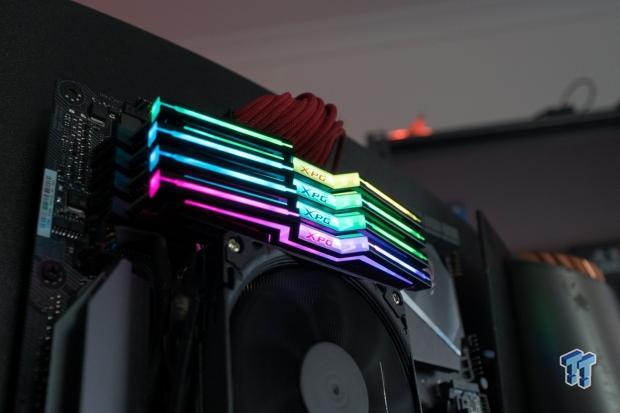
Accompanying the CPU and motherboard we have 16GB of DDR4-4000MHz RAM from ADATA with gorgeous RGBs that light up the back of the ASUS Garage Mod AIO Gaming Rig.
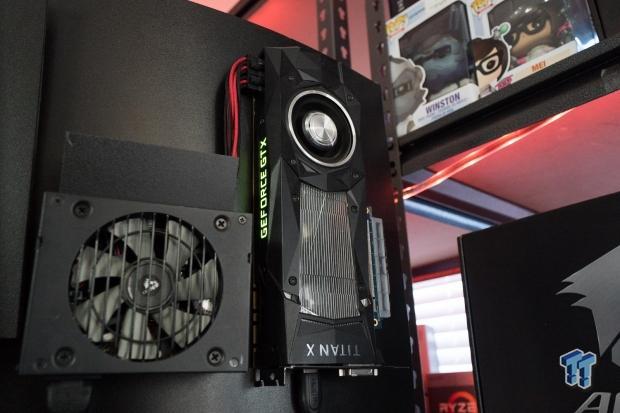
What good is the high-end CPU, motherboard and RAM without a ridiculous graphics card on the back. We would've loved to have used one of the new GeForce RTX 2080 Ti graphics cards but at the time of building it all we had spare that was better than the GTX 1080 Ti was the TITAN X from NVIDIA. This card provides enough gaming horsepower to drive games at 3440x1440 and get 100FPS average with a few tweaks to in-game visual settings.

OCZ and Toshiba were also great to us, providing a 1TB RD400 NVMe M.2 SSD that provides ridiculous 2GB/sec reads for our OS and games.

Corsair provided their SF600, a 600W small form factor PSU that is small and light enough to sit on the back of the display. It's also got enough juice to drive the 8700K and TITAN X graphics card, all while mounted on the back of the ASUS ROG STRIX PG348Q gaming monitor.
ASUS Garage Mod AIO Gaming Rig Specs
- ASUS ROG STRIX PG348Q UltraWide monitor
- ASUS STRIX Z370-G Gaming
- Intel Core i7-8700K @ 5GHz
- 16GB ADATA DDR4-4000 RGB RAM
- NVIDIA TITAN X graphics card
- Corsair 600W SFF PSU
- 1TB Toshiba/OCZ RD400 M.2 NVMe SSD
The Final Build
Final Thoughts
Our new ASUS Garage Mod AIO Gaming Rig is an awesome sight to behold. A full AIO gaming PC with rocking components, with a beasty Core i7-8700K processor and NVIDIA TITAN X graphics card that can handle nearly anything you can throw at it on 3440 x 1440 at 100FPS without a problem.
We are now using this system as a workstation machine that can be deployed anywhere in our office: a huge 34-inch UltraWide all-in-one gaming PC. There's no tower, no separate display, just the all-in-one rig done our way. It was a big journey to get there, but we got there in the end with all of the changes we put into it. I'd love to see a new refreshed system with the same ASUS motherboard and 8700K processor, but with a new RTX 2080 Ti.
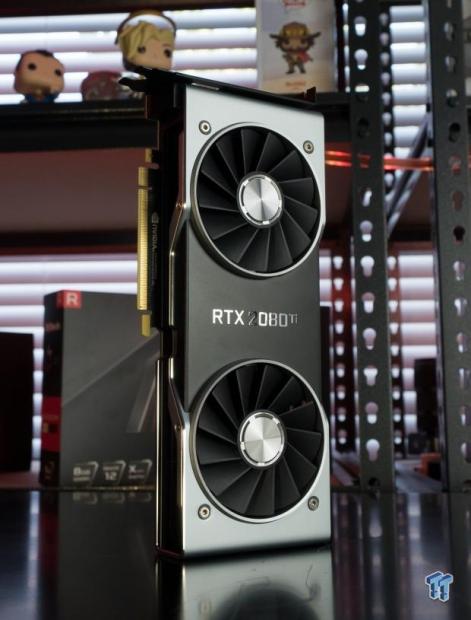
Since the new GeForce RTX 2080 Ti has its 'RTX 2080 Ti' branding in the middle of the card, it would look perfect if it was standing up like the TITAN X is on our ASUS Garage Mod AIO Gaming Rig.
For now, what do you guys think? Like it, don't like it? Enjoy the garage-style all-in-one gaming PC? Do you think we should refresh it with the new GeForce RTX 2080 Ti Founders Edition, or one of the new ASUS ROG Strix GeForce RTX 2080 Ti graphics cards?
Some bonus photos of the ASUS Garage Mod AIO Gaming Rig: