Introduction & Beginner Hardware
Since the introduction of ChatGPT in late 2022, the popularity of AI has risen dramatically.
Perhaps less widely covered is the parallel thread that has been woven alongside the popular cloud AI models from the likes of large players such as OpenAI, Google, and Anthropic. While these models are widely regarded for their SOTA performance, a growing niche in the AI community is placing more emphasis on models they can run locally, at home, and on their own hardware. This community is active across a multitude of different corners of the internet, with each member having their own specific use case, favorite model, and reasons for wanting to run Local AI. A common denominator among them all? The interest in hardware that allows for these models to be run locally.
Popular Now: Adding thermal paste to thermal pads drops RTX 3080 GDDR6X temperatures by up to 15COver the past year, I have been fortunate enough to have a large amount of hands-on experience with many of the popular devices that have emerged to fill this growing niche. From devices purpose-built to run AI, to devices that, through the trial and error of the community, have been found as competent options for running local AI, there is something for everyone. From beginner-friendly to devices aimed at professionals, this article will take a look at a wide range of devices capable of handling local AI.
Beginner Friendly Hardware
To begin, let us take a look at two beginner-friendly options that offer excellent hands-on experience and educational value, without breaking the bank.
NVIDIA Jetson Orin Nano Super

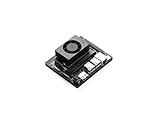
First, the NVIDIA Jetson Orin Nano Super. Released in late 2024, this device was marketed as the "$250 AI Supercomputer" and marked a significant departure from how the Jetson lineup had previously been thought of. While the Jetsons of years gone by were mostly found in robotics labs, regarded for their ability to orchestrate multiple attached motors and sensors, the Jetson, with its small form factor and power-efficient nature, was now being sold as a low-cost, all-in-one device that allowed anyone to run their own Local AI.
Best Deals: NVIDIA Jetson Orin Nano Developer Kit
Price Trend:
Prices last scanned 5 hours and 39 minutes ago


Throughout the past year, the Jetson Orin Nano Super (from now on to be referred to simply as the "Jetson"), has been a mainstay in my lineup of AI-focused hardware. The relatively low-cost, performance capabilities, and flexibility of the Jetson has, in this writer's opinion, made it one of, if not the finest AI devices of the past year. The Jetson has the power to run a small Local AI model to chat with you, run a home security system through image detection capabilities, or even function as the core of a self-hosted smart home system.
With 8GB of unified system memory (meaning the CPU & GPU share this memory), the Jetson is potent enough to run some well-known open source AI models like Google's Gemma 3, Alibaba's Qwen 3, and Meta's Llama 3. The versatility, coupled with the low power draw, makes this a fantastic option for anyone looking for a beginner-friendly device to get hands-on experience with Local AI.
Our Latest Editorials Article Coverage
Raspberry Pi 5 & Hailo-8L

In the same vein, the well-known Raspberry Pi 5 has also proven to be a relatively decent option. While not specifically designed or marketed for AI use cases, the Pi's relatively low cost, power draw, and wide availability have led to it being creatively integrated into many solutions in which it runs local AI. From its ability to run small LLMs to its usefulness as an AI-enabled image detection system (when coupled with an AI accelerator like the Hailo-8L), the Pi has opened up a lot of possibilities for hobbyists, tinkerers, and learners to get hands-on experience with AI, without needing a specialized degree or large budget.
As with the Jetson, the Pi (specifically the 8GB/16GB variant) has been a very useful device in my work. From building open-source and low-cost AI chatbots utilizing the Pi5 to using it to create educational content on making an automated AI image detection notification bot with the Hailo-8L, the Pi5 has been an excellent and flexible device for many different AI-centered use cases.
The widespread availability, community software support, and 3rd party accessory support for the Pi have made it an invaluable device for anyone looking to get hands-on experience in building solutions that rely on local AI. Quite impressive, especially for a device that was not purpose-built for AI applications.
Gaming Hardware For AI
Gaming Hardware You Already Own
While the previous two options are excellent budget and beginner-friendly solutions, they quickly find themselves limited when a user wants to run a much larger and more potent local AI solution. Next up is the logical jump from either of these devices, and ironically, something you very likely have at your disposal already. To put it simply, if you have a gaming PC or Apple Silicon machine from the past 2-3 years, you very likely have a Local AI capable machine sitting in front of you at this very moment.
For a bit of technical preamble, the most popular option for running local AI throughout the past year has been through the use of a graphics card, or GPU. Without turning this into a technical write-up, the GPU is well-suited for performing the specific operations that AI models rely on, making it a go-to option for anyone interested in budget-friendly Local AI.
For one more bit of technical info (the last, I promise), the concept of quantization should be briefly mentioned, since it applies to some of the examples in this article. Quantization, to put it very simply, is the act of taking a larger AI model and shaving off a bit of quality in exchange for making its overall size smaller and therefore more likely to run on a consumer's system. All of the LLMs mentioned in this article were run in various forms of quantization.
When it comes to running Local AI models using a desktop or laptop, the general consensus is that VRAM is king. The more VRAM you have, the larger models you can run, but equally as important, the more context length you can handle, which means your conversations with the AI can be longer, more detailed, and more capable of handling real, useful tasks.
Desktop GPUs

A long-time favorite of the hobbyist crowd was the NVIDIA 3000 series. These GPUs were introduced before ChatGPT was even a thing, but their power and popularity have allowed them to be a go-to option for many enthusiasts looking to have a powerful local AI system. I personally used an NVIDIA 3090ti system reliably for a couple of years, and even had a wonderful experience with the NVIDIA 3060 12GB card as well.
In my own testing, I have been able to run Llama 3.3 70B (a very well-regarded but aging model) on a system equipped with 2x of NVIDIA's 3090ti GPUs. This system provided a very powerful local AI setup that even assisted in prototyping many offline solutions for business customers. On the 3060 GPU, I was able to run Google's Gemma 3 12B at conversational speeds, without hitting the limits of the card in temperature or memory ceiling levels.
What allows this sort of setup to move beyond a simple novelty experience, into something genuinely useful, is RAG - Retrieval Augmented Generation. As opposed to chatting with a model and being restricted to facts contained within its training data, RAG allows you to point a local AI at your own documents and query against that context. If you have an internal document that outlines your HOA bylaws and rules, RAG would allow you to use a local AI to answer questions you may have about this information, without having to read through the documents yourself. This capability allows an old gaming desktop to become a private, searchable AI assistant for your own files.
Gaming Laptops


Everything mentioned above applies equally to gaming laptops. Until recently (say the past year or so), gaming laptops were limited in their VRAM amounts for all but the most expensive options, but it is now relatively common to see mid-level gaming laptops with 8-12GB of VRAM. The most expensive of the bunch, equipped with NVIDIA's 5090 mobile GPU, now has 24GB, something that a year ago was unheard of for a mobile device.
As a big fan of laptops who will take any excuse to get a new one, I decided to push the limits of what mobile hardware can handle with a 5090 mobile MSI Raider 18 HX AI Laptop. For this test, I ran GLM-4 32B using LM Studio as a front end, a genuinely large model that was released in April of 2025. This model was widely regarded as one of the best front-end coding models of its size, and to this day, it is still one of the most impressive models I have used, especially considering its size.
For those who might have an older gaming laptop, I should mention that a 4060-equipped ASUS Nitro 17 has been my workhorse for north of 18 months now, and the 8GB VRAM has allowed me to run a lot of cool things, from local AI TTS models to smaller LLMs.
AMD, Intel & Apple Alternatives
While the current local AI conversation is dominated by NVIDIA, thanks to their mature CUDA software support, alternatives do exist. AMD Radeon GPUs and Intel ARC cards can both run local LLMs, though support remains more experimental for things beyond straightforward text generation from a local LLM. Image and video generation workloads are more difficult to get working with these cards, though community support and the maturity of software for both have improved significantly over the past year.

For those reading who have Macs instead and are left wondering if their computer will do any of these aforementioned things, I have good news. Apple Silicon deserves a particular mention. Macs equipped with Apple Silicon chips offer unified memory pools that are particularly well-suited for running local AI models. Over the past couple of years, the popularity of Apple Silicon Macs for local AI has increased, in unison with the amount of memory the machines ship with, as well as the community support for using said machines for local AI.
Professional AI Devices
Purpose-Built AI Devices
Now that we have reflected on some of the most popular options for beginners and hobbyists, it is only fair that we touch upon the next segment, something that has really blossomed over the past year, and that is, purpose-built AI devices, targeted at hardcore hobbyists and professionals. While most devices from the past couple of years would be able to run some form of AI model, the larger, more powerful open source models that come much closer to rivaling the quality of the closed source SOTA models necessitate serious computational horsepower, and now, in late 2025, the devices that allow this have arrived on the scene.
While all major manufacturers are now offering high-end systems designed for this niche of consumers, whether it be Apple's Mac Studio with 256 or 512GB of unified memory, NVIDIA's RTX Pro cards with up to 96GB VRAM, or AMD's Radeon AI PRO R9700 cards with 32GB GDDR6, this section is going to focus on two popular, all-in-one devices that I have had the pleasure of working with these past few months. The NVIDIA DGX Spark and the AMD Ryzen AI Max+ 395 System. Both of these systems are available from a number of different manufacturers under a number of different names, but their core specs remain the star of the show. Each is equipped with 128GB of unified system memory, small desktop-friendly footprints, and a price tag more suited to dedicated professionals.
NVIDIA DGX Spark

Beginning with the DGX Spark, I have been able to use this device for a number of different tasks that I previously would not have had the compute to perform. It has become my "side arm," so to speak. At a rather hefty price of $4,000, which is nearly double what its AMD competitor retails for in some configurations, the DGX Spark had its work cut out for it in order to justify the price tag. A delay pushed its release to October 2025, a time when there was even more competition, so the Spark had a lot to prove. Personally, my use cases for Spark have included the more mundane tasks, such as running OpenAI's gpt-oss-120b model in various use cases, from developmental agentic pipelines to simple Chatbot Q&A through LM Studio.

What sets the Spark apart from its competition is the benefit it gains from NVIDIA's mature CUDA software stack. Exotic use cases of AI, such as image and video generation, that may require hours of hair-pulling on other devices, simply just work on the Spark. One of my favorite use cases for Spark was building a simple AI-generated image sharing app clone. Using Ollama to run a small and fast LLM, and Stable Diffusion through ComfyUI to generate images, the project allowed for a completely automated AI-driven experience where AI was generating images, posting them, commenting on them (roleplaying as different "accounts"), and running infinitely until manually stopped. Swapping the image generation model and LLM to something a bit more colorful provided an endless amount of entertainment for a weekend night with friends.
I must also admit, I am a big fan of the aesthetic qualities of the Spark. The perhaps obnoxious gold finish and very dense, heavy feel make it a wonderful addition to my workspace. While I have not yet personally tried the QSFP networking capabilities - the ability to connect two Sparks together, essentially doubling the available resources, and something that is cited as heavily responsible for the high price tag - this is another professional-level capability included with the Spark.
AMD Ryzen AI Max+ 395

The next device worthy of inclusion in this section is the AMD Ryzen AI Max+ 395. While this chip is offered by a variety of different manufacturers and in different memory configurations, my personal device is a GMK-Tec Evo X2 with 128GB unified memory, the highest available amount for the AI Max+ 395. When it comes to running LLMs, this device is a direct competitor to the DGX Spark, and when one considers that it costs about 50% less, the decision on which is a better solution becomes quite a bit more difficult for prospective buyers.
In my personal experiments with the AI Max+ 395, which I have had for the past few months, the choice between which device would be the better option has become abundantly clear. I have used the AI Max+ 395 for local LLM workflows predominantly through LM Studio, and for users looking only to run local LLMs, the AI Max+ 395 is very likely the better option. It offers similar speeds compared to the DGX Spark, has a similar footprint, and comes in significantly cheaper, especially if purchased from one of the mini PC manufacturers.
Where the AI Max+ 395 left a lot to be desired was on the software maturity side of things. While the open source community has done excellent work on solutions for more exotic AI workloads, such as allowing image and video generation to run on the AI Max+ 395, the "plug and play" nature of getting these things to work on the 395 was unfortunately not there. This device has the capability to run things like ComfyUI, but the support is heavily based upon the passionate efforts of the open source community, and the official software support from AMD has, in my opinion, not yet allowed this device to reach its full potential.
DGX Spark vs AI Max+ 395: The Verdict
While both of these devices have homes in my current setup, I can't help but sometimes feel that having both is rather redundant. My honest assessment and advice for these devices would be entirely dependent upon the type of person who was looking to purchase one, and perhaps even more so, on the type of work they required of the device. When it comes to purely text-based AI, that is, chatting back and forth with an AI model using something like LM Studio, the AI Max+ 395 is around the same speed and around half the price as the NVIDIA DGX Spark, making it the clear winner. Another notable mention is the fact that only one of these devices supports running Windows: the AI Max+ 395. While a lot of folks whose work necessitates one of these devices will probably be opting for some flavor of Linux, the Windows support is a definite plus for the AI Max+ 395, as it does also make for a rather potent mini gaming PC.
When it comes to image and video generation, or anything else that has the best support when using a CUDA-capable device, the Spark is the clear winner. While it is possible to get some exotic things working on the AI Max+ 395, the process of doing so will take time, energy, and feel draining to anyone who views the device as more of a tool to perform a specific job, as opposed to a hobby purchase that is bought for tinkering. The inclusion of the QSFP ports on the Spark also allows it to be expanded into a more powerful system, a capability the AI Max+ 395 lacks.
Unique Devices & Final Thoughts
New & Niche AI Hardware
Beyond the mainstream options, several unique devices have emerged that don't fit neatly into existing categories. These are the cool, weird, and niche devices that are not mentioned every day, but reflect what I believe to be a growing number of devices built around AI.
Tenstorrent Wormhole n300d

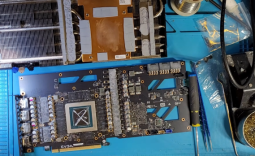
First up is the Tenstorrent Wormhole n300d. Upon first glance at this device, one would likely just assume it is some type of GPU with desktop fans bolted on in a rather aggressive manner. It is only when you look at the back of the card and realize it does not contain any video out connections that you see it's a different beast entirely. Although the Wormhole is equipped with 24GB RAM and capable of running AI workloads, it is quite different than a GPU. The Wormhole is an AI accelerator. Each of the two fans lies on top of a Tenstorrent Wormhole Tensix Processor, each with 12GB GDDR6 memory. The Wormhole features a completely open source software stack and is marketed to ML developers seeking an alternative to traditional GPUs.
Olares One

While local AI is still heavily viewed as something that is restricted to tech enthusiasts, the Olares One seeks to change that. I am fortunate enough to own a pre-production prototype of the Olares One and have hands-on experience with its capabilities. In what looks like an elongated Mac Mini case, the Olares One contains some powerful hardware in the form of a 5090 mobile GPU and 96GB DDR5. While the hardware is nothing to scoff at, the real unique part of the Olares is its operating system. Designed to be a sort of personal AI cloud, the Olares OS, which is open source and can be used on most devices, offers one of the first "plug and play" experiences for local AI that I have ever seen. The marketplace app packages complex local AI offerings, from image generation to 3D mesh generators. The Olares market lets users one-click install and run these programs. It is also designed to act as a server, allowing you to access it from anywhere while on the go.

ASUS ROG Phone 9 Pro

My final mention is the ASUS ROG Phone 9 Pro, a mobile phone. At the time of this writing, the adoption of AI running directly ON mobile phones has been fairly limited. Some companies have begun to make AI models optimized to run on mobile devices, but the newness of local AI (especially compared to how long mobile phones have existed) has made for a relatively delayed reaction by manufacturers to integrate "Local AI" into their offerings. The ROG 9 Pro is equipped with 24GB RAM, an extremely large amount for a phone, and therefore is the perfect testbed for how well mobile phones can handle running LLMs.

My main use for this phone is to run the Tao Avatar application, developed by Alibaba's MNN, that displays a virtual 3D avatar driven by offline AI models for speech-to-text, text-to-speech, and LLM intelligence. The combination of all of these models running locally on the phone, along with the avatar, allows for a completely offline, intelligent AI-powered chatbot that you speak to conversationally. While I believe this specific example will one day be looked back at in the same way one views an old Geocities page, it seems like a very early look at the capabilities of mobile devices to handle local AI.
Final Thoughts
With the year coming to a close, I wanted to reflect on some of the coolest local AI devices I have been lucky enough to play with over the past 12 or so months. With CES 2026 coming up in less than a week, I have zero doubt that the next 12 months will produce devices that push the limits beyond what we have currently seen. It's natural to see technology improve in iterative updates, like the next series of a GPU or phone, but I believe we will see a renaissance of hardware design and performance, one that outpaces what is expected from the traditional refresh cycle. The rapid adoption of AI is pushing the limits further, and I fully expect the upcoming year's hardware to reflect this excitement. However, if you're looking to get started, you don't need to wait for the next generation. The hardware covered in this article is more than capable and will be for years to come.