
Our Verdict
Introduction and Packaging
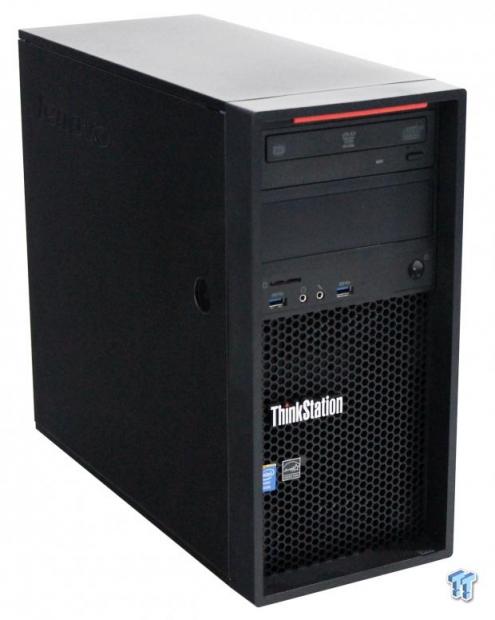
When you are looking into the entry-level workstation market, you want the best bang for your buck in both performance and serviceability. Performance should be your primary consideration; you don't want to purchase systems that will be under performing with increasing demands later on down the line.
Designing systems that are well balanced in component selection, offer high performance, serviceability, installation options, and allow for expansions later on, is no easy task. Budgets are also very tight these days, so these machines need to be competitively priced, and offer value to the workspace.
To take this design challenge head on, Lenovo came up with the ThinkStation P300 Tower Workstation. The P300 comes in a tower form factor; alternatively, there is a small form factor design available.
The P300 workstation we have in the lab today is a tower form factor, outfitted to higher-end specifications. Let's get to unboxing and exploring the new P300 from Lenovo.
Packaging

After opening the shipping box, we find the contents inside are well protected by foam inserts. There is an accessory box at the top, and a boxed keyboard down the side. The accessory box includes a power cord, a software and manual disk, and installation instructions.

Here we get a look at the supplied keyboard and mouse that come with the P300, the Lenovo USB Slim Keyboard (New F5) Win8.1 English and Lenovo USB Optical Wheel Mouse. We used these in our tests, and found they are functional, and work very well. Nothing fancy here, but they do work just fine.

The disks that come with the P300 allow for upgrading to Windows 8.1, and include recovery disks.
Our Latest Servers Review Coverage
Specifications and Layout
Specifications

The P300 we received has a Xeon E5-1276 v3 processor installed, and plenty of expansion options. The unit sent to us for review came equipped with an NVIDIA Quadro K4000 for graphics power. These two components complement each other very well in scaling and price point.
CPU Options:
- Intel Xeon E3-1271 v3 Processor (8MB Cache, 3.60GHz)
- Intel Xeon E3-1276 v3 Processor (8MB Cache, 3.60GHz)
- Intel Xeon E3-1281 v3 Processor (8MB Cache, 3.70GHz)
Graphics Card Options:
- NVIDIA Quadro K420 1GB (DVI+DP)
- NVIDIA Quadro K620 2GB (DVI+DP)
- NVIDIA Quadro K2200 4GB (DVI+2DP)
- NVIDIA Quadro K4000 (Dual link DVI, DP, DP) - 3GB
- NVIDIA Quadro K4200 4GB (DVI+2DP)
Storage Options:
- 1TB+8GB Hybrid Hard Drive, SATA, 3.5"
- 3.5" 2TB SATA HDD 7200 rpm
- 250GB SATA - 10000 rpm, 6 Gb/s, 32MB cache, 2.5"
- 2TB+8GB Hybrid Hard Drive, SATA, 3.5"
- 2.5" 180GB SSD SATA3 Hard Drive
- 500GB SATA - 10000 rpm, 6 Gb/s, 2.5"
- 2.5" 256GB SATA Solid-State Drive
- 2.5" 256GB SATA Solid-State Drive (OPAL)
- 256GB SATA 2.5" Solid-State Drive (OPAL)
- 2.5" 240GB SATA SSD
- 3.5" 3TB 7200rpm SATA Hard Drive
- 2.5" - 128 GB Solid-State Drive SATA3
- 1TB SATA - 10000 rpm, 6 Gb/s, 2.5"
- 3.5" 4TB 7200RPM SATA
- 2.5" 128GB SATA 3 Solid-State Drive
You can see that there are many different ways to configure the P300, depending on user requirements.
Layout
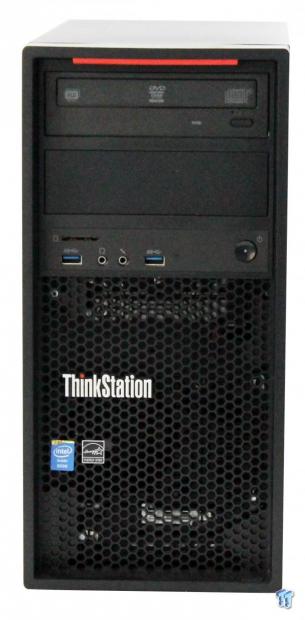
Here we get a look at the front of the P300, which has clean lines, a simple design, and looks great. We like the hex mesh on the front. The mesh gives it a hi-tech look and feel, and offers good ventilation. It would be nice to have some kind of dust filter behind all that.

There is not much to see on the sides of the case. On the right is a simple push-button to unlock the door. Once that button is pushed, the door will slide off easily.
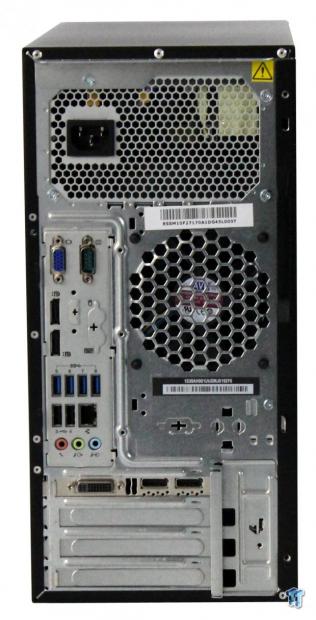
Looking at the rear of the P300, we find the following:
- 4x USB 3.0
- 2x USB 2.0
- 1x Serial, 1x VGA, 2x Display Port
- 1x Ethernet
- 1x audio line in, 1x audio line out, and 1x mic in
- There's also optional Firewire, 29:1 MCR, eSATA, and Serial
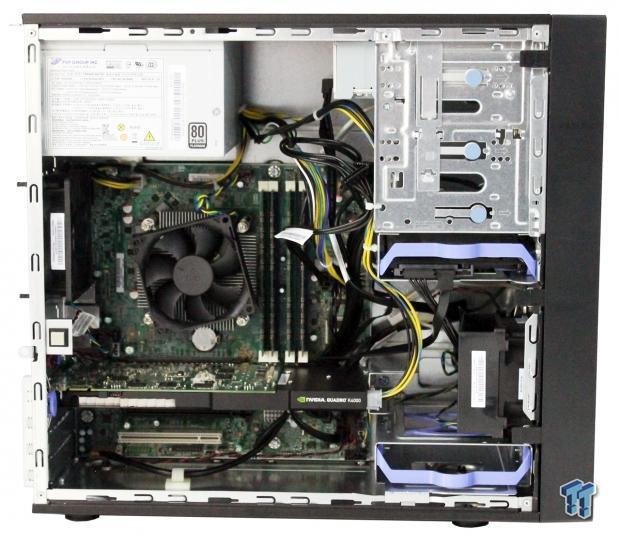
Here we have taken the side panel off to get a look at the insides of the P300. This is simple enough, and typical for systems like this one.
The first impression that we got was better cable management should be provided on these builds. This seems rather messy. On the plus side though, all cables are tucked away, and do not block any airflow.
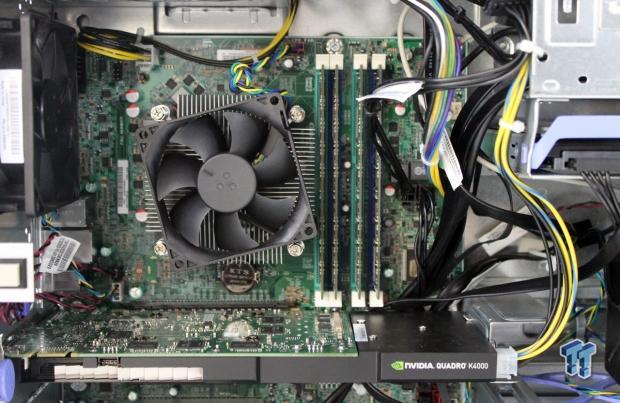
The CPU heat sink and air cooler that Lenovo uses is larger than standard Intel heat sinks, and has a more powerful fan. This works very well for keeping the CPU cool, and cutting down on noise when under a full load.
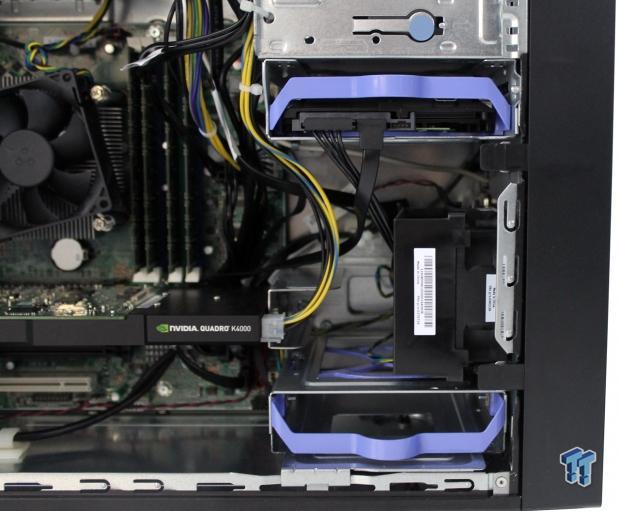
Here we are looking at the two internal drive bays. The top location has the Seagate 1TB HDD, and the bottom bay is empty.

Hard drives are easy to remove. Simply unplug the power and SATA connector, squeeze in the side tabs, and pull the drives outward. The blue frame also absorbs vibrations, and holds the HDD in place very well.

We also noted that the NVIDIA Quadro K4000 is held in place by a support bracket, which is shown here. This is a very good addition to the build, as it firmly holds the K4000 in place, and will keep the card from flopping around during shipping to help reduce shipping damage. The drawback is, if you need to replace the K4000, it is a little bit of extra work to unscrew the mounting bracket.

At the inside back of the case, there is a locking spring to secure the K4000 in place. To remove the video card simply push the blue button in and it unlocks the card's hold down lock.

Just push in the blue button, and the locking bar can be pulled away to free the installed video card.

At the inside front of the case, there are three blue buttons that will release the installed DVD drive, or other devices.
BIOS and Bundled Software
BIOS
The BIOS for this server is typical, so we will only show key BIOS screens.
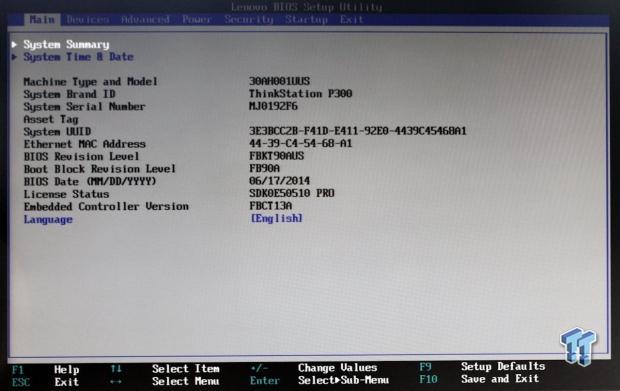
This is the main BIOS screen you see when you first enter the BIOS.

This is the advanced CPU setup menu. This allows you to set different aspects of the CPU properties.

Looking at the advanced CPU setup menu, we can see the options that the P300 allows users to change.

This is the advanced processor manageability menu, and options that can be changed.

Now we are looking at the advanced power management tab and what options that are changeable as well.

Here we see adjustments to the intelligent cooling engine.

The security menu has many options to adjust for how secure you want your machine to be.

Here we see the startup option menu, where you can select what device you want to boot from, among other options.
Bundled Software
The first thing that many people do is take a look at the bundled software that comes pre-installed on the computer they purchase, and start uninstalling the bulk of it. On many of the machines we have used in the past, there is a fair amount of junk stuff. Much of that is trial software, and software that we are not interested in using.
In the case of the P300, we did not find any junk real apps, but we did find apps that you should take a careful look at to decide if you want to keep them. The P300 we received came with Windows 7 installed; pre-loaded software includes:
- Adobe Acrobat Reader
- CyberLink PowerDVD (on systems with Optical drives)
- CyberLink Create (on systems with Optical drives)
- Microsoft Office 2013 Trial
- Norton Internet Security 2014 (30-day trial)
- Skype
- ThinkVantage System Update
- Rescue and Recovery (Ready-to-Install)
- Lenovo Reach (only in US and Canada)
- Lenovo Solution Center
- PC Device Experience
Additional disks included with the package allow for upgrading to Windows 8.1, which includes the following pre-loaded software:
- CyberLink PowerDVD (on systems with Optical drives)
- CyberLink Create (on systems with Optical drives)
- Evernote
- Lenovo Companion
- Lenovo Support
- Lenovo Solution Center
- Norton Internet Security 2014 (30-day trial)
- Password Manager (Web install)
- PC Device Experience
- Hightail
- Lenovo Reach (only in US and Canada)
- Norton Studio
We use Kaspersky for our anti-virus needs. These selections would be our choice to uninstall. This is our personal preference, these are fine products, and it is up to your personal preference if you wish to keep those. PowerDVD is necessary to have on the P300, so it will stay. On the other hand, we found the Lenovo software very useful, so let's look at what Lenovo has done to make managing the P300 easier for us.

Down at the bottom, right-hand side of the task bar, you will find a red icon with white cross like the red logo at the top of this picture. Click on this to bring up Lenovo Solution Center, which will be your home for controlling the P300.

Here we see the home screen for the Lenovo Solution Center. At first startup, yours should look something like this. This screen tells you that you need to get an anti-virus, do a hardware scan, register your P300, and complete a backup. We advise you to do a complete backup at this time. Our backup took maybe 20 minutes, and used four DVDs in total, but we are all set in case something goes wrong.

This is the home screen you will see after you select the first option from the previous step. On the left-hand side, you can see all the steps you will need to go through to complete this procedure.

Next on the list is the System menu. This shows all information about the P300. Simply click on each icon to bring up status windows.

The Memory icon shows you how many slots the P300 has, and which ones have a RAM stick installed. You can see the current amount of memory installed. What the maximum capacity is for the P300, in this case its 32GB. Optimizing performance will tell you to close some programs. Clicking "Get More Memory" will bring up a Lenovo webpage where you can order additional memory.

The Security menu will allow you to set passwords for the P300, turn on the firewall, check virus-protection, and adjust internet connection security settings.

Here we can see the firewall option in the security menu. You can enable or disable the firewall with just a click of the button.

Check-up allows you to do a hardware scan, check the device manager, and take backup snap shots. This is useful to diagnose hardware issues, or confirm that you have the latest drivers installed.

This will enable you to run a full hardware scan to see if you have any issues with your hardware that needs to be checked out.

The Support menu allows you to connect to online support and check your warranty status. You can check your configuration history and register your W540. That about covers Lenovo Solution Center, there are several other Lenovo apps to look at next.

Lenovo SHAREit allows you to share files without network changes, or Wi-Fi connection. Lenovo SHAREit eliminates the need for cables, and wirelessly transfers information rapidly between devices.

Lenovo Reach simplifies your digital life by enabling access to all your favorite things from all your devices, regardless of operating system.

Rescue and Recovery is very much like the one we saw in Lenovo Solution Center. It is very easy to do full backups, or create a snap shot of the current system.

Here we are looking at the main screen for Rescue and Recovery, which is a simple way to keep your P300 backed up, and recover if needed.

CyberLink PowerDVD (on systems with optical drives) and CyberLink Create (on systems with Optical drives) are also included, and provide a great way to create DVDs on the P300.
Test System Setup

We would like to thank Lenovo, SPEC, Yokogawa, AIDA64, and Kingston for their support in providing parts for our test system.
For all tests we have run, we used default BIOS settings.

This is the CPUz screen, showing the various stats of the Xeon E3-1276 v3 CPU. As you can see, this CPU has a max TDP of 84 watts, and core voltage of 0.720V.
This is a quad-core CPU with hyper-threading, giving us four cores/eight threads to work with. The CPU has a stock speed of 3.6GHz, and a turbo of up to 4.0GHz. In addition to four CPU cores, the microprocessor embeds HD P4600 Graphics Processing Unit. While this graphics unit is not fast enough to play the latest games with all settings on, it can be used for casual gaming and 3D apps. The memory we used in our tests is 32GBs of Kingston RAM, KVR16E11/8EF 1.5V CL11 1600MHz. Features of the E3-1276 v3 processor are:

The Intel Xeon E3-1276 v3 processor is a very powerful CPU that matches up very well in workstations like the P300. Many features like VT-x and VT-d can come in handy if you plan to use VMs on the system. Virtualization (VT-x) Features lower entry/exit latency, which reduces VMM overhead, and increases overall virtualization performance. VM control structure (VMCS) shadowing enables efficient nested VMM usages, such as manageability and VM protection.
Advanced Vector Extensions (AVX) 2.0 has also been updated to AVX2, which now uses 256-bits floating point SIMD instructions. This will allow you to use up to twice the amount of packed data with a single instruction. Turbo and AVX Improvements will automatically allow processor cores to run faster than rated, and AVX frequencies if they are operating below power, current, and temperature specification limits.
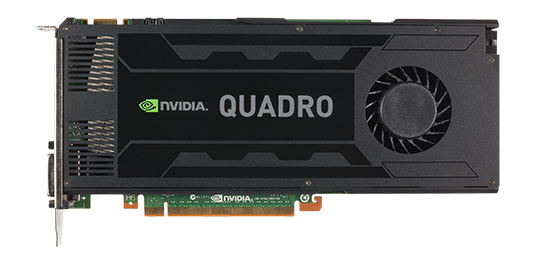
The video card that came with our system is the NVIDIA Quadro K4000. The K4000 and other NVIDIA video cards available for the P300 allow it to be certified to run many key professional independent software vendor (ISV) applications, including Adobe, Autodesk®, Dassault, PTC, SolidWorks, Avid, and Siemens. The main specification list for the NVIDIA Quadro K4000 is shown here. The K4000 is a powerful workstation video card, and is able to run demanding applications, and has the ability to use OpenCL and Cuda applications on the P300.
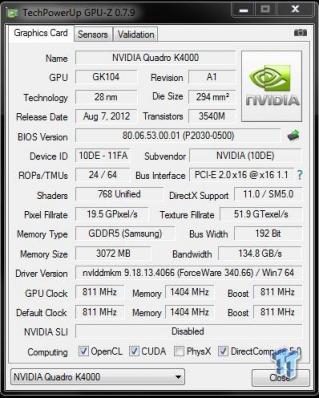
Looking at the GPUz screenshot for the K4000 gives us a fully detailed breakdown of the specifications for the K4000. Let's move forward now with testing the Lenovo ThinkStation P300 Tower Workstation. We will show test results from actual workstations we have tested, and not just motherboards. Workstation load outs can effect scores vs motherboards that have far less options installed. We will also keep this on same socket setups, so processor classes will not be mixed up.
System and CPU Benchmarks
CINEBENCH 11.5
CINEBENCH is a real-world, cross platform test suite that evaluates your computer's performance capabilities. The test scenario uses all of your system's processing power to render a photorealistic 3D scene. This scene makes use of various different algorithms to stress all available processor cores. You can also run this test with a single-core mode to give a single-core rating.

The E3-1276 v3 processor has very strong results for a CPU in this class. It also has strong single-threaded results, which is typical for processors in this class. The E3-1276 v3 can turbo up to a higher speed, and will help to increase performance of the P300.
CINEBENCH R15
CINEBENCH R15 is a real-world cross platform test suite that evaluates your computer's performance capabilities. CINEBENCH is based on MAXON's award-winning animation software CINEMA 4D, which is used extensively by studios and production houses worldwide for 3D content creation.
The test scenario uses all of your system's processing power to render a photorealistic 3D scene (from the viral "No Keyframes" animation by AixSponza). This scene makes use of various algorithms to stress all available processor cores.

We like the multi-threaded scores on this workstation; they really show that a lot of power can be installed into a single socket tower workstation.
wPrime
wPrime is a leading multi-threaded benchmark for x86 processors that tests your processor performance. This is a great test to use to rate the system speed; it also works as a stress test to see how well the system cooling is performing.

wPrime shows similar results to the CINEBENCH scores. The E3-1276 v3 can turbo up to 4.0GHz, which gives a nice boost to single-threaded scores in our tests.
Memory Benchmarks
AIDA64
AIDA64 memory bandwidth benchmarks (Memory Read, Memory Write, and Memory Copy) measure the maximum achievable memory data transfer bandwidth.

AIDA64 memory tests show the P300 using has good memory bandwidth with Dual-Channel memory. Higher speed memory sticks would help to improve memory bandwidth.
Linpack
Intel Optimized LINPACK Benchmark is a generalization of the LINPACK 1000 benchmark. It solves a dense (real*8) system of linear equations (Ax=b), measures the amount of time it takes to factor and solve the system, converts that time into a performance rate, and tests the results for accuracy.
Linpack is a measure of a computer's floating-point rate of execution ability, and measured in GFlops (Floating-point Operations per Second), ten-billion FLOPS = ten GFLOPS.
Linpack is a very heavy compute application that can take advantage of the new AVX2 instruction. As it puts a very high load on the system, it is also a good stress test program.

The E3-1276 v3 processors have very good bandwidth results that are relative to all Haswell CPUs tested here. Peaking at slightly over 186 GFlops shows a very strong processor IMC and memory setup also. We are very pleased with the P300 Workstation's Linpack results.
System Benchmarks
Geekbench
Geekbench 3 is a processor benchmark that uses single-core and multi performance simulating real-world scenarios.

In Geekbench, we see strong scores in both single and multi-threaded scores. This shows a well-rounded system, and a powerful processor for the P300.
Passmark
PassMark performance test runs 32 tests including CPU, 2D & 3D graphics, disk, and memory tests, to come up with an overall system ranking that allows you to determine how fast your computer is in comparison to other systems.

This is an impressive score with PassMark 8, which is just shy of some higher-end systems. It shows there is plenty of processing power in the P300.
PCMark8
PCMark 8 is the latest version in the series of PC benchmarking tools by Futuremark. It is fully compatible with Windows 8, and can be run under Windows 7.

Again, we see very strong results in PCMark 8, which runs a test on the complete system. This score is just below a system running an Intel Xeon Processor E5-2650 v2 with a score of 3994. This is eight cores/sixteen threads and K4000. It shows that not only is the E3-1276 v3 an upgrade, but a very powerful one at that.
SPECwpc

Again, we see impressive results with SPECwpc. Some of these tests rely on storage devices to load files; using a SSD would boost these scores.
Sony Vegas Pro 13

Here we see what the K4000 can do in video work. These are very nice scores at about half the time used on our W540 review.
UnixBench 5.1.3 and SPEC CPU2006v1.2
UnixBench
UnixBench has been around for a long time now, and is a good general-purpose bench to test on Linux based systems. This is a system benchmark, and it shows the performance of single-threaded and multi-threaded tasks.

This shows the system indexes after a complete UnixBench run. Here, we get an idea of how much performance gain we get using multi-threaded applications. However, many applications use single-threaded, so this number is really the base, and a higher clock speed will increase both indexes.
Now we are seeing that the E3-1276 v3 in the P300 come very close to other systems we have tested. This is starting to look very good for the P300.
SPEC CPU2006v1.2
SPEC CPU2006v1.2 measures compute intensive performance across the system using realistic benchmarks to rate real performance.
In our testing with SPEC CPU2006, we use the following basic commands to run these tests:
Runspec --tune=base --config=tweaktown.cfg, then int, or fp
To do multi-threaded, we add in --rate=8 on the P300.
When SPEC CPU first came out, these tests could take up to a week to run, but as computers become faster, our tests now take up to four days for a full run. The user can do many things to effect the results of CPU2006 runs, such as utilizing compiler optimizations, add-ons like Smartheap, and different commands used in to start the tests.

Here, you can see the SPEC scores after full runs for Integer (int), and Floating Point (fp) tests.
Single-core runs show how fast (speed) a CPU can perform a given task. In the multi-core runs, we set SPEC CPU2006v1.2 to use all threads, and this is a measure of the throughput of the system.
The additional core/threads of this system have a huge impact on performance in these tests, and really show the amount of horsepower that a dual socket system has over a single socket board.
Single-threaded results are still very important, but when you need lots of those to run, moving to a dual socket setup is the way to go.

By looking at the results of single-threaded integer runs, we can get an idea of the speed at which the Intel Xeon E3-1276 v3 can crunch through the different integer tests. Not all CPUs are equal here, and ones that have a higher speed will perform these tests faster. In this case, this is the stock speed of the Intel Xeon E3-1276 v3. Naturally, using an overclocked system or CPUs with a higher stock speed will generate higher results.

Now we run the test using all eight threads of the Intel Xeon E3-1276 v3 to measure the throughput of the system. In this test, more cores/threads will have a greater effect on the outcome.

Just as we did with the integer tests, we now run the floating-point tests in single (speed) mode. We do see a strong advantage in using Haswell E3-1276 v3 in this test.

Here, we see the results of the multi-threaded floating-point run that uses all eight threads of the Intel Xeon E3-1276 v3. Like the multi-threaded integer test, more cores/threads will have a greater impact on the test. Just the single-threaded FP runs see a strong advantage when using Haswell E3-1276 v3 in this test.
Power Consumption and Final Thoughts
Power Consumption
We have upgraded our power testing equipment, and now use a Yokogawa WT310 power meter for testing. The Yokogawa WT310 feeds its data through a USB cable to another machine where we can capture the test results.
To test total system power use, we used AIDA64 Stability test to load the CPU, and then recorded the results. We also now add in the power use for a server from an off state, to hitting the power button to turn it on, and taking it all the way to the desktop. This gives us data on power consumption during the boot up process.

The Lenovo ThinkStation P300 Tower Workstation did peak out at about 103 watts under load, and settled in to ~30 watts. Setting the workstation power features and CPU speed step will lower these numbers. Overall, the P300 does not use a lot of power in comparison to larger systems. This is good as it also lowers heat output, and makes for a cool running server.
Idle power use is in the range of ~33 watts, which is very good for a workstation of this type. Lower idle power use means less running costs in the long run, making the P300 inexpensive to run over time.

Booting up the P300 peaks out at ~87 watts, then quickly settles down to ~33 watts while sitting on the desktop. The P300 uses very little power during boot up, and does not put a drain on power use for idle states.
Final Thoughts

We ran the P300 through all our tests, and found the performance to be quite high for a computer of this type.
We like the new design of the P300; it's clean looking, lightweight, and easy to move around. The tower version does have a large footprint to consider when installing; 6.9" x 16.97" x 16.7" does not make for a small machine. You can order the P300 SFF (slim form factor), which is 6.9" x 16.97" x 16.7" if size is an issue.
The bundled software is very similar to what we found in the W540 Mobile Workstation. What impresses us the most about this software is it is actually usable, and is something you want to keep installed. Many of the features make maintaining the P300 easier, keeping you up-to-date and making backups, which is very important. There is no need to purchase other backup up software, because the P300 handles all that for you.
The choice of hardware inside our P300 is well balanced. The Intel Xeon E3-1276 v3 is a powerful processor, and matches up to the NVIDIA Quadro K4000 very well. This is well suited for graphics work, CAD, and 3D modeling. The P300 is also certified for professional independent software vendor (ISV) applications, including Adobe, Autodesk, Dassault, PTC, SolidWorks, Avid, and Siemens.
If upgrades are required, the tool-less design of the P300 makes adding new components rather easy. This will help the IT staff that often gets to do this job, which can be time consuming. If additional I/O ports are needed, the Flex Module will fit right into the top of the P300 in the bay below the DVD drive. The ability to customize the Flex Module to fit your requirements is also a big plus.
Platform stability is also important; the P300 workstation features a fifteen-month life cycle with no planned hardware changes that will affect the preloaded software image. This will help to reduce transition, qualification, and testing costs.
If you need more than one monitor for your workflow, you can attach up to three independent monitors using Mosaic Mode with integrated Intel graphics, or connect to up to sixteen independent monitors with 1.2 stream cloning mode.
We found the Seagate 1TB hard drive to be responsive, and a good performer; we would suggest that a user would pick a SSD for the OS drive, and then a second 1TB drive for storage. Yes, this will add extra costs to the P300, but it will increase its performance by a great deal.
We have to say that when we opened the P300 up to look at the insides, we were surprised at the lower quality of the cable management. Not that there are any side windows so you can see the insides, but we would hope that this would be addressed in the future. Good cable management is important in keeping good airflow, and ease of maintenance if and when upgrades, or replacement parts are required.
In closing, we find that the P300 is a well-designed, powerful workstation that is able to handle demanding workloads with ease, and not break the bank while doing so.